
More project photos (2)
The problem
Everyone keeps a mental list of films to watch — and loses it. Notes apps are not built for movies: no posters, no ratings, no distinction between "want to watch" and "watched". Existing streaming apps lock watchlists inside one service, while a student-built app can be service-agnostic and fully offline. React Native lets one JavaScript codebase ship to both Android and iOS, and Expo removes the native-toolchain pain that stops most student mobile projects. This project builds that app: catalogue browsing, search, a persistent watchlist, watched history and star ratings, all working without an internet connection, with a bottom-tab navigation structure that follows real mobile design conventions.
How it works
- On launch the app rehydrates the watchlist from AsyncStorage into the global store.
- The Home tab renders trending and top-rated sections from the bundled catalogue JSON.
- Tapping a poster pushes the detail screen with synopsis, metadata chips and the star-rating control.
- Adding, marking watched or rating a film updates the store and writes through to AsyncStorage immediately.
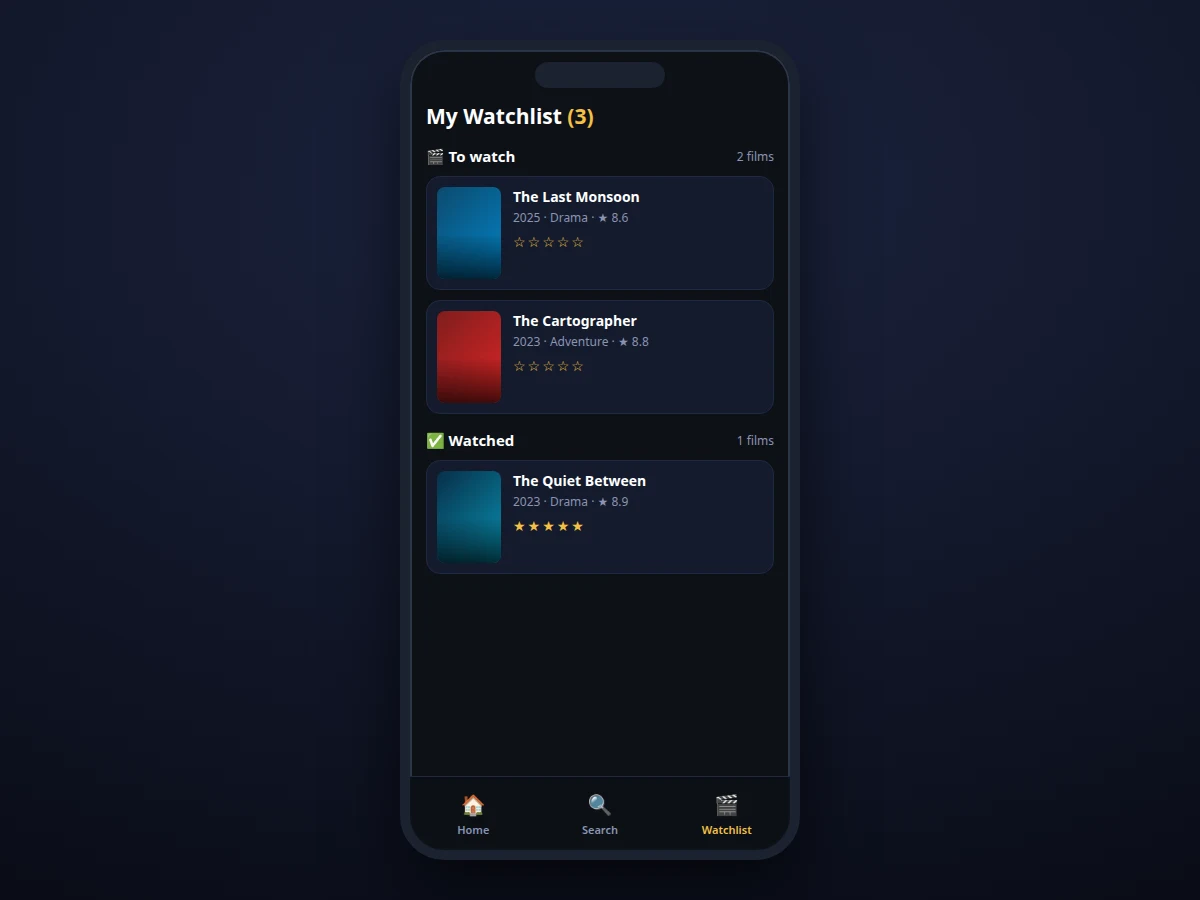
- The Watchlist tab splits saved films into To-watch and Watched sections with live counts.
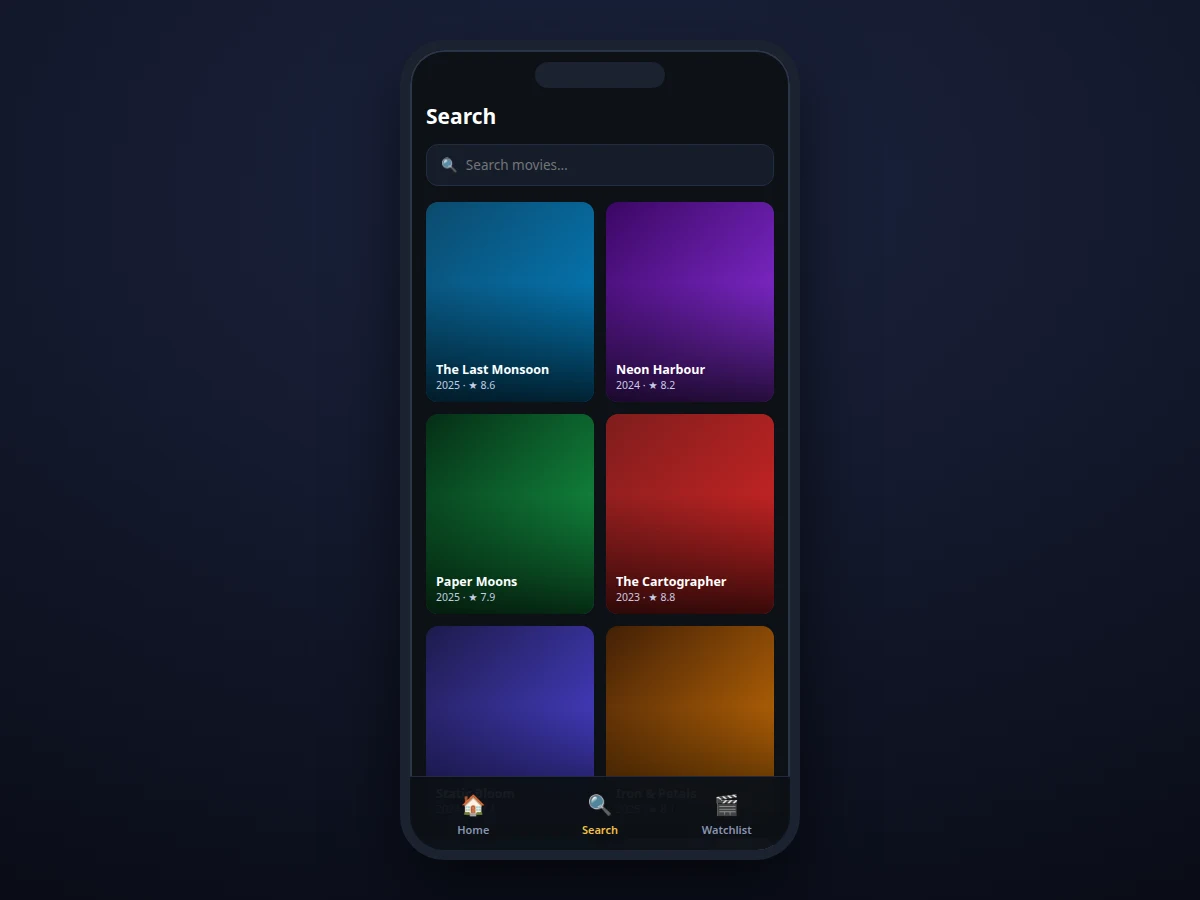
- Search filters the catalogue locally as the user types, so every feature works offline.
Tech stack:
- React Native, Expo (managed workflow)
- React Navigation (bottom tabs + stack)
- AsyncStorage (on-device persistence)
- JavaScript, StyleSheet-based UI components
| Parameter | Value |
|---|---|
| Platform | Android (primary demo target); iOS-compatible codebase |
| Framework | React Native with Expo managed workflow |
| Navigation | React Navigation: bottom tabs + detail stack |
| Data | Bundled JSON catalogue (films, posters, metadata); user state in AsyncStorage |
| State | Context provider with write-through persistence on every change |
| Network | None required — fully offline |
| Demo | Expo Go on a physical device; EAS build config for standalone APK |
| Screens | Home, Search, Watchlist, Film detail |
Project features
- [Bottom-tab navigation] Home, Search and Watchlist tabs with a stack navigator for film detail screens via React Navigation
- [Browsable catalogue] Bundled film dataset with posters, genres, years, ratings and synopses in trending and top-rated sections
- [Live search] Client-side filtering by title and genre as the user types — no network needed
- [Watchlist management] Add/remove films, with separate To-watch and Watched sections and per-section counts
- [Star ratings] Interactive 5-star rating control on detail screens and row cards, stored per film
- [Offline-first persistence] All watchlist state held in a context provider and written through to AsyncStorage on every change
- [Film detail screens] Synopsis, metadata chips, rating summary and quick actions (add, mark watched, rate)
- [Expo demo build] Runs on a physical phone via Expo Go; EAS build configuration for a standalone APK
What is included
- Complete React Native source code (screens, navigation, store, persistence layer)
- Bundled film catalogue dataset with metadata
- Expo/EAS build configuration and demo-build instructions
- Project report PDF (React Native architecture, navigation, state design, offline strategy)
- PPT presentation for final review
- Viva Q&A preparation document (components, hooks, navigation, AsyncStorage, Expo vs bare)
- Setup guide (Node, Expo CLI, running on emulator and on-device)
Limitations & prerequisites
- The catalogue is a bundled static dataset, not a live movie database: new releases will not appear unless the dataset is updated (TMDB API integration is documented future scope).
- Posters in the demo are stylized generated artwork standing in for licensed poster images; the report states this openly.
- There is no user account or cloud sync in the base build — the watchlist lives on the device (social/sync features are future scope).
- Recommendations are not implemented: the app tracks and rates but does not suggest films (listed as future scope).
- iOS builds need Xcode/a Mac or EAS cloud builds; the primary tested target is Android.
Frequently Asked Questions
Does it need the internet?
No. The catalogue is bundled and all watchlist data persists on-device, so every feature works fully offline.
Will it run on my phone?
Yes — the demo runs on any Android phone via the Expo Go app, and the EAS build configuration produces a standalone APK. The same codebase is iOS-compatible.
Where do the movies come from?
A bundled JSON dataset with titles, genres, years, ratings and synopses. Live data via the TMDB API is documented as the natural next step and can be added as a customization.
Can I add my own ratings?
Yes — the star-rating control on each film's detail screen stores your rating with the film and marks it watched.
Is this project suitable for a final-year project?
Yes — it is listed under Android and suits Computer Science, IT and mobile-development students. It demonstrates React Native components, navigation, state management and on-device persistence.
What will I receive with the project?
Complete source code, the catalogue dataset, Expo/EAS build configuration, project report PDF, PPT, viva Q&A and the setup guide. Suitable for B.E./B.Tech final-year projects in Computer Science, Information Technology and related branches.
Components & software requirements
- React Native, Expo (managed workflow)
- React Navigation (bottom tabs + stack)
- AsyncStorage (on-device persistence)
- JavaScript, StyleSheet-based UI components
Delivery information
Built-to-order project. Delivery timeline is shared after order confirmation based on current queue.
Support terms
Complete documentation, setup guide, and viva preparation included. Support for setup and explanation provided.