
More project photos (2)
The problem
College study groups already exist — they just live in chaotic WhatsApp threads full of scattered PDFs, screenshots and last-minute doubt messages. Nothing in that workflow is organized around learning: notes are unsearchable, nobody tracks who studied what, and there is no structured way to quiz each other before exams. A peer-to-peer learning app gives each subject its own study circle with realtime discussion, a shared notes library, flashcard decks and quizzes with instant scoring — the study group, rebuilt as software. Flutter is the natural choice: one Dart codebase compiles to native Android and iOS apps, and Firebase provides authentication, a realtime database, file storage and push notifications without managing a single server. This project ships the complete app: groups, chat, notes, flashcards, quizzes and notifications, plus the report, PPT and viva Q&A.
How it works
- Users sign in with Firebase Auth (email or Google); a user document is created in Firestore.
- The Groups screen lists study groups from Firestore; creating or joining updates the member list live for everyone.
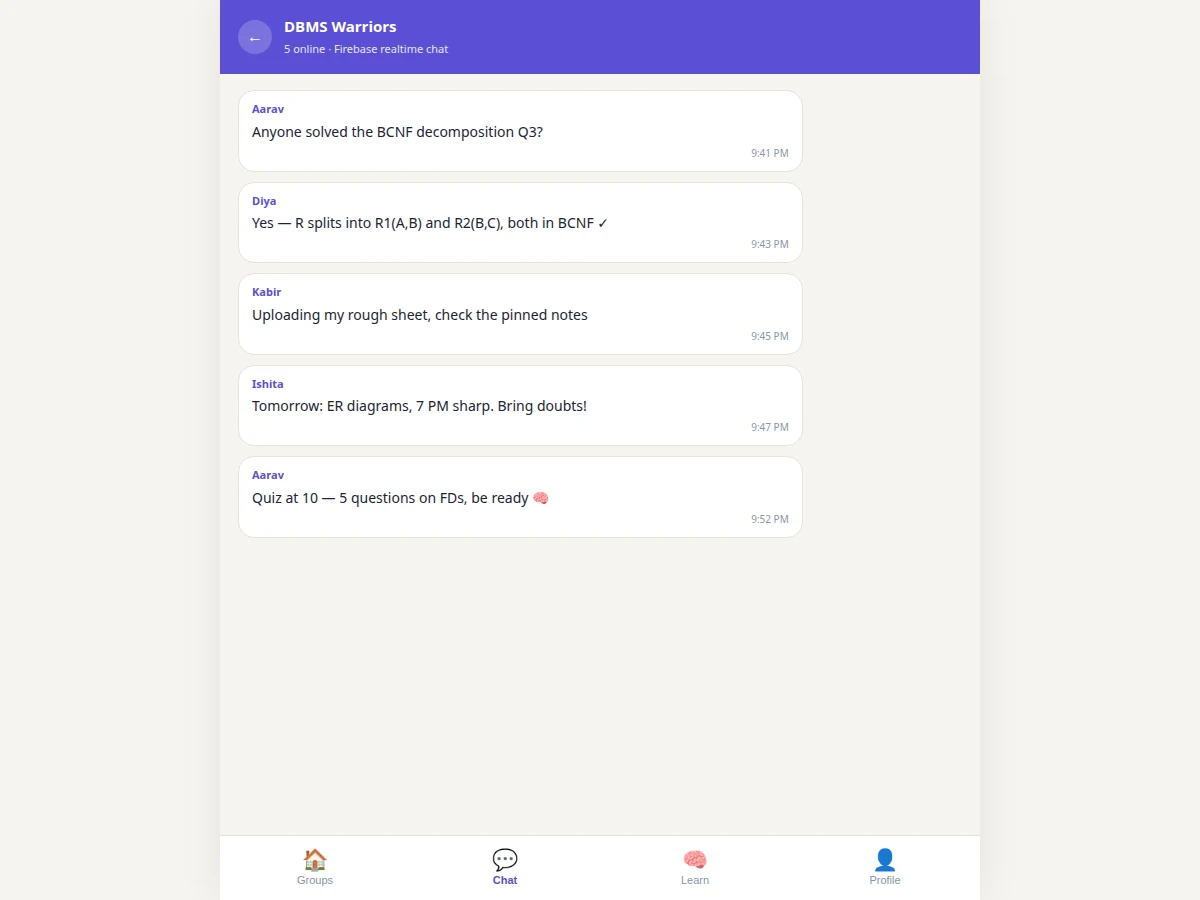
- Chat messages are written to a per-group Firestore collection; snapshot listeners update every member's screen in real time.
- Notes are uploaded to Firebase Storage with metadata in Firestore; members browse and download from the group's library.
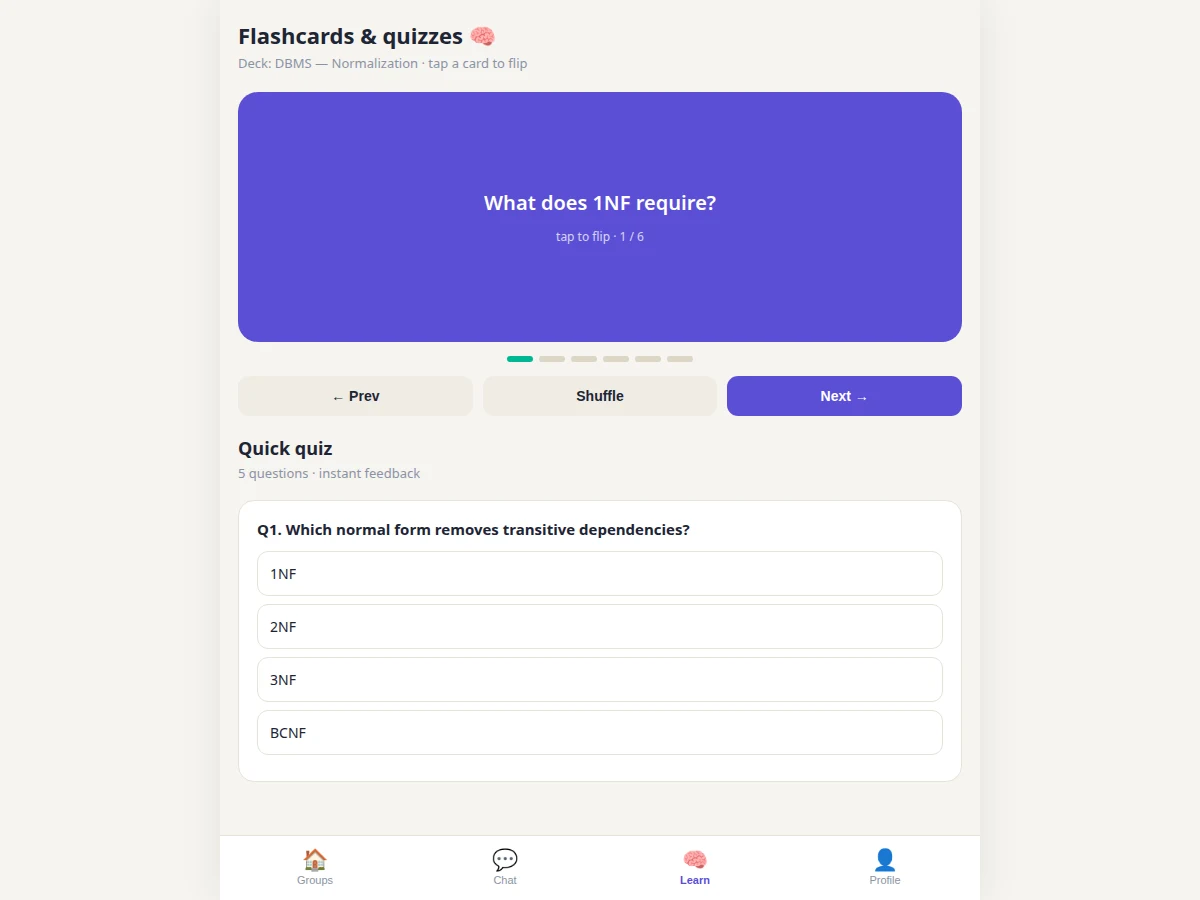
- Flashcards and quizzes are stored as Firestore documents; the Learn screen renders decks and grades quizzes client-side.
- Quiz attempts are persisted per user, building a score history visible on the profile screen.
- A Cloud Function triggers FCM push notifications on new messages and quiz events.
Tech stack:
- Flutter SDK, Dart (single codebase, Android and iOS)
- Firebase Authentication (email/Google sign-in)
- Cloud Firestore (users, groups, messages, decks, quiz results)
- Firebase Storage (notes PDFs and images)
- Firebase Cloud Messaging (push notifications)
- Android Studio / VS Code with Flutter extensions
| Parameter | Value |
|---|---|
| Framework | Flutter (Dart), one codebase for Android and iOS |
| Auth | Firebase Authentication: email and Google sign-in |
| Database | Cloud Firestore with security rules scoped to group members |
| Storage | Firebase Storage for notes (PDFs, images) |
| Notifications | FCM via Cloud Function triggers on new messages |
| Screens | Groups, Chat, Learn (flashcards + quiz), Profile |
| Chat | Realtime Firestore listeners, presence counts, timestamps |
| Quizzes | Multiple-choice, instant scoring, per-user attempt history |
| Platform | Android-first build and test; iOS build is an optional add-on |
| ML involvement | None — this is an application project, no dataset or model |
Project features
- [Study groups] Create subject-wise groups with member lists and subject tags, or join open groups and start studying together immediately.
- [Realtime group chat] Firestore-backed messaging with live updates, presence counts and timestamps — the group's discussion channel.
- [Notes library] Upload PDFs and images to Firebase Storage, browse the group's shared collection and download anytime.
- [Flashcards] Subject decks with tap-to-flip cards, next/previous navigation, shuffle mode and progress tracking.
- [Quizzes with instant scoring] Multiple-choice quizzes that grade immediately, show correct answers and persist per-user scores for progress tracking.
- [Push notifications] FCM alerts for new messages and quiz events keep members engaged without opening the app.
- [User profiles] Auth-backed profiles with study stats, joined groups and quiz history.
- [Clean mobile UI] Bottom-tab navigation across Groups, Chat, Learn and Profile screens, built once in Flutter for Android and iOS.
What is included
- Complete Flutter source code (all screens, widgets, Firebase integration)
- Firestore data model and security rules documentation
- Firebase setup guide (project creation, enabling Auth/Firestore/Storage/FCM)
- Project report PDF (background, architecture, data model, testing, evaluation)
- PPT presentation for final review
- Viva Q&A preparation document (Flutter, widgets, state management, Firebase services, security rules)
- Setup guide (SDK install, emulator/device testing, building the APK)
Limitations & prerequisites
- The app needs an internet connection — there is no offline mode in the base build; chat and sync pause without connectivity.
- Firebase's free tier (Spark plan) covers development and demo scale; a large active user base would need the Blaze pay-as-you-go plan, and the report documents the quota boundaries.
- The build and test matrix targets Android; the iOS build is an optional add-on that requires macOS and Xcode.
- No video calls or screen sharing in the base build — the app is text, notes and quiz-centric by design.
- Push notification delivery depends on the device's FCM channel; aggressive battery optimization on some Android skins can delay them.
- This is an application project: there is no ML dataset, model or accuracy metric involved, and the listing makes no such claim.
Frequently Asked Questions
Why Flutter and Firebase?
Flutter builds native-quality Android and iOS apps from one Dart codebase, and Firebase supplies auth, realtime database, storage and push notifications without a custom server — the standard stack for student mobile projects and exactly what employers ask about.
How does realtime chat work?
Messages are stored in a per-group Firestore collection, and every member's app holds a snapshot listener on it — new messages appear on all screens within a fraction of a second, with no polling.
Who can read a group's messages?
Only members. Firestore security rules restrict reads and writes on group data to the group's member list, and the report documents the rule set.
Does it work on iPhones?
The codebase is cross-platform, but the build and test matrix targets Android. An iOS release build is a documented optional add-on requiring macOS and Xcode.
What are the main limitations?
Internet is required (no offline mode); Firebase free-tier quotas bound demo scale; no video calls in the base build; and there is no ML component — no dataset or accuracy claims apply.
Is this project suitable for a final-year project?
Yes — for Computer Science, Mobile Development and IT programs. It demonstrates cross-platform UI, realtime data sync, cloud storage, push notifications and security rules, all strong viva material. Suitable for B.E./B.Tech final-year projects in Computer Science, Mobile Development and IT.
Components & software requirements
- Flutter SDK, Dart (single codebase, Android and iOS)
- Firebase Authentication (email/Google sign-in)
- Cloud Firestore (users, groups, messages, decks, quiz results)
- Firebase Storage (notes PDFs and images)
- Firebase Cloud Messaging (push notifications)
- Android Studio / VS Code with Flutter extensions
Delivery information
Built-to-order project. Delivery timeline is shared after order confirmation based on current queue.
Support terms
Complete documentation, setup guide, and viva preparation included. Support for setup and explanation provided.