
More project photos (2)
The problem
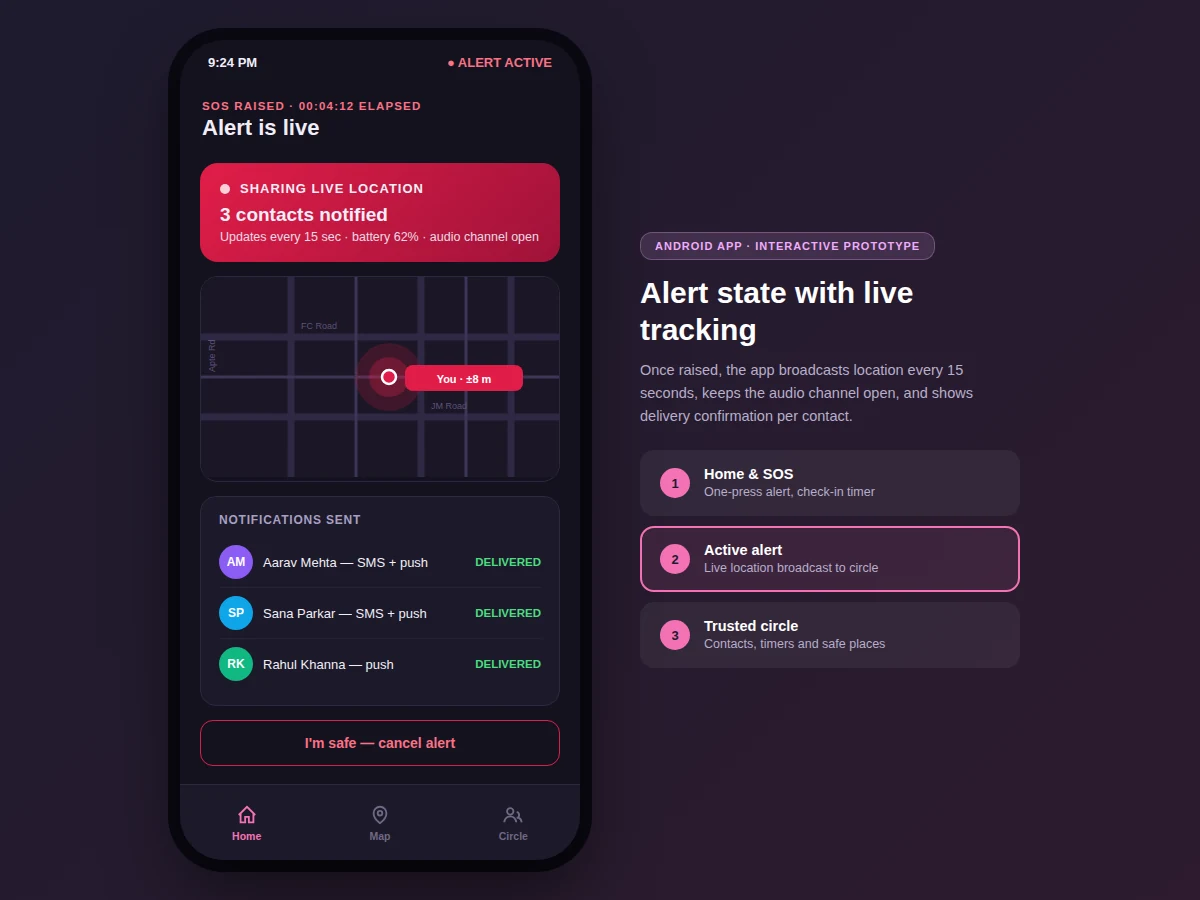
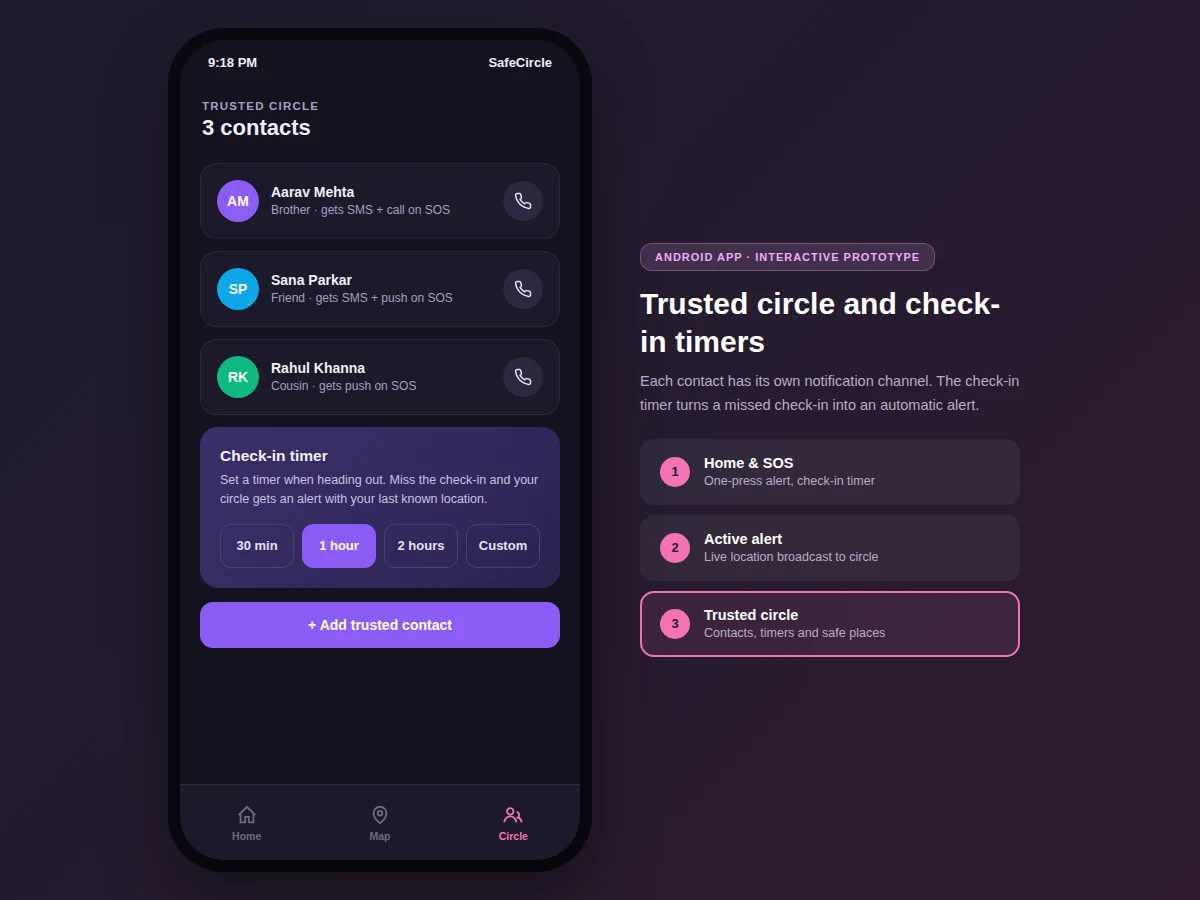
In an emergency, nobody opens an app, navigates menus and types a message. Safety apps fail when they ask for fine motor control and attention under stress — the correct interface is one big button and everything else automatic. This project builds that: a press-and-hold SOS that broadcasts live location to a trusted circle every 15 seconds, sends each contact their configured channel (SMS, push notification, phone call), opens an audio channel, and keeps running with the screen locked through a foreground service. A check-in timer covers the quieter case: set it when heading out, and a missed check-in raises the same alert with the last known location automatically.
How it works
- The user builds a trusted circle of contacts, each with their preferred SOS notification channels.
- Pressing and holding SOS starts a foreground service that captures the current location and opens the alert session.
- The alert pipeline notifies each contact through their configured channels with a live-tracking link.
- Every 15 seconds the service broadcasts a fresh location fix; the active-alert screen shows elapsed time, battery and delivery status.
- Contacts opening the link see the live map with the user's moving position and accuracy radius.
- The check-in timer runs independently: on expiry without check-in, the same alert pipeline fires with the last known location.
- The user cancels from the alert screen with a confirmation step to prevent accidental dismissal.
Tech stack:
- Kotlin (Android app)
- Foreground Service (lock-screen-resilient alerts)
- Fused Location Provider (location fixes)
- Firebase Cloud Messaging (push notifications)
- SMS Manager API (fallback SMS alerts)
- Room (contacts, timers, alert history)
- Google Maps SDK (live tracking view)
- Material 3 UI components
| Parameter | Value |
|---|---|
| SOS trigger | Press-and-hold, 2 seconds (configurable) |
| Location interval | Every 15 seconds during alert (design) |
| Notification channels | SMS, push, phone call — per contact |
| Background operation | Foreground service with persistent notification |
| Check-in timer | 15 minutes to 12 hours, configurable |
| Location accuracy | As reported by device GPS (shown per fix) |
| Min Android version | Android 8.0 (API 26, design target) |
Project features
- [One-press SOS] Press-and-hold the SOS button (2 seconds) to raise an alert — no menus, no typing, works from the lock screen widget.
- [Live location broadcast] Location updates every 15 seconds to the trusted circle for the duration of the alert, with accuracy shown honestly.
- [Per-contact channels] Each trusted contact configures SMS, push, phone call or any combination for SOS events.
- [Check-in timer] Set a timer when heading out; a missed check-in auto-raises an alert with the last known location.
- [Foreground service] The alert survives screen lock and app backgrounding; a persistent notification shows elapsed time.
- [Delivery confirmations] Per-contact sent/delivered status is shown in the active-alert screen.
- [Safe places] Saved locations (home, hostel, office) with arrival detection that can auto-resolve an active timer.
What is included
- Complete Android app source (Kotlin) with SOS flow
- Alert pipeline with per-contact channel dispatch
- Trusted-circle and check-in timer management
- Live tracking view for contacts
- Test plan for the alert flow (staged drills documented)
- Project report PDF (background, alert-pipeline design, Android service architecture, methodology)
- PPT presentation for final review
- Viva Q&A preparation document (foreground services, location APIs, FCM, SMS fallbacks)
Limitations & prerequisites
- SMS delivery depends on the carrier and needs SMS permission granted; delivery is best-effort and reported honestly per contact.
- Location accuracy depends on the device GPS and environment — fixes carry their accuracy radius, never a false precision.
- The app assists contacting trusted people; it is not a replacement for calling local emergency services, and the report states this clearly.
- Battery impact during an active alert is real (GPS + radio every 15 seconds); measured drain is documented from test runs.
- iOS is out of scope — this is an Android build.
Frequently Asked Questions
How fast does the alert go out?
The SOS hold is 2 seconds; notifications dispatch immediately after. SMS/push delivery times then depend on the carrier and network, and the app shows per-contact delivery status.
Does it work with the screen locked?
Yes — a foreground service keeps the alert alive with the screen off, and a persistent notification shows the elapsed alert time.
What if I set a check-in timer and forget?
A grace window with a loud local reminder fires first; only a continued miss raises the alert to your circle with your last known location.
How is this different from sharing location on a maps app?
It is event-driven, not always-on: nothing is shared until SOS or a missed check-in, and each contact gets their own channel (SMS/call/push) rather than needing the same app.
Can alerts be cancelled accidentally?
Cancellation needs a deliberate confirmation step on the alert screen, and the circle is notified of the cancellation.
Is this project suitable for a final-year project?
Yes — for Computer Science, IT and Android programs. Foreground services, real-time location pipelines and the human-factors design of emergency UX make it strong applied work. Suitable for B.E./B.Tech final-year projects in Computer Science, IT and Android development.
Components & software requirements
- Kotlin (Android app)
- Foreground Service (lock-screen-resilient alerts)
- Fused Location Provider (location fixes)
- Firebase Cloud Messaging (push notifications)
- SMS Manager API (fallback SMS alerts)
- Room (contacts, timers, alert history)
- Google Maps SDK (live tracking view)
- Material 3 UI components
Delivery information
Built-to-order project. Delivery timeline is shared after order confirmation based on current queue.
Support terms
Complete documentation, setup guide, and viva preparation included. Support for setup and explanation provided.