
More project photos (2)
The problem
A wedding host usually collects replies across paper cards, phone calls, and scattered chat messages, and then has to reconcile them by hand before giving a number to a venue or caterer. Replies arrive late, plus-one details get lost, and a guest who changes their mind may be counted twice or not at all, so the final headcount is often a guess made under time pressure. This project replaces that scattered process with one Android app: the host builds a guest list, sends each guest a personal invitation link, and watches replies arrive as attending, declined, or maybe, together with plus-one details and event choices. The app keeps a single live count from those replies, so seating, catering, and venue numbers all come from the same list. For a host, one list answers how many guests are coming, who is still undecided, and which seats need a plus-one allowance, without recounting cards at the last moment.
| Approach | Response tracking | Reminders | Headcount reliability |
|---|---|---|---|
| App RSVP tracking | Every reply lands in one live guest list | Pending guests can be filtered and followed up | Confirmed guests plus their plus-ones, updated on every change |
| Paper RSVP cards | Cards return at different times and must be counted by hand | Follow-up needs a separate phone call or message | Easy to double-count a changed reply or miss a late card |
| Spreadsheet guest lists | Replies must be typed in by the host | No built-in follow-up view | Reliable only while the host keeps every edit in step |
Host who creates the wedding event, its celebration events, and the guest list.
Follow the working sequence
How it works
The end-to-end mechanism runs from the host's guest list to a single trusted headcount. The host creates the wedding event and its celebration events, adds guests with their side and invited events, and shares one personal invitation link with each guest through the Android Sharesheet. Each guest opens the link, sees the schedule and their own details, and submits an attending, declined, or maybe reply with plus-one details. The app stores that reply against the guest's single record, updates the confirmed headcount at once, and keeps the reply visible in the host's filtered list. When a guest changes their mind, the new reply replaces the old one on the same record, so the headcount moves with the change instead of counting both replies. That single-record rule is what keeps the headcount honest, because every change lands on the reply already stored for that guest.
- The host creates the wedding event and adds its celebration events, each with a date, time, and venue.
- The host adds guests with their name, side of the family, and the events each guest is invited to.
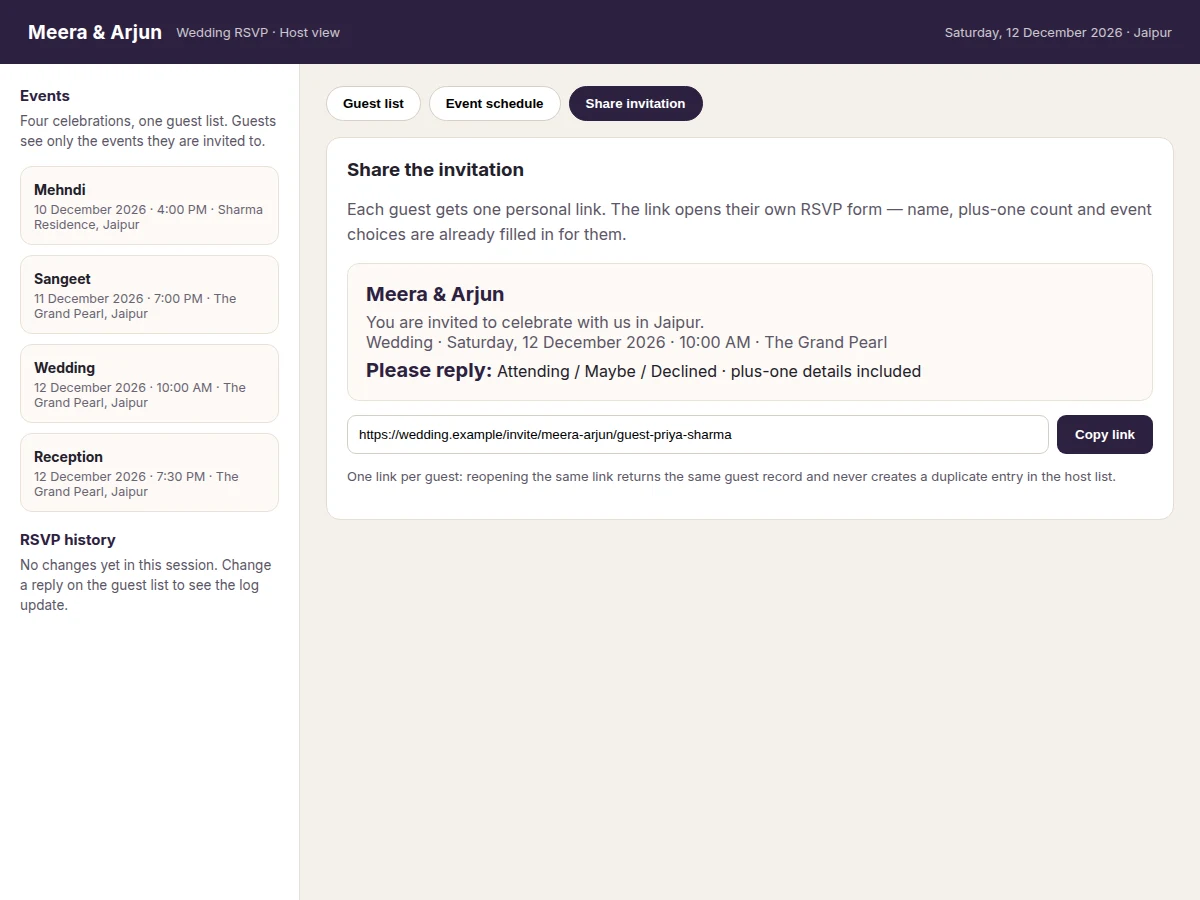
- The host shares one personal invitation link per guest through the Android Sharesheet to any messaging app.
- The guest opens the link, reviews the event schedule, and submits an attending, declined, or maybe reply with plus-one details.
- The app stores the reply on the guest's single record and updates the confirmed headcount immediately.
- The host filters the list by reply status to check confirmed guests, maybe replies, and guests still pending.
- The host follows up only with pending guests by resending the same personal link, and uses the seating-ready list for venue and catering planning.
Tech stack:
- Kotlin · Android app language
- Jetpack Compose · app user interface
- Room persistence library · local guest and reply database
- Android Sharesheet · invitation link sharing
- Material Design 3 · app styling components
- Android Studio · app build environment
- Deep-link invitation tokens · one link per guest record
| Parameter | Value |
|---|---|
| Build type | Android software app · host guest list plus guest RSVP form (design target) |
| Platform | Android · phone app (design target) |
| Language | Kotlin · Android app language (design target) |
| User interface | Jetpack Compose · guest list, schedule, and invitation screens (design target) |
| Local database | Room persistence library · abstraction layer over SQLite for guest and reply records (Android Developers documentation) |
| Invitation sharing | Android Sharesheet · ACTION_SEND intent with a chooser for sharing text links (Android Developers documentation) |
| Guest record | Name plus side plus invited events plus reply status plus plus-one count (design target) |
| Invitation link | One personal link per guest record · reopening the same link returns the same record (design target) |
| RSVP states | Attending plus declined plus maybe plus pending before any reply (design target) |
| Headcount rule | Confirmed guests plus their confirmed plus-ones · recalculated on every reply change (design target) |
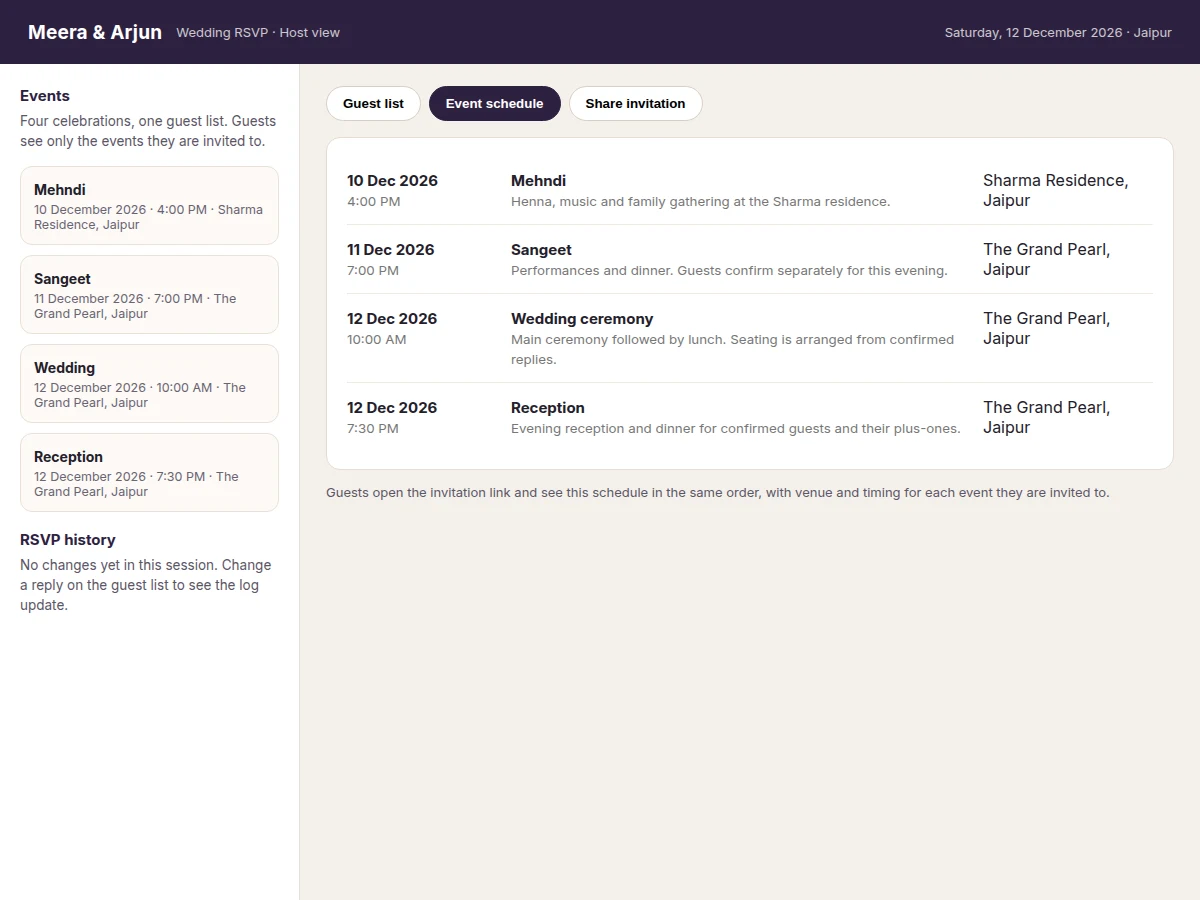
| Event schedule | Mehndi plus Sangeet plus wedding ceremony plus reception · each with date, time, and venue (design target) |
| Follow-up | Pending filter plus resend of the same personal link to pending guests only (design target) |
| Payment gateway | None in the base build · no payment collection is implemented or claimed (design target) |
| Builder note | On the demo build, a guest changing a Confirmed reply to Declined drops the headcount at once and releases the plus-one seat, and reopening the same invitation link never creates a duplicate guest record · noted as a builder observation |
Project features
This wedding RSVP app combines four capabilities that matter most to a host: a single guest list organised by side and event, a personal invitation link for every guest, replies that carry plus-one details, and a live headcount that updates whenever a reply changes. The event schedule sits beside the guest list, so guests see timings and venues in the same place they reply, instead of hunting through separate messages. Pending-guest follow-up closes the loop, because the host can see exactly who has not replied and resend the same link to those guests only. Together these capabilities turn reply-chasing into a list the host can trust at a glance. A guest, meanwhile, gets a simple job: open one link, check the schedule, and reply, with no account setup and no separate message thread to follow.
- [Guest list by side and event] Guests are stored with their side of the family and the events they are invited to, so the host can filter the list by side, event, or reply status instead of scrolling one long undifferentiated list — implemented in the base build.
- [Personal invitation links] Each guest receives one personal link that opens their own RSVP form with their name and event choices already filled in, so a guest never has to retype details the host already knows — implemented in the base build.
- [RSVP replies with plus-one details] Guests reply attending, declined, or maybe, and attending guests add their plus-one count, so the host learns not just who is coming but how many seats each reply represents — implemented in the base build.
- [Live headcount and seating-ready list] Confirmed guests plus their confirmed plus-ones are totalled automatically on every change, giving the host one current number for venue and catering planning — implemented in the base build.
- [Event schedule in the app] Mehndi, Sangeet, wedding ceremony, and reception each carry a date, time, and venue in the same app, so guests check timings where they reply rather than in a separate message thread — implemented in the base build.
- [Pending-guest follow-up] The host filters the list to guests still marked pending and resends the same personal link to those guests only, so reminders go to people who have not replied instead of to the whole list — implemented in the base build.
- [Seating-chart generator] Future scope only, not implemented: automatic table and seating-chart generation from confirmed replies, listed as an extension because the base build delivers a seating-ready list rather than a finished chart.
What is included
- Complete Android app source code (guest list, invitation sharing, RSVP form, live headcount, event schedule)
- Working demo app (guest list with filters, RSVP status changes, add-guest flow, schedule view, invitation preview)
- Setup and testing guide (adding guests, sharing a link, changing a reply, checking the headcount, following up pending guests)
- Project report PDF (app design, database structure, invitation-link flow, headcount rule, honest limitations)
- PPT presentation for final review
- Viva Q&A preparation document (Android app structure, Room local storage, Sharesheet sharing, RSVP state handling, headcount logic)
Limitations & prerequisites
- No payment gateway in the base build: the app collects replies and headcounts only, so any payment or gift collection would need a separate integration with its own approval and testing.
- One wedding per host list in the base build: the app is organised around a single wedding event and its celebrations, so managing several unrelated weddings would need a multi-event extension.
- Local storage in the base build: guest and reply records live in the on-device Room database, so a host who loses the device without a backup loses the list, and multi-device sync is not included.
- Replies depend on guests opening the link: a guest who never opens the invitation stays marked pending, and the app cannot force a reply, so the host still needs to follow up with unresponsive guests.
- No seating-chart generation in the base build: the app delivers a seating-ready confirmed list, but table allocation remains a manual step unless the future-scope seating extension is added.
- This is an academic prototype, not a commercial event platform: invitation delivery depends on the messaging apps guests already use, and large-scale public deployment would need server hosting, accounts, and privacy review beyond the base build.
Frequently Asked Questions
Is this project suitable for a final-year project?
Yes, for Computer Science, IT, and Computer Engineering programmes, because it combines Android app development with a real workflow problem that students can explain end to end, from guest records and local storage to invitation sharing and a headcount rule that must stay correct when replies change. The review thread is concrete: screens, database records, share intents, and reply-state handling, rather than a generic claim about an app.
How does a guest reply without installing anything extra?
The guest opens the personal invitation link the host shared, sees the event schedule and their own details, and submits an attending, declined, or maybe reply with plus-one details in the same view, without creating an account or installing anything extra for the base design. The link itself identifies the guest record the reply belongs to, so the guest never retypes details the host already knows.
What happens when a guest changes their reply after confirming?
The new reply replaces the old reply on the same guest record, and the headcount is recalculated at once, so a guest who moves from confirmed to declined stops counting and releases their plus-one seat instead of being counted twice in the host list. The demo build logs the change in the host view, so the host can see that a reply changed rather than finding two conflicting counts.
Can the host see who has not replied yet?
Yes, because the guest list filters by reply status, and guests who have not replied stay marked pending until they submit a reply, so the host can see the unanswered group at a glance without scanning the whole list and follow up with only those guests. Resending the same personal link keeps the follow-up tied to the original guest record, so no duplicate entry is created.
Does the app collect payments or handle gifts?
No, and the base build makes no payment claim, because payment-gateway integration is not implemented in this project, so the app covers invitations, replies, plus-one details, schedule, and headcount only, and a host who needs payments must commission that work separately. That separate work would need its own approval, testing, and security review before any money is collected.
Can the schedule and guest list be customised for a different wedding?
Yes, within the base design, because event names, dates, times, venues, guest sides, and invited events are entered by the host rather than fixed in the app, so a different wedding reuses the same flow with its own events and guest list. Features outside the base build, such as seating-chart generation, remain future scope rather than included features.
Components & software requirements
- Kotlin · Android app language
- Jetpack Compose · app user interface
- Room persistence library · local guest and reply database
- Android Sharesheet · invitation link sharing
- Material Design 3 · app styling components
- Android Studio · app build environment
- Deep-link invitation tokens · one link per guest record
Delivery information
Built-to-order project. Delivery timeline is shared after order confirmation based on current queue.
Support terms
Complete documentation, setup guide, and viva preparation included. Support for setup and explanation provided.
Download free synopsis (PDF)
Enter your name and WhatsApp number — the synopsis PDF downloads immediately. We may send occasional project updates on WhatsApp; no spam.