
More project photos (2)

The problem
The Apartment Parking Android App replaces the register book and the WhatsApp message thread that most housing societies still use to manage basement parking. In a typical society, slots are allotted by memory, a second car quietly takes a neighbour's bay, and a guest vehicle stays parked days after the visit ended because nobody recorded when the visit was supposed to end. This project answers that problem with one shared record: a slot map that shows every bay as free or allotted, a resident permit that binds one vehicle to one flat and one slot, and a guest pass that carries its own expiry window. Requests pass through an admin approval queue, so allotment is a decision with a name and a timestamp attached, not a favour granted in a corridor conversation. The demo built for this listing models 40 bays: a 36-slot basement with 14 free bays and 22 allotted bays, plus 4 visitor bays.
Resident opens the app and views the basement slot map.
Follow the working sequence
How it works
The mechanism is deliberately boring in the best sense: every parking right in the building exists as exactly one record with a status, and every status change passes through the admin queue. A resident never edits the slot map directly; they request, and the admin approves. A guest never holds a permanent right; they hold a pass with an end time, and expiry is enforced by comparing the current time with that end time at the gate, not by hoping someone remembers to delete the pass. That single rule — rights are records, records have statuses, statuses change only through approval or expiry — is what keeps two residents from holding the same bay and what keeps a weekend guest from becoming a permanent parker. The admin queue is the only path between a request and a right, and the gate check is the only path between a pass and entry.
- The resident opens the app, sees the basement slot map with free and allotted bays, and taps a free bay to select it.
- The resident submits an allotment request, which records the flat number, vehicle plate and requested bay, and appears in the admin queue as pending.
- The admin reviews the queue, checks that the bay is still free and the flat holds no conflicting allotment, then approves or rejects the request.
- On approval, the system creates a digital resident permit binding the flat, the vehicle and the bay, with a 12-month validity (design target) and the bay marked allotted on the map.
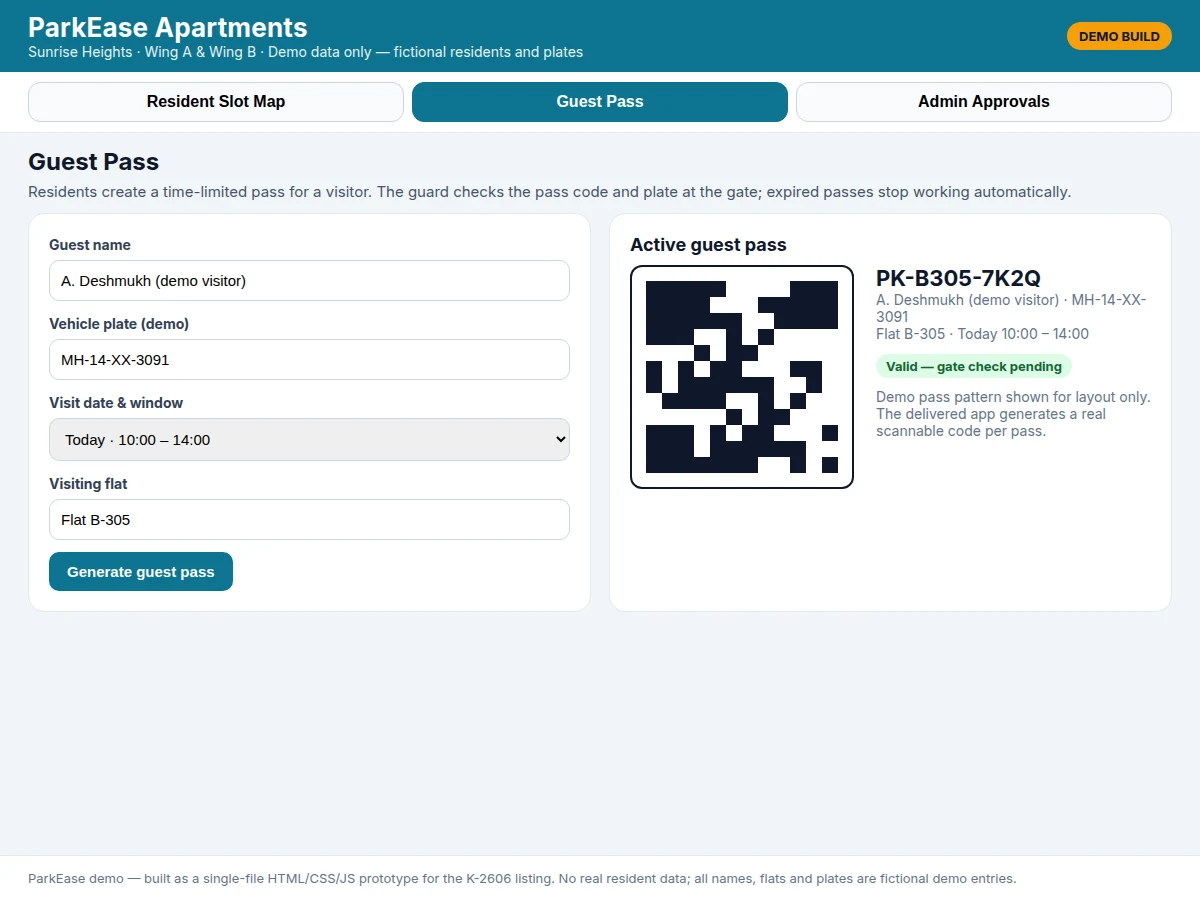
- For a visitor, the resident fills in the guest name, plate, visiting flat and visit window, and the app generates a guest pass with a unique pass code and a visitor-bay assignment.
- At the gate, the guard checks the pass code against the visitor name, plate and flat, and admits the vehicle only while the pass is valid and unrevoked.
- When the visit window ends, the pass expires automatically; the admin can also revoke an issued pass early, and a revoked or expired pass is refused at the gate.
- Permit renewal repeats the same queue: the resident requests renewal, the admin approves, and the permit validity extends without re-allotting the bay.
Tech stack:
- Kotlin · Android Studio
- Jetpack Compose UI
- Firebase Authentication
- Cloud Firestore database
- Firebase Cloud Messaging
- QR code generation library
- MVVM architecture
- Git version control
| Parameter | Value |
|---|---|
| Platform | Android 8.0 and above (design target) |
| Demo bays | 40 bays: 36 basement slots + 4 visitor bays (demo dataset) |
| Demo free bays | 14 bays (demo dataset) |
| Demo allotted bays | 22 bays (demo dataset) |
| Visitor bays | 4 bays (design target) |
| Resident permit validity | 12 months from approval (design target) |
| Guest pass window | 2–12 hours per pass (design target) |
| User roles | 3 roles: resident · admin · guard (design target) |
| App screens | 3 main views: slot map · guest pass · admin queue (delivered demo) |
| Data model | 4 record types: slot · permit · request · guest pass (design target) |
Project features
The app's three capabilities work as one system rather than three separate tools: the slot map is the single source of truth for which bays are free, the resident permit turns an approved allotment into a checkable record, and the guest pass extends the same discipline to visitors without giving them permanent access. Around those three, the admin queue, the gate check and the pass-expiry rule close the loopholes that make manual parking management break down: a request cannot silently become an allotment, a pass cannot silently become permanent, and a revoked pass cannot be reused. The demo shows all three views working together — a resident requesting bay A-104, a guest pass for Flat B-305 with a four-hour window, and an admin queue holding two pending decisions — so the viva discussion can trace one request from tap to approval.
- [Live slot map] A basement-level grid shows every bay as free, allotted or selected, with counts for each state, so a resident checks availability before requesting instead of asking the office.
- [Slot allotment requests] A resident taps a free bay and submits a request tied to their flat and vehicle; the bay stays marked as requested, never silently reserved, until the admin decides.
- [Digital resident permits] Each approved allotment creates a permit record naming the flat, the vehicle plate and the slot, with a 12-month validity (design target) that the admin renews or ends.
- [Time-limited guest passes] A resident generates a pass for a named visitor, vehicle plate and visit window; the pass stops working when its window ends, without anyone needing to cancel it.
- [Admin approval queue] Allotment requests, permit renewals and guest passes land in one queue where the admin approves, rejects or revokes, and every decision updates the resident view immediately.
- [Gate check view] The guard checks a pass by its code, visitor name, plate and flat, and sees its validity at a glance, so an expired or revoked pass is refused at the gate.
- [Visitor bay separation] Guest vehicles are directed to dedicated visitor bays, keeping resident bays out of the visitor flow and making overstays visible in one place.
What is included
- Complete Android app source code (resident, admin and guard flows)
- Slot map, allotment request and approval queue implementation
- Guest-pass generation with pass codes and expiry handling
- Demo dataset with 36 basement slots plus 4 visitor bays, permits and pending requests
- Project report PDF (background, system design, database schema, methodology, testing)
- PPT presentation for final review
- Viva Q&A preparation document (Android architecture, Firebase data modelling, role-based access, expiry logic)
Limitations & prerequisites
- The delivered app is a software system, not a hardware gate: it does not open a boom barrier or read plates with a camera unless a gate-hardware module is added.
- Guest-pass codes in the demo are layout patterns; the delivered app generates real scannable codes per pass, and scanning behaviour is verified on the delivered build.
- The demo dataset (40 bays: 36 basement slots — 14 free, 22 allotted — plus 4 visitor bays) is fictional sample data for demonstration, not a measurement from any real society.
- No number-plate recognition is claimed: the guard checks the plate manually against the pass record.
- The app assumes one admin per society in the base scope; multi-admin roles and fine-grained permissions are an extension, not part of the base build.
- Offline behaviour is limited: allotment and pass generation need connectivity to sync the shared record, so two devices cannot safely approve the same bay offline.
Frequently Asked Questions
How does slot allotment work in this app?
A resident taps a free bay on the slot map and submits a request tied to their flat and vehicle plate, and that request waits in the admin queue until the admin approves or rejects it. The bay is never reserved by the tap alone, so two residents cannot claim the same bay by tapping it first. On approval, the system creates a digital resident permit binding the flat, vehicle and bay, and the map updates to show the bay as allotted.
How do guest passes work, and what stops a guest from overstaying?
A resident generates a pass naming the guest, the vehicle plate, the visiting flat and a visit window, and the pass carries a unique code the guard checks at the gate. Expiry is enforced by comparing the current time with the pass end time at each gate check, so a pass stops working when its window ends even if nobody cancels it. The admin can also revoke an issued pass early, and revoked passes are refused the same way.
What does the admin actually control?
The admin controls the single approval queue where allotment requests, permit renewals and guest passes arrive, and approves, rejects or revokes each item from one screen. Every decision updates the resident view immediately, so a resident sees a pending request turn into an approved permit without asking the office. The admin also sees totals for free, allotted and visitor bays, which makes the state of the whole basement visible at a glance.
Is this project suitable for a final-year project?
Yes, for Computer Science, IT and Android application development programmes, because it combines mobile UI, role-based access, a shared cloud database and a state machine for permits and passes. The viva discussion can trace one request from tap to approval, explain why expiry is enforced by time comparison rather than deletion, and show how the queue prevents double allotment. The demo's three views give examiners something concrete to click through.
Does the app need any hardware at the gate?
No hardware is needed for the base build, because the guard checks passes on a phone or tablet using the pass code, visitor name, plate and flat shown in the app. The base scope is purely software: slot map, permits, passes and the approval queue, all synced through the cloud database. A boom barrier, camera-based plate reading or RFID reader would be a separate hardware extension and is not claimed in this listing.
Can one flat hold more than one vehicle or slot?
The base design binds one permit to one flat, one vehicle and one slot, which matches how most societies allot basement bays and keeps the approval logic simple. A second vehicle needs a second request, and the admin sees both requests for the same flat in the queue before deciding. Societies that allow two bays per flat can adopt that as a stated extension, with the queue logic updated to permit it explicitly rather than silently.
Components & software requirements
- Kotlin · Android Studio
- Jetpack Compose UI
- Firebase Authentication
- Cloud Firestore database
- Firebase Cloud Messaging
- QR code generation library
- MVVM architecture
- Git version control
Delivery information
Built-to-order project. Delivery timeline is shared after order confirmation based on current queue.
Support terms
Complete documentation, setup guide, and viva preparation included. Support for setup and explanation provided.
Download free synopsis (PDF)
Enter your name and WhatsApp number — the synopsis PDF downloads immediately. We may send occasional project updates on WhatsApp; no spam.