
More project photos (2)
The problem
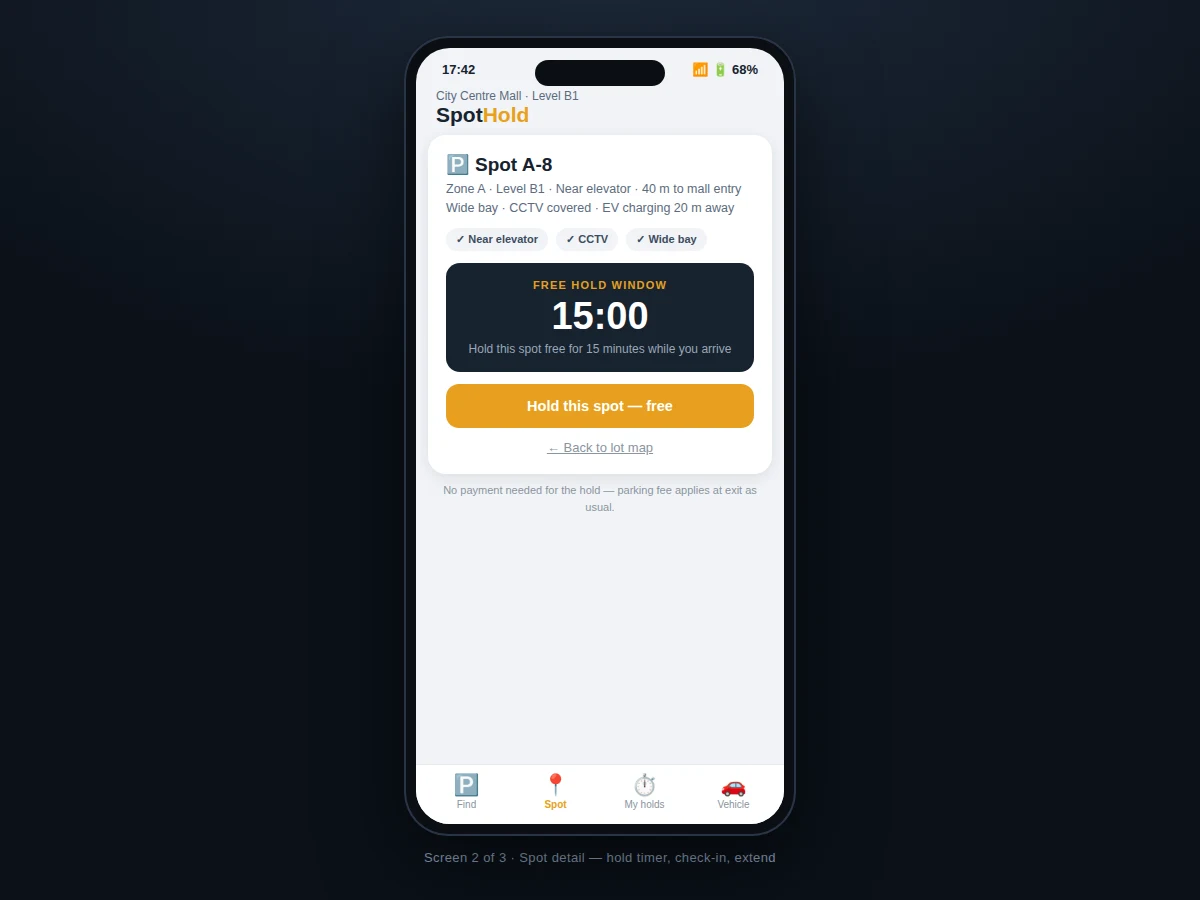
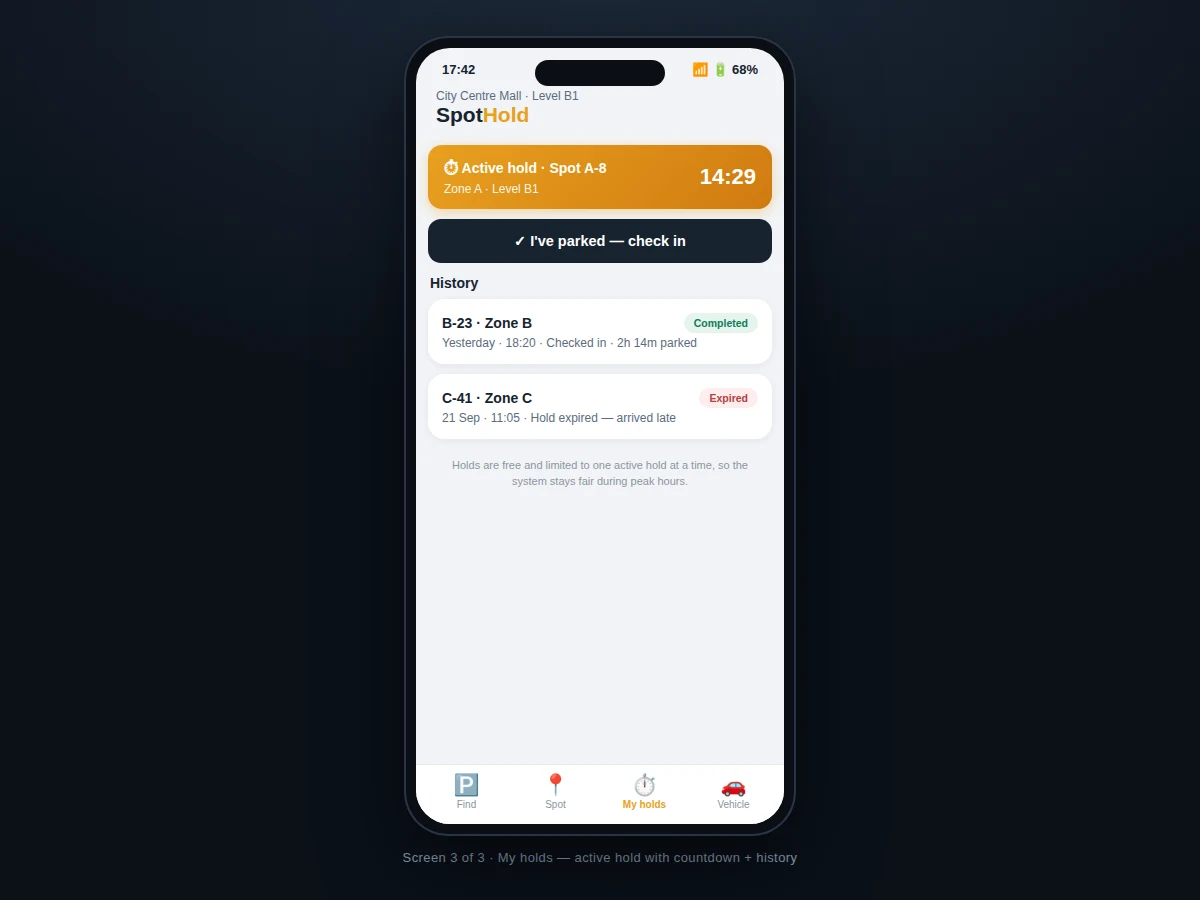
In mall and office parking lots the failure mode is always the same: you spot a free bay on the map, drive toward it, and someone physically closer takes it. Existing parking apps show availability but can't reserve — the map and the ground truth diverge in the two minutes that matter. SpotHold closes that gap with a hold, not just a map: tapping a free spot locks it for 15 minutes, visible to every other user as "held" so nobody is routed to it. The countdown is honest — arrive before it ends or the spot releases automatically. Check-in on arrival converts the hold into a parked session; a single 10-minute extension covers traffic-light delays. Zones are tiered by walking distance (near elevator vs open deck) with live free counts, so drivers pick their trade-off with open eyes. Fairness is structural: one active hold per user, holds are free, and the history screen records holds kept, completed and expired. The build is Kotlin with a Firebase realtime backend — holds are atomic transactions, and the lot map updates live for everyone.
How it works
- The lot operator maps bays into zones; each bay carries its state (free/held/occupied) in the realtime backend.
- The driver opens the zone map and sees live free counts per zone plus per-bay states.
- Tapping a free bay creates a hold as an atomic transaction — the bay flips to "held" for every user instantly.
- The countdown (15:00) ticks on the spot screen; the driver navigates to the bay.
- On parking, the driver taps check-in; the hold converts to a parked session.
- If delayed, the driver uses the single 10-minute extension; at zero the bay auto-releases.
- The history screen logs the outcome, and the fairness rule blocks a second concurrent hold.
Tech stack:
- Kotlin (Android app language)
- Android Studio (build & layout tooling)
- Firebase Realtime Database (live bay states + hold transactions)
- Firebase Authentication (driver sign-in)
- Material Design 3 components
- MVVM architecture (ViewModel + StateFlow)
- Firebase Cloud Messaging (hold-expiry warnings)
- Git version control
| Parameter | Value |
|---|---|
| Platform | Android 8.0 (API 26) and above (design target) |
| Hold window | 15 minutes (configurable) |
| Extension | One × 10 minutes per hold (configurable) |
| Active holds | 1 per user (fairness rule) |
| Hold transaction | Atomic check-and-lock on the bay record |
| Lot size | 60 bays/zone in the reference layout (configurable) |
| Expiry alerts | Push warning at 5 and 1 minute remaining |
| Build | Single APK via Android Studio |
Project features
- [Live lot map] Zone-wise bay grid (A/B/C) with free, held and occupied states updating in real time.
- [15-minute spot hold] Tap any free bay to lock it while you drive in — free, with a live countdown.
- [Check-in on arrival] One tap converts the hold into a parked session; the bay shows occupied to others.
- [One-time 10-minute extension] A single extension covers delays; after that the spot releases fairly.
- [Auto-release] Holds expire automatically at zero — no manual cleanup, no permanently "held" bays.
- [Zone tiers] Zones carry walking-distance notes and live free counts (near elevator vs covered vs open deck).
- [Hold history] Every hold recorded: completed, released, expired — with timestamps.
- [Fairness rules] One active hold per user; holds are free so the system can't be gamed by bulk-holding.
What is included
- Complete Kotlin Android app source code
- Firebase backend schema and transaction rules (bay states, holds, history)
- Lot map, spot detail, hold timer and history screens as designed
- Check-in / extend / release flows
- Hold-expiry push notifications
- Project report PDF (problem, architecture, transaction design, fairness model, testing)
- PPT presentation for final review
- Viva Q&A preparation document (realtime transactions, countdown UX, FCM)
Limitations & prerequisites
- The hold is a social contract backed by the map — the app cannot physically block another car from taking the bay; lots pair it with bay signage.
- Bay states need the operator's data feed (manual, sensor or camera); the app does not detect occupancy itself as shipped.
- GPS guidance to the bay is coarse (±5–10 m); in multi-level lots the driver follows level signage.
- Parking fee payment at exit is out of scope — the hold itself is free and payment-agnostic.
- One lot per backend project — multi-lot city networks are future scope.
Frequently Asked Questions
How is a hold different from a booking?
A booking reserves far ahead and usually costs money; a hold is free, short (15 min) and exists only to cover the drive-in gap — it's closer to "saving your place in the queue."
What stops someone holding spots all day?
Three things: one active hold per user, a single 10-minute extension, and automatic expiry — the rules are enforced in backend transactions, not in the UI.
What if two drivers tap the same free bay?
The hold is an atomic transaction that re-checks the bay state; only the first write wins, the other driver sees it flip to held.
Do I need internet in the basement lot?
The map caches the last-known layout for viewing; creating or releasing a hold needs connectivity so the transaction is authoritative.
What happens when my hold expires?
The bay releases to free for everyone and your history records it as expired; repeated expiries can be rate-limited by the operator.
Is this project suitable for a final-year project?
Yes — for Computer Science, IT and mobile development programs. It demonstrates realtime state sync, atomic transactions, countdown-driven UX, push notifications and a fairness-constrained design. Suitable for B.E./B.Tech final-year projects in Computer Science, IT and mobile application development.
Components & software requirements
- Kotlin (Android app language)
- Android Studio (build & layout tooling)
- Firebase Realtime Database (live bay states + hold transactions)
- Firebase Authentication (driver sign-in)
- Material Design 3 components
- MVVM architecture (ViewModel + StateFlow)
- Firebase Cloud Messaging (hold-expiry warnings)
- Git version control
Delivery information
Built-to-order project. Delivery timeline is shared after order confirmation based on current queue.
Support terms
Complete documentation, setup guide, and viva preparation included. Support for setup and explanation provided.