
More project photos (2)
The problem
Booking a plumber, electrician or cleaner in most Indian cities still runs on phone calls, forwarded contacts and uncertain arrival times. A customer describes the problem, waits for a callback, and often has no confirmed slot, no fixed visit charge and no way to know whether the provider is actually on the way. The Home Service Booking Android App replaces that informal chain with a single booking flow: the customer picks a trade, compares nearby providers with ratings and visit charges, reserves a specific time slot, and then follows the booking's status from confirmation to arrival. Providers, in turn, see only confirmed bookings with a fixed slot, instead of juggling calls and messages across the day. The result is a small, complete scheduling system that demonstrates the real problems of two-sided service marketplaces — availability conflicts, no-shows, trust and status communication — in a form a student can build, test and explain.
Picks a trade and browses nearby providers in the app.
Follow the working sequence
How it works
The Home Service Booking Android App moves a booking through four stages: discovery, slot reservation, status tracking and completion. A customer opens the app, chooses a trade such as plumbing or electrical work, and browses provider profiles showing ratings, completed-job counts and visit charges. Selecting a provider opens a slot calendar for the coming days; each slot can be booked only once, so a confirmed booking removes that slot from everyone else's view. Once booked, the customer follows a status timeline — confirmed, provider assigned, on the way, arrived, work started — updated by the provider's app and pushed to the customer as notifications. After the job, the customer rates the visit, and the completed booking stays in history for easy rebooking of the same provider. Every stage is visible to both sides, so neither the customer nor the provider is left guessing.
- The customer signs in with Firebase Authentication and picks a trade, then browses provider profiles with ratings, completed-job counts and visit charges.
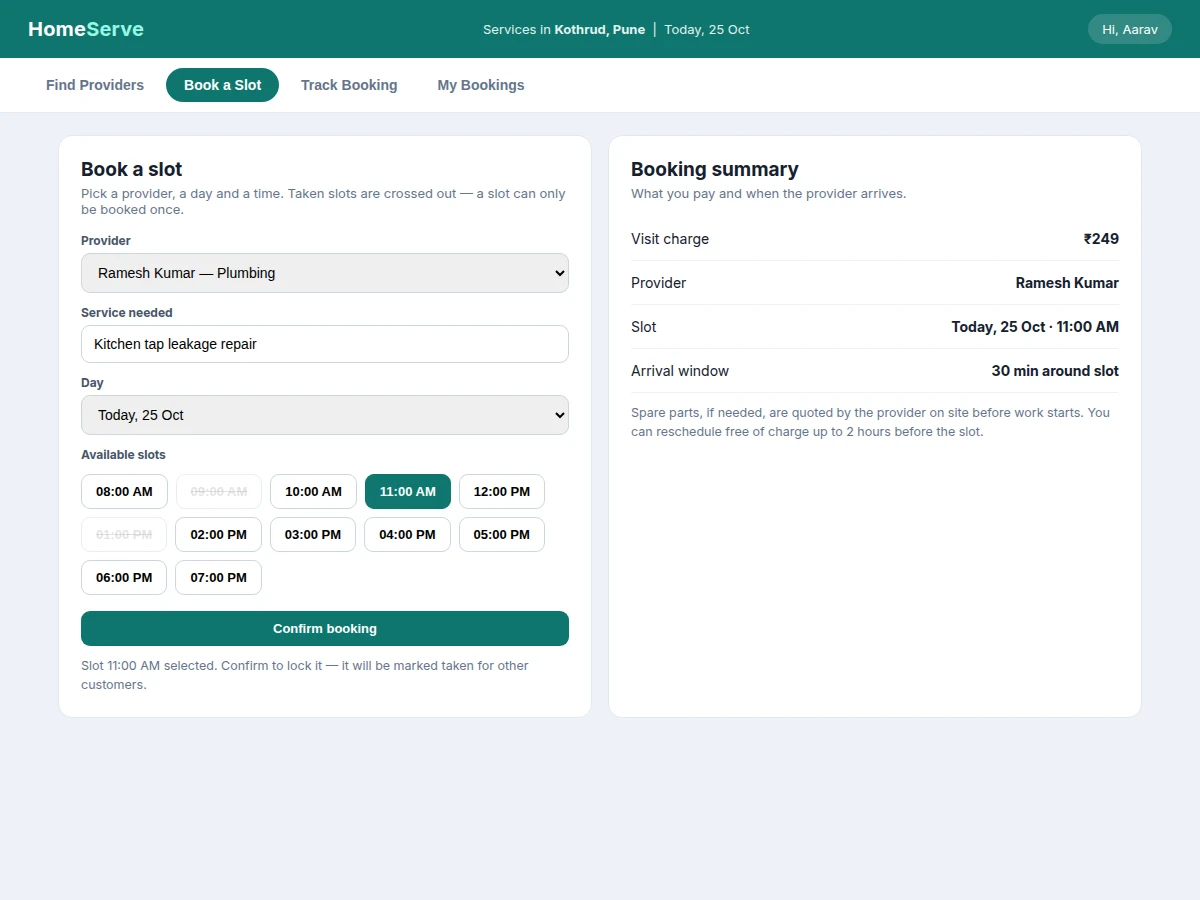
- The customer selects a provider, a day and an hour slot; the app checks Cloud Firestore and only offers slots that are still free for that provider.
- On confirmation, the booking is written to Firestore, the slot is marked taken for all other customers, and a confirmation notification is sent.
- The provider accepts the booking in the provider view, which moves the status to Provider assigned and notifies the customer.
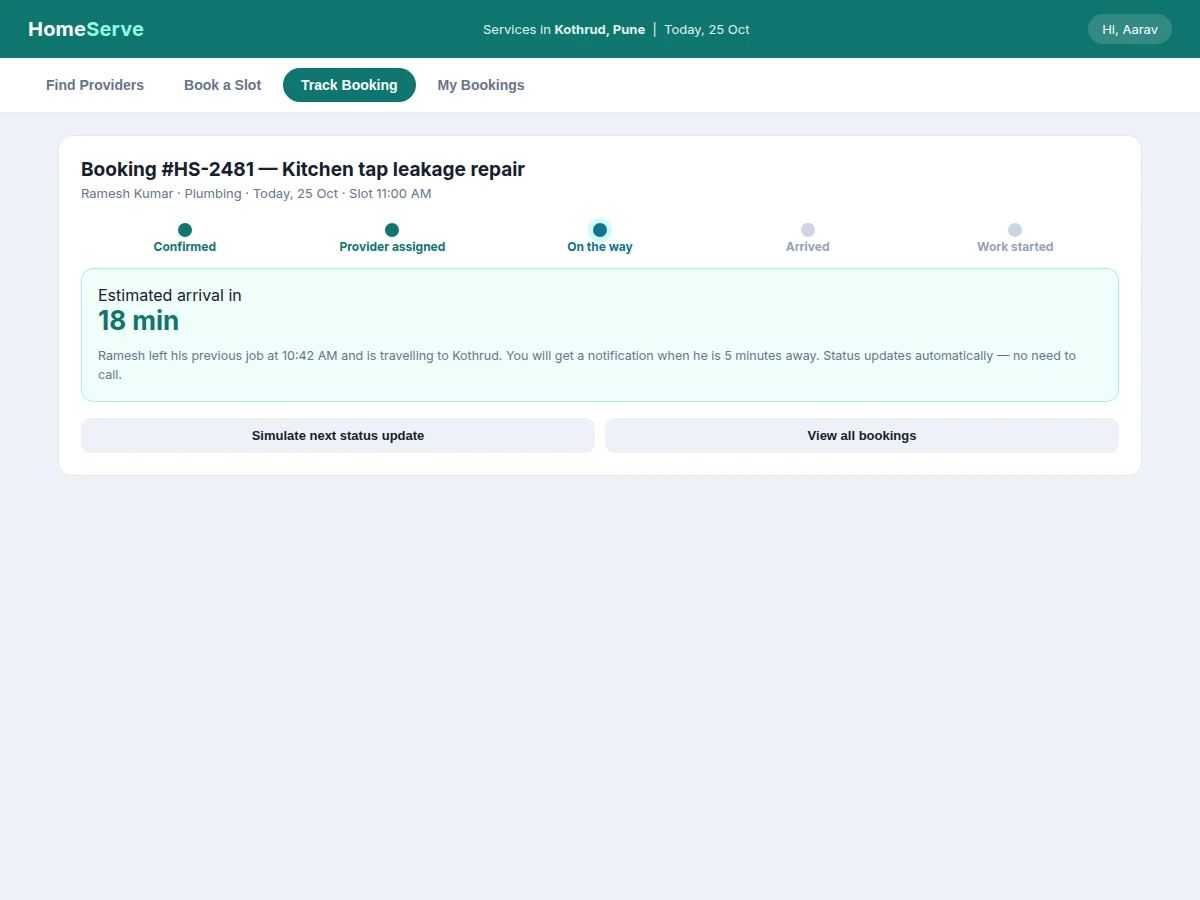
- As the provider travels and arrives, each status change is saved and pushed to the customer, who follows the timeline without calling.
- After the work is done the provider marks the job complete, the customer rates the visit, and the booking moves into history for rebooking.
Tech stack:
- Kotlin · Android Studio
- Jetpack Compose
- Firebase Authentication
- Cloud Firestore
- Firebase Cloud Messaging
- Material Design 3
- Git · Gradle
Requirements
- Android Studio with Kotlin support and JDK 17 (design target)
- An Android device or emulator running Android 7.0 or higher (design target)
- A Firebase project with Authentication, Cloud Firestore and Cloud Messaging enabled
- Internet connection for bookings, slot data and notifications
| Parameter | Value |
|---|---|
| Service trades in the demo build | 5 trades (design choice: Plumbing, Electrical, Cleaning, Appliance Repair, Painting) |
| Providers in the demo build | 6 providers (demo data) |
| Slots per provider per day | 12 slots (design choice: hourly from 08:00 AM to 07:00 PM) |
| Booking statuses | 5 statuses (design choice: Confirmed, Provider assigned, On the way, Arrived, Work started) |
| Arrival window | 30 minutes around the slot (design choice) |
| Free rescheduling window | Up to 2 hours before the slot (design choice) |
| Tracking cycle in the demo build | 5 statuses advanced by simulation (measured in the demo build) |
| Platform | Android, minimum SDK 24 (design target) |
| Backend | Cloud Firestore with Firebase Authentication |
| Notifications | Firebase Cloud Messaging |
Project features
The Home Service Booking Android App is built around four capabilities that carry the whole booking journey: finding the right provider, reserving a slot that cannot be double-booked, tracking the provider's status, and keeping a usable history of every job. Provider discovery filters by trade and shows ratings, completed-job counts and upfront visit charges before any booking is made. Slot scheduling shows a per-provider calendar in which taken slots are visibly blocked, so two customers can never hold the same hour. Live status tracking turns the wait into a visible timeline, from confirmation through arrival to work start, with notifications at each change. Booking history and ratings close the loop, letting customers rebook a trusted provider in seconds and giving new customers honest evidence about quality. Together these four capabilities cover every step from first search to a finished, rated job.
- [Provider Discovery by Trade] Customers filter providers by trade — plumbing, electrical, cleaning, appliance repair or painting — and compare ratings, completed-job counts and upfront visit charges before booking.
- [Slot Scheduling with Conflict Checks] A per-provider calendar shows bookable hours for the coming days; once a slot is booked it is marked taken and removed from every other customer's view, so no slot is ever double-booked.
- [Live Booking Status Tracking] Each booking carries a visible status timeline — Confirmed, Provider assigned, On the way, Arrived, Work started — updated by the provider and pushed to the customer as a notification at every change.
- [Booking History and One-Tap Rebooking] Completed and upcoming bookings stay in one list with provider, date and slot details, so a trusted provider can be rebooked for a new job without searching again.
- [Ratings and Reviews] After a completed job the customer rates the visit, and the rating feeds the provider's profile, giving future customers evidence grounded in completed work.
- [Provider Profiles with Upfront Visit Charges] Each provider profile shows trade, experience, completed jobs, rating and a visit charge before booking, so the customer knows the starting cost with no surprise.
- [Booking Reminders and Notifications] Firebase Cloud Messaging sends a confirmation on booking, a reminder before the slot, and an alert when the provider is on the way or has arrived.
Feature status: Implemented — all 7 features above. Optional customization — in-app payment, live GPS map tracking, provider-side earnings dashboard. Future scope — multi-city provider onboarding, service-package subscriptions, in-app chat between customer and provider.
What is included
- Complete Android source code in Kotlin with Jetpack Compose
- Firebase project setup guide and Cloud Firestore data schema
- Working demo build with provider discovery, slot booking, status tracking and booking history
- Project report PDF (background, methodology, system design, implementation, limitations)
- PPT presentation for final review
- Viva Q&A preparation document (booking flow, Firestore modelling, slot conflicts, notifications)
- Project abstract PDF
Timeline
- Week 1 (expected): App design, Firebase project setup and data modelling for providers, slots and bookings.
- Weeks 2–3 (expected): Provider discovery screens, slot calendar with conflict checks, and the booking flow.
- Week 4 (expected): Status tracking timeline, provider status updates and push notifications.
- Week 5 (expected): Booking history, ratings, final testing, report and presentation polish.
Support
- Setup guidance for Android Studio and the Firebase project is included with the delivery.
- A demo walkthrough covering discovery, booking, tracking and history is included.
- College-specific changes, such as an extra user role or a different report format, are handled as customizations.
Limitations & prerequisites
- Tracking in the base build is status-based: the provider updates each stage, and there is no live GPS map position shown to the customer.
- In-app payment is not included in the base build; visit charges are shown upfront and settled outside the app.
- Provider availability and status accuracy depend on providers updating their own status promptly; a provider who forgets to update leaves the timeline stale.
- All provider names, ratings and charges in the demo build are sample data for demonstration, not real providers.
- Bookings, slot availability and notifications require an internet connection; offline use is limited to viewing cached screens.
- The app is an academic project build, not a production marketplace, and it does not verify provider credentials or handle disputes.
Frequently Asked Questions
Is this project suitable for a final-year project?
Yes. This project suits B.E./B.Tech final-year students in Computer Science, IT and Android application development, because it combines a real two-sided booking problem with mobile UI, cloud data modelling, slot-conflict logic and push notifications in one working app, and gives the student a complete demo to present and explain in the viva. It demonstrates scheduling logic, cloud database design and notification handling — concepts that map directly to mobile application coursework.
What is the main technology used?
The app is built with Kotlin and Jetpack Compose for the Android interface, while Firebase provides user accounts through Firebase Authentication, booking and slot data through Cloud Firestore, and status alerts through Firebase Cloud Messaging. Material Design 3 supplies the visual system. No separate backend server is needed, which keeps the architecture explainable in a viva.
Does the app need internet or GPS?
Yes, an internet connection is required, because bookings, slot availability and status updates are stored in the cloud so that customers and providers always see the same slot state. GPS is not required in the base build: tracking is status-based, with the provider updating each stage, rather than a live map position. Live map tracking can be added as a customization.
Can this project be customized?
Yes, this project can be customized with realistic changes such as adding new service trades, changing the slot length or cancellation rules, adding in-app payment, adding live map tracking, and building a provider-side earnings dashboard for providers, and adapting the booking flow to a college's report format or an extra user role. College-specific requirements, such as a particular report format or an extra user role, can also be accommodated within the build. Changes are scoped before the build starts so the timeline stays realistic.
What are the main limitations?
The base build tracks providers by status updates, not by live GPS position, and it does not include in-app payment; charges are shown upfront and settled outside the app. Provider availability and status accuracy also depend on providers updating their own status promptly. The full list of limitations, including internet dependency and sample demo data, appears in the Limitations section above.
What will I receive with the project?
You receive the complete Android source code, the Firebase project setup and database schema, the working demo build, setup instructions, the project abstract, report, presentation and viva preparation material. Everything is prepared fresh for your order, so the demo data and provider examples match the final build. The delivery covers the app and its documentation, not real provider onboarding.
Components & software requirements
- Kotlin · Android Studio
- Jetpack Compose
- Firebase Authentication
- Cloud Firestore
- Firebase Cloud Messaging
- Material Design 3
- Git · Gradle
Requirements
- Android Studio with Kotlin support and JDK 17 (design target)
- An Android device or emulator running Android 7.0 or higher (design target)
- A Firebase project with Authentication, Cloud Firestore and Cloud Messaging enabled
- Internet connection for bookings, slot data and notifications
Delivery information
Built-to-order project. Delivery timeline is shared after order confirmation based on current queue.
Support terms
Complete documentation, setup guide, and viva preparation included. Support for setup and explanation provided.
Download free synopsis (PDF)
Enter your name and WhatsApp number — the synopsis PDF downloads immediately. We may send occasional project updates on WhatsApp; no spam.