
More project photos (2)
The problem
A hospital outpatient department (OPD) sees hundreds of patients a day across multiple counters, yet most still run their queues on paper tokens and shouted names. Patients arrive, stand in a registration line to collect a token, then sit in a crowded hall with no sense of when their turn will come. Reception staff maintain the order in registers, doctors get interrupted by patients peeking in to ask whether it is their turn yet, and a skipped no-show can quietly stall the whole line. This project replaces that chaos with a web-based queue token system built around three roles: a patient booking view that issues numbered tokens with estimated waiting times, a staff console that runs the queue — call next, mark served, skip, recall and walk-in issue — and a live counter display board with big "Now Serving" numbers that the entire hall can read from a distance. The queue is first-come and visible to everyone, which removes the arguments about whose turn it is.
This is a built-to-order software project: the patient booking portal, staff queue console, live display board and backend are developed fresh for you.
The problem
Walk into a busy hospital OPD at 10 AM and the queue problem is visible in the corridor: patients clustered around the reception desk asking the same question, staff answering it while also writing tokens into a register, and the doctor's room door opening every few minutes for someone checking whether their number has been called. Paper token systems fail in three specific ways. First, patients have no visibility — a token number means nothing without knowing how many are ahead and how long each consultation takes, so people either hover near the counter or wander off and miss their turn. Second, the queue is fragile — a no-show who never returns leaves a gap the staff must handle by memory, and there is no clean way to recall a skipped token or reorder a late arrival. Third, nothing is recorded — at the end of the day nobody can say how long patients actually waited, which counters ran slow, or where the bottleneck was. This project treats the OPD queue as a state machine with three views of the same state: the patient books into it, the staff advances it, and the display board reflects it in real time.
Books a token from the portal or kiosk and follows the now-serving board.
Follow the working sequence
How it works
- The patient opens the booking view, enters a name and mobile number, picks a department, doctor and slot, and submits — the system issues the next token number for that department's counter (e.g. C-174 for Cardiology) and stores it at the end of the queue.
- The token ticket shows three things: the queue position, the token currently being served at that counter, and an estimated waiting time computed as position × the average consultation time (a design-target formula, stated as an estimate, not a measured value).
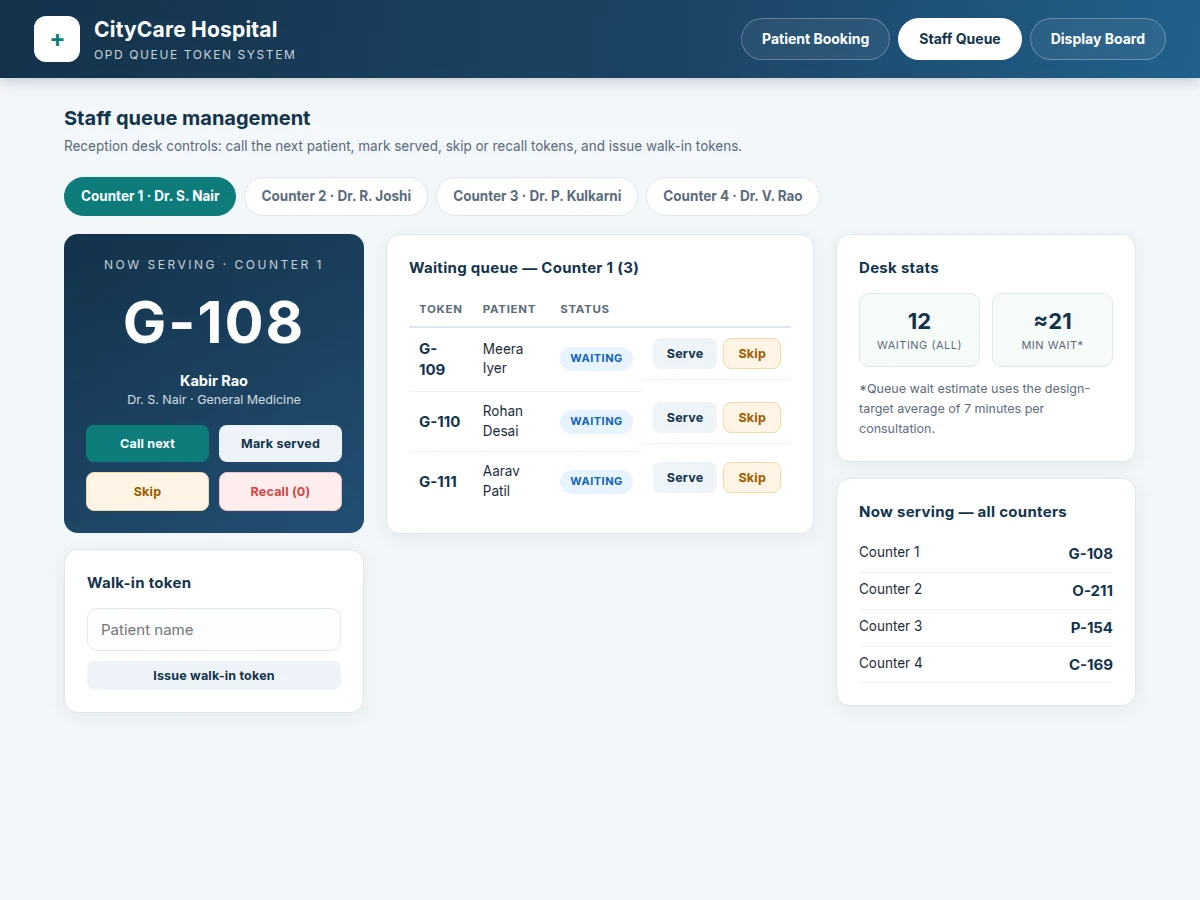
- At the reception desk, the staff console shows the live waiting queue per counter with patient names and token numbers; one click calls the next token, marks the current one served, skips a no-show, or recalls a skipped token to the front.
- Every state change is written to the backend, which pushes it over the real-time channel so all connected views update within seconds: the staff console, the booking view's "now serving" strip, and every display board in the hall.
- Walk-in patients who arrive without a booking are issued tokens from the same console into the same queue, so booked and walk-in patients share one fair first-come order.
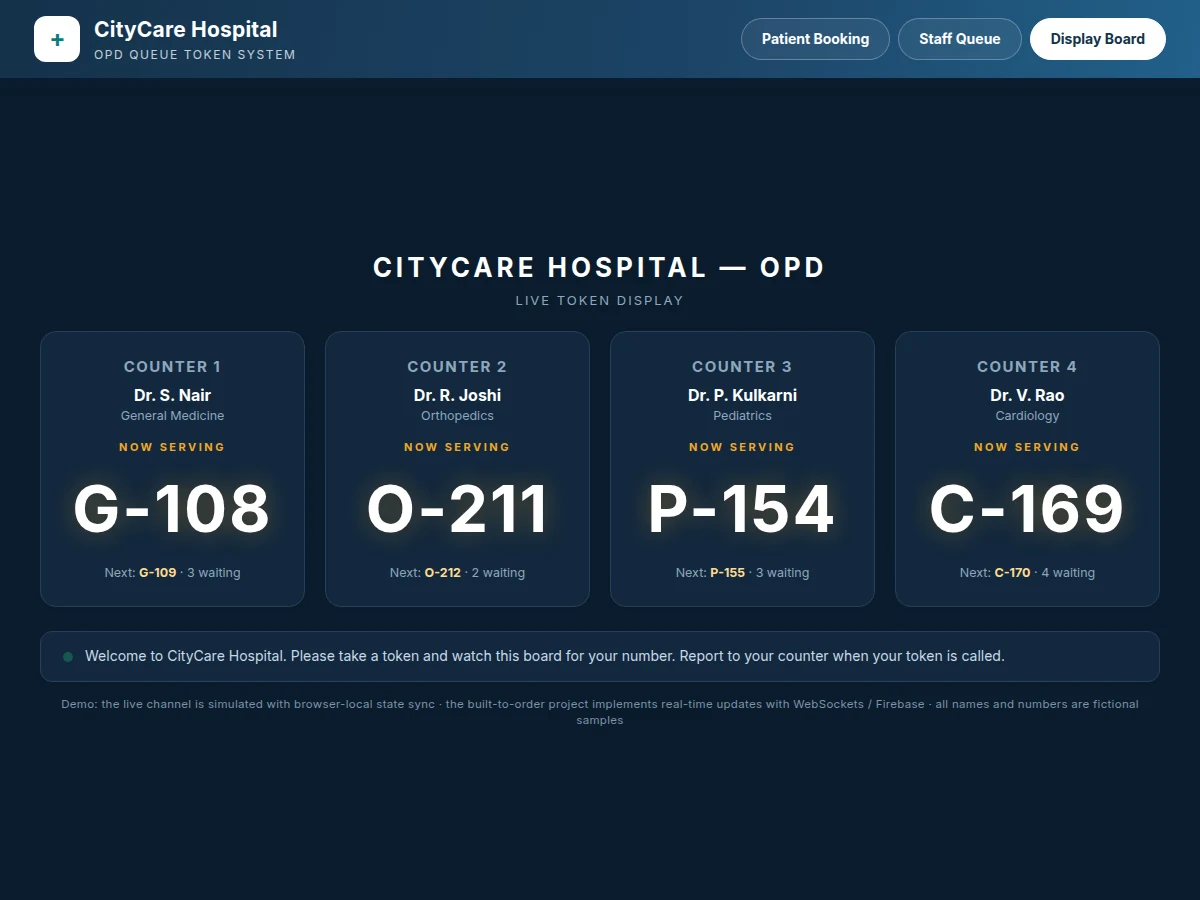
- The display board — a full-screen dark view with oversized numbers — shows "Now Serving" and "Next" per counter and is meant to run on a wall-mounted screen or TV in the waiting area.
Tech stack:
- HTML5 · CSS3 · JavaScript (patient portal, staff console, display board)
- Node.js 20 · Express (REST API backend)
- MySQL 8 (token, queue, doctor and slot persistence)
- WebSocket / Firebase Realtime (live board updates)
- Responsive CSS layout (board view designed for wall-mounted screens)
- SMS gateway integration (optional reminders add-on)
- Apache / Nginx hosting
- Git
| Parameter | Value |
|---|---|
| Platform | Web application: patient portal, staff console, display board |
| Roles | 3 — patient, reception staff, display board; no shared logins |
| Counters (reference build) | 4 counters × 4 departments; 3 configurable slots per day (design target) |
| Queue model | First-come per counter; skipped tokens parked, recallable to front |
| Token format | Department code + sequential number, e.g. C-174 |
| Wait-time estimate | Queue position × average consult time; 7 min average is the design target, shown as an estimate |
| Live updates | WebSocket / Firebase push to all views within seconds (design target); demo simulates this with browser-local sync |
| Booking inputs | Patient name, 10-digit mobile, department, doctor, slot |
| Persistence | MySQL 8; queue state survives staff-console restarts (design target) |
| Browsers | Modern Chrome, Edge or Firefox (expected) |
Requirements
- A PHP/MySQL-capable host is not required here — the stack is Node.js 20 + MySQL 8, so the host must allow a long-running Node process (a small VPS or Node-capable shared host), with approximately 200 MB disk space (expected).
- A wall-mounted screen, TV or projector browser for each display board view; any modern browser in fullscreen/kiosk mode works — no special hardware.
- No SMS gateway account is needed for the base build; the optional reminders add-on requires one (e.g. a Twilio or Indian SMS-provider account, credentials supplied by the buyer).
Project features
- [Patient self-booking] Book a token from a phone or kiosk: name, mobile, department, doctor and slot. The issued ticket shows the token number, queue position, currently-serving token and an estimated wait — no registration line needed.
- [Estimated wait on every ticket] Each token carries an estimated waiting time computed as queue position × average consultation time. This is a design-target formula shown as an estimate, not a measured or guaranteed figure.
- [Staff queue console] The reception desk view for one or many counters: call next, mark served, skip a no-show, recall a skipped token, and issue walk-in tokens — all in a few clicks with per-counter stats.
- [Live counter display board] A full-screen, big-number "Now Serving" board per counter that updates automatically as the staff advances the queue, readable from across a waiting hall. The demo simulates the channel with browser-local sync; the delivered project implements it with WebSockets or Firebase.
- [Multi-counter, multi-department queues] Separate first-come queues per department counter (General Medicine, Orthopedics, Pediatrics, Cardiology in the reference build), each with its own token series, running in parallel on one backend.
- [Queue transparency panel] Before visiting, patients can see the currently-serving token and waiting count per doctor, so they can time their arrival instead of sitting in the hall for hours.
- [Optional: SMS reminders] Text-message reminders when a patient's token is approaching are an optional add-on, quoted separately — they need an SMS gateway account and are not part of the base build or the demo.
- [Future scope: multi-hospital deployment] Running the system across branches or hospitals with a central admin dashboard and cross-branch analytics is a planned extension, not part of the base project.
What is included
- Complete source code for all three views: patient booking portal, staff queue console and live display board
- Node.js/Express backend with MySQL schema (.sql) covering tokens, queues, doctors, departments and slots
- Setup and deployment guide (Node hosting, database import, display-board kiosk setup)
- Project report PDF (background, requirements, database design, queue state-machine design, screenshots)
- PPT presentation for final review
- Viva Q&A preparation document (queue data structures, state machines, WebSockets vs polling, REST API design, concurrency in token issuance)
Limitations & prerequisites
- The demo simulates the real-time channel with browser-local storage sync so the three views can be shown in one browser; it does not use WebSockets or a live backend — the delivered built-to-order project implements live updates with WebSockets or Firebase.
- Estimated waiting time is a design-target formula (position × 7-minute average consult time), not a measured figure — real waits vary with case complexity, so it is shown as an estimate everywhere.
- No payment gateway is included: consultation fees are shown on the ticket as payable at the hospital counter, and no online payment is collected.
- SMS reminders are not part of the base build or the demo — they are an optional, separately-quoted add-on that needs a gateway account.
- All demo data (patient names, doctors, token numbers) are fictional samples; the delivered project ships with an empty database and a seed script.
- Patient privacy basics (no public listing of phone numbers) are followed in the build, but hospital-grade compliance certification is out of scope.
Delivery timeline
- Standard delivery is 3–4 weeks from order confirmation: weeks 1–2 cover the backend, queue engine and database; week 3 covers the three frontend views and the live channel; week 4 covers testing, the report, PPT and viva Q&A document. Exact dates are confirmed on the quotation.
Support & explanation
- Every order includes a walkthrough session explaining the queue state machine, the live-update channel and the database design, so the viva can be defended confidently. Bug fixes are covered for 30 days after delivery; new features (like the SMS add-on) are quoted separately.
Frequently Asked Questions
How does the "live" display board actually update?
In the delivered project, every staff action (call next, mark served, skip) is written to the backend, which pushes the new state over WebSockets or Firebase to every connected view within seconds — the board needs no refresh. The demo here simulates that channel with browser-local state sync so all three views can be shown in one browser; the mechanism, not the behaviour, is what changes in the full build.
How is the estimated waiting time calculated?
It is a simple design-target formula: your queue position multiplied by the average consultation time, set at 7 minutes in the reference build. It is shown on every ticket as an estimate, not a promise — real waits stretch or shrink with case complexity, doctor availability and skipped tokens, and the page and report both say this plainly.
Can walk-in patients and online bookings share one queue?
Yes — that is the point of the design. Booked patients take tokens from the patient portal and walk-ins are issued tokens from the staff console, but both land in the same per-counter queue in first-come order. The staff never has to merge two lists by hand, which is where paper systems go wrong.
What happens when a patient misses their turn?
The staff marks the token skipped, which parks it in a skipped list instead of deleting it, and the queue moves on. If the patient returns, one click recalls the token to the front of the queue. The display board reflects every change live, so the hall always sees the current state.
Does it include SMS reminders or online payment?
No. SMS reminders are an optional add-on quoted separately and need a gateway account; online payment is not part of this project at all — consultation fees are shown on the ticket as payable at the hospital counter. Keeping these out of the base build keeps the price and scope honest.
Is this project suitable for a final-year project?
Yes — for Computer Science, IT and related computing programs. It demonstrates a real multi-role web application: REST API design, relational database modeling, a queue state machine, concurrency-safe token issuance, and a live-update channel, all wrapped around a problem every student has personally experienced in a hospital waiting hall. Suitable for B.E./B.Tech final-year projects in Computer Science, Information Technology and related computing programs.
Components & software requirements
- HTML5 · CSS3 · JavaScript (patient portal, staff console, display board)
- Node.js 20 · Express (REST API backend)
- MySQL 8 (token, queue, doctor and slot persistence)
- WebSocket / Firebase Realtime (live board updates)
- Responsive CSS layout (board view designed for wall-mounted screens)
- SMS gateway integration (optional reminders add-on)
- Apache / Nginx hosting
- Git
Delivery information
Built-to-order project. Delivery timeline is shared after order confirmation based on current queue.
Support terms
Complete documentation, setup guide, and viva preparation included. Support for setup and explanation provided.
Download free synopsis (PDF)
Enter your name and email — the synopsis PDF downloads immediately. We may send occasional project updates; no spam, unsubscribe anytime.