
More project photos (2)
The problem
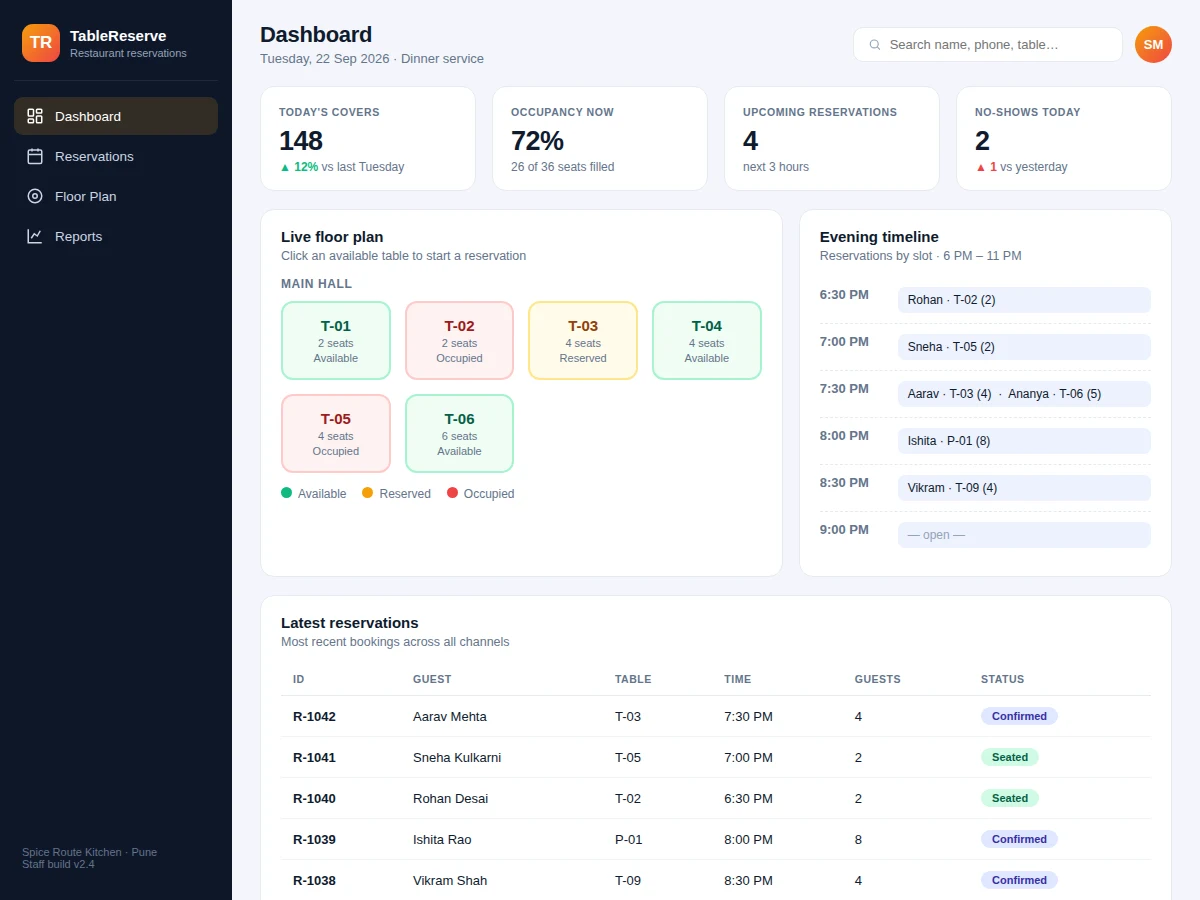
Most small and mid-size restaurants still manage tables on a paper register, a whiteboard, or the manager's memory. That breaks down on busy evenings: double bookings, forgotten phone reservations, tables held for guests who never arrive, and no record of which slots actually make money. This project replaces that chaos with a proper reservation system. The centrepiece is a live floor plan — every table shown with its real-time status (available, reserved, occupied) — so staff can seat and book without walking the floor. Reservations carry guest details, party size, time slot and status; confirmations go out by SMS or email; and the manager gets occupancy and no-show reports. The design is deliberately scoped to one outlet done well: roles for staff and manager, validation that prevents over-seating a table, and a clean relational schema a student can fully explain in a viva.
How it works
- The manager sets up the outlet once: tables with seat counts grouped into zones (main hall, terrace, cabins) on the floor plan.
- Staff take a booking by phone, walk-in or web form; the app suggests tables that fit the party size and are free in the chosen slot.
- The reservation is stored with a unique ID, and a confirmation is sent to the guest via the configured SMS/email gateway.
- On arrival, staff mark the guest seated; the table flips to occupied on the floor plan for everyone to see.
- When the party leaves, the table is marked free and the reservation moves to completed, feeding the occupancy reports.
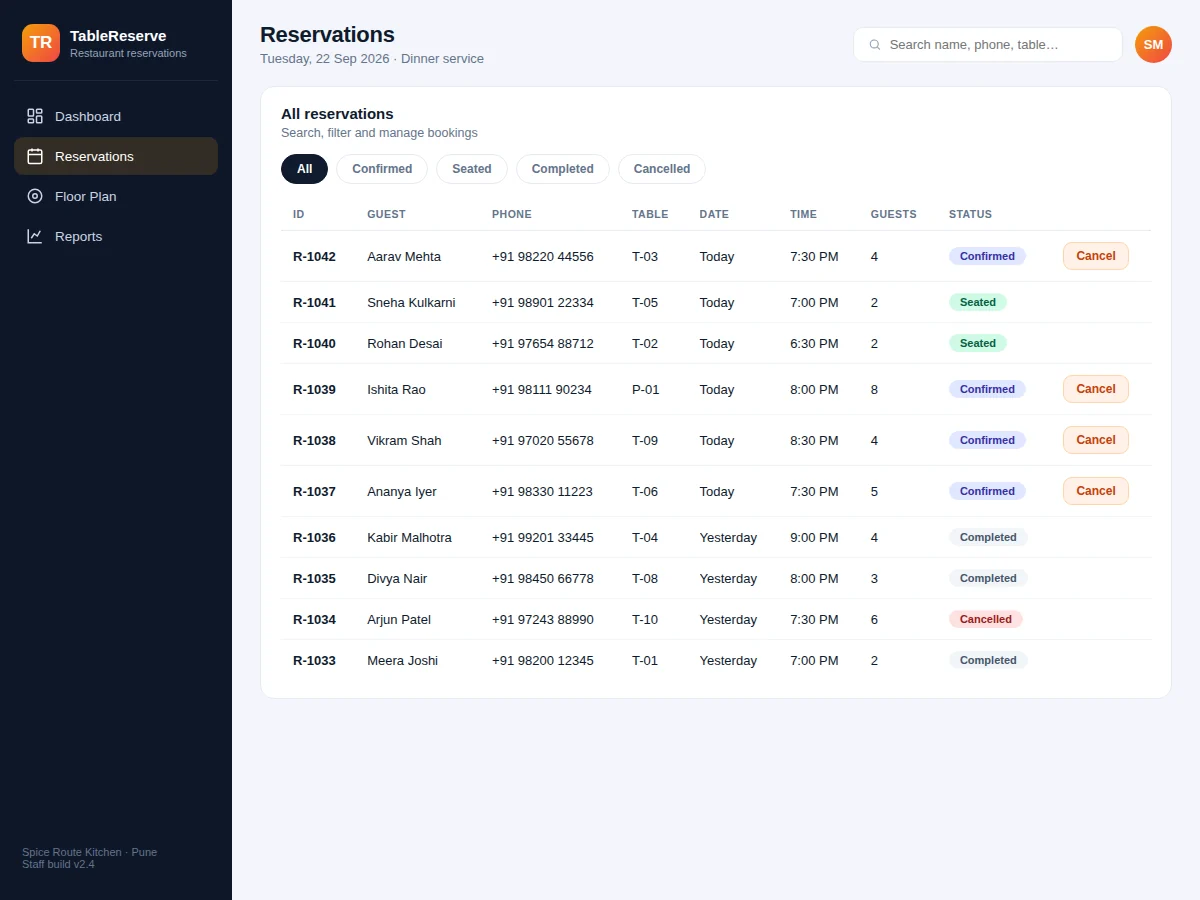
- Cancellations and no-shows are recorded with one click, freeing the table and updating the guest's history.
- The manager reviews covers, turnover and no-show trends on the reports dashboard at close of service.
Tech stack:
- HTML5 · CSS3 · JavaScript (ES6)
- Node.js · Express
- MySQL · relational schema design
- REST API architecture
- Responsive mobile-first UI
- Canvas/SVG chart rendering
- Git · version control
| Parameter | Value |
|---|---|
| User roles | Staff and manager (design target) |
| Tables supported | Up to ~200 per outlet (expected) |
| Booking window | Up to 30 days ahead (configurable) |
| Page load | Under ~2 s on broadband (design target) |
| Database | MySQL with migration scripts and seed data |
| Notifications | SMS/email gateway hooks (Twilio/MSG91-ready) |
| Deployment | Shared hosting or VPS; no special hardware needed |
| Browsers | Modern Chrome, Firefox, Edge, Safari (expected) |
Project features
- [Live floor-plan booking] Visual floor plan with every table's real-time status — available, reserved or occupied. Clicking a free table opens the booking form pre-filled with that table.
- [Reservation management] Create, edit, cancel and reassign reservations with guest name, phone, party size, date and time slot, all validated against table capacity.
- [Guest notifications] Booking confirmations and reminders through SMS/email gateway hooks (Twilio/MSG91-ready), with console logging in test mode.
- [Table status tracking] One-click transitions as guests arrive, are seated and leave, keeping the floor plan truthful through the whole service.
- [Search & filters] Instant search across guest name, phone and table, plus status filters (confirmed, seated, completed, cancelled).
- [Occupancy reports] Covers by day, table turnover and booking-channel split rendered as charts for the manager's weekly review.
- [No-show tracking] Flags guests who miss reservations so repeat no-shows can be spotted and policies applied.
- [Walk-in handling] Seats walk-in parties directly from the floor plan without a prior reservation, keeping one system of record.
What is included
- Complete source code: frontend, backend API and database schema
- Database migration scripts with realistic seed data
- Setup and deployment guide (local + shared hosting/VPS)
- User manual written for restaurant staff
- Project report PDF (problem, design, schema, testing)
- PPT presentation for final review
- Viva Q&A preparation document
Limitations & prerequisites
- Scoped to a single restaurant outlet; multi-branch management is future scope.
- SMS delivery needs the buyer's own paid gateway account; test mode logs messages to the console instead.
- Reservations are confirmation-only — no online advance payment or table-hold deposits.
- The floor plan is a 2D schematic for operations, not a CAD-accurate architectural layout.
- Real-time status assumes a stable internet connection; there is no offline mode.
- Reports are only as complete as the reservations staff enter — garbage in, garbage out.
Frequently Asked Questions
How does the floor-plan booking work?
Each table is drawn on a schematic floor plan coloured by live status. Staff click a free table and a booking form opens with that table pre-selected; party size is validated against the table's seats before saving, so over-seating is impossible.
Can guests book online themselves?
The build ships with a staff-facing app. A public guest booking page is included as a documented extension path, with the API endpoints already in place to support it.
Does it really send SMS confirmations?
The notification module is wired to standard SMS/email gateway APIs. In the demo it logs to the console; connecting a real gateway is a documented 15-minute configuration step needing the buyer's own API key.
What stops two staff booking the same table?
A unique database constraint on table + date + time slot rejects the second write, and the UI re-checks availability at save time. The report documents this as the concurrency strategy.
Is this project suitable for a final-year project?
Yes — for Computer Science, IT and Web Development programs. It demonstrates CRUD, relational schema design, REST APIs, role-based access and reporting — the full web-development stack in one coherent product. Suitable for B.E./B.Tech final-year projects in Computer Science, IT and Web Development.
Components & software requirements
- HTML5 · CSS3 · JavaScript (ES6)
- Node.js · Express
- MySQL · relational schema design
- REST API architecture
- Responsive mobile-first UI
- Canvas/SVG chart rendering
- Git · version control
Delivery information
Built-to-order project. Delivery timeline is shared after order confirmation based on current queue.
Support terms
Complete documentation, setup guide, and viva preparation included. Support for setup and explanation provided.