
More project photos (2)
The problem
Most college libraries still run issue/return on paper registers or a bare spreadsheet: reservations are taken on phone calls, nobody knows which copy is actually on the shelf, and late-fee calculation happens only when a student happens to return a book — inconsistently and often from memory. The result is lost reservations, untracked overdue books, and fee disputes. This project replaces that workflow with a proper web system. Students browse a searchable catalog with live availability, reserve a title with a pickup date, and receive a QR check-in pass. The librarian scans the pass at the circulation desk to issue the book with an automatic 14-day due date, and the system computes late fees, blocks fresh issues until dues are cleared, and sends email reminders. It is a realistic, self-contained full-stack build — authentication, roles, CRUD, QR workflows, scheduled reminders and reporting — sized exactly for a final-year demonstration and viva.
Searches the catalog, reserves books with a pickup date, and checks in with the QR pass at the desk.
Follow the working sequence
How it works
- A student registers and logs in; the librarian approves the account (auto-approval is a configurable option).
- The student searches the catalog by title, author or ISBN, filters by genre and availability, and opens a book's detail page.
- Clicking Reserve with a pickup date creates a reservation row, decrements the available-copy count, and generates a unique QR check-in pass.
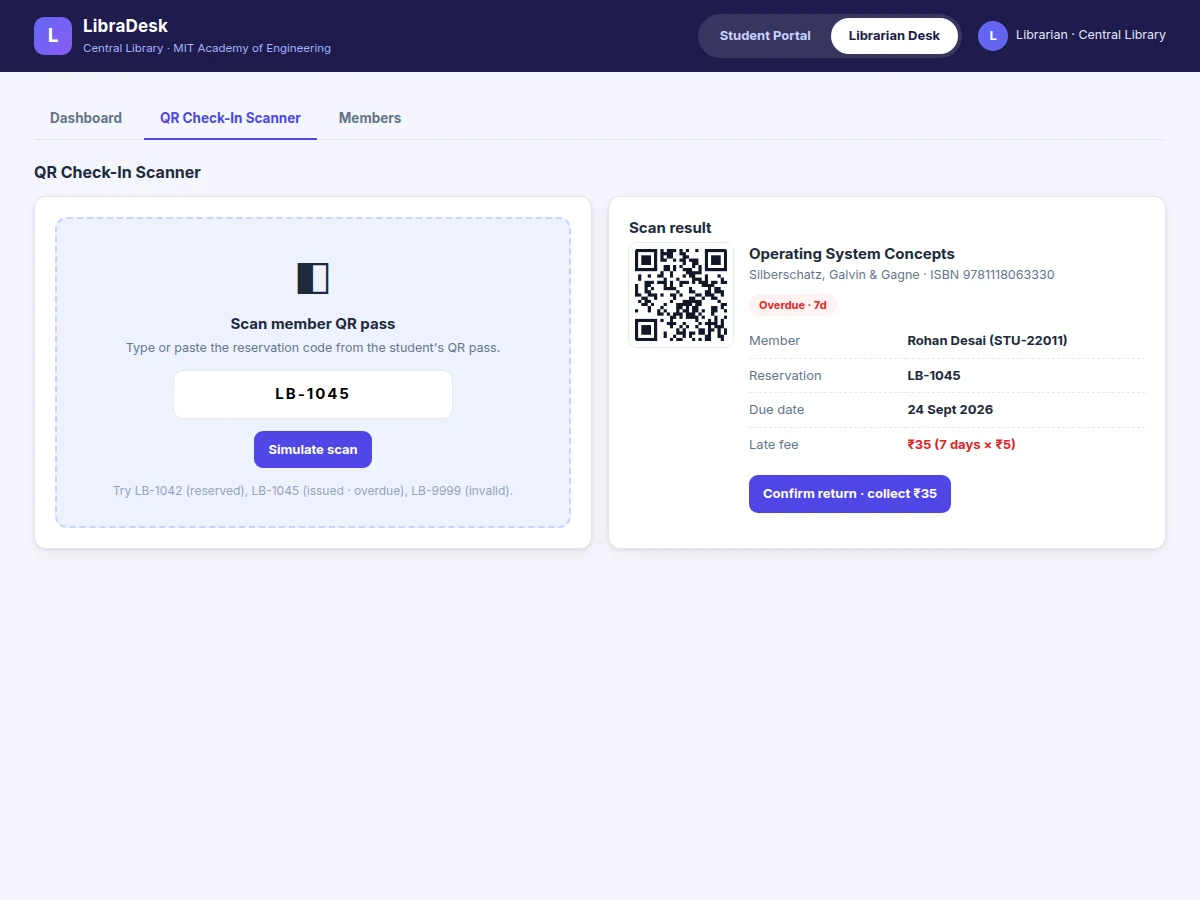
- At the circulation desk the librarian enters or scans the reservation code; the system creates an issue transaction with the due date set to 14 days ahead.
- Every login and every return recomputes overdue days × ₹5 per book; the fee ledger updates and new issues stay blocked until dues are marked paid.
- A scheduled job sends email reminders 2 days before the due date and daily once a book is overdue; the librarian can also trigger pending reminders manually.
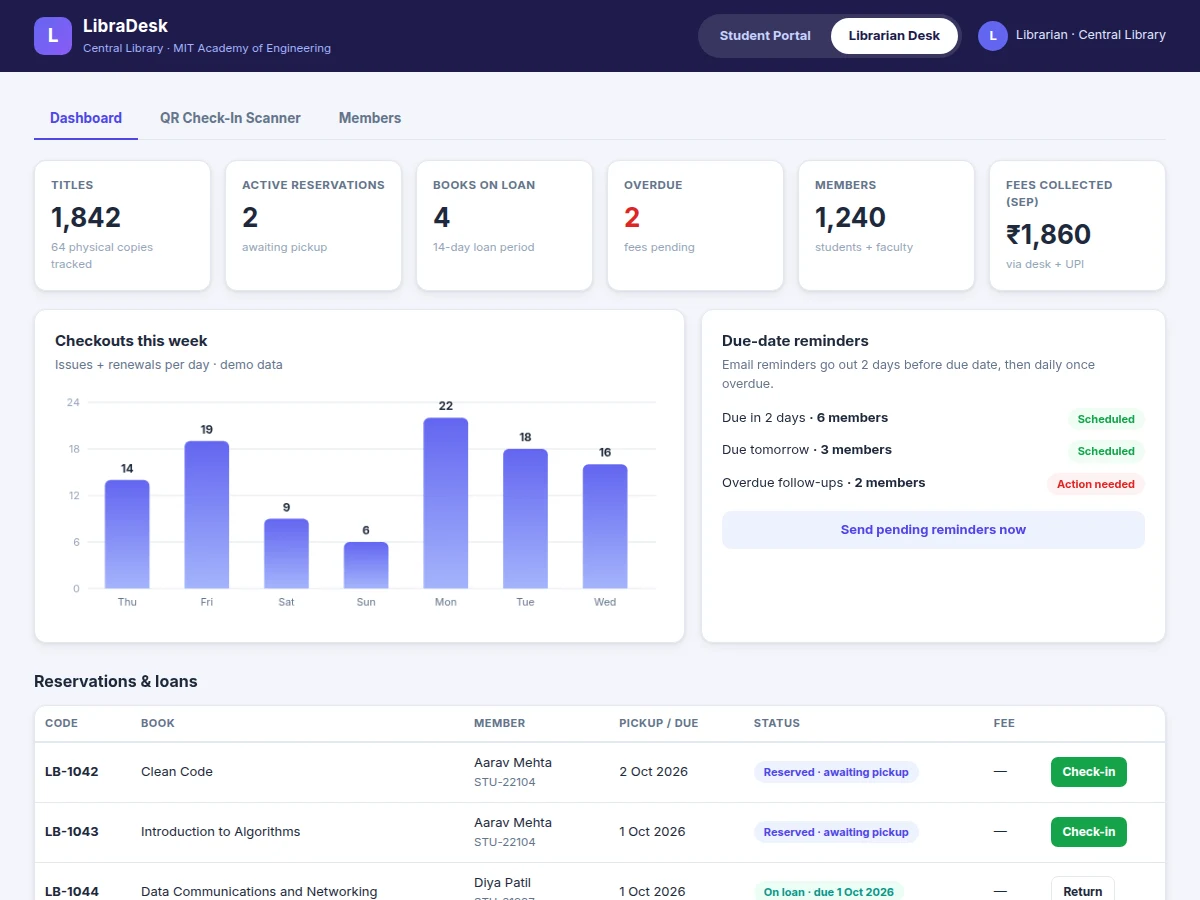
- Returns are recorded from the same scan flow; the dashboard updates reservations, loans, dues and the weekly checkout chart in real time.
Tech stack:
- PHP 8 · Laravel 11
- MySQL 8
- HTML5 · CSS3 · JavaScript
- Endroid QR Code · check-in passes
- PHPMailer · SMTP reminders
- Apache · shared-hosting ready
- Git
- phpMyAdmin
| Parameter | Value |
|---|---|
| Demo catalog | 1,800+ titles with ISBN, author, genre, copies (seed data) |
| User roles | Student, Librarian, Admin |
| Loan period | 14 days (configurable) |
| Late fee | ₹5 per day per book (configurable) |
| QR pass | Unique reservation code as downloadable/on-screen QR |
| Reminders | 2 days before due date + daily when overdue, via SMTP |
| Concurrent users | Approximately 50–100 on typical shared hosting (expected) |
| Page response | Design target: under 1 second on typical shared hosting |
| Deployment | Apache + PHP 8 + MySQL; XAMPP-compatible for local demo |
| Database option | MySQL 8 for production; SQLite for zero-setup demo |
Project features
- [Searchable book catalog] Search by title, author or ISBN with genre filters, availability filters and sorting; each book shows copies, ISBN, pages and loan terms in a detail view.
- [Reservation with QR check-in pass] Reserve a book with a pickup date; the system generates a unique QR pass (reservation code) instantly for scanning at the circulation desk.
- [Desk check-in / check-out flow] The librarian enters or scans the reservation code to issue the book with an automatic 14-day due date, or records a return with the late fee computed on the spot.
- [Automatic late-fee engine] ₹5 per day per book after the due date, visible on both student and librarian screens; a built-in calculator lets students estimate dues, and returns stay on hold until the fee is marked paid.
- [Librarian dashboard] Live stats (reservations, loans, overdue, members, fees collected), a weekly checkout chart, a reservations-and-loans table with one-click check-in/return, and a member directory with dues.
- [Email reminders] Due-soon reminders 2 days before the due date and daily follow-ups once overdue, sent via SMTP, with a manual "send now" trigger on the dashboard.
- [Member management] Student and faculty records with loan history and outstanding fees per member.
- [Role-based access] Separate student portal and librarian desk behind session login; loan period and fee rate are configurable settings.
What is included
- Complete source code (Laravel + MySQL) with migrations and seed data
- Working single-file UI demo build for preview and presentation
- QR pass generation module and desk check-in/check-out flow
- Email reminder templates with scheduling setup guide
- Deployment guide for XAMPP and shared hosting (Hostinger/cPanel)
- Project report PDF (10-section abstract), PPT presentation, viva Q&A document
Limitations & prerequisites
- Email delivery needs valid SMTP credentials and respects the host's sending limits — credentials and mail quota are not included.
- The demo desk flow accepts the reservation code typed or pasted (simulated scan); a production desk would add a USB scanner or camera-based reader.
- No payment gateway in the base build — late fees are marked paid manually at the desk; online collection is a customization.
- Barcode/RFID shelf integration and multi-branch catalog sync are out of scope.
- Concurrent-user and response-time figures are expected/design-target values, not load-tested measurements.
- Fine rules follow a flat per-day rate; slab-based or category-based fine structures would be a customization.
Suitable for B.E./B.Tech final-year projects in Computer Science, IT and Web Development.
Frequently Asked Questions
Is the database included?
Yes. The project ships a MySQL schema with migrations and seed data — a demo catalog, members and sample reservations — and it can also run on SQLite for a zero-setup local demo.
Does the project include a librarian/admin panel?
Yes, a full librarian desk: dashboard stats, weekly checkout chart, reservations-and-loans table, the QR check-in flow, member dues and reminder controls.
Can it be hosted online?
Yes. It is a standard PHP 8 + MySQL application that deploys on any shared host (Hostinger, cPanel) or runs locally on XAMPP; the setup guide covers both.
How does QR check-in work without a camera?
Every reservation gets a unique code rendered as a QR pass. The desk flow accepts the code typed or scanned — in production you would pair it with a USB barcode scanner or a camera-based reader, which is listed as an optional add-on.
Is online payment for late fees included?
Not in the base build. Fees are marked paid manually at the desk (UPI or cash); a payment-gateway integration is available as a customization.
Is this project suitable for a final-year project?
Yes — for Computer Science, IT and Web Development programs. It demonstrates full-stack CRUD, authentication with roles, QR-based workflows, scheduled email jobs and reporting dashboards, all easy to explain in a viva.
Components & software requirements
- PHP 8 · Laravel 11
- MySQL 8
- HTML5 · CSS3 · JavaScript
- Endroid QR Code · check-in passes
- PHPMailer · SMTP reminders
- Apache · shared-hosting ready
- Git
- phpMyAdmin
Delivery information
Built-to-order project. Delivery timeline is shared after order confirmation based on current queue.
Support terms
Complete documentation, setup guide, and viva preparation included. Support for setup and explanation provided.
Download free synopsis (PDF)
Enter your name and email — the synopsis PDF downloads immediately. We may send occasional project updates; no spam, unsubscribe anytime.