
More project photos (2)
The problem
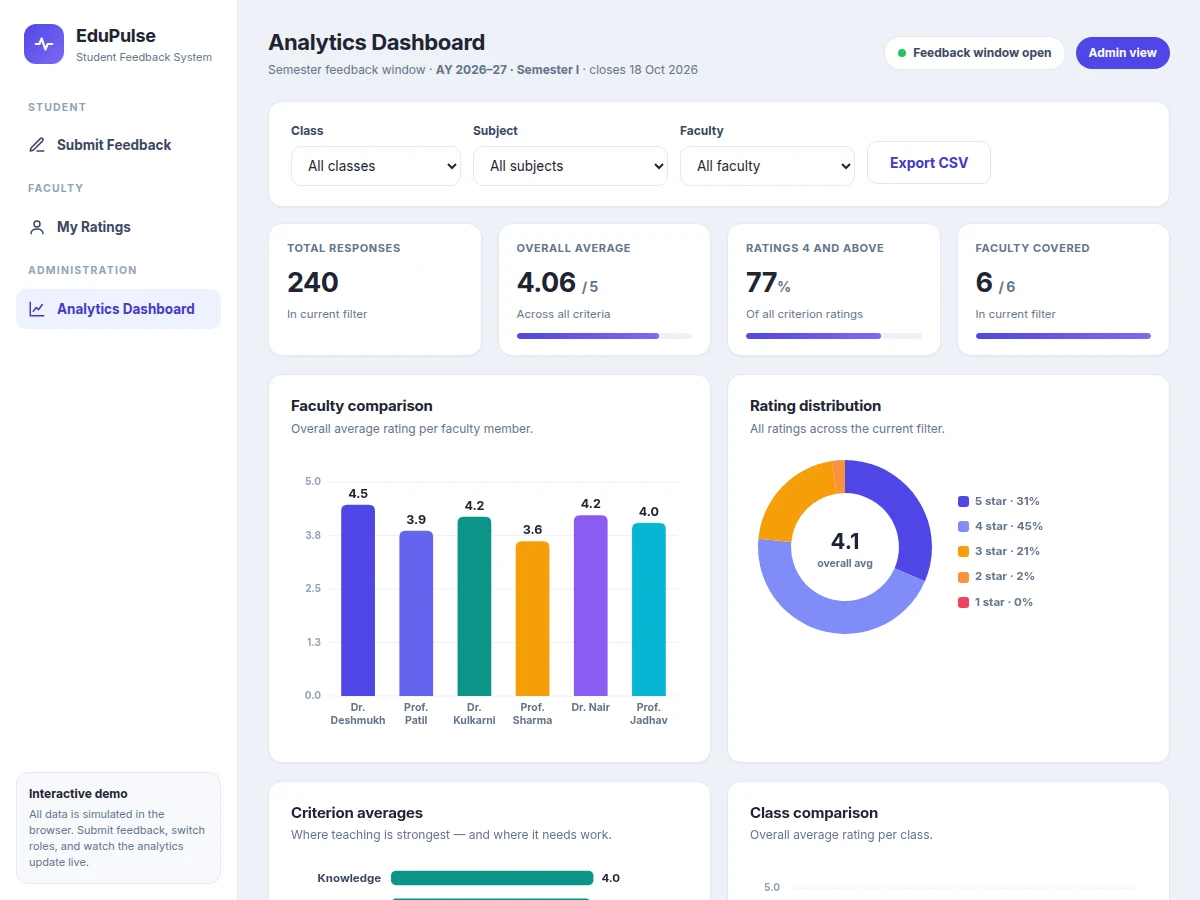
Most colleges still collect semester feedback on paper forms or generic online form links. Paper means weeks of manual tabulation and counting errors; generic forms cannot enforce one-response-per-student, cannot map responses to classes, subjects and faculty, and leave the analysis to whoever is willing to wrestle a spreadsheet. Faculty see raw sheets or nothing at all, and the department gets no dashboard it can open in a review meeting. Students, meanwhile, hold back honest criticism when they cannot verify that a response is truly anonymous. This project replaces that workflow with a purpose-built system: the admin sets up the semester once — classes, subjects, faculty roster and a ten-question bank — students submit one rated form per subject with an anonymous mode they can trust, and the system computes every average automatically. Faculty see only their own anonymized aggregates; administrators compare faculty, classes and criteria on a live dashboard and export PDF reports for IQAC and NAAC records.
Sets up the semester: classes, subjects, faculty mapping and the ten-question bank.
Follow the working sequence
How it works
- The admin sets up the semester from the admin panel: classes, subjects, faculty-to-subject mapping and the ten-question bank.
- Students log in with their college credentials and see only the subjects mapped to their class for the active semester.
- Each student submits one form per subject — ten 5-point ratings plus an optional comment — with the anonymous toggle deciding whether identity is stored.
- A per-student semester token blocks any second submission for the same subject, keeping responses one-per-student without exposing who said what.
- Responses accumulate in MySQL; the analytics module aggregates averages per faculty, per criterion, per class and per subject on demand.
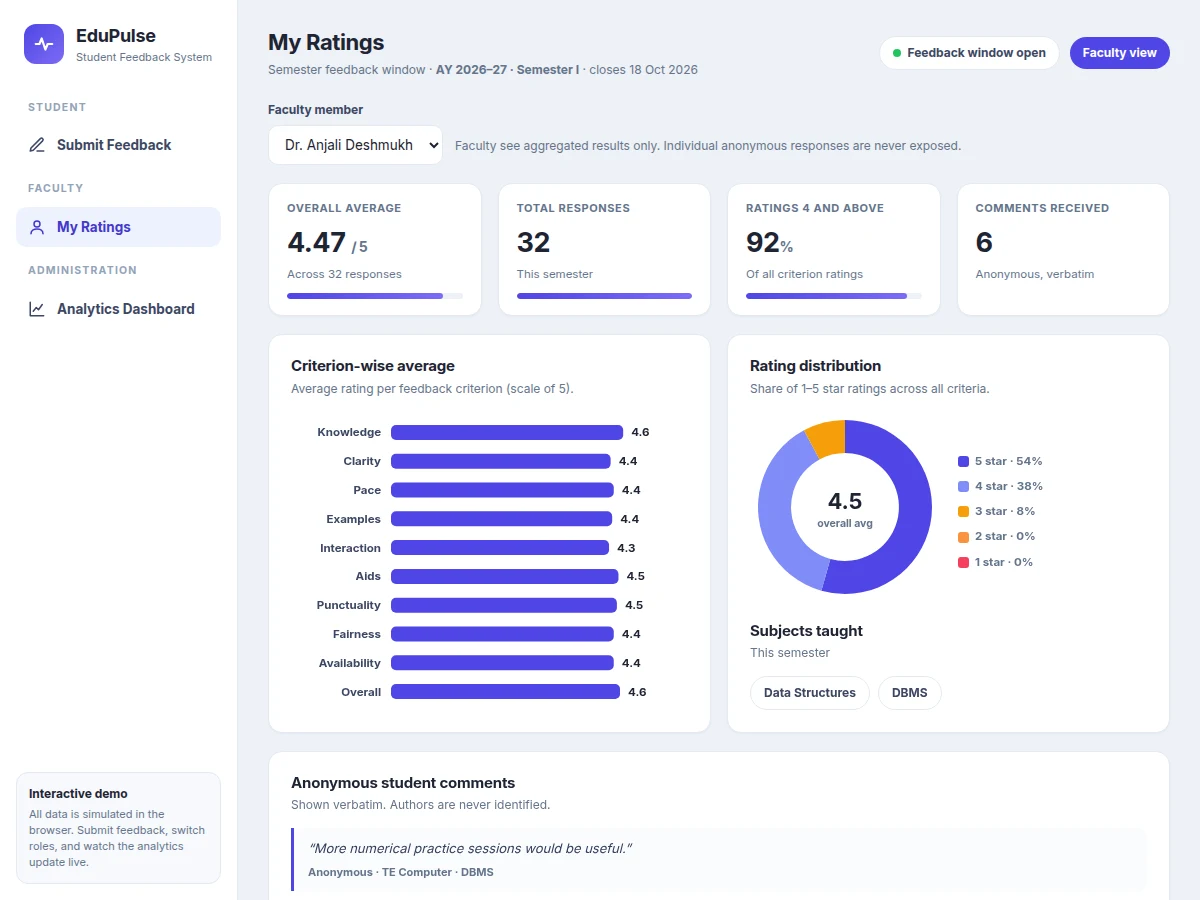
- Faculty log in to see their own anonymized summary — averages, criterion bars, distribution and comments, with no names attached.
- The admin filters the dashboard by class, subject or faculty and exports a printable PDF report or a CSV of anonymized responses for records.
Tech stack:
- PHP 8 (backend logic, session authentication)
- MySQL 8 (relational storage, ER-designed schema)
- HTML5 · CSS3 · JavaScript (responsive frontend)
- Chart.js (dashboard charts)
- TCPDF (PDF report generation)
- XAMPP · Apache (development and deployment stack)
- phpMyAdmin (database administration)
- Git (version control)
| Parameter | Value |
|---|---|
| Rating scale | 5-point Likert scale (1 = Poor, 5 = Excellent) |
| Feedback criteria | 10 questions per form (admin-configurable, up to 20 questions) |
| User roles | 3 roles (admin, faculty, student) |
| Duplicate rule | 1 response per student per subject per semester |
| Seeded demo data | 240 responses across 6 faculty members |
| Dashboard query | Under 2 seconds on the reference installation (design target) |
| Response size | Approximately 1 KB per response (expected) |
| Report formats | PDF and CSV export (generated on demand) |
| Browser support | Chrome, Edge, Firefox — latest 2 major versions (expected) |
| Hosting footprint | Approximately 50 MB disk space on shared LAMP hosting (expected) |
Project features
- [Anonymous response mode] Students submit with a single toggle; when on, no name, PRN or login trace is stored with the response. A one-way semester token still enforces one response per student per subject without revealing who submitted what.
- [Criterion-wise rating form] Ten configurable criteria on a 5-point scale with an optional written comment. The admin can edit, reorder or disable questions from the question bank without touching code.
- [Faculty analytics view] Each faculty member sees their own aggregated results only — overall average, per-criterion bars, rating distribution and anonymized comments — refreshed as responses arrive.
- [Admin comparison dashboard] Cross-faculty and cross-class averages, criterion-wise bars, rating distribution charts and response counts, with class, subject and faculty filters for review meetings.
- [Role-based access control] Separate session-based logins for admin, faculty and students. Faculty can never open another faculty member's results or any individual anonymous response.
- [Duplicate-submission guard] The one-response-per-student-per-subject rule is enforced at the database level; a second attempt for the same subject is rejected with a clear notice.
- [Report export] Filtered analytics export to printable PDF reports (via TCPDF) and CSV downloads of the anonymized response set for IQAC and NAAC records.
- [Configurable master data] Semesters, classes, subjects, faculty assignments and the questionnaire are all managed from the admin panel — no code changes needed for a new semester.
Optional on request (quoted separately, not part of the base build): SMS/email feedback reminders, AI sentiment analysis of comments, an HoD role with department-level trends, and a companion Android app.
What is included
- Complete PHP + MySQL source code with setup instructions
- Database schema as an SQL dump, with seeded demo data (6 faculty, 3 classes, 240 responses)
- Student feedback form, faculty aggregated view and admin analytics dashboard
- Question-bank, class, subject and faculty management modules
- PDF and CSV report export
- ER diagram and database documentation
- Project report PDF (background, methodology, screenshots, testing)
- PPT presentation for final review
- Viva Q&A preparation document
Limitations & prerequisites
- Anonymous mode hides identity but relies on a per-student token for duplicate prevention — it is honest anonymity, not cryptographic, and credential sharing between students cannot be detected by the base build.
- No built-in email or SMS reminders — the college announces the feedback window itself (reminders are an optional add-on).
- Dashboard aggregates are computed on demand; beyond roughly 5,000 responses per semester on shared hosting, pagination or caching would be needed (design target).
- Written comments are shown verbatim to faculty — screening abusive text is a manual step in the base build.
- The base build has no sentiment analysis of comments; that is listed as future scope.
- Domain and hosting charges are separate from the software deliverable.
Frequently Asked Questions
Is this project suitable for a final-year project?
Yes — for Computer Science, IT and MCA programs. It demonstrates complete full-stack development: session-based authentication, a normalized relational database with an ER model, role-based access control, aggregate analytics with charts, and PDF/CSV report generation. The anonymous-mode mechanism and duplicate-submission guard give it a distinctive technical story, and the working dashboard makes the demo convincing in reviews and the viva.
How does the anonymous mode actually work?
When the toggle is on, the form hides the name and PRN fields and the response row is stored without any student identifier. Faculty and administrators see only aggregated averages and anonymized comments. A separate one-way token per student marks each subject as submitted, so duplicates are blocked without recording who submitted what.
Does the project include an admin panel?
Yes. The admin panel manages semesters, classes, subjects, the faculty roster and the ten-question bank, and hosts the analytics dashboard. From it you filter results by class, subject or faculty, compare faculty and class averages, view rating distributions, and export printable PDF reports or CSV files for IQAC and NAAC documentation.
Is the database included?
Yes. You receive the complete MySQL schema as an SQL dump plus seeded demo data — three classes, five subjects per class, six faculty members and 240 feedback responses — so every dashboard, chart and report works immediately after import through phpMyAdmin or the bundled setup steps.
Can it be hosted online?
Yes. The application runs on any standard LAMP shared hosting account or a college intranet server, needing roughly 50 MB of disk space. Handover includes deployment steps for XAMPP locally and a typical cPanel host. Domain registration and hosting charges are separate from the project deliverable.
Can more roles or modules be added?
Yes. Common additions are an HoD role with department-level trends, SMS or email collection reminders, AI-based sentiment analysis of comments, and a companion Android app. These are optional customizations quoted separately — the base build ships the three roles and the modules listed above.
Components & software requirements
- PHP 8 (backend logic, session authentication)
- MySQL 8 (relational storage, ER-designed schema)
- HTML5 · CSS3 · JavaScript (responsive frontend)
- Chart.js (dashboard charts)
- TCPDF (PDF report generation)
- XAMPP · Apache (development and deployment stack)
- phpMyAdmin (database administration)
- Git (version control)
Delivery information
Built-to-order project. Delivery timeline is shared after order confirmation based on current queue.
Support terms
Complete documentation, setup guide, and viva preparation included. Support for setup and explanation provided.
Download free synopsis (PDF)
Enter your name and email — the synopsis PDF downloads immediately. We may send occasional project updates; no spam, unsubscribe anytime.