
More project photos (2)
The problem
Every college in India is required by UGC and AICTE regulations to run an anti-ragging committee with a working complaint mechanism — yet most institutions still manage this on paper registers, notice boards and word-of-mouth. Complaints get misplaced, follow-ups depend on one person's memory, and students who fear retaliation simply never report. This project replaces that fragile process with a proper web portal: students file complaints either identified or fully anonymous, the committee works every case through a tracked open → under review → resolved workflow, and the college gets clean compliance reports for regulatory filings. Because it is built with plain PHP and MySQL on a standard LAMP stack, the student can host it, demo it live, and explain every part of the architecture in a viva without hiding behind a framework.
This is a built-to-order software project: the portal source code, database, report/PPT documentation and viva kit are prepared fresh for you.
Colleges are legally obliged to maintain an anti-ragging mechanism, but the obligation usually exists only on paper. In practice, complaints are taken down in a register kept in one office, escalation happens through phone calls that nobody logs, and there is no way to know whether a case was ever resolved or how long it took. The bigger failure is on the reporting side: students who witness or suffer ragging avoid formal complaints because they fear their name will reach the accused — so incidents stay invisible until they escalate into something serious. Committees, meanwhile, have no dashboard view of pending cases, no severity triage, and no audit trail to show regulators. The gap is not a lack of rules but a lack of tooling: a confidential, trackable, auditable reporting channel that protects the complainant and forces the workflow forward with deadlines and escalations.
Files the complaint in identified or anonymous mode and tracks it with the confidential ARC reference number.
Follow the working sequence
How it works
- A student opens the portal and submits a complaint: category, location, date, severity and a written account. In anonymous mode the identity fields are disabled and nothing personal is written to the database.
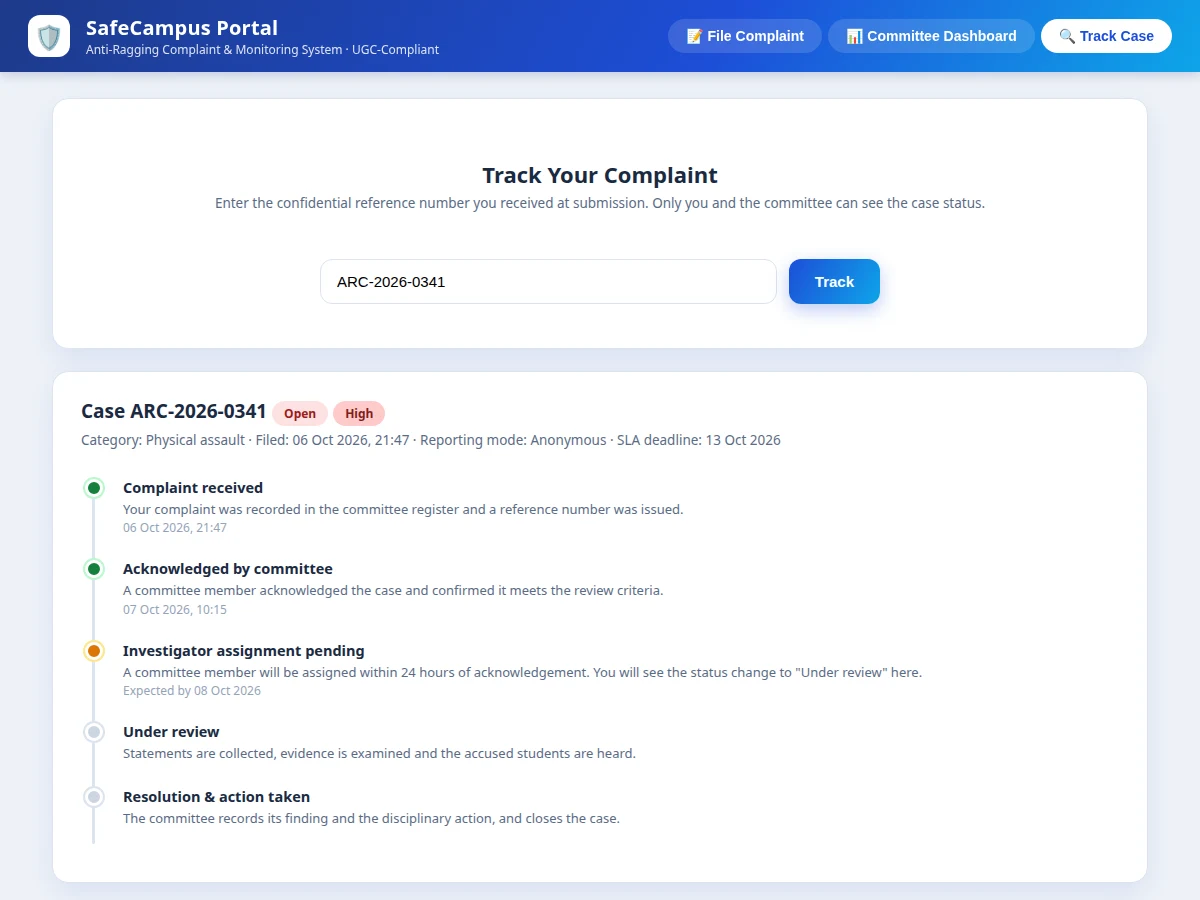
- The PHP backend validates the input, inserts the complaint into MySQL, and issues a reference number in the format ARC-YYYY-NNNN, which the student uses for all future tracking.
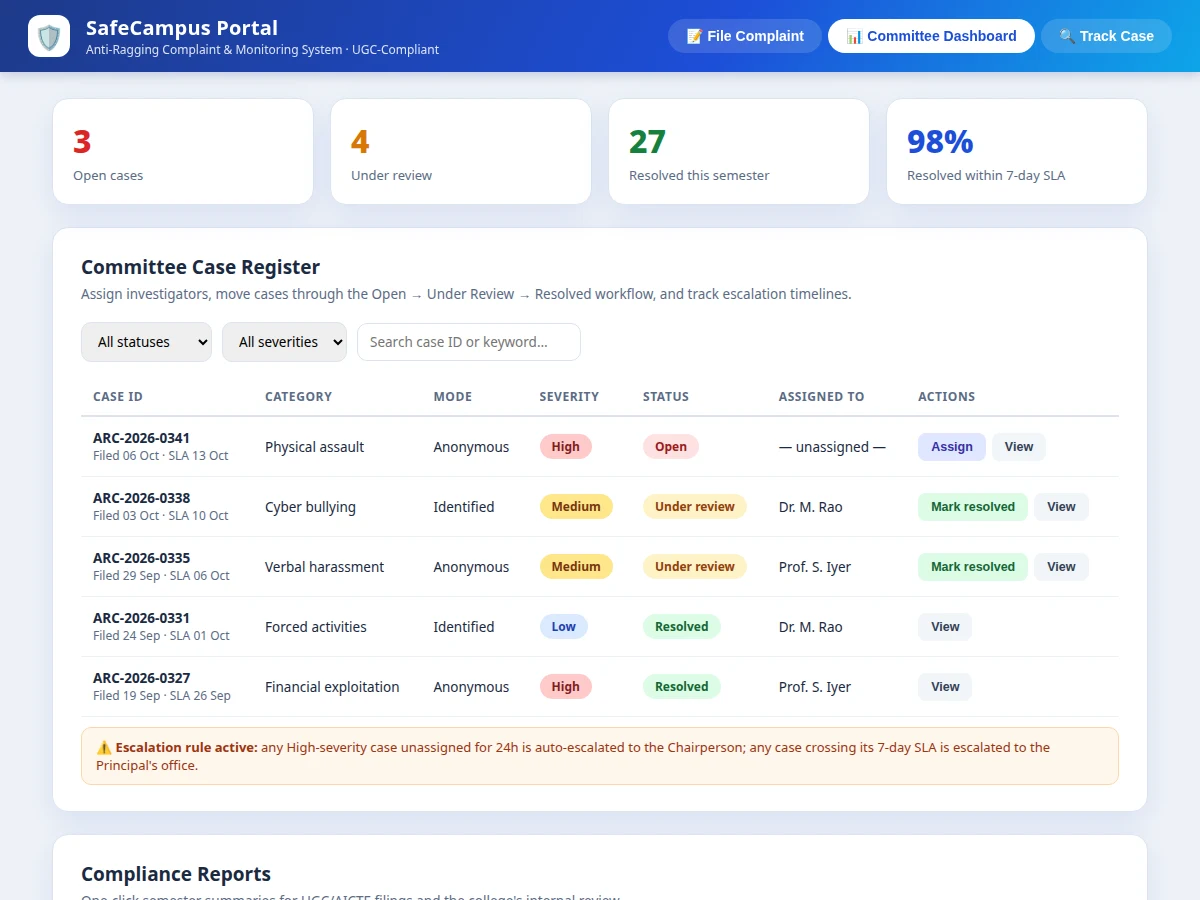
- The committee dashboard lists the new case under Open; an acknowledgement is required within 24 hours (configurable), after which the status changes and the resolution clock starts.
- A committee member is assigned to the case; investigation notes, statements and evidence references are recorded against it and the status moves to Under Review.
- A scheduled job checks escalation rules hourly: High-severity cases unassigned for 24 hours go to the Chairperson, and cases past their 7-day resolution deadline go to the Principal's office.
- When the committee records its finding and the disciplinary action taken, the case is marked Resolved and the complainant's tracking page shows the outcome.
- Every step — submission, acknowledgement, assignment, note, escalation, resolution — is written to the audit trail with timestamp and actor, so the full history is reviewable.
- At semester end, the admin generates the compliance report (PDF) summarising cases, severities, resolution times and SLA adherence for regulatory filing.
Tech stack:
- PHP 8 (plain PHP, no framework)
- MySQL 8 (relational schema with seed data)
- HTML5, CSS3, JavaScript (frontend)
- Apache on LAMP (deployment target)
- Chart.js (dashboard charts)
- TCPDF (PDF report export)
- Git (version control)
| Parameter | Value |
|---|---|
| User roles | 3 (student, committee member, admin) |
| Case reference format | ARC-YYYY-NNNN (alphanumeric) |
| Reporting modes | 2 (identified, anonymous) |
| Acknowledgement SLA | Within 24 hours (portal default mirroring UGC regulatory windows, configurable) |
| Resolution SLA | Within 7 days (portal default mirroring UGC regulatory windows, configurable) |
| Escalation check frequency | Every 1 hour via scheduled job (expected) |
| Anonymous storage | Zero personal fields stored (by design) |
| Max incident description | 5,000 characters (configurable) |
| Attachment size limit | Up to 10 MB per complaint (design target) |
| Semester report generation | Approximately 2–5 seconds per report (expected) |
| Screens / pages | Approximately 12 (design target) |
| Database | MySQL 8 |
| Hosting requirement | PHP 8.x + MySQL (LAMP or typical shared host) |
Project features
- [Anonymous & identified reporting] Students file complaints in identified mode (name, roll number and contact recorded) or anonymous mode, where zero personal fields are stored and the case is tracked only by its confidential reference number.
- [Committee case register with status workflow] Every complaint becomes a case in the dashboard and moves through Open → Under Review → Resolved, with assignment of committee members, action logging and resolution notes.
- [Severity triage & escalation timelines] Cases are marked High, Medium or Low severity; unassigned High-severity cases auto-escalate to the Chairperson after 24 hours, and any case crossing its resolution deadline escalates to the Principal's office. Thresholds are configurable in the admin panel.
- [Confidential case tracking for students] Complainants enter their ARC reference number to see a timeline of exactly where their case stands — received, acknowledged, under review, resolved — without exposing any other case.
- [Undertaking / affidavit register] Stores student and parent anti-ragging undertaking records per the UGC requirement, with semester-wise listing and CSV export for audit.
- [Compliance reports] One-click semester summaries — cases filed, severity split, resolution times, SLA adherence — exportable as PDF for UGC/AICTE filings and internal review.
- [Role-based access & audit trail] Three roles — student, committee member, admin — with permission-checked pages; every status change, assignment and login is written to a tamper-visible audit log.
- [Configurable SLA rules] Acknowledgement window (default 24 hours) and resolution deadline (default 7 days) are configurable per institution rather than hard-coded.
What is included
- Complete PHP + MySQL portal source code with relational schema and seed data
- Student complaint module (identified + anonymous modes with reference-number tracking)
- Committee dashboard with case workflow, severity triage and escalation engine
- Undertaking / affidavit register with CSV export
- Compliance report generator (PDF) for semester filings
- Role-based access control and audit-trail logging
- Project report PDF (background, ER diagram, methodology, testing)
- PPT presentation for final review
- Viva Q&A preparation document (PHP, MySQL, RBAC, workflow design, UGC compliance context)
- Deployment guide for LAMP / shared-hosting setup
Limitations & prerequisites
- The portal manages reporting and workflow; it does not replace the anti-ragging committee's judgement, the college's enquiry process or any legal procedure — this is stated honestly to every buyer.
- Anonymous complaints cannot be followed up for missing details, so a thin anonymous report may stall the investigation; this is an inherent trade-off of anonymity, not a defect.
- The demo build performs no reporter identity verification, so false or mischievous complaints are possible — handling them remains the committee's responsibility.
- Escalation reminders depend on a scheduled cron job running on the host; some shared hosts restrict cron frequency, which can delay automated escalations.
- Production deployment needs HTTPS, hardened server configuration and regular backups — the built-to-order code ships with security basics, not a managed-hosting setup.
- The compliance report follows the commonly used UGC filing structure; a college with its own prescribed format may need small report customisations (available as an optional extension).
Frequently Asked Questions
Which technologies does the project use?
Plain PHP 8 with MySQL 8 on a LAMP stack, plus HTML/CSS/JavaScript on the frontend, Chart.js for dashboard charts and TCPDF for PDF reports. No heavy framework — deliberately, so the student can explain the full stack in the viva and host it on any typical shared host.
Does the anonymous mode really store nothing personal?
Yes. In anonymous mode the identity fields are disabled and the complaint row stores no name, roll number, phone or email — the case is tracked only by its ARC reference number. The trade-off is that the committee cannot contact the complainant for follow-up details.
Is there an admin panel and audit trail?
Yes. Three roles exist — student, committee member, admin — with permission-checked pages, and every status change, assignment, note, escalation and resolution is written to an audit log with timestamp and actor.
Can it be hosted online?
Yes. It runs on any PHP 8 + MySQL host — a LAMP server or typical shared hosting — with no cloud dependency and no mandatory external API.
What are the main limitations?
The portal does not replace the committee's judgement or legal process; anonymous cases cannot be followed up; automated escalation needs a working cron on the host; and false complaints remain a committee-handled risk. All of this is documented in the report.
Is this project suitable for a final-year project?
Yes — for Computer Science, IT and MCA programs. It demonstrates authentication, role-based access control, relational database design, a real-world workflow engine, audit logging and report generation around a genuine compliance problem colleges face.
Components & software requirements
- PHP 8 (plain PHP, no framework)
- MySQL 8 (relational schema with seed data)
- HTML5, CSS3, JavaScript (frontend)
- Apache on LAMP (deployment target)
- Chart.js (dashboard charts)
- TCPDF (PDF report export)
- Git (version control)
Delivery information
Built-to-order project. Delivery timeline is shared after order confirmation based on current queue.
Support terms
Complete documentation, setup guide, and viva preparation included. Support for setup and explanation provided.
Download free synopsis (PDF)
Enter your name and email — the synopsis PDF downloads immediately. We may send occasional project updates; no spam, unsubscribe anytime.