
More project photos (3)
The problem
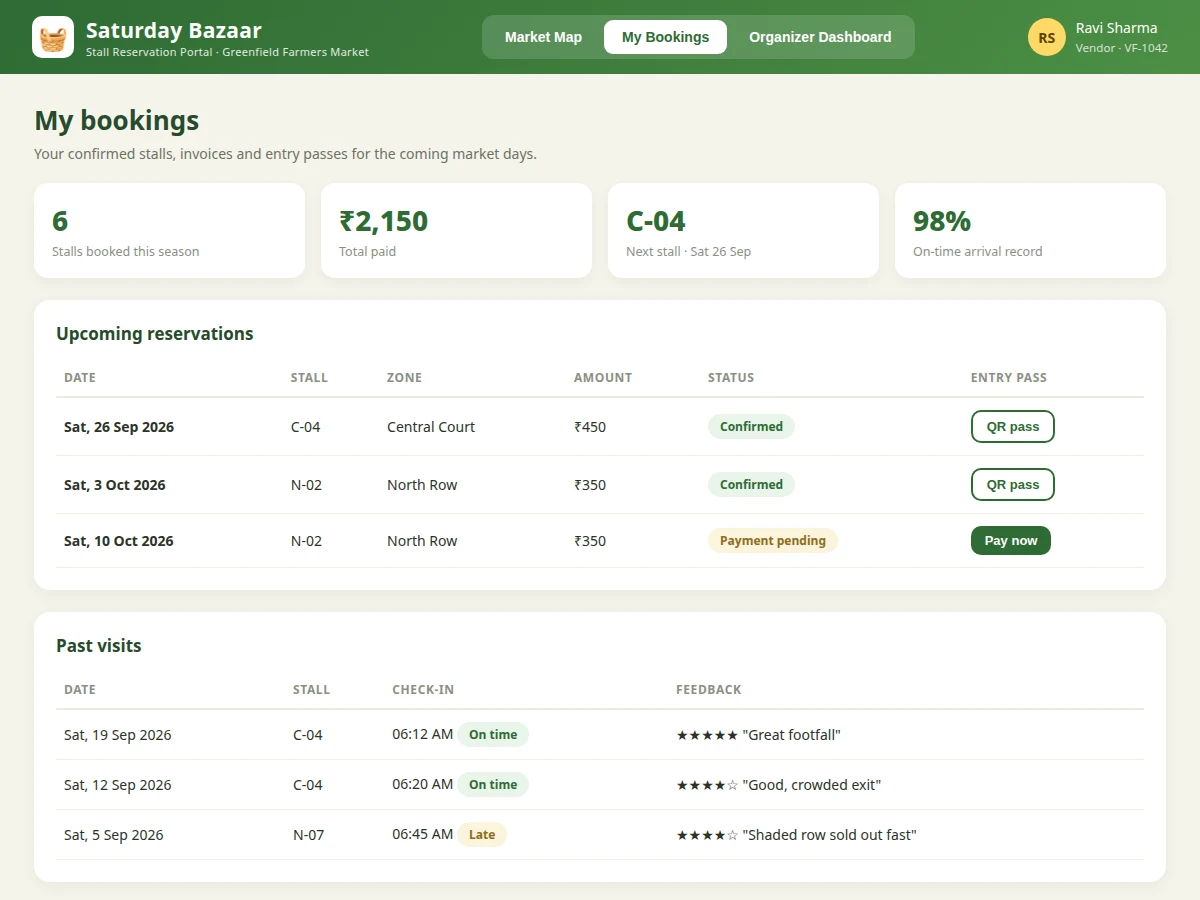
Weekly farmers markets run on paper registers and phone calls: a vendor rings the organizer, is told which stalls are free, and pays cash at the gate. Double bookings happen, organizers have no record of who paid, and vendors cannot plan ahead. This project replaces that chaos with a stall reservation portal. Vendors see a live map of the market ground with every stall marked available, booked or pending; they choose a date and stall, reserve it, and get a booking reference with a QR entry pass. Organizers get a dashboard showing occupancy, collected revenue, pending payments and new vendor applications. The system is deliberately built with ordinary, explainable technology — PHP, MySQL and vanilla JavaScript — because the learning goal is a complete working web application (auth, CRUD, bookings, reports) the student genuinely understands, not a framework demo.
Registers, browses the stall map and reserves a stall for a market day.
Follow the working sequence
How it works
- The organizer configures the market ground once: zones, stall counts, sizes and per-day rates, stored in the database.
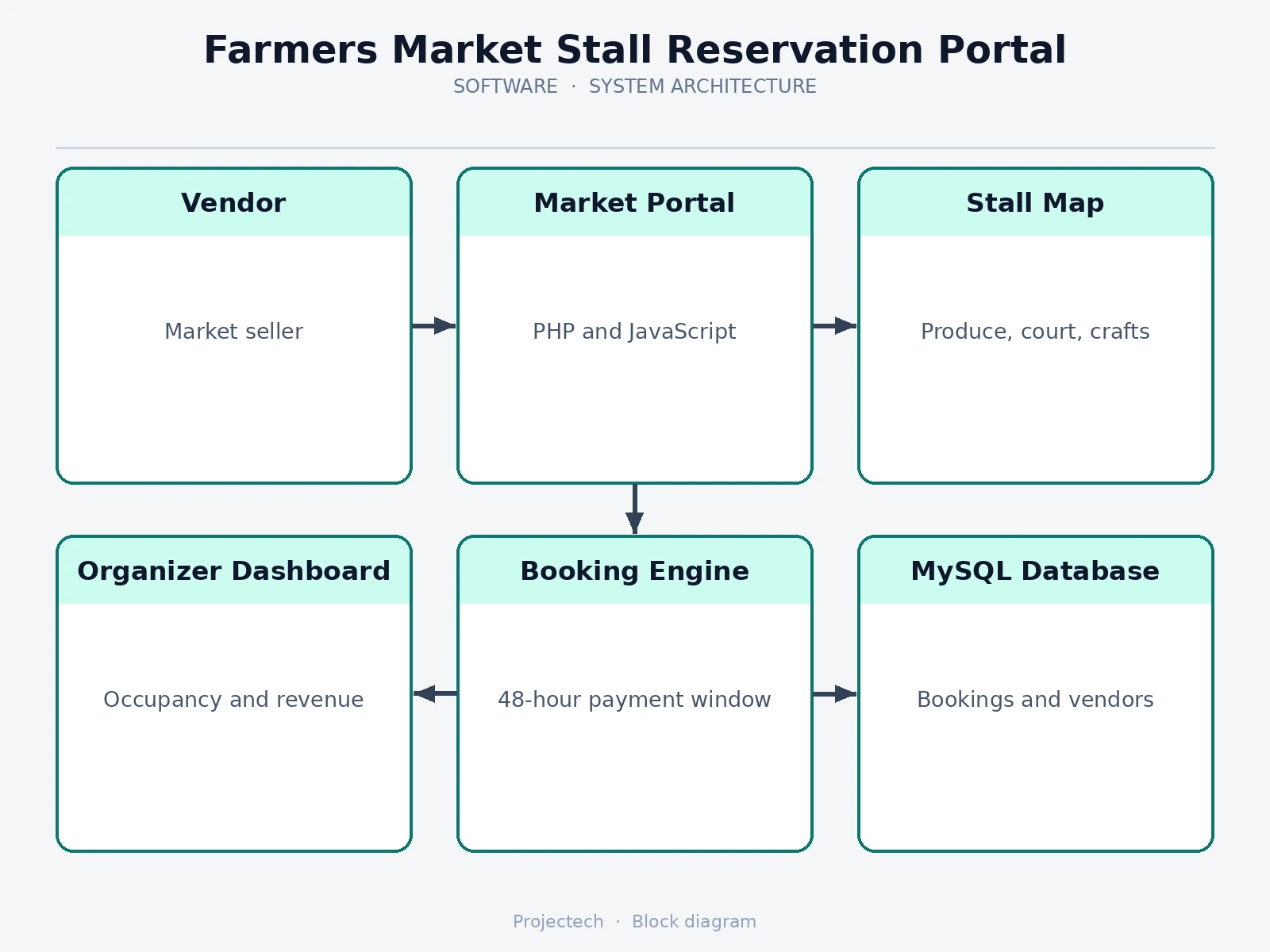
- A vendor registers, logs in, and opens the market map for a chosen market date; stall statuses are computed from existing reservations.
- Clicking an available stall shows its details; confirming creates a reservation row with a unique booking reference and a 48-hour payment deadline.
- On payment (or gate payment confirmation by the organizer), the reservation flips to confirmed and a QR entry pass is generated.
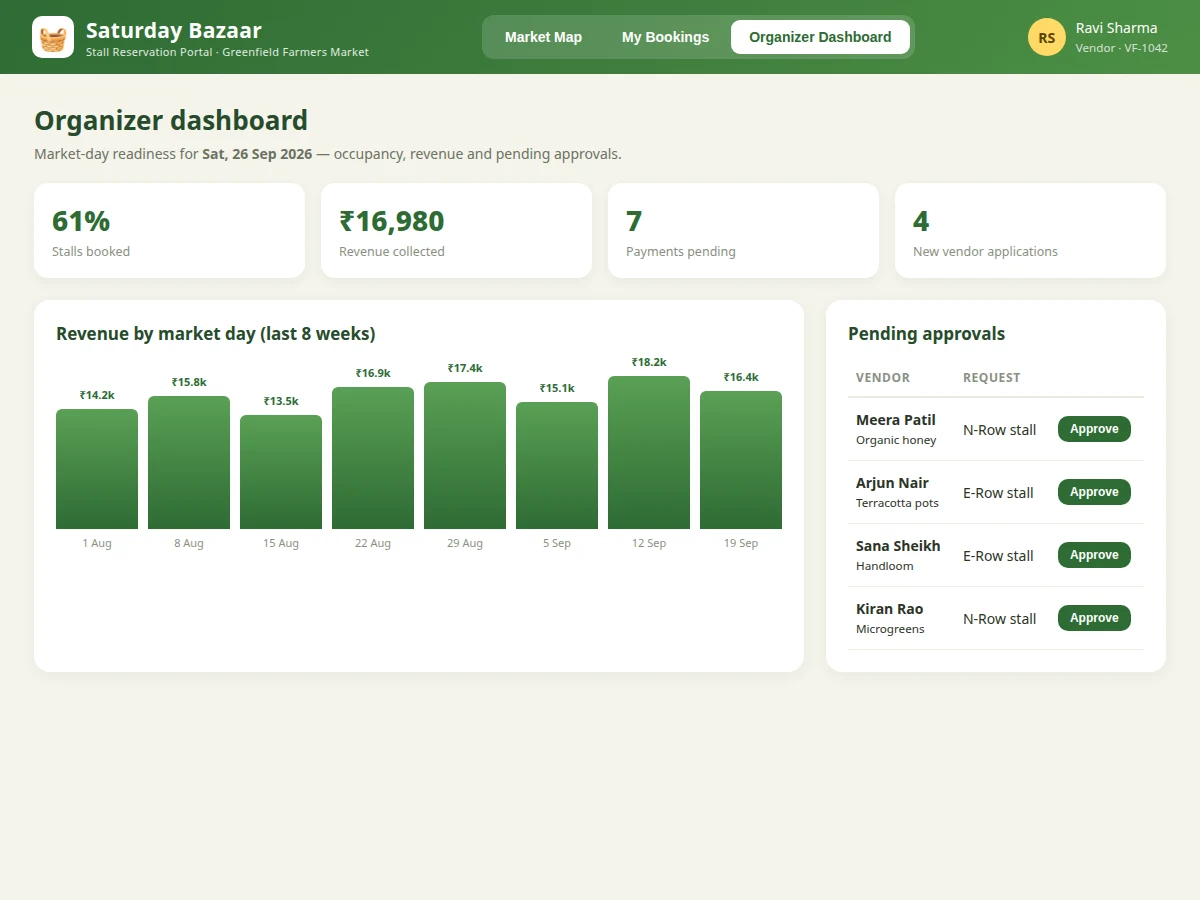
- Organizers monitor the dashboard: occupancy, revenue per market day, pending payments and new vendor applications.
- On market day the gate volunteer scans QR passes; check-in times are logged and feed the vendor's punctuality record.
Tech stack:
- PHP 8 (backend, no framework)
- MySQL (relational schema: stalls, vendors, reservations, payments)
- HTML5, CSS3, vanilla JavaScript (front end)
- QR code generation library (entry passes)
- Apache / shared hosting deployment
| Parameter | Value |
|---|---|
| Architecture | Server-rendered PHP + MySQL, responsive front end |
| Concurrent users | Design target: ~200 vendors browsing simultaneously on shared hosting |
| Page load | Design target: market map renders in under 2 seconds on 4G (expected) |
| Database tables | Approximately 8 (vendors, stalls, zones, reservations, payments, applications, checkins, feedback) |
| QR passes | Generated per confirmed booking (PNG) |
| Browser support | Current Chrome, Edge, Firefox; mobile-responsive layout |
| Deployment | Standard LAMP / shared hosting; no build step |
Project features
- [Interactive stall map] A zone-wise market map (produce row, central court, crafts row) where each stall shows live status — available, booked or pending — and clicking a stall reveals its size, rate and facilities.
- [Date-wise reservations] Vendors pick any upcoming market day, reserve a stall, and receive a booking reference; a 48-hour payment window keeps unconfirmed stalls from blocking inventory.
- [QR entry passes] Each confirmed booking generates a QR pass the vendor shows at the gate, replacing the paper token system.
- [Payment tracking] Organizers see collected vs pending amounts per market day, and vendors can pay pending bookings online from their bookings page.
- [Organizer dashboard] Occupancy percentage, revenue-by-day charts, pending approvals and new vendor applications in one view.
- [Vendor application workflow] New vendors apply online; organizers approve or reject with one click before they can book.
- [Booking history & feedback] Past visits with check-in punctuality and a simple rating, giving organizers data on reliable vendors.
What is included
- Complete portal source code (PHP backend + JS front end)
- MySQL schema with sample market, stall and vendor data
- Interactive stall map, booking flow, QR passes, organizer dashboard
- Project report PDF (requirements, ER diagram, module design, screenshots, testing)
- PPT presentation for final review
- Viva Q&A preparation document (sessions, SQL joins, booking race conditions, QR design)
Limitations & prerequisites
- Online payments are integrated via a standard gateway in the build; the demo data simulates payment callbacks — the buyer connects their own gateway keys.
- QR scanning assumes a phone camera at the gate; no dedicated scanner hardware is included.
- Stall map is a schematic grid, not a satellite-accurate ground plan — organizers configure stall counts, not GPS coordinates.
- The system is designed for one market ground per installation; multi-market support would need a schema extension (noted as future scope).
- Email/SMS notifications are stubbed in the base build and wired to the buyer's provider of choice.
Frequently Asked Questions
How does the stall map stay accurate?
Stall status is computed live from the reservations table for the selected date — there is no caching layer to go stale. When two vendors click the same stall, the database transaction that writes the reservation first wins; the second sees it as booked.
What stops someone from holding a stall without paying?
Every reservation carries a 48-hour payment deadline. A scheduled cleanup marks unpaid reservations as expired and frees the stall automatically.
Can the organizer change stall prices?
Yes — zones, stall counts and per-day rates are configuration rows in the database, editable from the organizer panel without touching code.
Does it handle refunds or cancellations?
Vendors can cancel from their bookings page; the stall returns to inventory. Refund processing itself goes through the payment gateway's dashboard, which is standard practice.
How is this deployed?
It is plain PHP + MySQL with no build step, so it runs on any LAMP shared hosting account — the report includes deployment steps.
Is this project suitable for a final-year project?
Yes — for Computer Science, IT and Web Development programs. It demonstrates authentication, relational design, transactions, reporting and a real two-sided (vendor/organizer) workflow. Suitable for B.E./B.Tech final-year projects in Computer Science, IT and Web Development.
Components & software requirements
- PHP 8 (backend, no framework)
- MySQL (relational schema: stalls, vendors, reservations, payments)
- HTML5, CSS3, vanilla JavaScript (front end)
- QR code generation library (entry passes)
- Apache / shared hosting deployment
Delivery information
Built-to-order project. Delivery timeline is shared after order confirmation based on current queue.
Support terms
Complete documentation, setup guide, and viva preparation included. Support for setup and explanation provided.
Download free synopsis (PDF)
Enter your name and WhatsApp number — the synopsis PDF downloads immediately. We may send occasional project updates on WhatsApp; no spam.