
More project photos (2)
The problem
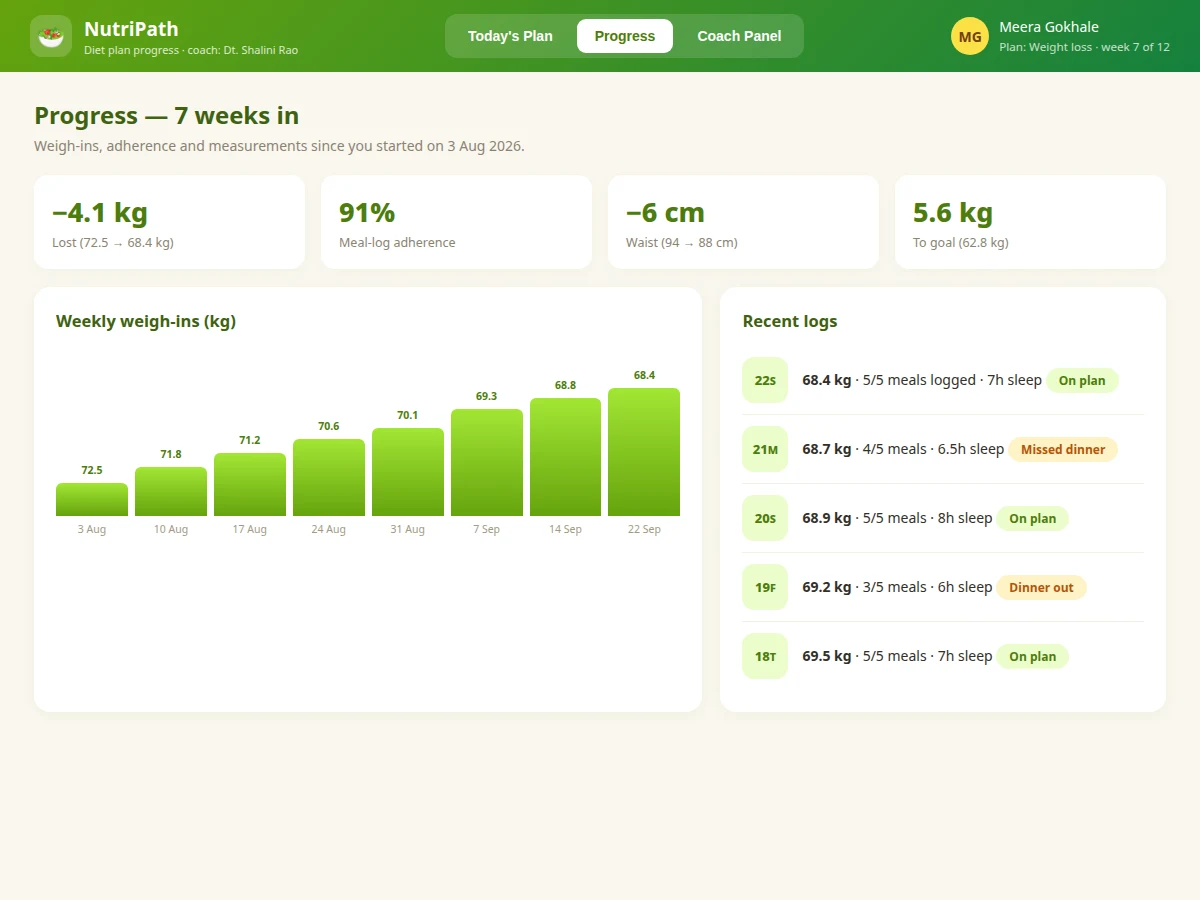
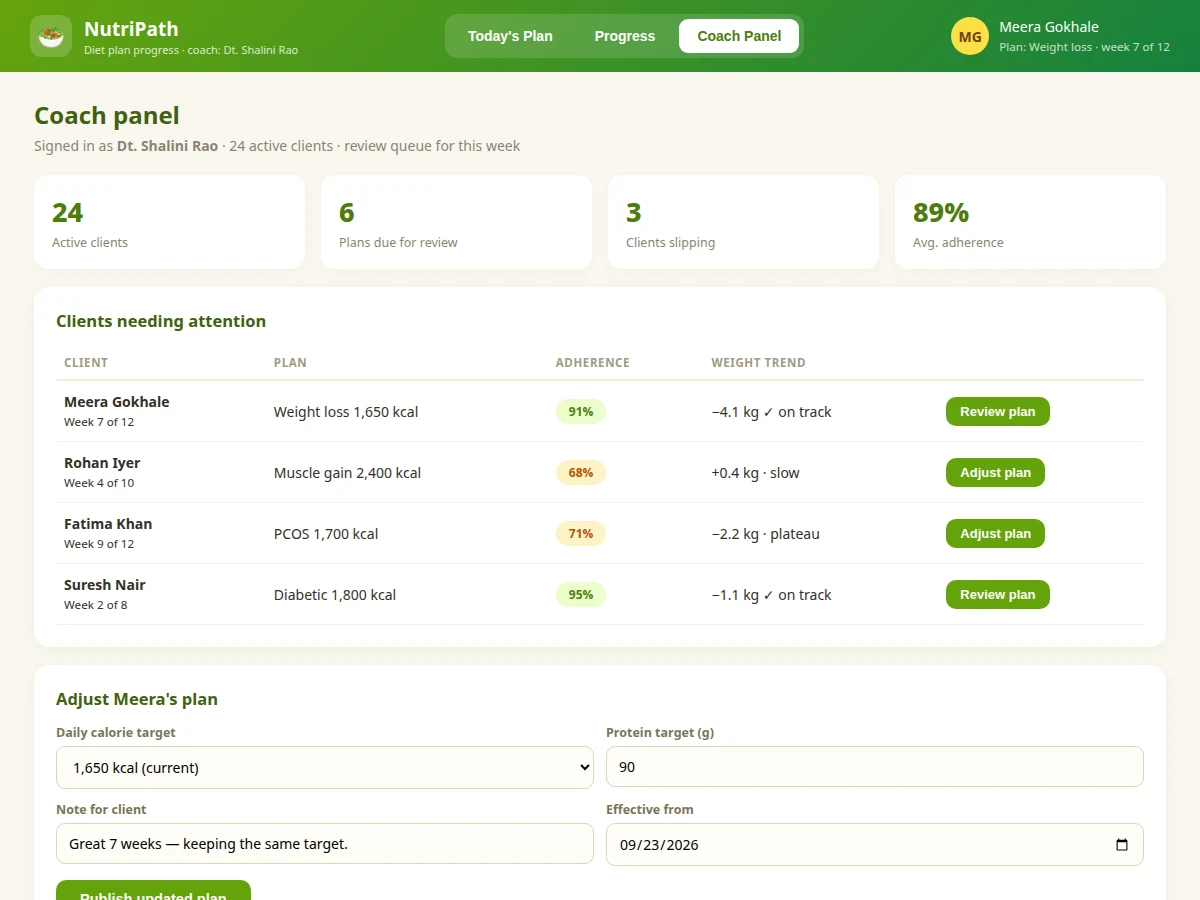
Diet plans usually arrive as a PDF on WhatsApp and die there. The client has no easy way to log what they actually ate, the coach has no visibility until the next appointment, and by week three nobody knows whether the plan is working. This project builds a progress portal for that exact gap. Each day the client sees their meal plan — breakfast through dinner with calories, protein, carbs and fat per meal — ticks meals off as eaten, and logs morning weight, water and sleep. A calorie ring shows the day's intake against target; weekly weigh-ins chart the trend; adherence percentages tell the coach who needs attention. The coach panel ranks clients by adherence and weight trend, and plan adjustments publish instantly. The nutrition content is realistic Indian meal data (poha, dal-roti, paneer) because that is what the target users eat. Scope is honest throughout: it tracks intake against a coach's plan — it never auto-generates medical diets.
How it works
- The coach creates a client profile with goal (weight loss/gain/maintenance), duration and daily calorie target.
- The coach builds the meal plan from the food database — Indian dishes with verified calorie/macro values — and publishes it with an effective date.
- Each day the client opens "Today's Plan", eats, and ticks meals off; the ring shows intake vs target.
- Morning weight, water, steps and sleep are logged in under a minute.
- Weekly charts (weight trend, adherence %) build automatically; the coach reviews the panel and adjusts targets or swaps meals.
- Plan changes publish instantly — the client sees the new target the next morning with the coach's note.
Tech stack:
- PHP 8 (backend)
- MySQL (clients, plans, meals, food database, logs)
- HTML5, CSS3, JavaScript + SVG charts
- Session-based auth with client/coach roles
| Parameter | Value |
|---|---|
| Architecture | PHP + MySQL, two roles (client, coach) |
| Food database | Ships with ~80 Indian dishes with calorie/macro values |
| Logging | Per-meal ticks, daily weight, water, steps, sleep |
| Charts | Calorie ring, weight trend, adherence % (SVG) |
| Database tables | Approximately 9 (users, clients, plans, plan_meals, foods, meal_logs, weigh_ins, habits, swaps) |
| Deployment | LAMP / shared hosting; mobile-responsive |
Project features
- [Daily meal plans] Coach-published plans with 4–5 meals, each showing calories and macros, scheduled by time of day.
- [One-tap meal logging] Clients tick meals as eaten; the calorie ring and macro totals update for the day.
- [Weight-trend charts] Weekly weigh-ins plotted over the plan duration with start/current/goal markers.
- [Adherence scoring] Percentage of meals logged per week, visible to both client and coach.
- [Swap suggestions] Alternative meals at matching calories/macros when the client is bored of a dish, applied by the coach in one click.
- [Coach panel] Client list ranked by adherence and weight trend, with flags for slipping clients and one-click plan adjustments.
- [Habit tracking] Water intake, steps and sleep logged alongside meals for the full picture.
What is included
- Complete portal source (client app + coach panel)
- MySQL schema with sample clients, plans and food database
- Calorie ring, trend charts and adherence scoring
- Project report PDF (requirements, data model, UI design, nutrition-data notes, testing)
- PPT presentation for final review
- Viva Q&A preparation document (two-sided apps, charting, data modelling)
Limitations & prerequisites
- Meal plans are created by the human coach; the system suggests swaps from the food database but never auto-generates diets or medical nutrition therapy.
- Calorie/macro values are standard reference values for the dishes, not lab-measured for the client's exact portion — the report states this.
- Weight entries are self-reported; there is no smart-scale integration in the base build.
- The food database covers common Indian dishes; regional additions are the coach's job via the admin screen.
- This is a coaching aid, not a medical device — clients with clinical conditions are directed to qualified professionals in the UI.
Frequently Asked Questions
Where do the calorie numbers come from?
A built-in food database of ~80 common Indian dishes with standard reference values per serving. Coaches can add dishes with their own values.
How does the coach know who is slipping?
The panel ranks clients by weekly adherence % and weight trend vs goal; anyone under the coach's threshold is flagged automatically.
Can the client change their own plan?
No — only the coach publishes plans. Clients can request swaps, which the coach approves, keeping professional oversight intact.
Does it count calories from a photo?
No. Logging is tick-based against the planned meals plus a simple add-extra field — honest and fast, with no fake AI claims.
How are plans versioned?
Every published plan keeps its effective date and the coach's note, so the client and coach can always see what changed and when.
Is this project suitable for a final-year project?
Yes — for Computer Science, IT and Web Development programs. It demonstrates two-sided workflows, data modelling for nutrition, charting and coaching analytics. Suitable for B.E./B.Tech final-year projects in Computer Science, IT and Web Development.
Components & software requirements
- PHP 8 (backend)
- MySQL (clients, plans, meals, food database, logs)
- HTML5, CSS3, JavaScript + SVG charts
- Session-based auth with client/coach roles
Delivery information
Built-to-order project. Delivery timeline is shared after order confirmation based on current queue.
Support terms
Complete documentation, setup guide, and viva preparation included. Support for setup and explanation provided.