
More project photos (2)
The problem
Physiotherapy works only if the patient does the home exercises — and most don't. The physio demonstrates the routine in the clinic, the patient forgets half of it by evening, and at the next visit nobody knows what was actually done. Adherence trackers exist for fitness, but they are built for workouts, not rehab: no prescribed plans, no pain logging, no clinician oversight. This project builds a rehab-specific tracker. The physiotherapist creates a plan (exercises, sets × reps, hold times, rest intervals) tied to the patient's condition; the patient opens today's plan, follows guided steps with a rest timer, ticks off each exercise, and logs a pain score. Streaks and weekly adherence charts keep motivation up, while the physio sees real compliance data and progress notes at review time. The scope is deliberately honest: it tracks prescribed exercises and self-reported outcomes — it never diagnoses, never prescribes by itself, and says so on every page that matters.
How it works
- The physiotherapist registers the patient with their condition (e.g. post-ACL rehab, frozen shoulder) and picks exercises from the library.
- Sets, reps, hold times and frequency are set per exercise, forming the patient's plan for the week.
- The patient opens "Today's Plan", performs each exercise following the guided steps, and ticks it off; the rest timer paces the sets.
- After the session the patient logs a 0–10 pain score and any notes ("sharp pain on rep 8").
- Streaks, weekly adherence and pain trends update instantly; the physio reviews them before the next clinic visit.
- At review, the physio records measured range-of-motion, adjusts the plan (progressions or regressions), and the cycle continues.
Tech stack:
- PHP 8 (backend)
- MySQL (patients, plans, exercises, sessions, pain logs, measurements)
- HTML5, CSS3, JavaScript (front end, timers, SVG charts)
- Session-based auth with patient/physio roles
| Parameter | Value |
|---|---|
| Architecture | PHP + MySQL, two roles (patient, physiotherapist) |
| Exercise library | Ships with ~30 common rehab exercises, physio-editable |
| Session logging | Per-exercise completion + duration + pain score |
| Charts | Weekly adherence %, pain trend, range-of-motion (SVG) |
| Database tables | Approximately 8 (users, patients, exercises, plans, plan_items, sessions, pain_logs, measurements) |
| Deployment | LAMP / shared hosting; mobile-responsive for bedside use |
Project features
- [Prescribed exercise plans] Physios build plans from an exercise library with sets, reps, hold times, rest intervals and resistance — per patient, per condition.
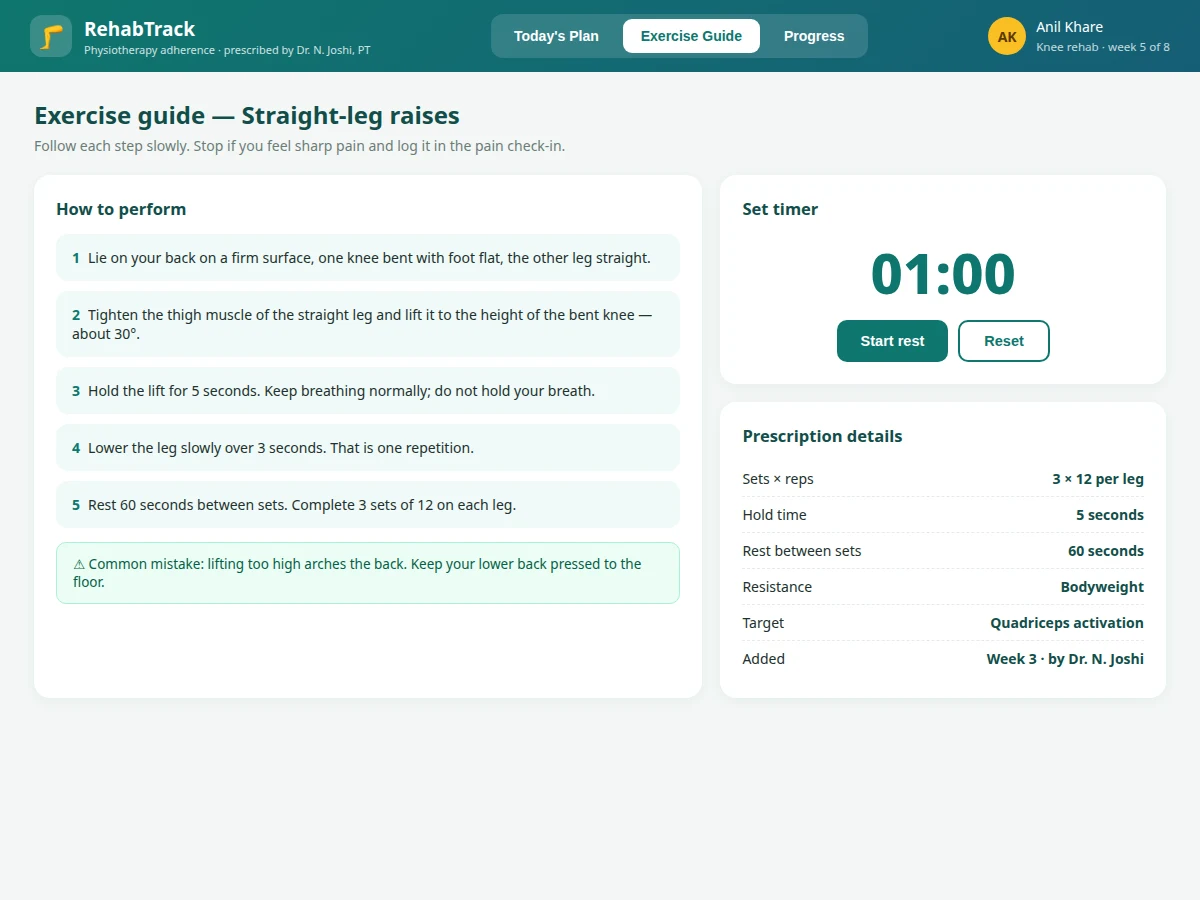
- [Guided session view] Patients work through today's plan step by step with instructions, common-mistake warnings and a built-in rest timer.
- [One-tap session logging] Tick off each exercise as done; finishing logs the session with duration and extends the streak.
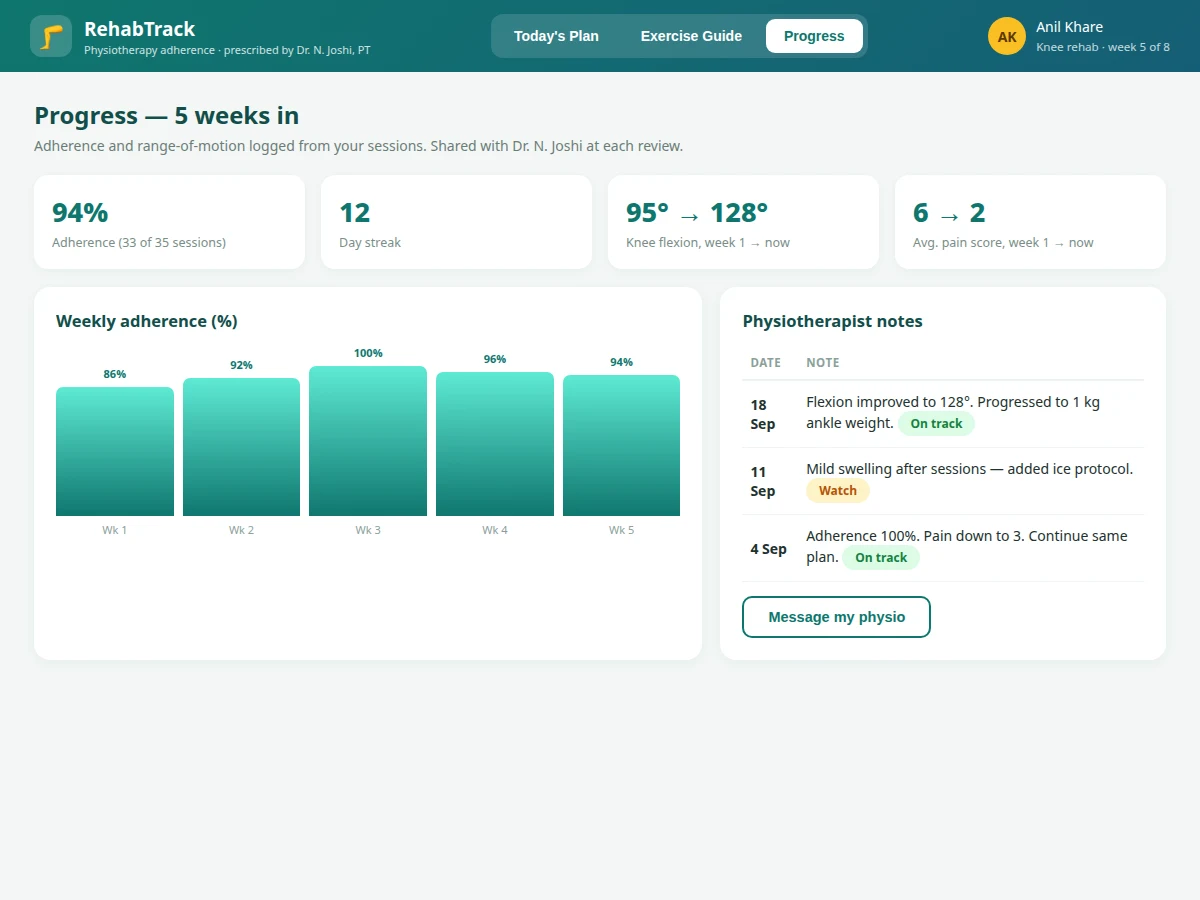
- [Pain score check-ins] A 0–10 pain log after each session, charted over time so the physio sees whether pain is actually falling.
- [Adherence analytics] Weekly completion percentages, streak counts and missed-session patterns for patient and physio.
- [Range-of-motion tracking] Measured values (e.g. knee flexion in degrees, entered at clinic visits) plotted across weeks.
- [Physio notes & messaging] Progress notes per review visit and a simple message thread between patient and physio.
What is included
- Complete web app source (patient app + physio panel)
- MySQL schema with sample patients, plans and exercise library
- Guided exercise guides with timers and adherence charts
- Project report PDF (requirements, data model, UI design, testing, scope notes)
- PPT presentation for final review
- Viva Q&A preparation document (two-sided apps, adherence metrics, health-data scope)
Limitations & prerequisites
- The app tracks exercises a qualified physiotherapist prescribes; it never generates diagnoses or treatment plans on its own, and the UI states this.
- Range-of-motion values are entered manually at clinic visits — there is no sensor or camera measurement in the base build.
- Pain scores are self-reported and subjective; the system presents them as trends, not clinical measurements.
- Exercise pictures in the base build are illustrations; the buyer can replace them with their own photos.
- No emergency handling: the app advises stopping on sharp pain and contacting the physio, but it is not a medical device.
Frequently Asked Questions
Does the app tell patients which exercises to do?
No — only their physiotherapist's prescribed plan appears. The app is a compliance and tracking tool, not a prescription engine, and that boundary is explicit in the design.
How is adherence measured?
Per-session completion (exercises ticked off vs prescribed) aggregated weekly, plus streak length. The physio sees both numbers, not just the patient's word.
Can the physio change the plan remotely?
Yes — plan adjustments (more sets, added exercises, regressions) publish instantly to the patient's "Today's Plan" with an effective date.
What about patient privacy?
Standard role separation: patients see only their own data, physios see only their own patients. The report documents what a production deployment would additionally need.
Why not just use a fitness app?
Fitness apps track workouts; this tracks prescribed rehab — sets/reps/hold times per condition, pain scores, range-of-motion, and clinician oversight are all rehab-specific.
Is this project suitable for a final-year project?
Yes — for Computer Science, IT and Web Development programs. It demonstrates two-sided workflows, health-app scope discipline, charting and motivational design. Suitable for B.E./B.Tech final-year projects in Computer Science, IT and Web Development.
Components & software requirements
- PHP 8 (backend)
- MySQL (patients, plans, exercises, sessions, pain logs, measurements)
- HTML5, CSS3, JavaScript (front end, timers, SVG charts)
- Session-based auth with patient/physio roles
Delivery information
Built-to-order project. Delivery timeline is shared after order confirmation based on current queue.
Support terms
Complete documentation, setup guide, and viva preparation included. Support for setup and explanation provided.