
More project photos (3)


The problem
A busy phone repair counter runs on a paper job sheet and the technician's memory. Customers call repeatedly to ask "is my phone ready?", technicians lose track of which jobs are waiting for parts, and nobody knows the real queue order. This project builds a digital queue system with three views. The front-desk display shows live columns — Received, In Repair, Ready for Pickup — with token numbers, devices, faults and progress, plus a "Now Serving" call. Technicians log in to see only their assigned jobs, update statuses, and record parts and customer approvals. Customers enter their token on the website and get a timeline: received, diagnosed, estimate approved, repair in progress, QC passed — with ETAs and warranty terms. The design goal is a realistic small-business system with proper role separation, built on plain PHP/MySQL so every query and state transition is explainable in a viva.
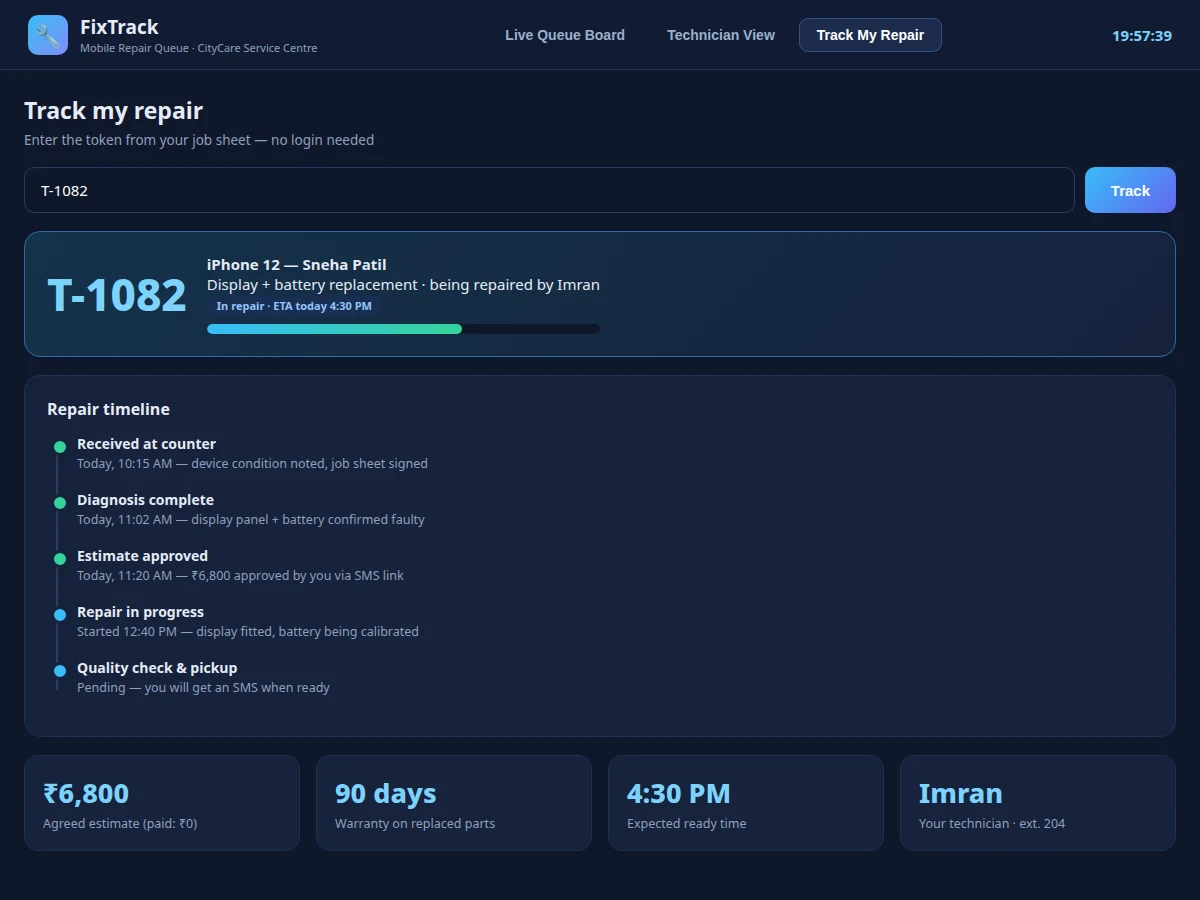
Gets a token at the counter, approves the estimate, and looks up the repair timeline online.
Follow the working sequence
How it works
- The counter staff creates a job: customer name, device, reported fault — the system issues the next token number and prints the job sheet.
- The job appears in the Received column of the live board; a technician is assigned and starts diagnosis.
- After diagnosis the technician records the fault found and an estimate; the job waits in "awaiting approval" until the customer approves.
- On approval, repair begins — the technician updates progress, and the board's In Repair column reflects it with the ETA.
- Finished jobs go through a QC checklist; on pass, the job moves to Ready for Pickup and the customer is notified.
- The customer picks up the device, pays the balance, and the token leaves the active queue into history.
Tech stack:
- PHP 8 (backend)
- MySQL (jobs, customers, technicians, parts, timeline events)
- HTML5, CSS3, JavaScript (front end, auto-refresh board)
- Role-based sessions (manager, technician, counter)
- Printable job-sheet layout (CSS print)
| Parameter | Value |
|---|---|
| Architecture | PHP + MySQL, role-based sessions |
| Board refresh | Design target: auto-refresh every 30 seconds (expected) |
| Token format | Sequential per day (T-1087…), configurable prefix |
| User roles | 3 (manager, technician, counter) + public tracker |
| Database tables | Approximately 7 (jobs, customers, technicians, parts, events, estimates, users) |
| Deployment | LAMP / shared hosting; display view needs only a browser |
Project features
- [Live queue board] A big-display view with Received / In Repair / Ready columns, token numbers, device and fault details, per-job progress bars and a "Now Serving" announcement panel.
- [Token lifecycle] Every job gets a token (T-1087…) that moves through defined states — received, diagnosed, awaiting approval, in repair, testing, QC passed, ready — with timestamps at each step.
- [Technician work view] Role-based login showing each technician only their jobs, with actions to start repair, mark QC, request parts and add notes.
- [Customer token tracker] No-login lookup: enter a token and see the full repair timeline, agreed estimate, warranty terms and technician contact.
- [Estimate & approval flow] Estimates are sent to the customer (simulated SMS link in the demo) and the job proceeds only after approval is recorded.
- [Parts inventory states] Jobs can be flagged waiting-for-part, and parts availability is tracked per job so counters stop promising impossible ETAs.
- [Daily stats] Jobs received, completed, average turnaround and technician workload on the manager view.
What is included
- Complete web app source (board, technician view, tracker, manager stats)
- MySQL schema with a sample repair shop's data
- Printable job-sheet template
- Project report PDF (requirements, state machine, ER diagram, screenshots, testing)
- PPT presentation for final review
- Viva Q&A preparation document (queues, state machines, roles, polling vs websockets)
Limitations & prerequisites
- The live board polls the server every 30 seconds; true push (WebSockets) is listed as future scope, not in the base build.
- SMS notifications are simulated in the demo — the buyer connects their own SMS gateway credentials.
- The base build tracks one shop; multi-branch support needs a schema extension (noted as future scope).
- Payment recording is a manual counter entry, not a payment-gateway integration.
- ETAs are technician-entered estimates, not computed predictions — the system does not claim to forecast repair times.
Frequently Asked Questions
How do customers track without an account?
The token printed on the job sheet is the key — entering it on the tracker page shows that job's timeline. Tokens expire from public lookup 7 days after pickup for privacy.
What happens if two technicians update the same job?
Status changes are timestamped events appended to the job's history, not overwrites, so concurrent updates never lose information; the board always shows the latest event.
Can the manager see technician performance?
Yes — completed jobs, average turnaround and current workload per technician are on the manager view, computed from the event timestamps.
Does it print job sheets?
Yes, a print-styled job sheet with the token, device condition notes and customer signature line is included.
How is this different from a generic ticketing system?
It models the repair-shop workflow specifically: diagnosis → estimate → approval → parts → repair → QC → pickup, with a public display board and a no-login customer tracker.
Is this project suitable for a final-year project?
Yes — for Computer Science, IT and Web Development programs. It demonstrates state machines, role-based access, reporting queries and a genuinely useful small-business workflow. Suitable for B.E./B.Tech final-year projects in Computer Science, IT and Web Development.
Components & software requirements
- PHP 8 (backend)
- MySQL (jobs, customers, technicians, parts, timeline events)
- HTML5, CSS3, JavaScript (front end, auto-refresh board)
- Role-based sessions (manager, technician, counter)
- Printable job-sheet layout (CSS print)
Delivery information
Built-to-order project. Delivery timeline is shared after order confirmation based on current queue.
Support terms
Complete documentation, setup guide, and viva preparation included. Support for setup and explanation provided.
Download free synopsis (PDF)
Enter your name and WhatsApp number — the synopsis PDF downloads immediately. We may send occasional project updates on WhatsApp; no spam.