
More project photos (3)
The problem
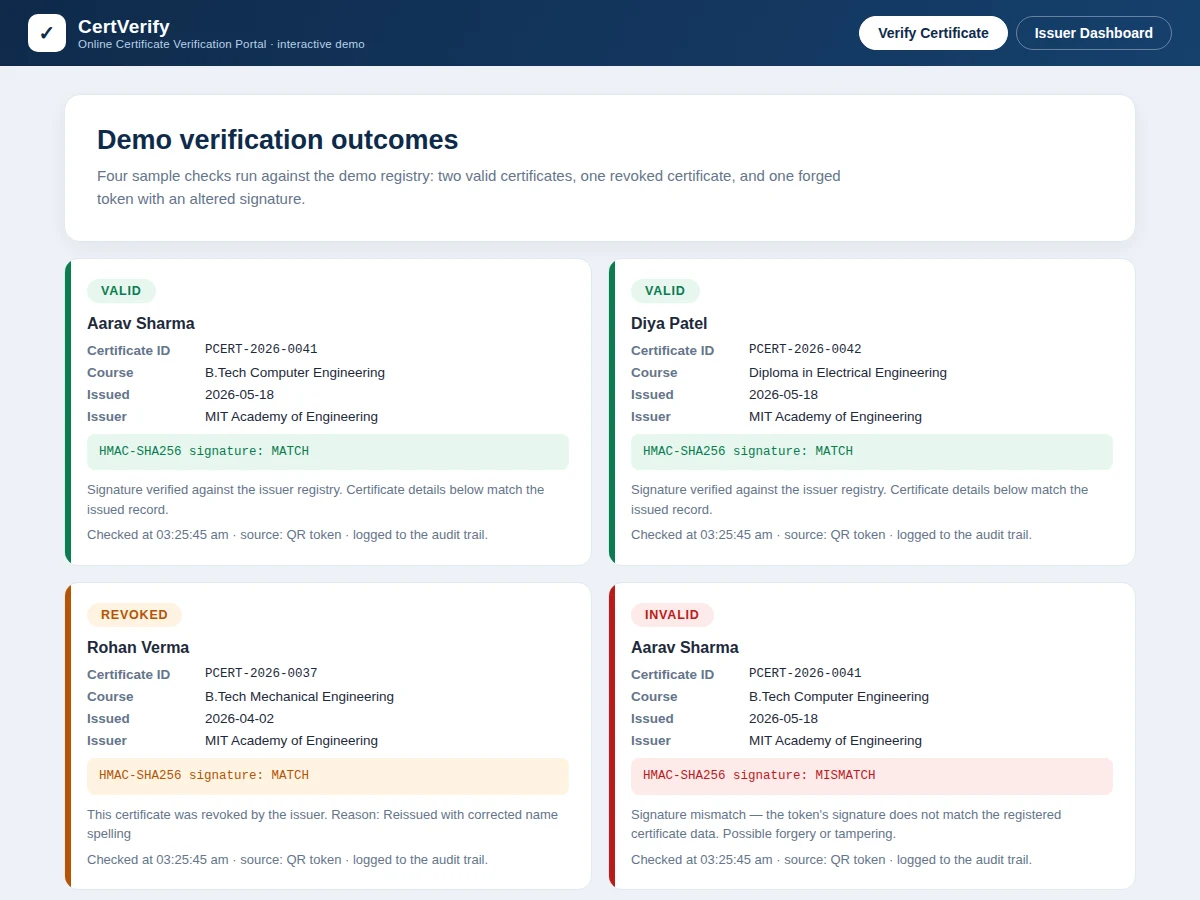
Fake certificates are a quiet, expensive problem: employers, banks and universities routinely receive degree and course certificates they cannot trust, and the only way to check is a phone call or email to the issuing institution — slow, unscalable and often unanswered. Some forgers go further, editing a real certificate's name or grade and reprinting it, which no visual inspection can catch. This project builds the verification half of the trust chain: a portal where an institution registers every certificate it issues, each one sealed with an HMAC-SHA256 signature encoded in a printed QR code. Anyone — an HR executive, a loan officer, an admissions desk — scans the QR or types the certificate ID and gets an instant verdict: VALID, INVALID or REVOKED, with the registered details shown for comparison. Because the signature is re-computed from the registry on every check, a copied QR on an altered certificate fails validation. The portal starts where issuance ends: it does not generate certificates, it proves which ones are real.
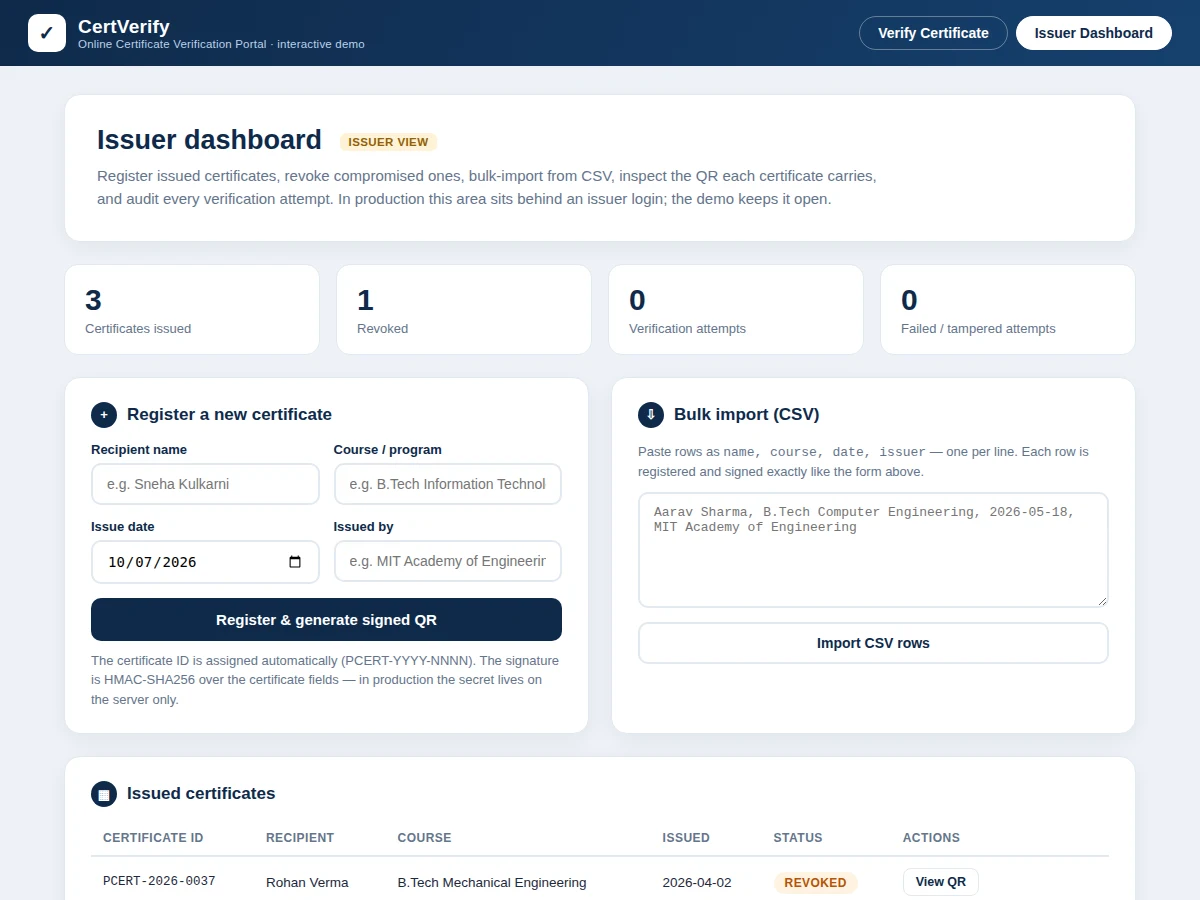
Institution staff who registers issued certificates or bulk-imports past issues via CSV.
Follow the working sequence
How it works
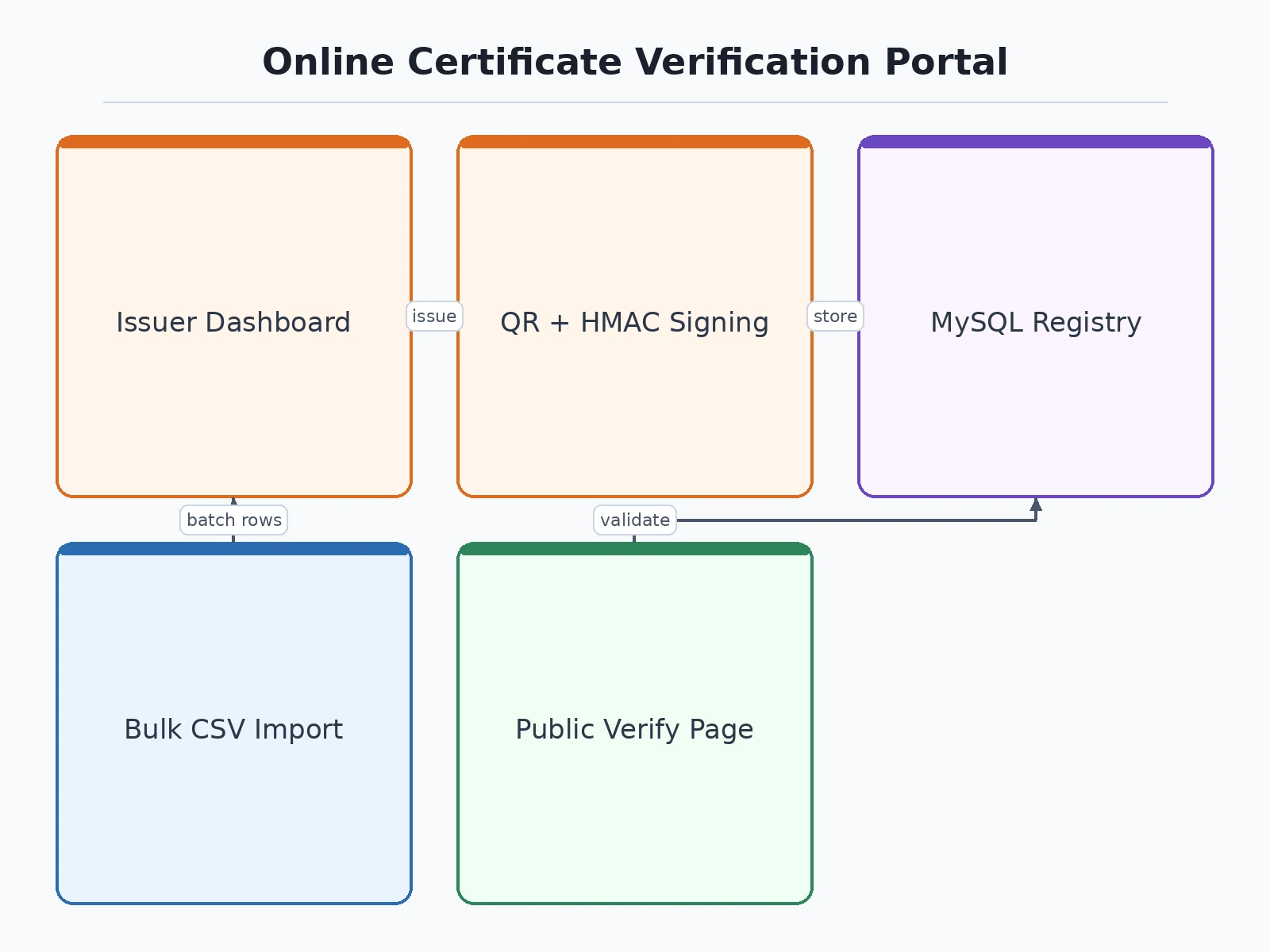
- The issuer registers a certificate — recipient name, course, issue date, issuer name — or bulk-imports a CSV of past issues.
- The server computes an HMAC-SHA256 signature over the certificate fields using a secret stored only on the server, and stores the record under a unique ID (format PCERT-YYYY-NNNN, design target).
- The portal generates a QR code encoding the verification URL plus the signed token (under 300 characters, design target), printable on the physical certificate.
- A verifier — employer, bank, university — scans the QR with any phone camera or types the certificate ID into the public page; no account is needed.
- The server looks up the ID: if it was never registered, the verdict is INVALID with a "not found" reason.
- If found, the server re-computes the signature over the stored fields and compares it with the token's signature; any mismatch means the printed data was altered, so the verdict is INVALID with a forgery warning.
- If the signature matches, the server checks the revocation flag: revoked certificates return REVOKED with the recorded reason, everything else returns VALID — and the attempt is written to the audit log.
Tech stack:
- PHP 8 (backend, HMAC signing)
- MySQL 8 (certificate registry, revocation flags, audit log)
- HTML, CSS, JavaScript (portal UI)
- Server-side QR code generation library
- Apache on shared hosting (deployment target)
- CSV import pipeline
- Session-based issuer authentication
- Git (version control)
| Parameter | Value |
|---|---|
| Verification verdicts | 3 — VALID, INVALID, REVOKED |
| Signature algorithm | HMAC-SHA256, 256-bit output (algorithm datasheet value) |
| Token format | CERT-ID + "." + 64 hex characters (design target) |
| Certificate ID format | PCERT-YYYY-NNNN (design target) |
| QR payload | Verification URL + token, under 300 characters (design target) |
| Verification response | Under 2 seconds on typical shared hosting (design target) |
| Bulk import | CSV files up to 1,000 rows each (design target) |
| User roles | 2 — issuer admin and public verifier |
| Password hashing | bcrypt, cost factor 10 (design target) |
| Audit log retention | 12 months rolling (design target) |
Project features
- [Public verification page] No login required: scan the QR or type the certificate ID to get a VALID, INVALID or REVOKED verdict, with the registered certificate details shown beside the verdict for visual comparison.
- [HMAC-SHA256 signed QR tokens] Every QR encodes a verification URL carrying a 64-character HMAC-SHA256 signature computed over the certificate fields with the issuer's server secret; the signature is re-computed on each check, so a QR copied onto a forged certificate fails validation.
- [Three-state verdicts] VALID for genuine unrevoked certificates, INVALID for unknown IDs or signature mismatches, REVOKED for certificates the issuer has withdrawn — each with a plain-language reason, not just a color.
- [Issuer dashboard] Password-protected area to register certificates one by one, search the registry, inspect any certificate's QR, and revoke certificates with a recorded reason.
- [Bulk CSV import] Register hundreds of issued certificates in one upload from the institution's existing spreadsheet; each row is validated and signed exactly like a manual entry.
- [Revocation registry] Revoked certificates stay in the database with their reason and keep returning REVOKED instead of silently disappearing, so old printouts can still be explained.
- [Verification-attempt audit log] Every check is logged with timestamp, certificate ID, verdict and source, giving the institution a tamper-evidence trail of who verified what.
- [Printable QR certificate page] Each registered certificate gets a print-ready page with its QR code, sized for pasting onto the physical certificate before lamination or dispatch.
Optional add-ons (quoted separately, not in the base build): blockchain anchoring of issuance hashes, email/SMS alerts on verification spikes, multi-department issuer roles, and a mobile scanner app.
What is included
- Complete portal source code (public verification page + issuer dashboard)
- MySQL database schema with seed data
- Signed-QR generation pipeline
- Bulk CSV import module
- Verification-attempt audit log module
- Printable QR certificate page template
- Deployment guide for shared hosting
- Project report PDF (problem, HMAC design, schema, methodology)
- PPT presentation for final review
- Viva Q&A preparation document (HMAC, QR encoding, revocation design, threat model)
Limitations & prerequisites
- The demo signs tokens in the browser with a visible demo secret for illustration; the production build must sign server-side with the secret in environment config, never shipped to the browser.
- Security rests entirely on the server secret: if it leaks, attackers can mint valid-looking tokens until the secret is rotated and certificates are re-signed.
- A photocopy of a genuine certificate verifies as VALID — the portal proves the institution issued those details, not that the paper in hand is the original; paper-level anti-copy features are a separate printing problem.
- Manual ID entry is typo-prone; QR scanning is the intended primary path.
- Signature verification needs the server and the registry, so checks require internet connectivity; there is no offline validation mode in the base build.
- The CSV import trusts the issuer's own data — the portal does not cross-check against any external education registry.
Frequently Asked Questions
How is this different from a bonafide certificate request portal?
That kind of portal is an issuance workflow — students request certificates and staff approve them. This portal starts where issuance ends: it takes already-issued certificates and lets third parties verify they are genuine. One creates certificates, the other proves them.
What stops someone from photocopying a valid certificate?
Honestly, nothing in this portal — a perfect photocopy verifies as VALID, because the data is genuine. What the portal defeats is forgery: changing the name, course or grade breaks the HMAC signature, so altered certificates fail. Paper originality needs printing-level security, which is outside this project's scope.
Does verification work offline?
No. Every check re-computes the signature on the server and consults the revocation registry, so the verifier needs internet. The QR itself is just a pointer plus a signed token — it carries no authority on its own.
Can a revoked certificate be un-revoked?
Revocation is recorded with a reason and is permanent in the base build. The recommended flow is to register a corrected certificate under a new ID and revoke the old one, which keeps the audit trail clean.
Is this project suitable for a final-year project?
Yes — for Computer Science, IT and Web Development programs. It demonstrates applied cryptography (HMAC signing and verification), QR data encoding, role-based access, database design and audit logging, with a threat model the student can defend in the viva.
Components & software requirements
- PHP 8 (backend, HMAC signing)
- MySQL 8 (certificate registry, revocation flags, audit log)
- HTML, CSS, JavaScript (portal UI)
- Server-side QR code generation library
- Apache on shared hosting (deployment target)
- CSV import pipeline
- Session-based issuer authentication
- Git (version control)
Delivery information
Built-to-order project. Delivery timeline is shared after order confirmation based on current queue.
Support terms
Complete documentation, setup guide, and viva preparation included. Support for setup and explanation provided.
Download free synopsis (PDF)
Enter your name and email — the synopsis PDF downloads immediately. We may send occasional project updates; no spam, unsubscribe anytime.