
More project photos (2)
The problem
Every academic year, campus security offices drown in parking sticker applications — paper forms, photocopied RCs and licences, manual fee receipts, and stickers handed out weeks later with no record of which vehicle belongs to whom. Verification is a desk pile: staff squint at documents, fee defaults go unnoticed, and at the gate nobody can quickly check whether a vehicle is authorised. This project is a parking sticker issuance portal that moves the whole workflow online. Students fill one application with vehicle and owner details, upload the registration certificate, driving licence and college ID, and pay the sticker fee plus refundable deposit online. The security office works through a verification queue showing each application's documents with per-document status, and approves, rejects or asks for resubmission with reasons. Approved applications move to sticker printing — a QR-coded sticker preview with the registration number, owner, vehicle type and allotted zone — and the student collects it against the application ID. A public status tracker and gate-side QR verification close the loop.
How it works
- The student fills the application form, uploads RC, driving licence and college ID, and pays the fee plus deposit.
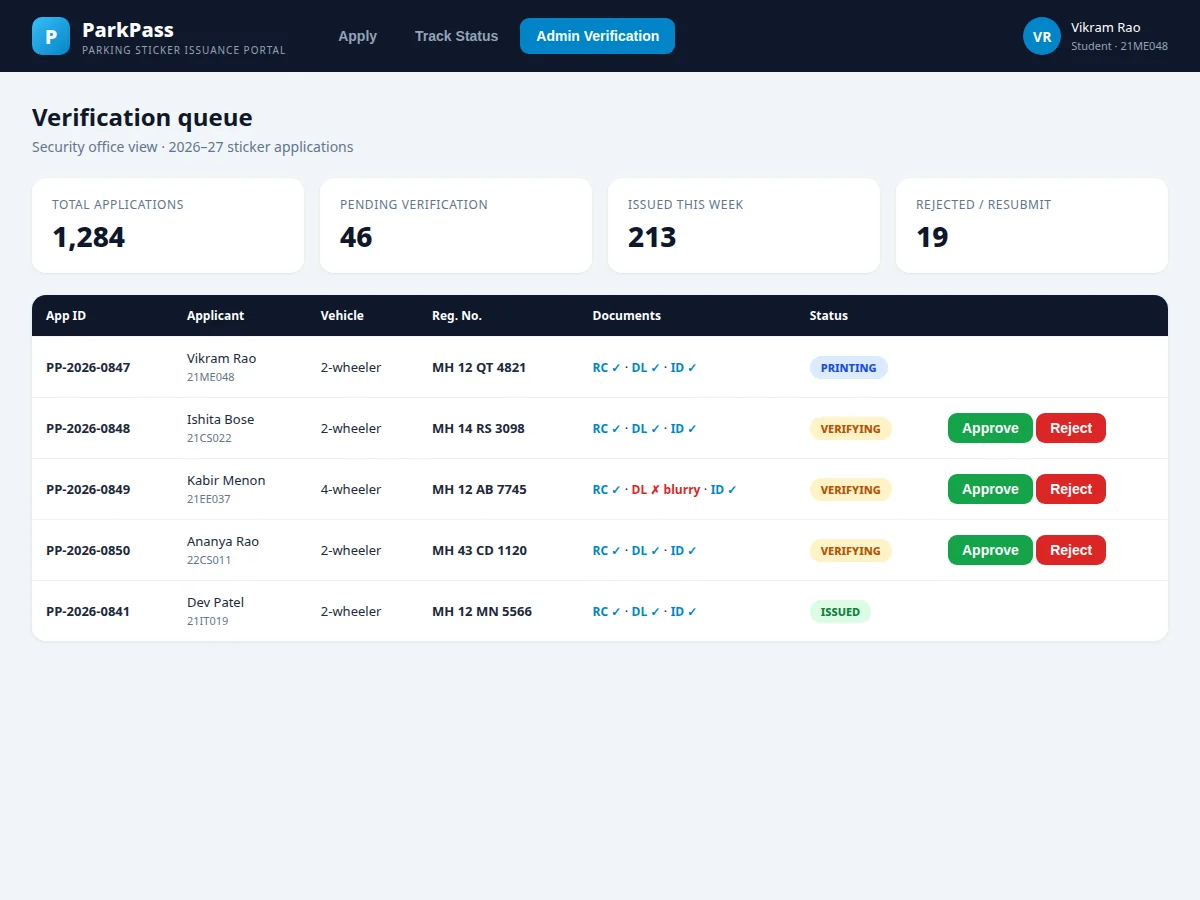
- The application enters the verification queue with per-document status flags.
- Security staff open each application, inspect the documents and approve, reject, or request resubmission with a reason.
- On approval, the system generates the QR-coded sticker with registration number, owner, vehicle type and allotted zone.
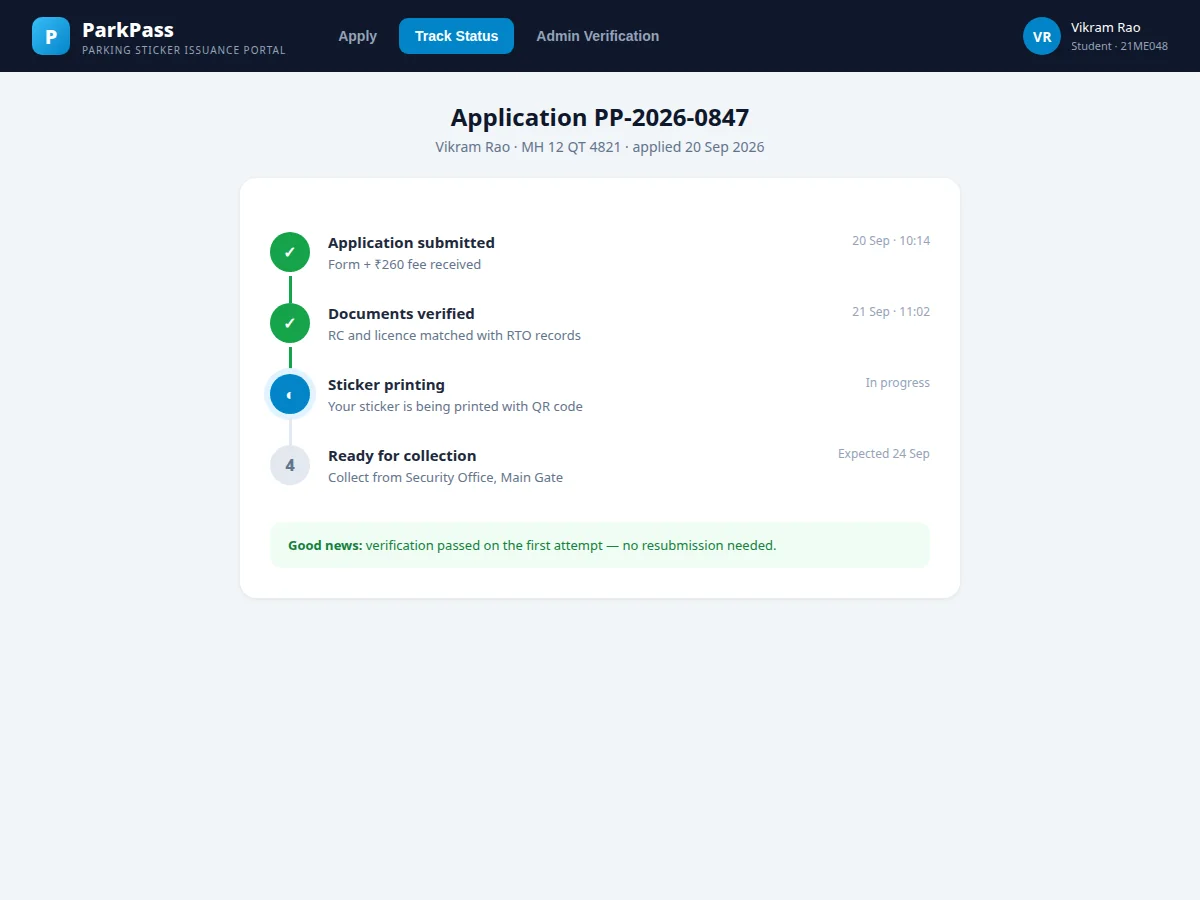
- The student tracks the four-stage timeline until the sticker is ready for collection at the security office.
- At the gate, staff scan the sticker QR to verify the vehicle against the issued record.
Tech stack:
- PHP · Laravel (REST API + Blade views)
- MySQL (relational schema with seed data)
- HTML · CSS · JavaScript (responsive frontend)
- QR code generation (sticker + verification)
- File upload validation pipeline
- Razorpay payment integration (sandbox mode)
- Role-based access (student, security admin)
- Git
| Parameter | Value |
|---|---|
| Application lifecycle | Submitted → Verifying → Printing → Issued / Rejected |
| Documents | RC, driving licence, college ID (PDF/JPG, ≤2 MB each) |
| Sticker contents | Reg. number, owner, vehicle type, zone, QR code |
| Fee structure | Annual sticker fee + refundable deposit + processing fee |
| Verification | Manual document check by security staff |
| Gate verification | QR scan against issued records |
| Zone model | Zone per vehicle type, configurable |
| Deployment | Shared hosting, VPS or college intranet |
Project features
- [Online application] One form for applicant, vehicle and document details with a live sticker preview and transparent fee breakup.
- [Document upload & checks] RC, driving licence and ID uploads with format and size validation and per-document verification status.
- [Fee payment] Sticker fee plus refundable deposit collected online; the payment state gates verification.
- [Admin verification queue] Security staff see every application with documents, applicant history and one-click approve / reject / resubmit with reasons.
- [QR sticker generation] Approved applications produce a QR-coded sticker carrying the registration number, owner and zone for gate verification.
- [Status tracker] A four-stage timeline — submitted, documents verified, sticker printing, ready for collection — with expected dates.
- [Zone allotment] Vehicle type maps to a parking zone on approval, printed on the sticker and stored against the vehicle.
What is included
- Complete working web application (application, tracker, verification queue, sticker generation)
- Database schema with seed data (applications at every stage, fee records)
- QR sticker template and gate-verification lookup
- Razorpay sandbox integration wired to the fee payment
- Project report PDF (SRS, ER diagram, DFD, test cases, screenshots)
- PPT presentation for final review
- Viva Q&A preparation document (verification workflow, QR design, fee states)
Limitations & prerequisites
- Document verification is a manual staff check; the system validates format and size only — OCR-based RC field extraction is future scope.
- Payments run in Razorpay sandbox in the demo; production needs the buyer's own keys and KYC.
- Physical sticker printing is outside the software; the portal produces the print-ready QR sticker layout.
- Gate QR scanning assumes a phone or scanner with network access to the portal.
- Applications, documents and fee figures in the demo are illustrative seed data.
Frequently Asked Questions
Does the system verify documents automatically?
It validates file format and size on upload, but the actual verification — matching RC and licence details to the applicant — is done by security staff in the queue. OCR-based extraction is documented as future scope.
What happens if a document is rejected?
The application moves to resubmission with the staff's reason recorded; the student re-uploads just that document and the application returns to the queue.
How does gate verification work?
Each sticker carries a QR code encoding the application ID; scanning it at the gate pulls up the issued record — vehicle, owner, zone and validity.
Is the fee refundable?
The deposit component is refundable per campus policy; the portal records the deposit separately from the fee so refunds are a clean ledger entry.
Can it handle staff and faculty vehicles too?
Yes — applicant type is a field on the application, and the admin can configure different fee and zone rules per type.
Is this project suitable for a final-year project?
Yes — for Computer Science, IT and Web Development programs. It demonstrates document workflows, verification queues, QR generation and payment states in a real administrative process. Suitable for B.E./B.Tech final-year projects in Computer Science, IT and Web Development.
Components & software requirements
- PHP · Laravel (REST API + Blade views)
- MySQL (relational schema with seed data)
- HTML · CSS · JavaScript (responsive frontend)
- QR code generation (sticker + verification)
- File upload validation pipeline
- Razorpay payment integration (sandbox mode)
- Role-based access (student, security admin)
- Git
Delivery information
Built-to-order project. Delivery timeline is shared after order confirmation based on current queue.
Support terms
Complete documentation, setup guide, and viva preparation included. Support for setup and explanation provided.