
More project photos (3)
The problem
Every Android syllabus covers networking in theory - HTTP calls, JSON parsing, background threads - but students rarely ship an app where all three meet a real, rate-limited public API with real failure modes. This project closes that gap with SkyPulse, a complete Android weather app built around the OpenWeatherMap API. The student registers a free API key, wires Retrofit calls to the current-weather and 5-day/3-hour forecast endpoints, and renders the results in a Material Design 3 interface with a home screen, an hourly strip, a 5-day forecast list and a dedicated severe-weather alerts panel. The part that makes it a genuine engineering build rather than a tutorial clone is the offline layer: every successful response is written to a Room database with a timestamp, and when the network disappears the app serves the last good data with an honest "cached" badge and age instead of an error screen. A WorkManager job polls the alerts endpoint on a schedule so warnings arrive even when the app is not open. The student graduates having handled API keys securely, parsed nested JSON with Moshi, survived null fields and HTTP 401s, and designed a cache with a TTL policy - the exact skill set entry-level Android roles screen for.
Pastes the OpenWeatherMap API key, searches cities and toggles Celsius/Fahrenheit.
Follow the working sequence
How it works
- The student creates a free OpenWeatherMap account and pastes the API key into the app's settings screen; the app validates the key with a test call and stores it in encrypted SharedPreferences.
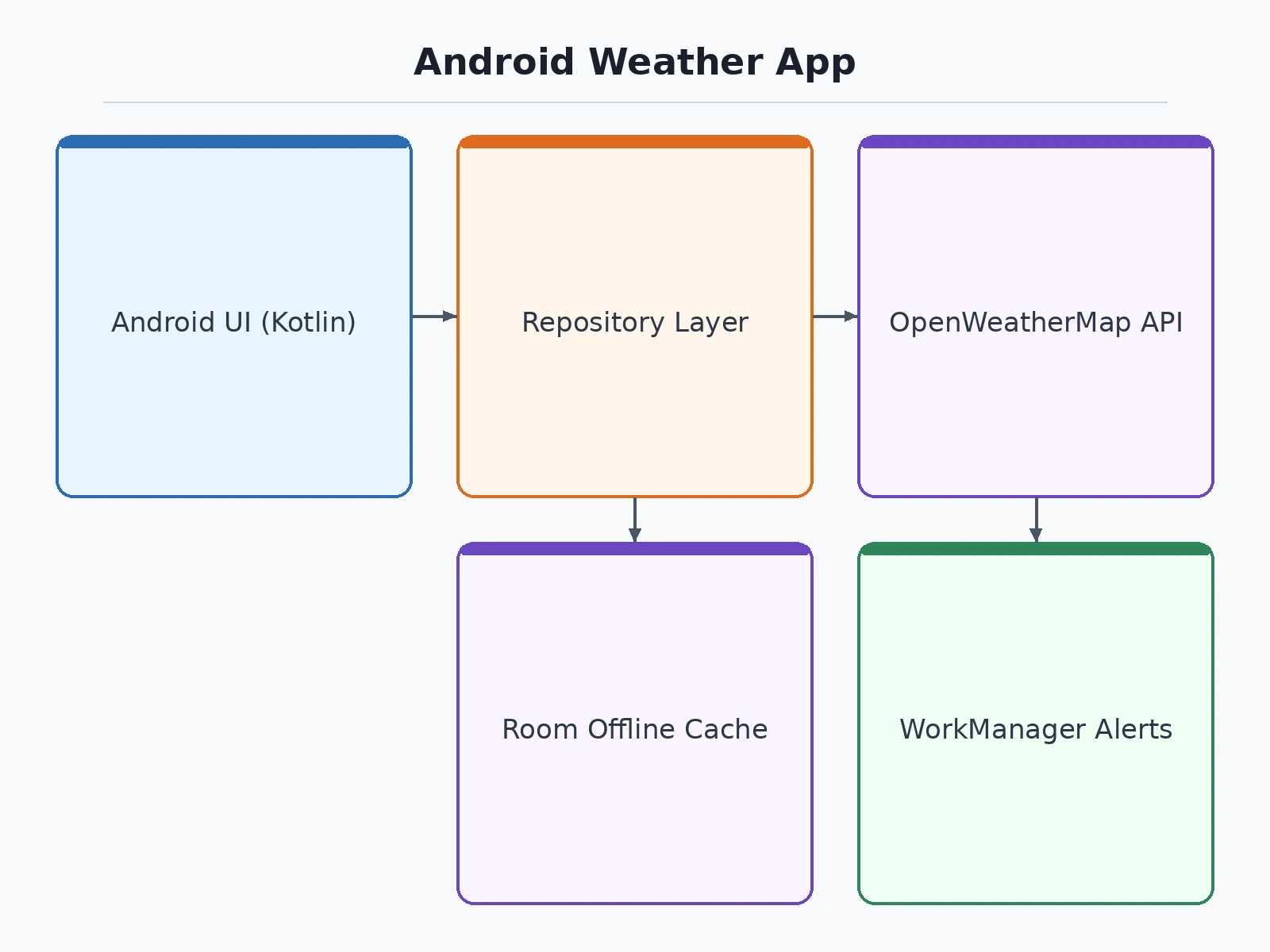
- On launch, the repository layer fires two Retrofit calls in parallel - current weather and the 5-day/3-hour forecast - on a background coroutine, while the UI shows skeleton shimmer placeholders.
- Moshi parses the nested JSON into data classes; the repository aggregates the 40 forecast timestamps into 5 daily entries (min/max, dominant condition) and writes the raw responses into the Room cache with a fetch timestamp.
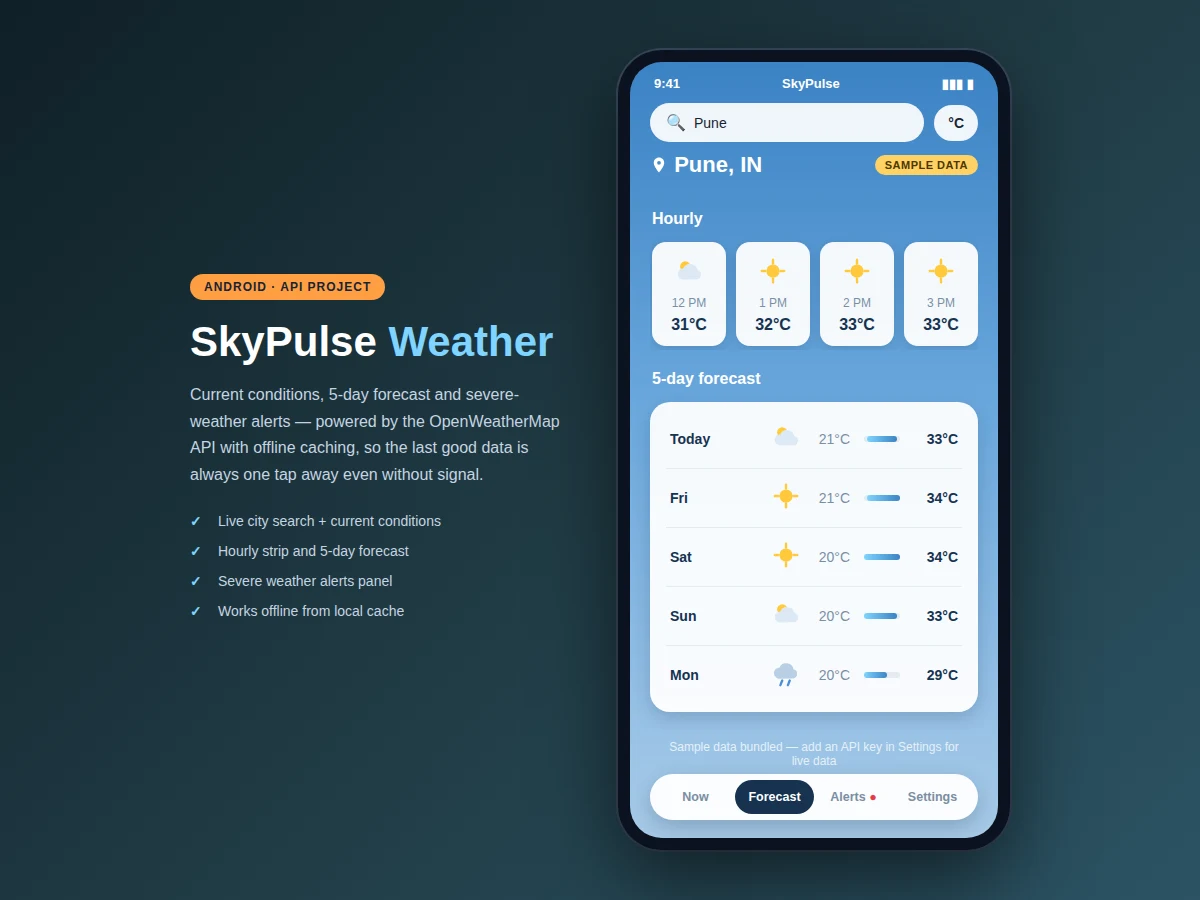
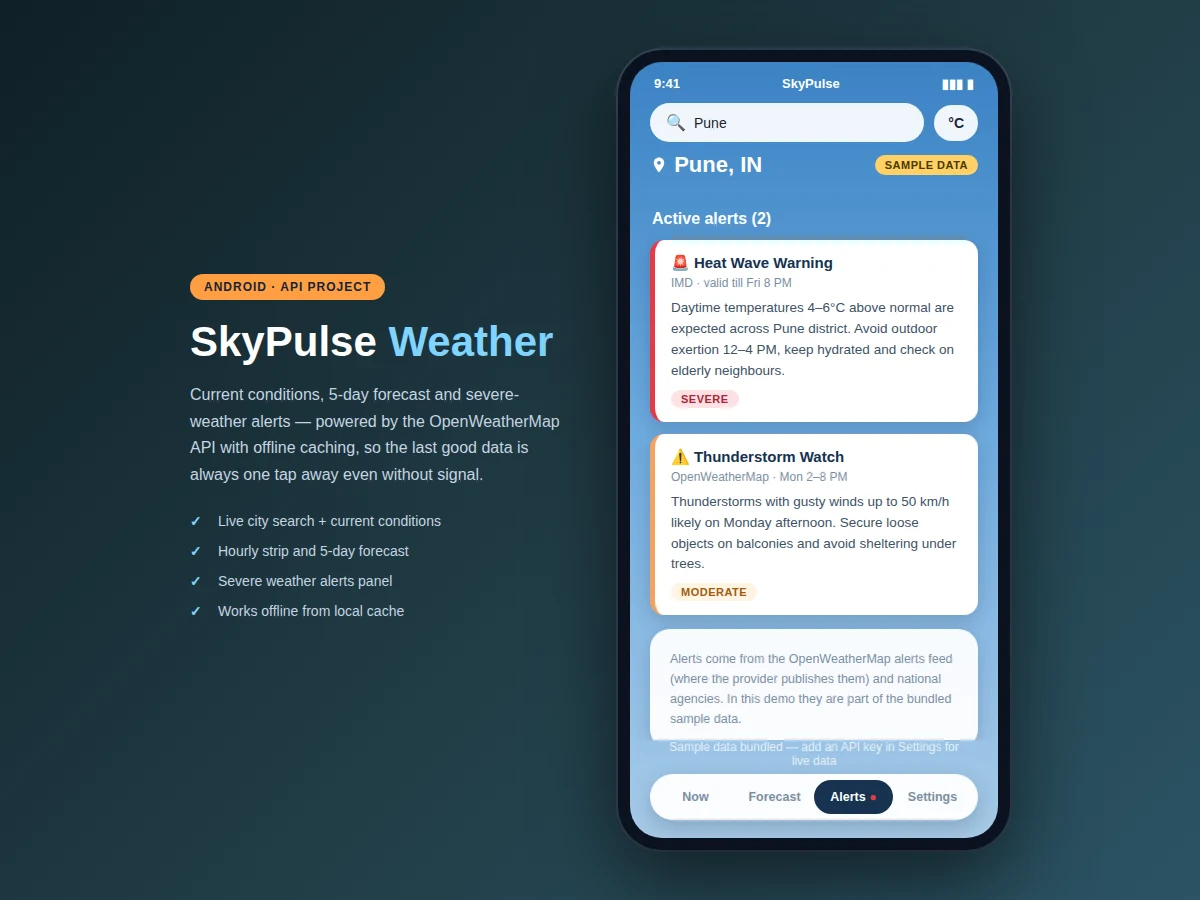
- The ViewModel exposes the data as StateFlow; the home screen renders current conditions, the hourly strip and the 5-day list, and the alerts tab parses the alerts feed into severity-badged cards.
- If the network call fails, the repository serves the last cached response and the UI stamps a "Cached - Xh ago" badge on the data; entries older than the 30-minute TTL (design, configurable) are marked stale.
- A WorkManager job re-polls the alerts endpoint every 60 minutes (design interval) in the background and posts a notification through a dedicated channel when a new severe alert is found.
- The student demonstrates the full loop - live fetch, offline mode via airplane mode, cache badges, alert polling - and records the behaviour matrix for the report.
Tech stack:
- Kotlin (design language choice)
- Retrofit 2 · OkHttp (networking)
- Moshi (JSON parsing)
- Room (SQLite offline cache)
- WorkManager (background alert polling)
- Material Design 3 · Jetpack Navigation
- Coroutines · StateFlow (async + UI state)
- Android Studio (build tool)
Software requirements
- Android Studio (Hedgehog or newer, design) with JDK 17 (design)
- Android SDK with compile SDK 34 / minimum SDK 24 (design) - covers Android 7.0 and above
- A free OpenWeatherMap API key (student registers; the app also runs on bundled sample data with no key)
- Kotlin 1.9+ (design), Gradle 8+ (design)
- Test device or emulator running Android 8.0+ (expected for notification channels)
| Parameter | Value |
|---|---|
| Platform | Android 7.0+ (minimum SDK 24, design) |
| Language | Kotlin (design choice) |
| Networking | Retrofit 2 with OkHttp (design) |
| Weather API | OpenWeatherMap current weather + 5-day/3-hour forecast endpoints (provider) |
| Free-tier allowance | 1,000 calls/day (expected, provider's published free allowance) |
| Forecast horizon | 5 days / 40 timestamps at 3-hour steps (provider) |
| Offline cache | Room database storing last response + fetch timestamp (design) |
| Cache TTL | 30 minutes default, configurable (design) |
| Alert polling interval | 60 minutes via WorkManager (design) |
| App size | Under 25 MB installed (design target) |
| Screens | 4 - Home, Forecast, Alerts, Settings (design) |
| Demo cities bundled | Pune, Mumbai, Delhi sample data (works with no API key) |
Project features
- [Live current weather screen] Big temperature readout with feels-like, condition icon, humidity, wind speed, pressure, visibility and sunrise/sunset - all parsed from the OpenWeatherMap current-weather endpoint and rendered in a Material Design 3 card layout.
- [Hourly strip + 5-day forecast] A horizontally scrolling next-hours strip plus a 5-day list with temperature-range bars, built from the 5-day/3-hour forecast endpoint's 40 timestamps, aggregated per day in the repository layer.
- [Severe-weather alerts panel] A dedicated tab that lists active alerts with severity badges (severe/moderate), source and validity window, fed by the provider's alerts feed where published, with IMD-style advisory formatting for the demo data.
- [Offline caching with honest badges] Every successful API response is cached in Room with a timestamp; offline launches show the last good data marked "Cached" with its age, and cache entries expire on a configurable TTL (design default 30 minutes).
- [City search + C/F unit toggle] Search by city name (demo ships with Pune, Mumbai and Delhi sample data so the app runs with no key), and a one-tap Celsius/Fahrenheit switch that re-renders every temperature on every screen.
- [In-app API-key setup] A settings screen where the student pastes their own free OpenWeatherMap key, with the app validating the key on first use and falling back to bundled sample data on HTTP 401 or network failure - implemented, so the demo works out of the box.
- [Background alert polling] A WorkManager periodic job (design interval 60 minutes) re-checks the alerts endpoint and raises a notification when a new severe alert appears - implemented as the scheduling skeleton with the notification channel wired.
- [Clean architecture, explained] MVVM with a repository layer, Retrofit + OkHttp + Moshi, coroutines for background work - each layer documented in the report so the student can defend every design decision in the viva. Optional: GPS-based auto-location (future scope, needs runtime permission handling).
What is included
- Complete Kotlin source code (MVVM + repository layer, documented)
- Debug APK of the working app for the demo
- Single-file interactive web demo of all 4 screens (this page's screenshots)
- Retrofit/OkHttp/Moshi integration code with the exact API endpoints used
- Room cache schema and migration notes
- WorkManager alert-polling implementation with notification channel
- API-key setup and error-handling guide (401s, nulls, rate limits)
- Behaviour matrix for the report (live / offline / stale-cache / invalid-key cases)
- Project report PDF (API integration, caching design, architecture, test cases)
- PPT presentation for final review
- Viva Q&A preparation document (Retrofit vs HttpURLConnection, caching policy, coroutines, API security)
Limitations & prerequisites
- Weather data, alert availability and the free-tier call allowance are the provider's - if OpenWeatherMap changes endpoints or limits, the app needs a key refresh or endpoint update, not a rewrite of the architecture.
- Severe-weather alerts appear only where the provider or a configured feed publishes them; some cities show an honest empty state, which is correct behaviour.
- The free tier's 1,000 calls/day (expected) is plenty for a demo and a class, but a public release with thousands of users would need a paid plan or request throttling.
- Offline mode shows the last fetched data, not live conditions - the cached badge and age exist precisely so the user is never misled.
- Location is city-search based in the built version; GPS auto-location is listed as future scope because runtime permission flows add a separate review burden.
Frequently Asked Questions
Which OpenWeatherMap endpoints does the app actually use?
The current-weather endpoint for the home screen and the 5-day/3-hour forecast endpoint for the hourly strip and 5-day list. Both are on the provider's free tier, and the project documents the exact request URLs, parameters and the JSON fields consumed, so the student can point at real calls in the viva.
How does the offline caching work?
Every successful response is written to a Room database with a fetch timestamp. When a request fails, the repository serves the cached copy and the UI stamps it "Cached - Xh ago". Entries older than the configurable 30-minute TTL are flagged stale. The behaviour matrix in the report covers live, offline, stale and invalid-key cases.
Where do the severe-weather alerts come from?
From the provider's alerts feed wherever it publishes them, formatted with severity badges, source and validity windows. The bundled demo data includes realistic IMD-style advisories so the alerts tab is demonstrable with no key, and the report explains how to wire a live feed.
What if I don't have an API key?
The app runs fully on bundled sample data for Pune, Mumbai and Delhi - all four screens, the forecast bars and the alerts panel work out of the box. The settings screen walks through registering a free key, and the app validates it on first use with a graceful fallback on failure.
What Android concepts will I actually learn?
Retrofit networking with OkHttp interceptors, Moshi JSON parsing of nested responses, MVVM with a repository layer, coroutines and StateFlow, Room persistence, WorkManager background jobs, notification channels and Material Design 3 - the practical stack entry-level Android job descriptions ask for.
Is this project suitable for a final-year project?
Yes - for Computer Science and IT programs. It demonstrates REST API integration against a real rate-limited service, offline-first design with a cache policy, background scheduling and clean Android architecture, all in a working app the student can demo live, including in airplane mode.
Components & software requirements
- Kotlin (design language choice)
- Retrofit 2 · OkHttp (networking)
- Moshi (JSON parsing)
- Room (SQLite offline cache)
- WorkManager (background alert polling)
- Material Design 3 · Jetpack Navigation
- Coroutines · StateFlow (async + UI state)
- Android Studio (build tool)
Software requirements
- Android Studio (Hedgehog or newer, design) with JDK 17 (design)
- Android SDK with compile SDK 34 / minimum SDK 24 (design) - covers Android 7.0 and above
- A free OpenWeatherMap API key (student registers; the app also runs on bundled sample data with no key)
- Kotlin 1.9+ (design), Gradle 8+ (design)
- Test device or emulator running Android 8.0+ (expected for notification channels)
Delivery information
Built-to-order project. Delivery timeline is shared after order confirmation based on current queue.
Support terms
Complete documentation, setup guide, and viva preparation included. Support for setup and explanation provided.
Download free synopsis (PDF)
Enter your name and email — the synopsis PDF downloads immediately. We may send occasional project updates; no spam, unsubscribe anytime.