
More project photos (2)
The problem
In most colleges attendance is still taken by calling roll numbers for ten minutes of every lecture, and paper registers make proxy attendance easy while offering no analytics. Mobile attendance apps exist, but the common ones need constant internet — which fails in basement classrooms and seminar halls with dead Wi-Fi — and cloud-based face recognition raises genuine privacy questions about student photos leaving the campus. This project takes a different route: an Android app where Google's ML Kit detects faces fully on-device, a stored face embedding verifies the student locally, and every attendance record is saved to an on-device Room database that syncs in the background only when connectivity returns. The result is a class teacher's tool that works in zero-network classrooms, keeps biometric data on the phone, and still produces the month-wise reports and 75%-rule defaulter lists that colleges actually need. The codebase is written in Kotlin with CameraX, Room and WorkManager, so the student can genuinely explain the mobile-ML and offline-first design decisions in the viva.
Enrolls students once, starts class sessions and reviews defaulter flags.
Follow the working sequence
How it works
- The admin enrolls each student once: the app captures a clear frontal photo, ML Kit detects the face, and a compact face embedding is computed and stored in the Room database as that student's template.
- The class teacher creates a session (subject, date, division) and starts the check-in camera built on CameraX.
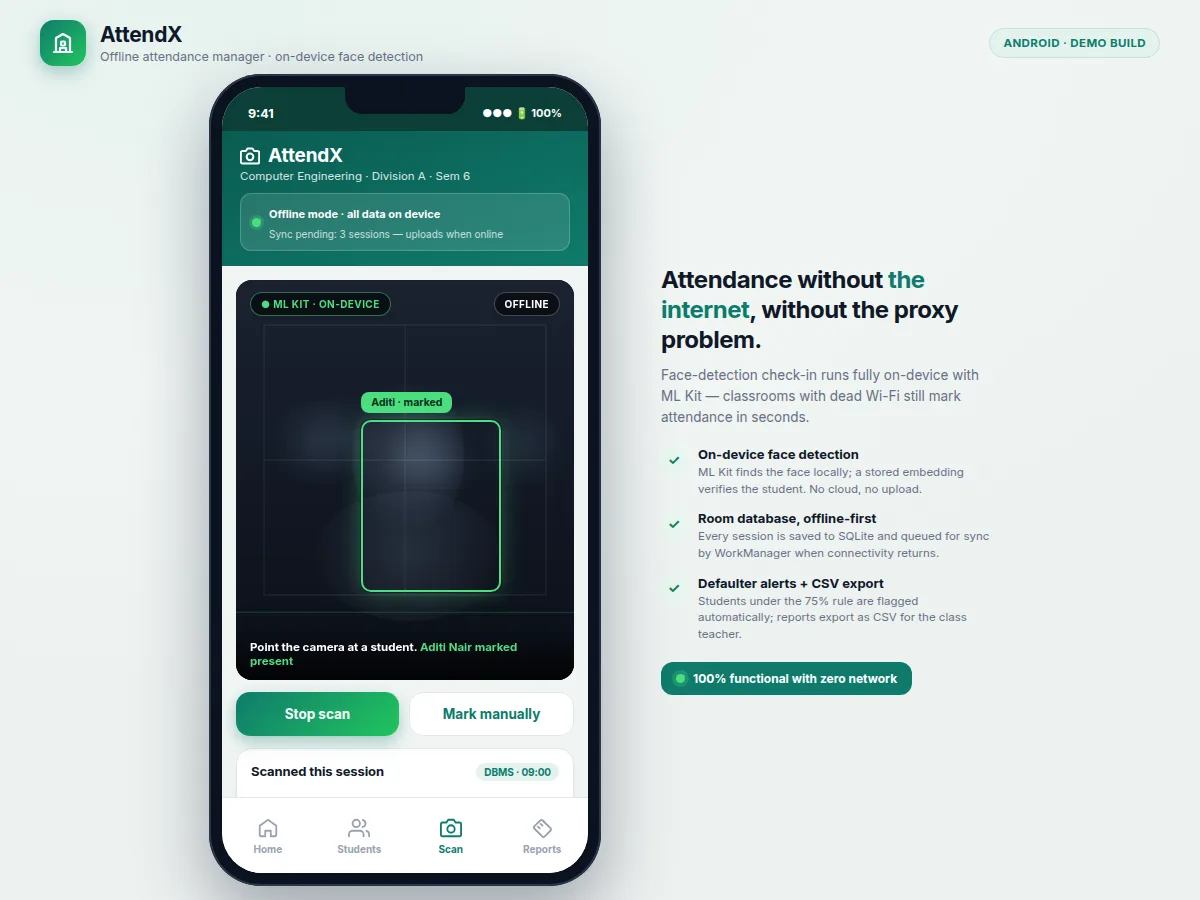
- Every camera frame is passed to the ML Kit face detector on-device; for each detected face the app computes its embedding.
- The embedding is compared against enrolled templates using similarity matching; on a match above the configured threshold the student is marked present with a timestamp.
- Unmatched faces are shown for teacher review — they can be enrolled on the spot or marked manually with the teacher PIN.
- The session summary (present/absent list, percentage) is saved locally and displayed immediately, with no network required.
- When the phone comes online, WorkManager pushes queued records to the optional backend and the month-wise reports and defaulter lists update from the synced data.
Tech stack:
- Kotlin (Android)
- Android Studio (build & debug)
- Google ML Kit Face Detection (on-device)
- CameraX (camera preview & frame analysis)
- Room / SQLite (local database)
- WorkManager (background sync)
- Material 3 / Jetpack components
- Optional backend: Firebase or REST API (sync target)
Dataset & model details
- Dataset: No training dataset is used — the project does not train a model. It uses Google ML Kit's bundled pre-trained on-device face detector, so there is no dataset whose classes need validating against this project's claims.
- Task: Face detection (locate faces and facial landmarks in camera frames) followed by embedding-based 1:N matching against student templates enrolled on the device.
- Model: ML Kit Face Detection (on-device, pre-trained by Google); identity matching via a stored face-embedding comparison with a configurable similarity threshold.
- Metrics: No accuracy is claimed as measured. The deliverable includes a buyer-run test procedure: the student enrolls a test set of classmates and runs the detection+matching check across defined lighting conditions (bright classroom, dim evening, partially covered face), recording true/false match counts in the report. Final performance depends on enrollment photo quality, lighting, camera quality and device, and the report documents the measured results honestly.
| Parameter | Value |
|---|---|
| Platform | Android 8.0 (API 26) and above (design target) |
| Language | Kotlin |
| Face detection | Google ML Kit, fully on-device (no cloud) |
| Local database | Room (SQLite), all records stored on device |
| Camera | CameraX preview + frame analysis |
| Background sync | WorkManager, queued records upload when online |
| Check-in time | Expected a few seconds per student in typical classroom lighting (not a measured claim) |
| Records capacity | Approximately 10,000 session records per device (expected, device-dependent) |
| Export | CSV, shareable via WhatsApp / Drive when online |
Project features
- [On-device face detection] Google's ML Kit face detector runs the full detection pipeline on the phone — no frame is uploaded anywhere, so check-in works with zero network and no student photo leaves the device.
- [Student enrollment module] Capture each student's photo once; the app extracts a face embedding and stores it in the local database as the reference template for future verification.
- [One-tap session check-in] The teacher starts a session and points the camera at students; a detected face is matched against enrolled templates and the student is marked present with a timestamp.
- [Fully offline-first storage] All sessions, students and attendance records live in a Room (SQLite) database; unsynced records queue up and WorkManager uploads them automatically when connectivity returns.
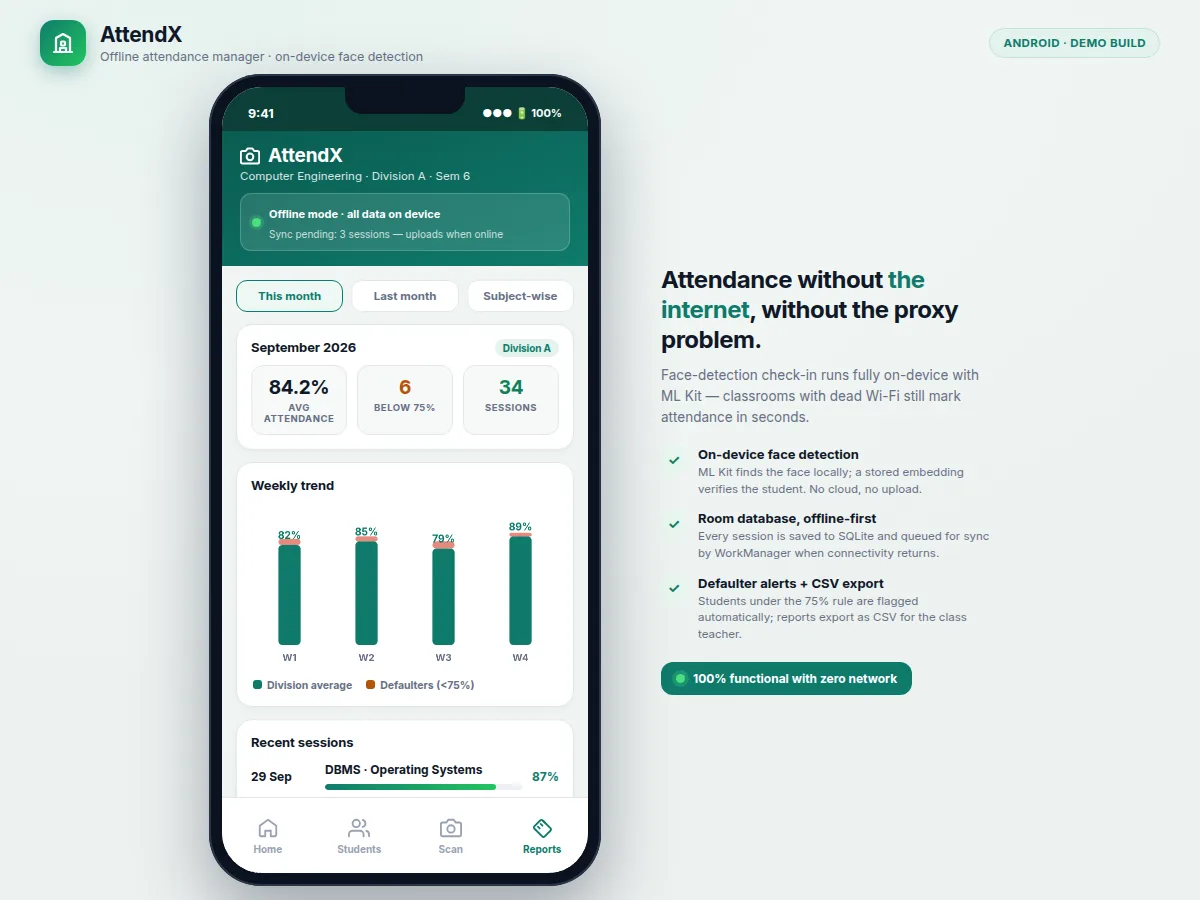
- [Defaulter flagging] Students falling below the attendance threshold (configurable, default 75%) are flagged automatically, so the class teacher sees the list without manual calculation.
- [Month & subject-wise reports] Attendance percentages per student, per subject and per month, with bar-chart summaries rendered inside the app.
- [CSV export and sharing] Reports export as CSV and can be shared via WhatsApp or Drive once the phone is online — designed around how class teachers actually circulate records.
- [Manual override with teacher PIN] A teacher can correct or manually mark records, PIN-protected, so an edge case (poor lighting, covered face) never blocks the class.
What is included
- Complete Android source code (Kotlin) with enrollment, check-in, reports and settings modules
- Room database schema and offline-first sync logic (WorkManager)
- Face detection + embedding-matching pipeline wired to ML Kit
- CSV export and defaulter-flagging report logic
- Buyer-run test procedure for detection/matching evaluation (lighting-condition test plan)
- Setup and build guide (Android Studio, SDK versions, device requirements)
- Project report PDF (background, on-device ML design, offline-first architecture, methodology, test results)
- PPT presentation for final review
- Viva Q&A preparation document (ML Kit pipeline, embeddings, Room, WorkManager, privacy design)
Limitations & prerequisites
- Face detection quality depends on lighting — dim rooms, backlight and covered faces (masks, scarves) reduce detection reliability; the manual override exists for exactly these cases.
- Embedding matching is a similarity check, not a certified identity system — identical twins or close siblings may produce ambiguous matches, which the teacher resolves manually.
- No accuracy figure is claimed: the actual match performance is measured by the student on their own device using the included test procedure and reported honestly.
- Enrollment needs a clear frontal photo per student and explicit consent — the project includes a consent-note template for the class.
- All data lives on the device until synced — if the phone is lost before syncing, unsynced records are unrecoverable; regular syncing is the student's responsibility.
- The optional cloud sync backend is a straightforward record store, not a biometric matching service — matching always happens on-device.
Frequently Asked Questions
Does it really work without internet?
Yes — face detection, matching, record storage and reports are all fully on-device. Internet is needed only for the optional background sync to a backend and for sharing exported CSV reports.
How is a student's identity actually verified?
ML Kit detects the face in the camera frame; the app computes a face embedding and compares it against the embeddings captured during one-time enrollment, all on the phone. A match above the similarity threshold marks the student present; anything uncertain is flagged for the teacher instead of being guessed.
Can a student mark proxy attendance for a friend?
The face has to match the enrolled template of the claimed student, which makes casual proxy marking much harder than with a paper register. Honest caveat: no attendance system is fully proxy-proof (a printed photo held to the camera is a known attack), and the report documents this limitation with suggested mitigations like teacher supervision during check-in.
Where does student face data go?
Nowhere off the phone by default — embeddings are stored in the on-device Room database and face frames are never uploaded. This privacy-by-design choice is one of the project's strongest viva talking points.
Can this be customized for my college?
Yes — subjects, divisions, the attendance threshold (default 75%), report formats, the optional backend, and UI branding can all be adjusted, since the deliverable is full source code, not a locked app.
Is this project suitable for a final-year project?
Yes — for Computer Engineering, Information Technology and Android/mobile-computing programs. It demonstrates Kotlin Android development, on-device ML integration, offline-first database design with background sync, and privacy-aware system design. Suitable for B.E./B.Tech final-year projects in Computer Engineering, Information Technology and Android application development.
Components & software requirements
- Kotlin (Android)
- Android Studio (build & debug)
- Google ML Kit Face Detection (on-device)
- CameraX (camera preview & frame analysis)
- Room / SQLite (local database)
- WorkManager (background sync)
- Material 3 / Jetpack components
- Optional backend: Firebase or REST API (sync target)
Dataset & model details
- Dataset: No training dataset is used — the project does not train a model. It uses Google ML Kit's bundled pre-trained on-device face detector, so there is no dataset whose classes need validating against this project's claims.
- Task: Face detection (locate faces and facial landmarks in camera frames) followed by embedding-based 1:N matching against student templates enrolled on the device.
- Model: ML Kit Face Detection (on-device, pre-trained by Google); identity matching via a stored face-embedding comparison with a configurable similarity threshold.
- Metrics: No accuracy is claimed as measured. The deliverable includes a buyer-run test procedure: the student enrolls a test set of classmates and runs the detection+matching check across defined lighting conditions (bright classroom, dim evening, partially covered face), recording true/false match counts in the report. Final performance depends on enrollment photo quality, lighting, camera quality and device, and the report documents the measured results honestly.
Delivery information
Built-to-order project. Delivery timeline is shared after order confirmation based on current queue.
Support terms
Complete documentation, setup guide, and viva preparation included. Support for setup and explanation provided.
Download free synopsis (PDF)
Enter your name and email — the synopsis PDF downloads immediately. We may send occasional project updates; no spam, unsubscribe anytime.