
More project photos (2)
The problem
English learners and exam aspirants reach for their phones dozens of times a day to check a word's meaning, but free dictionary apps demand a constant internet connection, interrupt with advertisements, and do nothing to build vocabulary as a habit. Students in hostels and low-connectivity areas are left with no reliable option, and even connected users juggle three separate tools — a dictionary, a word-of-the-day feed, and handwritten notes for revision. This project solves that with a single native Android app that works fully offline: a fast-searching English dictionary bundled with a starter wordlist, a daily word delivered by notification, a multiple-choice vocabulary quiz with scoring, and a saved-words list for revision. Built in Kotlin with Room (SQLite), WorkManager, and on-device text-to-speech, it demonstrates the core Android components students are expected to know — local persistence, background work, and clean Material Design UI — while remaining genuinely useful every day.
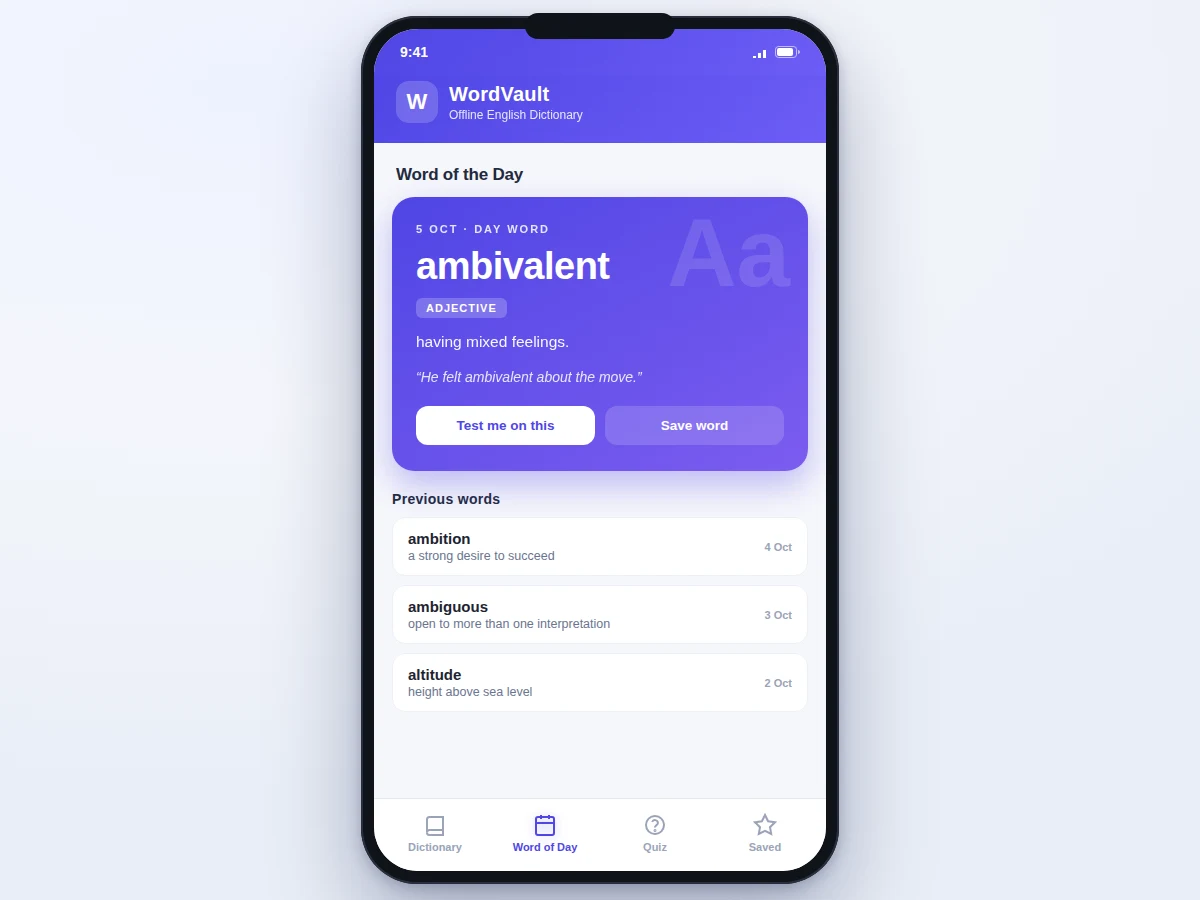
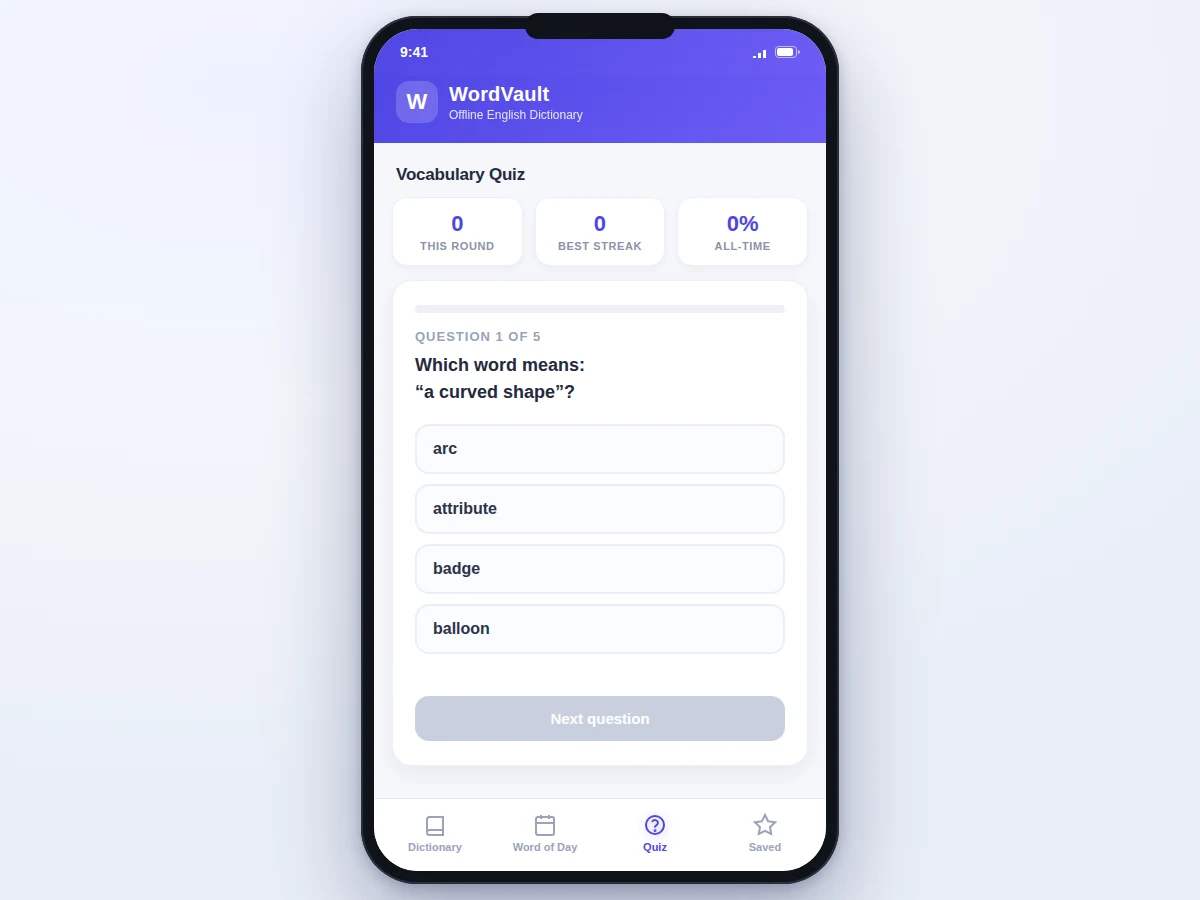
Searches words, saves favorites and takes quiz rounds from the dictionary app.
Follow the working sequence
How it works
- On first launch, the bundled starter wordlist is seeded into the Room (SQLite) database; every feature afterwards reads from local storage only.
- The user types in the search bar; the DAO runs an indexed prefix query and returns matches as they type, with a fuzzy fallback catching minor typos.
- Tapping a result opens the word detail: definition, part of speech, example sentence, a pronunciation button (on-device TextToSpeech), and a save button.
- Each calendar date maps deterministically to one word in the database, which becomes the word of the day; a WorkManager periodic worker posts it as a morning notification.
- "Test me on this" starts a quiz round seeded with that word; the general quiz builds multiple-choice rounds from random bundled words, four options per question.
- Every answer updates the round score — correct answers extend the streak — and round score, best streak, and all-time accuracy are persisted in SharedPreferences.
- Saved words are stored in a local favorites table and listed in the Saved tab for quick revision, all fully offline.
Tech stack:
- Kotlin
- Android SDK
- Room (SQLite)
- WorkManager
- RecyclerView
- Material Design components
- Android TextToSpeech
- Android Studio
| Parameter | Value |
|---|---|
| Platform | Android 8.0 (API 26) and above (design target) |
| Language | Kotlin |
| Local database | Room over SQLite, pre-seeded on first launch |
| Bundled wordlist | 250+ words with part of speech, definition, example (starter subset) |
| Search | Prefix match on indexed column + Levenshtein fuzzy fallback; under 200 ms per keystroke on mid-range devices (design target) |
| Word of the day | Deterministic per calendar date; daily notification via WorkManager |
| Quiz | Multiple-choice rounds from bundled words; score, streak, all-time accuracy persisted (5-question rounds expected) |
| Pronunciation | On-device TextToSpeech; no network call |
| Internet requirement | None for base features |
| Deliverable | Installable APK + full source code (expected) |
Project features
- [Offline word database] A starter wordlist of 250+ words — each with part of speech, definition, and example sentence — is seeded into a Room (SQLite) database on first launch, so the dictionary works with zero internet.
- [Prefix and fuzzy search] Results appear as you type through an indexed prefix query, with a Levenshtein-based fuzzy fallback that still finds the word when the spelling is slightly off.
- [Word of the day] A new word every day, selected deterministically from the calendar date, shown on a dedicated card with previous days browsable below it.
- [Daily notification] A WorkManager periodic worker posts the day's word each morning, turning vocabulary building into a habit without opening the app.
- [Vocabulary quiz] Multiple-choice rounds drawn from the bundled words, with per-round score, best-streak counter, and all-time accuracy statistics persisted on the device.
- [Saved words] Star any word to build a personal revision list stored locally and shown in the Saved tab.
- [On-device pronunciation] The Android TextToSpeech engine speaks any word aloud on demand — no network call, no API key.
Optional customization
- Cloud sync of saved words and quiz statistics across devices can be added on request (Firebase or a custom backend).
Future scope
- A larger licensed wordlist, adaptive quizzes that repeat missed words, illustrations for difficult words, and a home-screen word-of-the-day widget.
What is included
- Complete Kotlin source code (Android Studio project)
- Installable APK of the dictionary app
- Bundled starter wordlist (250+ words with definitions and examples)
- Project report PDF (background, architecture, Room/WorkManager design, testing)
- PPT presentation for final review
- Viva Q&A preparation document (Android lifecycle, Room, WorkManager, SQLite indexing)
Limitations & prerequisites
- The bundled wordlist is a starter subset of a few hundred words, not a full dictionary — expanding it needs a licensed wordlist or custom curation.
- TextToSpeech voice quality and available voices are device-dependent; the app uses whatever engine the phone ships with.
- The quiz draws only from the bundled words and is not adaptive — it does not automatically repeat words answered incorrectly.
- The word of the day repeats once the wordlist is exhausted; the cycle length equals the bundled word count.
- Daily notifications depend on the OS not aggressively killing background workers — some vendor ROMs restrict WorkManager timing.
- Saved words and quiz statistics live on the device and are lost if app data is cleared; cloud sync is an optional add-on, not included by default.
Frequently Asked Questions
What does the app actually do?
It is a native Android dictionary that works fully offline: search 250+ bundled words with definitions and examples, get a new word every day with a morning notification, test yourself with multiple-choice quizzes, save difficult words for revision, and hear any word pronounced on-device.
Does it really work without the internet?
Yes — every base feature (search, word of the day, quiz, saved words, pronunciation) runs from the local Room database and the on-device TextToSpeech engine. No server, no API keys, no data connection is needed after installation.
Which technologies are used?
Kotlin with the Android SDK, Room (SQLite) for the offline word database, WorkManager for the daily word notification, RecyclerView and Material Design components for the UI, and Android's built-in TextToSpeech for pronunciation. The project is built in Android Studio.
Can the wordlist be expanded or the app customized?
Yes. The wordlist is a starter subset and can be extended with a larger licensed wordlist or your own curated words. Common customizations include cloud sync of saved words, adaptive quizzes that repeat missed words, and a home-screen widget — quoted separately as optional additions.
Is this project suitable for a final-year project?
Yes — for Computer Science, IT, and mobile-app development programs. It demonstrates local persistence with Room, background scheduling with WorkManager, RecyclerView UI patterns, and Material Design, all in a genuinely usable app with clear viva talking points.
Components & software requirements
- Kotlin
- Android SDK
- Room (SQLite)
- WorkManager
- RecyclerView
- Material Design components
- Android TextToSpeech
- Android Studio
Delivery information
Built-to-order project. Delivery timeline is shared after order confirmation based on current queue.
Support terms
Complete documentation, setup guide, and viva preparation included. Support for setup and explanation provided.
Download free synopsis (PDF)
Enter your name and email — the synopsis PDF downloads immediately. We may send occasional project updates; no spam, unsubscribe anytime.