
More project photos (2)
The problem
Students preparing for board exams and entrance tests usually track their syllabus in their heads — or on a notebook page that goes stale in a week. The result is familiar: high-weightage chapters discovered unfinished two weeks before the exam, revision piled onto already-full days, and no honest answer to "am I on track?" SyllabusTrack makes progress visible and countable. Each subject holds its chapter list with High/Medium/Low weightage tags drawn from the exam blueprint; tapping a chapter done moves the subject's progress bar and the overall ring the same instant. The dashboard pairs that with a live countdown to the exam date and a streak counter that rewards showing up daily. A stats screen renders the week's study hours as bars and keeps a "revision due" queue so finished chapters actually get revised. Everything is stored locally on the phone — no account, no server needed for the core loop — which keeps the build focused, offline-first and genuinely demoable in a viva.
How it works
- The student creates an exam profile: exam name, date and target score.
- Subjects are added with their chapter lists; each chapter gets a weightage tag (High/Medium/Low) from the exam blueprint.
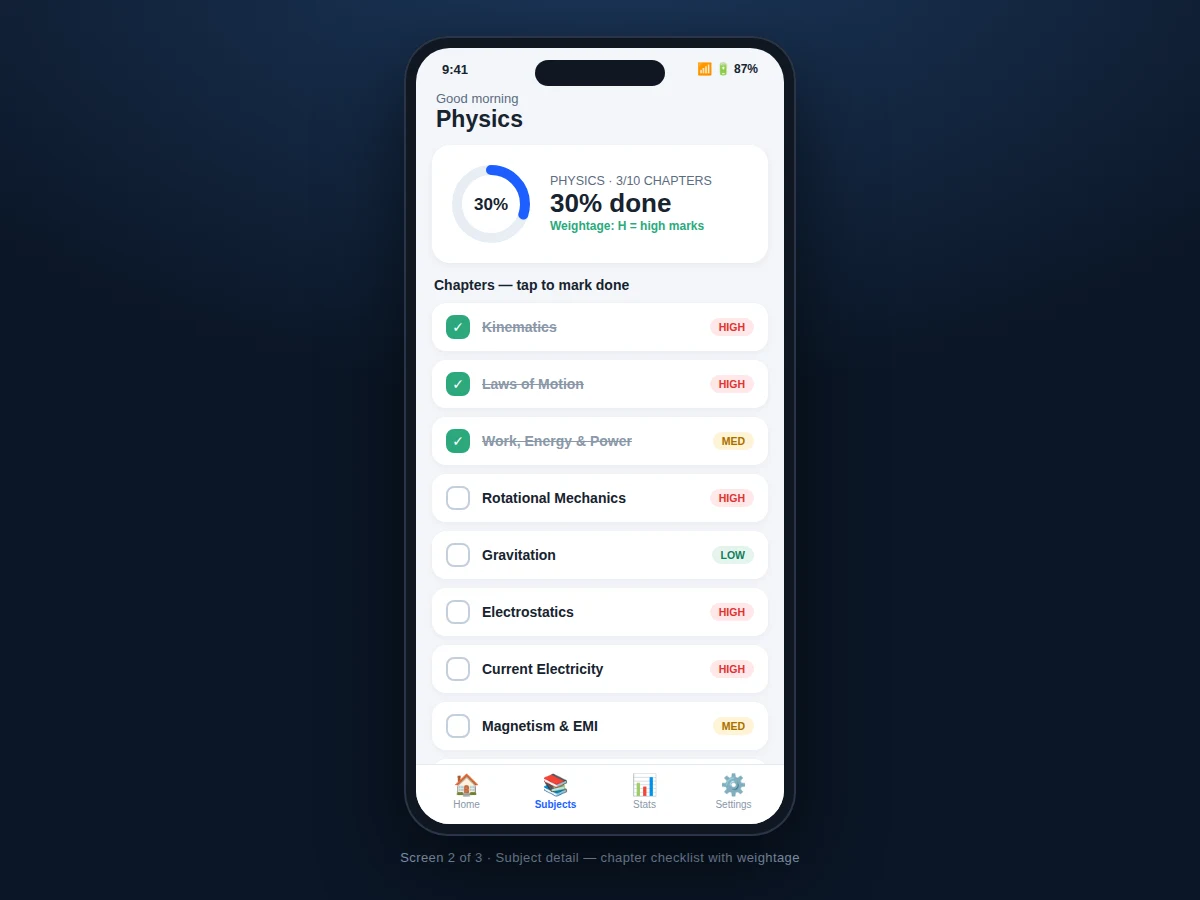
- On the subject screen the student taps chapters done as they finish them; progress bars and the dashboard ring update immediately.
- The dashboard shows the countdown, overall completion and per-subject progress at a glance.
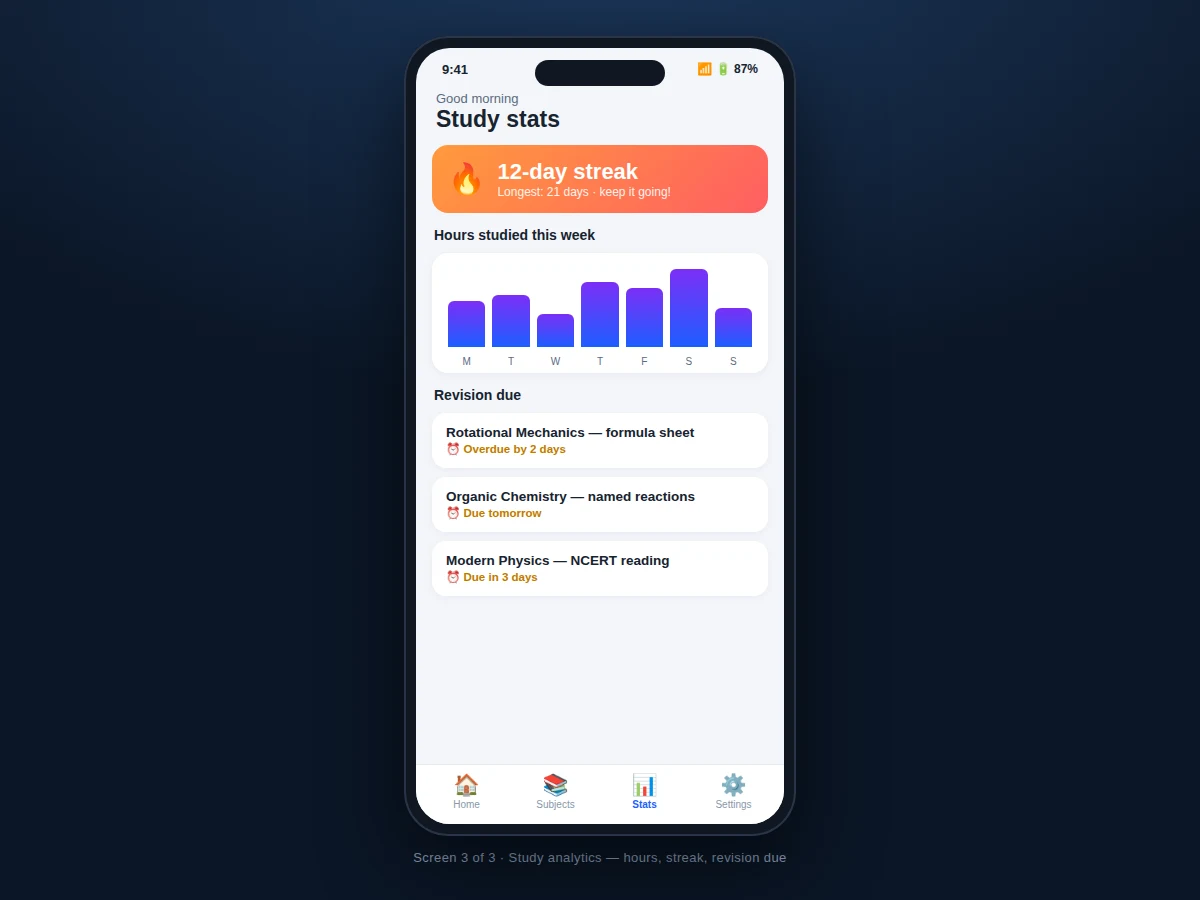
- Study sessions are logged (or timed), feeding the weekly hours chart and the day streak.
- The revision queue surfaces chapters whose revision interval has elapsed, ordered by urgency.
- Stats screen combines hours, streak and revision status into one weekly review the student can act on.
Tech stack:
- Kotlin (Android app language)
- Android Studio (build & layout tooling)
- Room · SQLite (on-device database)
- Material Design 3 components
- MPAndroidChart-class chart rendering (weekly bars)
- WorkManager (revision reminder scheduling)
- MVVM architecture (ViewModel + LiveData/StateFlow)
- Git version control
| Parameter | Value |
|---|---|
| Platform | Android 8.0 (API 26) and above (design target) |
| Subjects per exam | Unlimited (design target) |
| Chapters per subject | Unlimited (design target) |
| Storage | On-device Room/SQLite, no server required |
| Reminders | Local notifications via WorkManager |
| UI | Material Design 3, dark/light aware |
| Data export | Backup/restore of the local database |
| Build | Single APK via Android Studio |
Project features
- [Chapter-level progress tracking] Every subject expands into chapters; tapping a chapter done updates subject and overall progress instantly.
- [Exam-weightage tags] Chapters carry High/Medium/Low tags so high-marks topics are visually prioritized in the list.
- [Exam countdown] A live countdown card to the configured exam date with the target score, always visible on the dashboard.
- [Overall progress ring] A single ring showing total syllabus completion across subjects, with the week's gain noted underneath.
- [Study streak] Consecutive-day tracking with the longest streak recorded — the gentle pressure that keeps daily study alive.
- [Weekly hours chart] Bar chart of hours studied per day of the week, entered or timed per session.
- [Revision-due queue] Finished chapters resurface on a schedule (overdue / due tomorrow / due in 3 days) so revision isn't forgotten.
- [Offline-first storage] All data lives in the on-device database; the app works fully without internet.
What is included
- Complete Kotlin Android app source code
- Room database schema with seed data (sample exam, subjects, chapters)
- Dashboard, subject-detail and stats screens as designed
- Revision reminder scheduling
- Project report PDF (problem, requirements, architecture, schema, testing)
- PPT presentation for final review
- Viva Q&A preparation document (Room, MVVM, WorkManager, offline-first design)
Limitations & prerequisites
- Single-device use — there is no cloud sync or multi-device account as shipped (listed as future scope).
- Study hours are logged by the student (or a simple timer); the app cannot verify actual studying.
- Weightage tags are entered from the exam blueprint by the student; the app does not fetch official syllabi.
- Revision intervals use a fixed schedule per tag; adaptive spaced-repetition tuning is future scope.
- Reminder notifications need the app installed with notification permission granted.
Frequently Asked Questions
Does it need the internet?
No. The core loop — chapters, progress, countdown, streak, reminders — is fully offline-first on the device database. Sync is a listed future extension.
How is "overall progress" computed?
Each chapter counts equally within its subject by default; subjects average into the overall ring. The report documents the formula and the weightage-tag rationale.
Can it handle two exams at once?
The build supports one active exam profile with full stats; switching profiles is supported, and multi-exam dashboards are future scope.
How do revision reminders work?
Each finished chapter gets a next-revision date from its weightage tag's interval; WorkManager fires a local notification when it falls due, and the queue shows overdue items first.
What does the stats screen show?
Daily study hours as a bar chart, the current and longest streak, and the revision-due queue — the three numbers a weekly review needs.
Is this project suitable for a final-year project?
Yes — for Computer Science, IT and mobile development programs. It demonstrates Android UI, Room persistence, MVVM architecture, background scheduling and data visualization in a genuinely useful app. Suitable for B.E./B.Tech final-year projects in Computer Science, IT and mobile application development.
Components & software requirements
- Kotlin (Android app language)
- Android Studio (build & layout tooling)
- Room · SQLite (on-device database)
- Material Design 3 components
- MPAndroidChart-class chart rendering (weekly bars)
- WorkManager (revision reminder scheduling)
- MVVM architecture (ViewModel + LiveData/StateFlow)
- Git version control
Delivery information
Built-to-order project. Delivery timeline is shared after order confirmation based on current queue.
Support terms
Complete documentation, setup guide, and viva preparation included. Support for setup and explanation provided.