
More project photos (3)

The problem
Finding a book in a college library is still a small expedition: the OPAC terminal is occupied, the catalogue card says "available" but the shelf disagrees, and nobody knows whether the reading-hall reference copy is free without walking there. Students waste the gap between lectures hunting books that were issued yesterday. GranthaSearch fixes the information gap, not the shelves: a fast mobile search over the catalogue with live per-location availability (main stack vs reading hall, free vs issued), a shelf guide that names the exact row and bay, and reservations that hold a free copy at the circulation desk. Borrowed books live under "My shelf" with due dates, renewals and overdue-fine visibility, and holds show an honest queue position with an estimated wait. The catalogue data mirrors the library's existing records, so the app is a faithful mobile window rather than a parallel system. The build is Kotlin with a Firebase-backed catalogue — offline-tolerant search with live availability, and a clean, viva-friendly architecture.
Searches the catalogue, reserves books and tracks loans.
Follow the working sequence
How it works
- The library's catalogue (titles, authors, editions, copy locations) is loaded into the backend; each copy carries a location and status.
- The student searches by title or author and filters by section; results show free-copy counts per title.
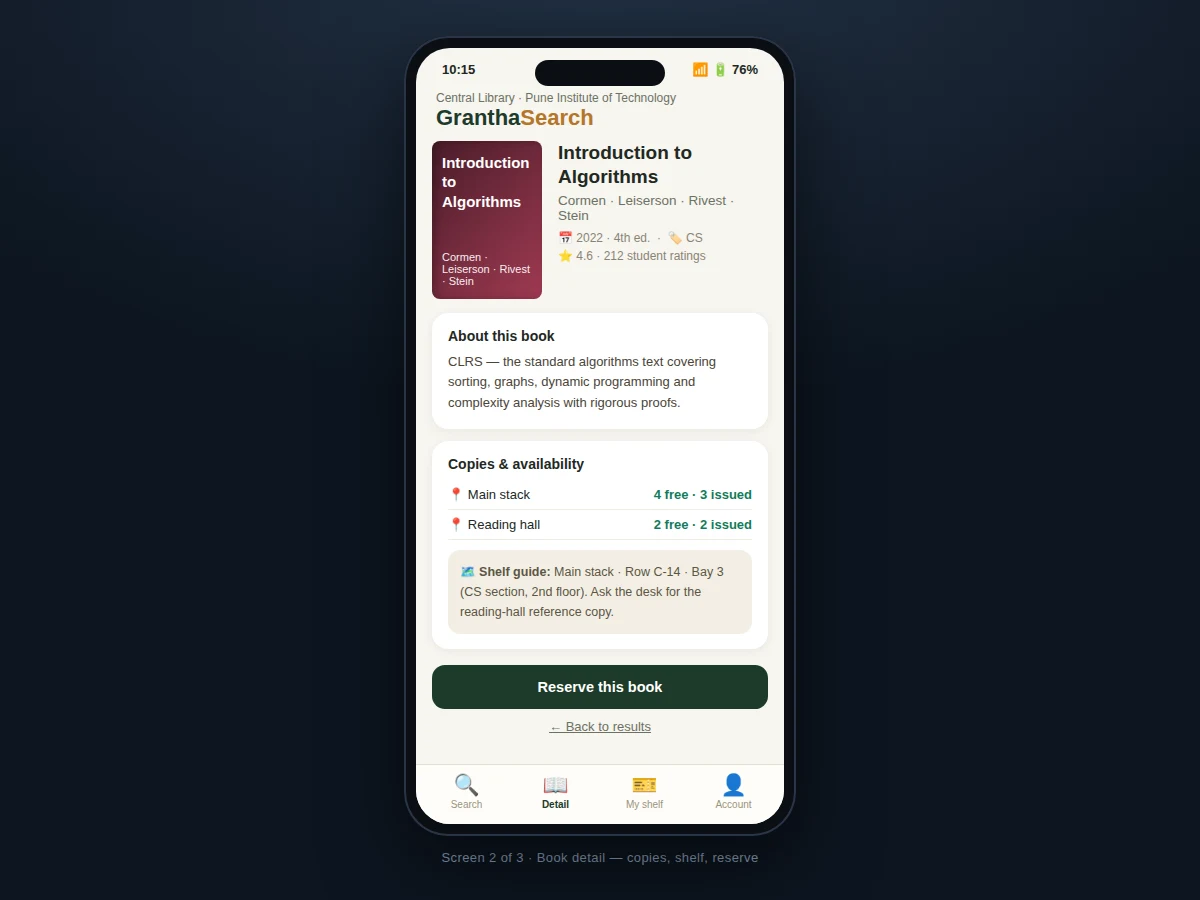
- Tapping a book opens the detail: description, per-location copy table and the shelf guide with row and bay.
- If a copy is free, the student reserves it; the circulation desk holds it for pickup and the copy status flips to reserved.
- If all copies are issued, the student joins the waitlist and sees a queue position with an estimated wait.
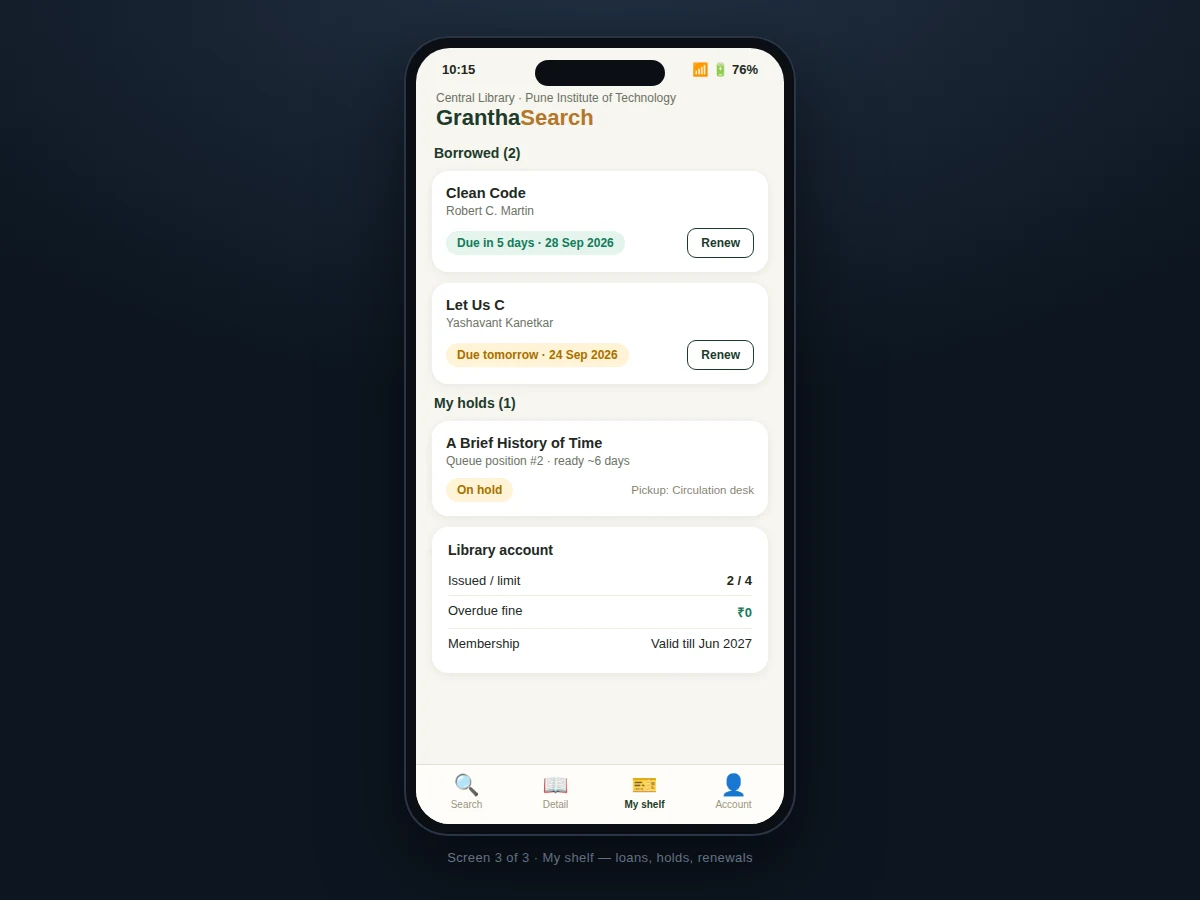
- Issued books appear under "My shelf" with due dates; renew extends the loan by 14 days where policy allows.
- Availability badges refresh from the backend whenever the app is online, so the shelf trip is never wasted.
Tech stack:
- Kotlin (Android app language)
- Android Studio (build & layout tooling)
- Firebase Firestore (catalogue + copy-status backend)
- Firebase Authentication (student sign-in)
- Material Design 3 components
- MVVM architecture (ViewModel + StateFlow)
- Local cache (Room) for offline catalogue browsing
- Git version control
| Parameter | Value |
|---|---|
| Platform | Android 8.0 (API 26) and above (design target) |
| Catalogue size | 10,000+ titles supported (design target) |
| Search | Title/author with section filters, sub-second on cache |
| Reservation hold | 48 hours at circulation desk (configurable) |
| Loan period | 14 days, one renewal where policy allows (configurable) |
| Issue limit | 4 books per member (configurable) |
| Offline | Cached catalogue browsable; availability needs sync |
| Build | Single APK via Android Studio |
Project features
- [Catalogue search] Title/author search with section filter chips (CS, Design, Science, Biography, Fiction) and instant result counts.
- [Live copy availability] Per-location free/issued counts for the main stack and reading hall, with green/red badges per title.
- [Book detail screen] Cover, author, edition, ratings, description and the full copy table in one place.
- [Shelf guide] Exact location per copy — floor, row and bay (e.g. "Row C-14, Bay 3, 2nd floor") plus a note for reference copies.
- [Reservations & waitlist] Reserve a free copy for desk pickup, or join the waitlist when all copies are issued.
- [My shelf] Borrowed books with due-date badges (due in 5 days / due tomorrow), one-tap renew, and hold queue positions with estimates.
- [Account summary] Issued-vs-limit count, overdue fine balance and membership validity.
- [Offline-tolerant catalogue] Last-synced catalogue browsable offline; availability refreshes on connectivity.
What is included
- Complete Kotlin Android app source code
- Firestore catalogue schema with seed data (sample titles, copies, locations)
- Search, detail, reservation and My-shelf screens as designed
- Circulation-desk reservation flow
- Renewal and waitlist logic
- Project report PDF (problem, architecture, data model, search design, testing)
- PPT presentation for final review
- Viva Q&A preparation document (Firestore modelling, offline cache, MVVM)
Limitations & prerequisites
- The app mirrors catalogue records — it needs the library's book data imported; it does not scan or digitize the library itself.
- Availability is only as fresh as the last sync; a book issued at the desk seconds ago may briefly show as free.
- Barcode/QR scanning for self issue-return is a listed extension, not in the base build.
- Fine payment is shown as a balance; online fine payment is an optional extension.
- One library per backend project — multi-campus union catalogues are future scope.
Frequently Asked Questions
Where does the book data come from?
The library's existing catalogue is imported into the backend (titles, authors, editions, copy locations); the app is a mobile window onto those records, seeded with sample data for the demo.
How accurate is the availability?
Copy statuses sync from the backend whenever the app is online; the detail screen shows per-location free/issued counts so students pick the right shelf before walking over.
What happens after I reserve?
The copy flips to "reserved" and is held at the circulation desk for 48 hours; you collect it with your member ID.
How do renewals work?
One tap extends the loan by 14 days where library policy allows; the due badge updates and the new date is recorded.
Does search work offline?
The last-synced catalogue is cached on-device and searchable offline; live availability badges need connectivity.
Is this project suitable for a final-year project?
Yes — for Computer Science, IT and mobile development programs. It demonstrates mobile search UX, cloud data modelling, offline caching, reservations with queueing and a complete circulation flow. Suitable for B.E./B.Tech final-year projects in Computer Science, IT and mobile application development.
Components & software requirements
- Kotlin (Android app language)
- Android Studio (build & layout tooling)
- Firebase Firestore (catalogue + copy-status backend)
- Firebase Authentication (student sign-in)
- Material Design 3 components
- MVVM architecture (ViewModel + StateFlow)
- Local cache (Room) for offline catalogue browsing
- Git version control
Delivery information
Built-to-order project. Delivery timeline is shared after order confirmation based on current queue.
Support terms
Complete documentation, setup guide, and viva preparation included. Support for setup and explanation provided.
Download free synopsis (PDF)
Enter your name and WhatsApp number — the synopsis PDF downloads immediately. We may send occasional project updates on WhatsApp; no spam.