
More project photos (2)
The problem
City bus networks in Indian metros run hundreds of routes, yet a first-time commuter standing at a stop usually has no reliable way to know which bus number goes where, when the next bus leaves, or what the fare will be. Operator websites are desktop-oriented and need connectivity; third-party apps cover only a few cities and stop working the moment mobile data drops — exactly when a commuter at a roadside stop needs them most. This project builds BusMitra, an Android app that puts the whole city bus system in the commuter's pocket: search by source and destination, see direct routes and sensible one-change combinations with fares and estimated journey times, browse stop-wise timetables, and calculate fares from an editable slab table. Everything runs from a local Room/SQLite database, so the app works fully offline after install. It ships with a realistic sample dataset modelled on PMPML Pune (7 routes, 20 stops) that the buyer can extend to any city, and the architecture (MVVM, repository pattern) is exactly what Android viva panels expect to see.
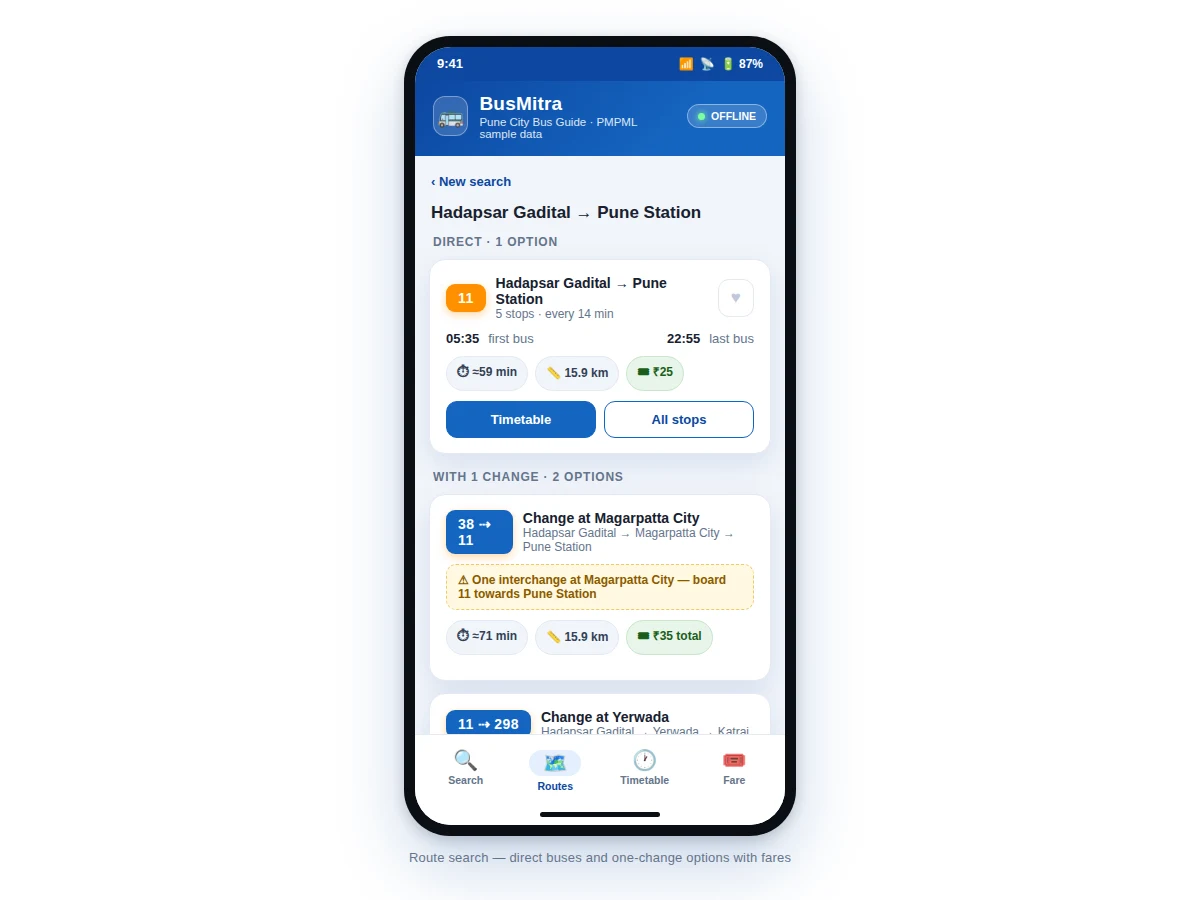
Picks boarding and destination stops, compares direct and one-change options, and saves favourites.
Follow the working sequence
How it works
- On first launch the app seeds its Room database from a bundled file containing stops, routes, stop sequences with distances, schedules and the fare slab table.
- The commuter picks a boarding stop and destination on the Search tab; the app queries the local database — no network request is made.
- Direct routes are found by checking which routes serve the boarding stop before the destination stop in their stop order; distance comes from the stored per-stop kilometre markers.
- One-change options are built by finding a common interchange stop between two routes and ranking the combinations by total travel distance.
- Each result card combines the route's first/last bus and frequency with the distance-based fare lookup, and shows an estimated journey time from distance.
- The Timetable tab generates departures for any route–stop pair from the stored first bus, last bus and frequency, offset by the stop's position along the route.
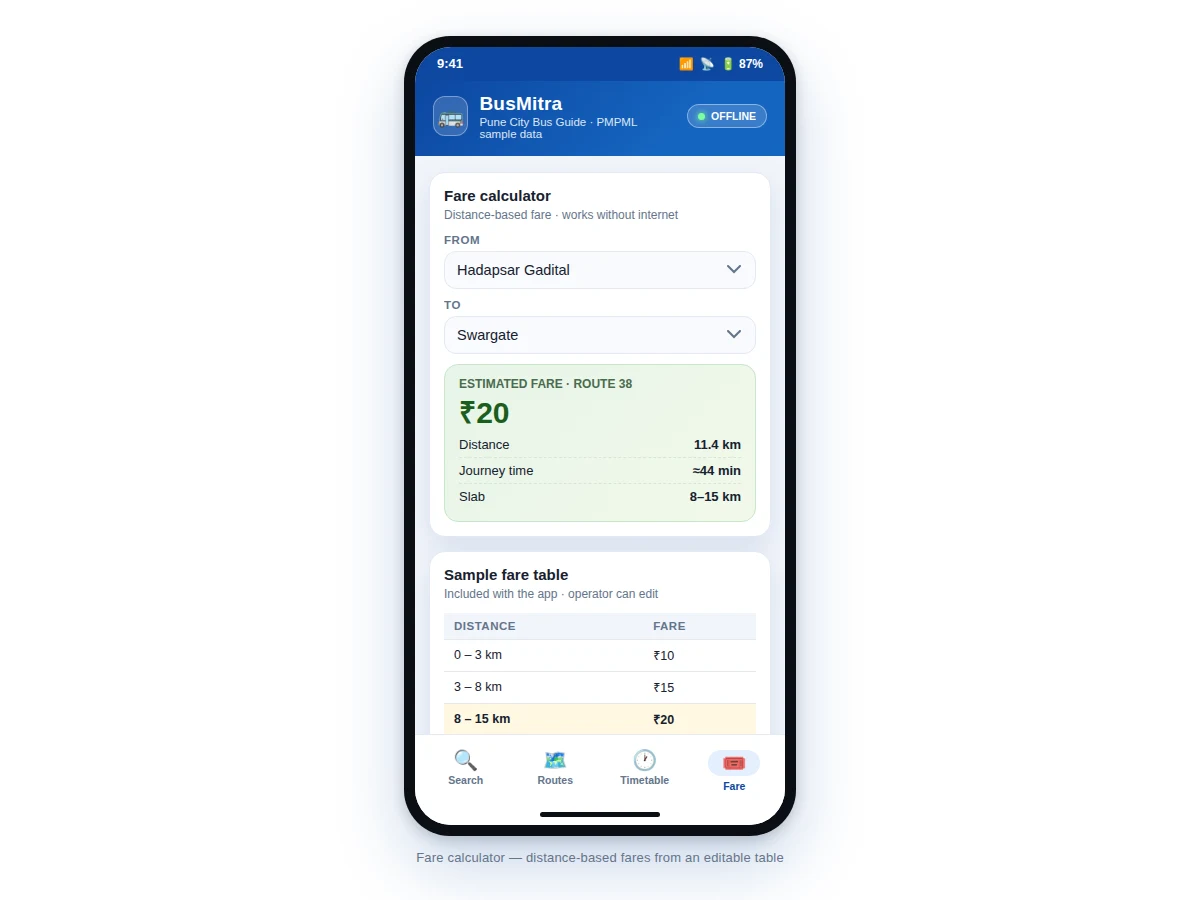
- The Fare tab looks up the journey distance in the editable slab table and highlights the matching slab so the fare is fully explainable.
Tech stack:
- Kotlin
- Android SDK (minSdk 26)
- Room · SQLite offline database
- MVVM · LiveData · Repository pattern
- Material 3 UI components
- Gradle (Kotlin DSL)
- Android Studio
- Git
| Parameter | Value |
|---|---|
| Platform | Android 8.0 (API 26) and above (design target) |
| Language | Kotlin |
| Local database | Room over SQLite, pre-seeded from bundled data |
| Sample dataset | 7 routes, 20 stops (PMPML Pune-style sample data) |
| Network dependency | None after install — fully offline (design target) |
| Search | Direct routes + one-change combinations, on-device |
| Fare logic | Editable distance-slab table in the database |
| App size | Approximately 12–18 MB installed (expected) |
| Architecture | MVVM with repository pattern |
Project features
- [Offline route search] Enter boarding and destination stops to get direct buses plus one-change combinations, ranked by total distance — computed entirely on-device with no network calls.
- [Route result cards] Each option shows bus number, stop count, first/last bus, frequency, estimated journey time, distance and fare, so the commuter can compare at a glance.
- [Stop-wise timetables] Departure times for any stop on any route, derived from the route's first bus, last bus and frequency stored in the local database — browsable without internet.
- [Fare calculator] Distance-based fare from an editable slab table (sample slabs ship with the app); the active slab row highlights so the calculation is transparent.
- [Sample Pune transit dataset] 7 routes and 20 stops modelled on PMPML Pune ship pre-loaded, so every screen is demonstrable immediately; a documented schema lets any city's data be added.
- [Favourites] Save frequent source–destination pairs with one tap (persisted locally) for one-tap repeat searches during daily commutes.
- [Clean MVVM architecture] Repository pattern over Room, LiveData-driven UI and Material 3 components — structured the way Android interviews and viva examiners expect.
What is included
- Complete Android source code (Kotlin, MVVM + Room)
- Pre-seeded sample transit database (7 Pune-style routes, 20 stops, schedules, fare slabs)
- Schema documentation and data-entry guide for adding another city
- Working demo build (APK) for testing on a real device
- Project report PDF (background, architecture, database design, search algorithm, screens)
- PPT presentation for final review
- Viva Q&A preparation document (Room, MVVM, offline sync, RecyclerView, Material 3)
Limitations & prerequisites
- Ships with sample Pune-style data, not live PMPML feeds — real-time bus tracking (GPS) is not part of this build.
- Timetables are schedule-based (first/last bus + frequency), so they do not reflect traffic delays or cancelled trips.
- One-change search covers a single interchange; journeys needing two or more changes are not computed.
- Fare slabs are sample values for demonstration — the buyer enters the real operator slabs for their city.
- Stop distances in the sample dataset are representative values, not surveyed measurements.
- The app is a commuter guide, not an official operator product — route numbers and schedules should be verified against the operator before public release.
Suitable for B.E./B.Tech final-year projects in Computer Science, IT and Android application development.
Frequently Asked Questions
Does the app really work without internet?
Yes. All routes, stops, timetables and the fare table live in a local Room/SQLite database bundled with the app. After install, search, timetables and fare calculation need no connectivity at all — that offline-first design is the project's core engineering point.
Which city's bus data is included?
A sample dataset modelled on PMPML Pune (7 routes, 20 stops, first/last bus times, frequencies and a fare slab table) ships pre-loaded. It is representative sample data for demonstration; the built-to-order delivery documents the schema and the data-entry flow so any city's real routes can be added.
How does the one-change route search work?
The app checks every pair of routes for a common interchange stop where the first route arrives and the second departs toward the destination, then ranks combinations by total distance. It is a straightforward graph walk over the local stop data — no server, no API.
How are timetable departures computed?
Each route stores a first bus, last bus and frequency; departures for a stop are generated by offsetting the schedule by the stop's distance along the route. The app presents these as the published schedule from the dataset, not as live GPS tracking.
Can the fare slabs be changed for another city?
Yes. Fares come from an editable slab table (distance range → fare) stored in the database, not hard-coded. Entering a different city's slabs updates the calculator and every fare shown in search results.
Is this project suitable for a final-year project?
Yes — for Computer Science, IT and mobile-application programs. It demonstrates offline-first Android architecture (Room, MVVM, repository pattern), a real graph-search feature, and a complete, demonstrable commuter use case.
Components & software requirements
- Kotlin
- Android SDK (minSdk 26)
- Room · SQLite offline database
- MVVM · LiveData · Repository pattern
- Material 3 UI components
- Gradle (Kotlin DSL)
- Android Studio
- Git
Delivery information
Built-to-order project. Delivery timeline is shared after order confirmation based on current queue.
Support terms
Complete documentation, setup guide, and viva preparation included. Support for setup and explanation provided.
Download free synopsis (PDF)
Enter your name and email — the synopsis PDF downloads immediately. We may send occasional project updates; no spam, unsubscribe anytime.