
More project photos (2)
The problem
Hostel messes still run on paper registers, spreadsheet billing and notice-board announcements. When a student is absent for several days, the rebate is claimed on a paper slip or verbally — slips get lost, verbal requests are forgotten, and the student is billed for days they never ate. Wardens have no structured approval queue, so decisions are delayed and hard to audit. Monthly bills are totalled by hand in spreadsheets, where one wrong cell can misbill hundreds of students, and menu changes reach students late or not at all. This project replaces that fragile chain with a single system of record on the student's phone: the app publishes the mess menu, accepts rebate claims with dates and reasons, routes them through a warden approval queue, and computes each month's bill automatically from the rule fee minus approved rebates plus extras. Because every approval instantly recomputes the bill, there is nothing to reconcile at month end.
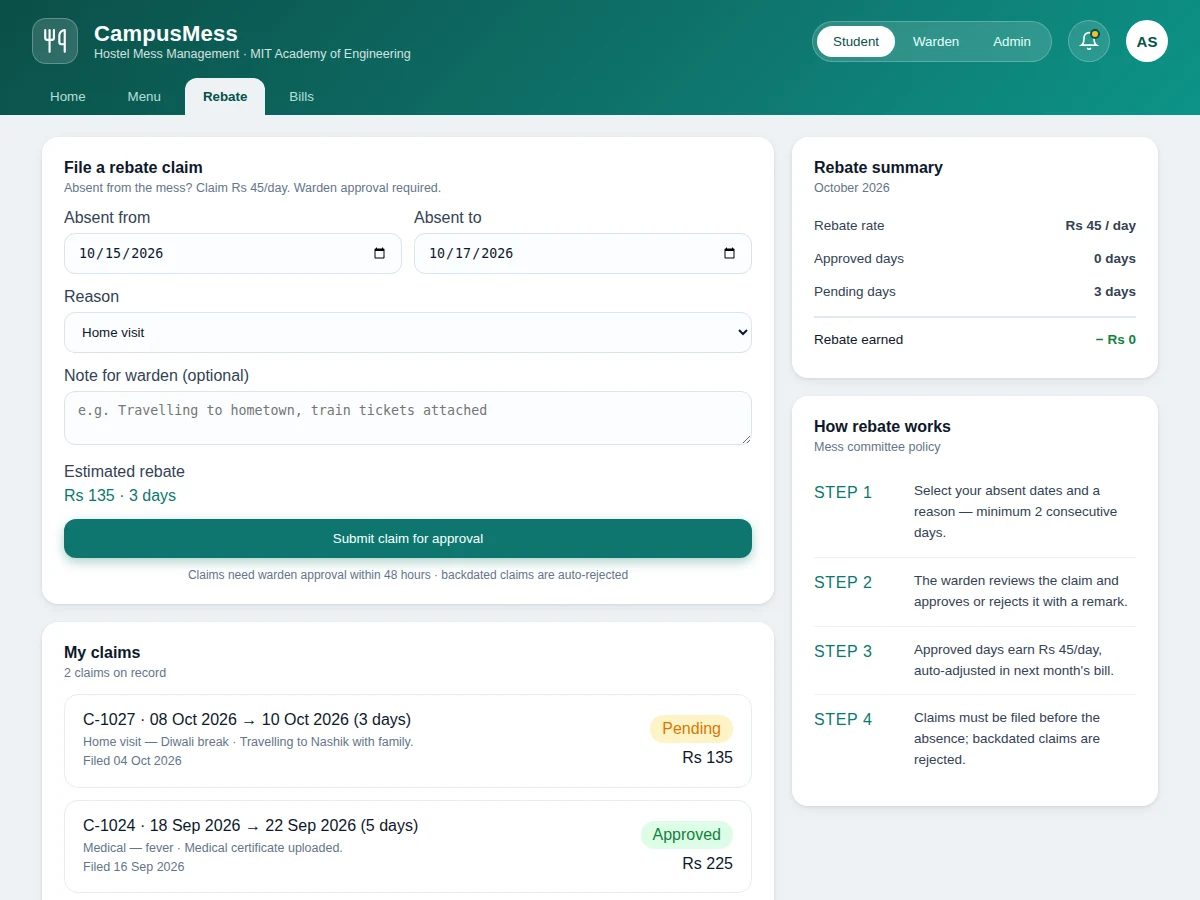
Files rebate claims for absent days with date range, reason and an optional note.
Follow the working sequence
How it works
- The admin configures the billing policy: monthly mess fee, rebate rate per absent day, minimum consecutive claim days and the warden approval SLA.
- The weekly mess menu (breakfast, lunch, snacks, dinner) is published in the app; updates are pushed to every student's device.
- A student going absent files a rebate claim with the date range, reason and an optional note; the app validates the range against the policy before accepting it.
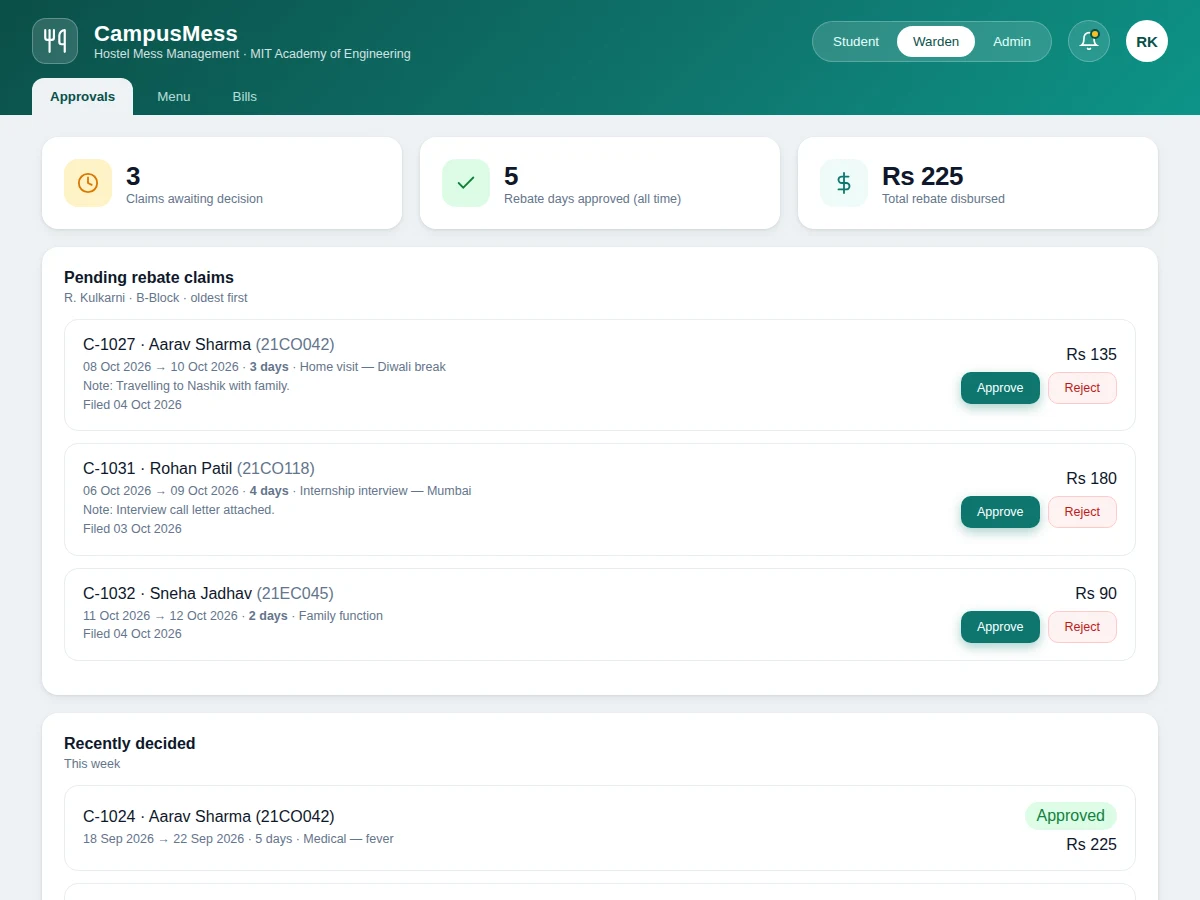
- The claim enters the warden's approval queue, ordered oldest-first, showing the student's details, dates, reason and note.
- The warden approves or rejects the claim with a remark; the decision and timestamp are recorded permanently.
- The billing engine recomputes the affected month's bill instantly: monthly fee minus approved rebate days times the rate, plus canteen extras.
- The student receives a notification and sees the updated bill with an exact breakup, plus the full history of past bills.
Tech stack:
- Kotlin, Jetpack Compose (Material Design 3)
- Room persistence library (offline-first SQLite)
- Firebase Authentication, Cloud Firestore, Cloud Messaging (optional sync + push)
- Gradle build system
- Android Studio
- Git
| Parameter | Value |
|---|---|
| Platform | Native Android app |
| Minimum Android version | 7.0 (API 24) |
| Target Android version | 14 (API 34, expected) |
| Language and UI | Kotlin · Jetpack Compose (Material Design 3) |
| Local database | Room (SQLite), offline-first |
| Cloud sync | Optional Firebase Firestore |
| Push notifications | Optional Firebase Cloud Messaging |
| User roles | 3 — student, warden/mess manager, admin |
| Rebate policy defaults | Rs 45/day, minimum 2 consecutive days (configurable) |
| Billing rule | Monthly fee − approved rebates + extras |
| Bill export | PDF per month |
| Deliverable | Signed APK + complete source code |
Project features
- [Monthly mess menu] The weekly menu — breakfast, lunch, snacks and dinner — is published in the app with today's day highlighted, replacing notice-board and WhatsApp announcements.
- [Rebate claim filing] Students file claims with an absent date range, reason and an optional note for the warden; validation blocks claims shorter than the policy minimum and backdated claims.
- [Warden approval queue] Pending claims appear oldest-first with student details, dates and reason; the warden approves or rejects each with a remark and timestamp.
- [Automatic bill computation] Each month's bill follows the rule monthly fee minus approved rebates plus extras, and recomputes the moment any claim is decided — no manual correction needed.
- [Billing history and PDF export] Past months stay available with full breakup, and any bill can be exported as a PDF for records or reimbursement.
- [Notifications] Students are notified of claim decisions, bill generation and menu updates, with a notification inbox inside the app.
- [Role-based access and admin configuration] Separate flows for student, warden/mess manager and admin; the admin sets the monthly fee, rebate rate, minimum claim days and approval SLA.
- [Offline-first data] All core data lives in a local Room database, so the app works without internet; claims and decisions sync to the cloud when connectivity returns.
What is included
- Complete Android app source code (Kotlin + Jetpack Compose)
- Signed debug APK ready to install and demonstrate
- Seeded demo data: sample students, weekly menu, claims in every state, 3 months of bills
- Project report PDF (background, methodology, architecture, screens, test cases)
- PPT presentation for final review
- Viva Q&A preparation document (Android components, Room, state management, billing logic)
- Setup guide: building the APK and configuring Firebase (optional)
Limitations & prerequisites
- The base build records the payable amount but does not collect payments — UPI or gateway integration is an optional customization.
- Push notifications need internet and a configured Firebase project; without it the app falls back to the in-app notification inbox.
- Rebate policy (rate, minimum days, SLA) is per-mess configuration, not a legal standard — the admin must set values matching their hostel's actual rules.
- The demo ships with seeded sample data; connecting a real hostel's student roster needs a one-time data import step.
- Meal attendance is claim-based, not verified — QR or biometric attendance is future scope, not part of this build.
- Cloud sync conflicts are resolved last-write-wins; the design assumes one device per user, which matches student usage.
Frequently Asked Questions
Is this project suitable for a final-year project?
Yes — for Computer Science, IT, MCA and BCA programs. It demonstrates native Android development with Kotlin and Jetpack Compose, offline-first data with Room, a real approval state machine, role-based access, business-rule-driven billing logic and optional cloud sync — a complete, defensible system rather than a single-screen demo.
How does the rebate approval workflow actually work?
The student files a claim with absent dates, a reason and an optional note. It enters the warden's queue ordered oldest-first. The warden approves or rejects it with a remark and timestamp. On approval, the billing engine immediately recomputes that month's bill using fee minus approved days times the rebate rate, and the student is notified of the decision and the updated amount.
Does the app work without internet?
Yes for all core functions. The Room database is the local source of truth, so menus, claims, approvals and bills all work offline. Claims filed offline are queued and synced when connectivity returns. Only push notifications and cloud backup need internet; without Firebase configured, updates appear in the in-app notification inbox instead.
Can the mess fee and rebate rate be changed?
Yes. The admin panel exposes the monthly mess fee, rebate rate per absent day, minimum consecutive claim days and the warden approval SLA as editable settings. Changing them affects future computations immediately, and past bills keep the values they were generated with so history stays auditable.
Is payment gateway integration included?
No. The base project computes the exact payable amount, keeps billing history and exports bill PDFs, but does not collect money. UPI or payment-gateway integration with receipts is a realistic optional customization that can be added on request, scoped separately from the base build.
Can this be adapted for my college's actual mess rules?
Yes. The rebate rate, minimum claim days, approval SLA and monthly fee are all configuration, not hard-coded logic. College-specific needs — multiple messes, different menus per hostel block, extra charge categories — are handled as customizations during the built-to-order build.
Components & software requirements
- Kotlin, Jetpack Compose (Material Design 3)
- Room persistence library (offline-first SQLite)
- Firebase Authentication, Cloud Firestore, Cloud Messaging (optional sync + push)
- Gradle build system
- Android Studio
- Git
Delivery information
Built-to-order project. Delivery timeline is shared after order confirmation based on current queue.
Support terms
Complete documentation, setup guide, and viva preparation included. Support for setup and explanation provided.
Download free synopsis (PDF)
Enter your name and email — the synopsis PDF downloads immediately. We may send occasional project updates; no spam, unsubscribe anytime.