
More project photos (2)
The problem
Students capture ideas, lecture points and reminders on the go, but voice memos on a phone are dead ends — you cannot search inside an audio file, and cloud note apps quietly upload your voice to someone else's servers. This project solves both problems at once: a native Android app that listens when you tap the mic, converts speech to editable text on the device itself, and stores everything in a local Room database where full-text search works instantly with zero network access. Because transcription runs on the phone (once the language pack is downloaded), dictation keeps working in basements, trains and exam halls with no signal. The app is deliberately scoped to what a student can genuinely defend in a viva: speech input, offline storage, search, categories, audio memos and export — each mapped to a real Android API (SpeechRecognizer, Room, MediaRecorder, WorkManager).
Taps the mic, dictates notes, edits transcripts and sets reminders.
Follow the working sequence
How it works
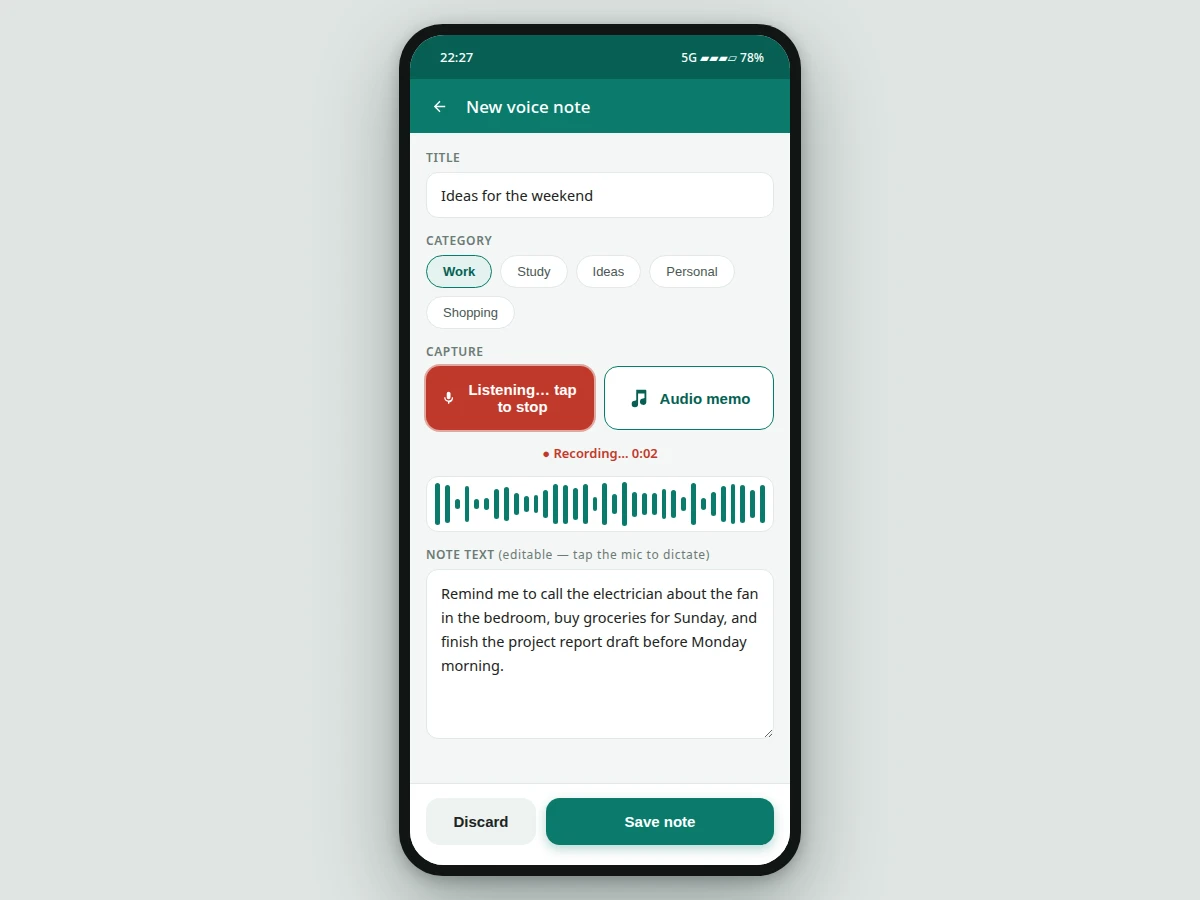
- The user taps the mic button on a new note; the app invokes Android's SpeechRecognizer with the on-device language pack.
- The recognizer streams partial transcripts back in real time; the editor renders them as editable text, so misheard words can be fixed immediately.
- On save, the note — title, transcript, category, timestamps — is written to the local Room database; audio memos are saved as files and referenced from the database row.
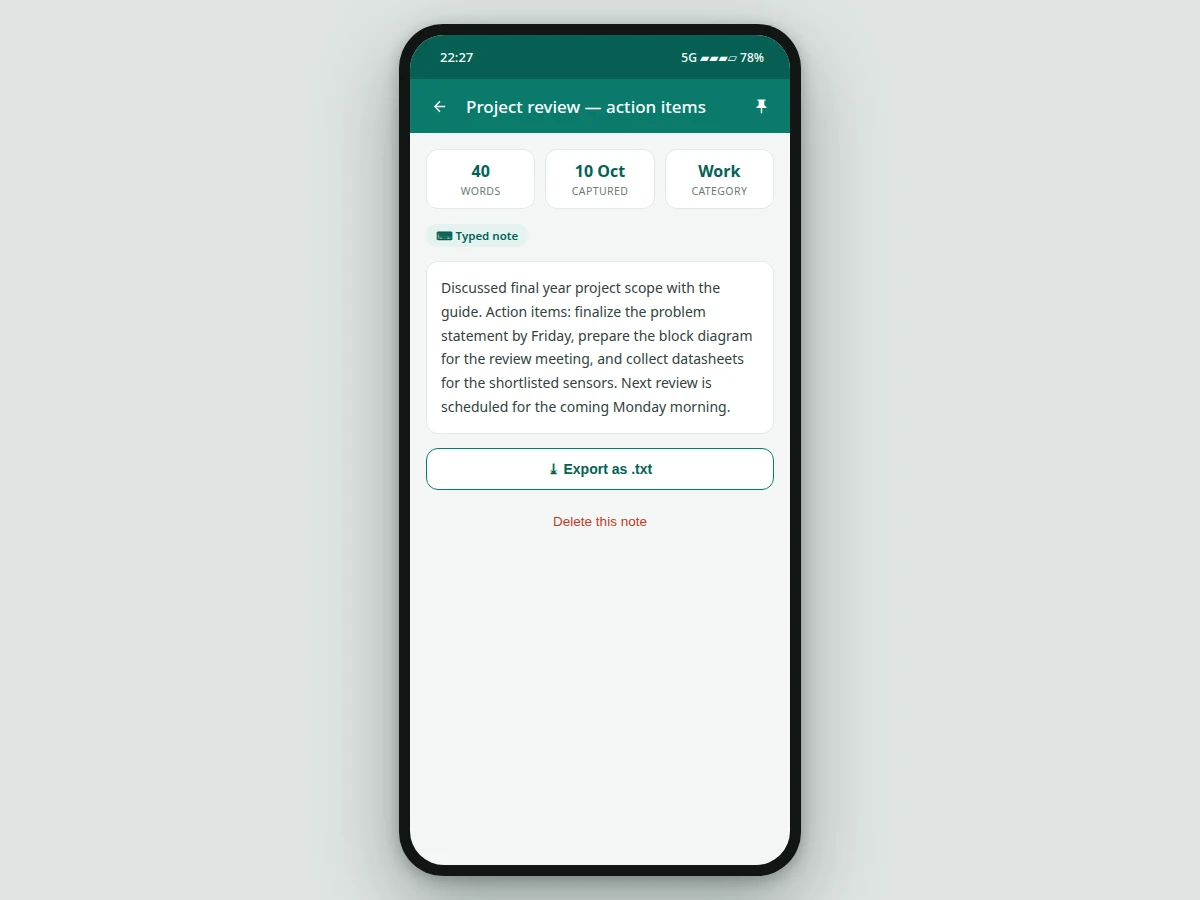
- The home screen reads from Room, grouped into pinned and recent sections, with category filters and a full-text search index over titles and transcripts.
- Configurable WorkManager jobs fire reminders attached to notes; the export action serializes any note to a .txt file for sharing.
Tech stack:
- Kotlin (native Android)
- Android Jetpack: Room, WorkManager, ViewModel
- Android SpeechRecognizer (on-device language packs)
- MediaRecorder (audio memo capture)
- Material Design 3 UI components
| Parameter | Value |
|---|---|
| Platform | Native Android, Min SDK 26 — Android 8.0 (design target) |
| Transcription engine | On-device SpeechRecognizer with downloadable language pack (device-dependent; no accuracy claimed) |
| Transcription latency | Expected under 2 s on-device for short phrases (device-dependent) |
| Note storage | Room (SQLite) local database, offline-first |
| Audio memos | MediaRecorder capture; approximately 0.5–1 MB per minute (format-dependent) |
| Search | Full-text search over titles and transcripts, on-device |
| Note reminders | WorkManager-based scheduling (configurable) |
| Export format | Plain-text (.txt) per note |
| Project size | Approximately 40–60 source files (expected) |
| Internet dependency | None after one-time speech-pack download; dictation without the pack needs connectivity |
Project features
- [One-tap voice capture] Tap the mic and speak — the on-device speech recognizer converts your voice into text in real time and drops it into an editable note, with partial transcripts shown as you talk.
- [Fully offline-first storage] Every note, category and transcript lives in a Room database on the phone — the app captures, saves and searches with zero network access.
- [Full-text search] Search across titles and transcripts instantly; pinned notes and the most recent matches surface first, so a note dictated weeks ago is found in seconds.
- [Categories and pinning] Organize notes into categories such as Work, Study and Ideas, and pin the important ones to the top of the list with one tap.
- [Audio memo attachments] Record raw audio memos with MediaRecorder alongside the transcript — useful when dictation is impractical or you want the original voice.
- [Export to TXT] Any note exports as a plain-text file, ready to paste into a report, share on WhatsApp or archive.
- [Configurable reminders] WorkManager schedules reminders on any note, so action items captured by voice actually get followed up.
- [Privacy by design] No accounts, no cloud sync, no analytics — your voice and your notes never leave the device.
What is included
- Complete Kotlin source code as an Android Studio project
- Room database schema, entities and DAOs
- Interactive concept demo of the app UI
- Project report PDF (background, architecture, methodology, results)
- PPT presentation for final review
- Viva Q&A preparation document (SpeechRecognizer, Room, WorkManager, permissions)
- Build and setup guide
Limitations & prerequisites
- Transcription accuracy depends on the device's speech engine, microphone quality and ambient noise — no accuracy figure is promised.
- On-device (offline) transcription needs the language pack downloaded once; without it, dictation falls back to server-based recognition which requires internet.
- Heavy background noise degrades recognition; quiet surroundings give the best results.
- Audio memos are stored as local device files, so long recordings consume phone storage.
- This is an academic build, not a production app — no cloud sync, no multi-device support, no accessibility certification.
Frequently Asked Questions
Does dictation really work without the internet?
Yes — once the device's on-device language pack is downloaded, Android's SpeechRecognizer runs fully locally, so capture, transcription, storage and search all work offline. The first time you dictate in a language, Android may ask to download its speech pack; without the pack and without internet, dictation falls back to typing.
How accurate is the speech-to-text?
Accuracy depends on the device's speech engine, the microphone and background noise, so no fixed figure is promised. Quiet surroundings and clear speech give the best results, and the report documents how to measure transcription quality on your own device for the viva.
Is this project suitable for a final-year project?
Yes — for Computer Science, IT and mobile-computing programs. It demonstrates native Android development with Kotlin, on-device speech recognition, Room database design, background scheduling with WorkManager, permission handling and a genuinely useful offline-first app — all strong, defensible viva material.
Can this project be customized?
Yes. Realistic additions include cloud backup or sync across devices, extra dictation languages, hands-free voice commands, home-screen widgets, biometric app lock and a Wear OS companion app — each quoted separately as optional customization on top of the base build.
What do I need to build and run it?
Android Studio and an Android phone running Android 8.0 or newer — emulators work for the UI, but a real device is needed for microphone and speech-pack testing. Dictation in your language needs its on-device speech pack downloaded once from Android's settings.
What will I receive with the project?
The complete Kotlin source code as an Android Studio project, the Room database schema and DAOs, an interactive concept demo of the app UI, the project report PDF, a final-review PPT and a viva Q&A document — everything prepared fresh and built to order for you.
Components & software requirements
- Kotlin (native Android)
- Android Jetpack: Room, WorkManager, ViewModel
- Android SpeechRecognizer (on-device language packs)
- MediaRecorder (audio memo capture)
- Material Design 3 UI components
Delivery information
Built-to-order project. Delivery timeline is shared after order confirmation based on current queue.
Support terms
Complete documentation, setup guide, and viva preparation included. Support for setup and explanation provided.
Download free synopsis (PDF)
Enter your name and email — the synopsis PDF downloads immediately. We may send occasional project updates; no spam, unsubscribe anytime.