
More project photos (2)
The problem
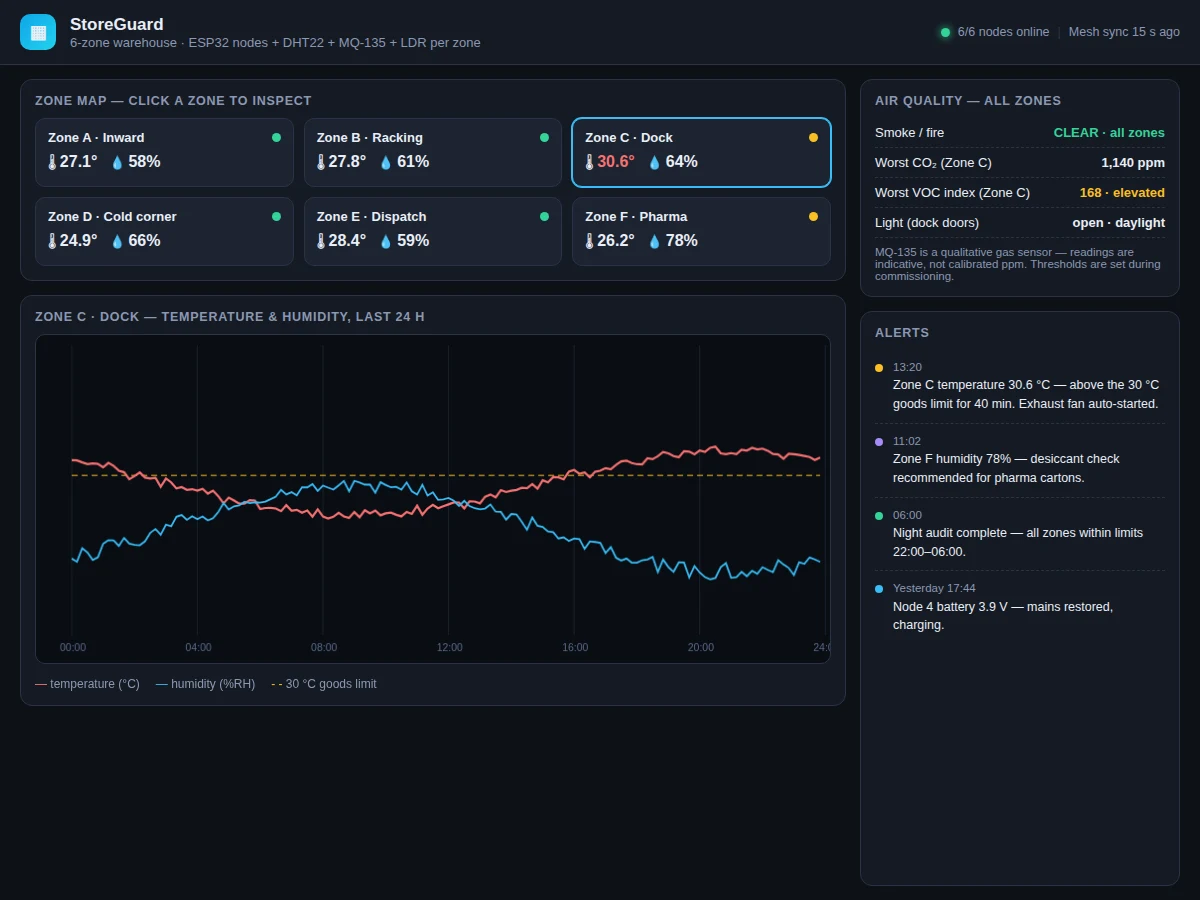
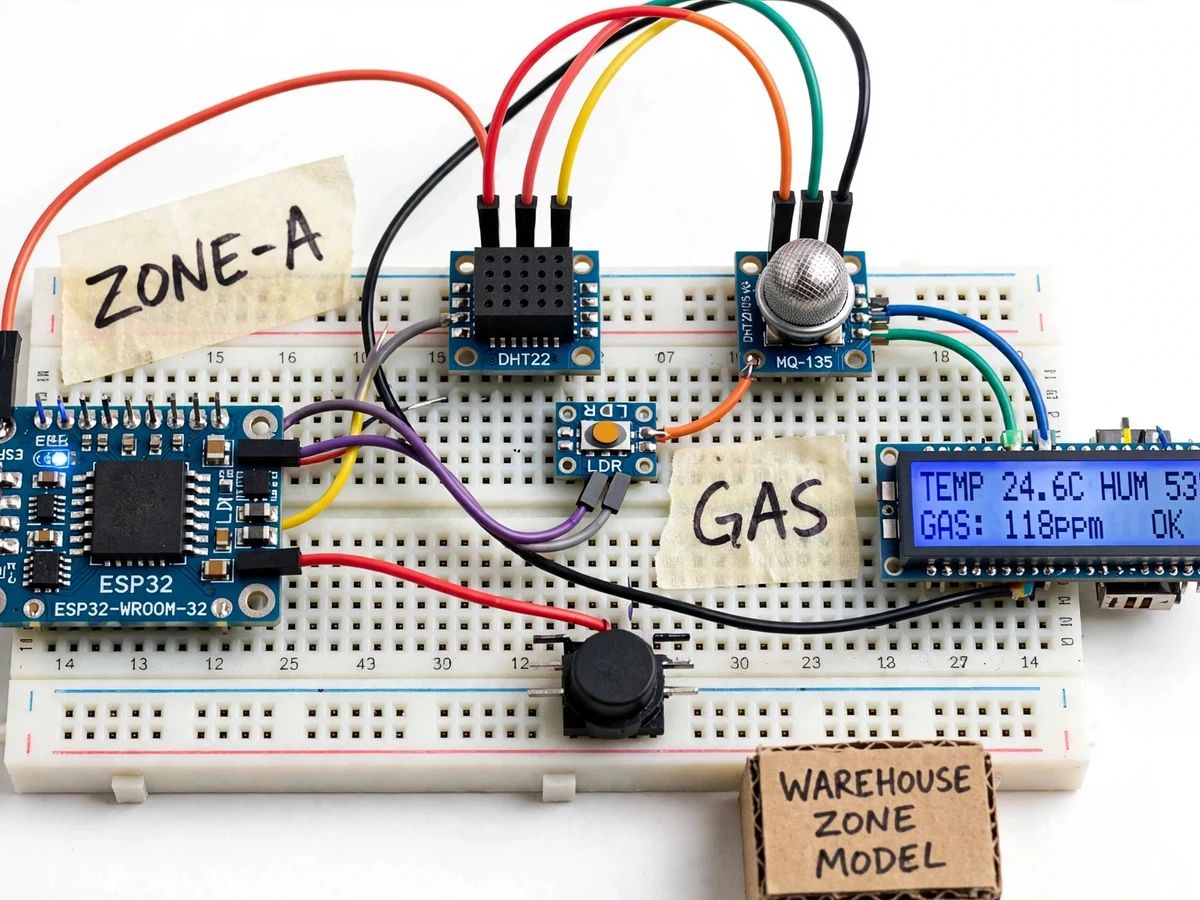
Warehouses lose goods to the environment, not to theft: a dock door left open pushes a zone past the goods temperature limit, humidity creeps up in the pharma corner, and nobody notices until stock is damaged. Spot checks with a handheld meter miss the drift between visits. This project instruments the warehouse properly. ESP32 sensor nodes — one per zone — read a DHT22 for temperature/humidity, an MQ-135 for air quality gases, and an LDR for light (dock doors open or closed), with a buzzer for local alarms and an LCD showing live readings (TEMP 24.6C, HUM 53%, GAS: 118PPM, OK). The StoreGuard dashboard maps all six zones with live temperature/humidity, plots the selected zone's 24-hour curves against the 30°C goods limit, tracks worst CO2 and VOC index, and keeps an alerts panel: temperature breaches, humidity warnings for pharma cartons, night-audit summaries and node battery events.
How it works
- Each ESP32 zone node polls its DHT22, MQ-135 and LDR on a schedule; readings are smoothed and compared against the zone's configured thresholds.
- When temperature or humidity crosses a threshold, the node sounds its local buzzer, updates its LCD, and publishes an alert event to the dashboard.
- The dashboard's zone map shows all six zones live; clicking a zone loads its 24-hour temperature/humidity chart with the goods-limit line drawn.
- The air-quality panel aggregates the worst CO2 and VOC readings across zones and reports smoke/fire status; MQ-135 values are labelled indicative.
- Light readings track dock-door state (open daylight vs closed); combined with temperature, they explain dock-zone excursions.
- At 06:00 the system writes a night-audit summary (all zones within limits 22:00–06:00) and archives the day's readings.
Tech stack:
- ESP32 zone-node firmware
- DHT22 (temperature + humidity)
- MQ-135 (air quality, indicative)
- LDR (light / dock-door state)
- Buzzer + 16×2 LCD (local alarm/display)
- Multi-zone cloud dashboard
- MQTT/HTTP telemetry
- Git
| Parameter | Value |
|---|---|
| Controller | ESP32-WROOM-32 per zone node |
| Climate | DHT22 (datasheet ±0.5°C, ±2–5% RH — indicative) |
| Gas | MQ-135 — qualitative/indicative readings, not calibrated ppm |
| Light | LDR for dock-door state (open/closed daylight) |
| Demo zones | 6 (Inward, Racking, Dock, Cold corner, Dispatch, Pharma) |
| Goods limit | 30°C example limit on 24-h chart (configurable per zone) |
| Alerts | Threshold breaches, night audit, node battery/mains (design) |
| Local UI | Buzzer alarm + LCD live readings per node |
Project features
- [Per-zone sensing] Each zone node reads DHT22 (temp/RH), MQ-135 (gas) and LDR (light) — six zones in the demo: Inward, Racking, Dock, Cold corner, Dispatch, Pharma.
- [Zone map dashboard] Click any zone to inspect it; live temp/RH per zone with online/degraded status dots.
- [Goods-limit monitoring] The 24-hour chart draws the 30°C goods limit; breaches are timed (demo: 40 min above limit) and trigger alerts.
- [Air quality panel] Smoke/fire status, worst CO2 and VOC index across zones — with the honest note that MQ-135 readings are indicative, not calibrated ppm.
- [Alerting] Temperature breaches, humidity warnings, night-audit summaries, node battery/mains events — timestamped in the alerts panel plus a local buzzer.
- [Local LCD] Each node shows live TEMP/HUM/GAS on its own display, so a zone can be checked without the dashboard.
- [Night audit] A daily summary confirms all zones stayed within limits 22:00–06:00 — the record a warehouse manager files.
What is included
- Complete ESP32 zone-node prototype (DHT22, MQ-135, LDR, buzzer, LCD, wiring diagram)
- Node firmware (thresholds, alerts, telemetry)
- Multi-zone dashboard (zone map, 24-h charts, air quality, alerts)
- Commissioning guide (threshold setting per goods type, sensor placement)
- Project report PDF (background, sensing theory, methodology)
- PPT presentation for final review
- Viva Q&A preparation document (DHT22, MQ-135, LDR, thresholds, MQTT)
Limitations & prerequisites
- The MQ-135 is a qualitative gas sensor — the dashboard explicitly labels its readings indicative, not calibrated ppm; thresholds are set during commissioning, not from a datasheet curve.
- The DHT22 is an indicative climate sensor (±0.5°C / ±2–5% RH datasheet); the build is a monitoring rig, not certified instrumentation — design targets, not measured claims.
- The dashboard figures (zone readings, alerts, night audit) are illustrative simulation data from the demo app, not measurements from a built warehouse.
- Six zone nodes need six ESP32s plus power and Wi-Fi coverage across the warehouse — the prototype demonstrates one node fully; the rest are replicated builds.
- Buzzer alerts are local; remote push/SMS alerting needs an added notification service (listed as future scope).
Frequently Asked Questions
What does each zone node measure?
Temperature and humidity (DHT22), air-quality gases (MQ-135) and light level (LDR) — the combination that explains most warehouse goods damage: heat, damp, fumes and dock doors left open.
Is the MQ-135 reading real ppm?
No — the dashboard says so explicitly. The MQ-135 is qualitative; its readings are indicative trends used with commissioning-set thresholds, not calibrated ppm values.
What is the night audit?
A daily summary confirming all zones stayed within limits 22:00–06:00 — the compliance record a warehouse manager files, generated automatically each morning.
How do alerts reach staff?
The node buzzes locally, its LCD shows the state, and the dashboard alerts panel timestamps every event. Remote push/SMS is future scope.
Why six zones?
Different goods have different limits — pharma cartons care about humidity, the dock swings with the door, the cold corner stays cool. One warehouse-wide reading hides all of this.
Is this project suitable for a final-year project?
Yes — for IoT & Embedded, Electronics and Computer Science programs. It is a multi-node environmental monitoring system with threshold logic, honest sensor limitations and a real logistics application. Suitable for B.E./B.Tech final-year projects in IoT & Embedded Systems, Electronics and Computer Science.
Components & software requirements
- ESP32 zone-node firmware
- DHT22 (temperature + humidity)
- MQ-135 (air quality, indicative)
- LDR (light / dock-door state)
- Buzzer + 16×2 LCD (local alarm/display)
- Multi-zone cloud dashboard
- MQTT/HTTP telemetry
- Git
Delivery information
Built-to-order project. Delivery timeline is shared after order confirmation based on current queue.
Support terms
Complete documentation, setup guide, and viva preparation included. Support for setup and explanation provided.