
More project photos (2)
The problem
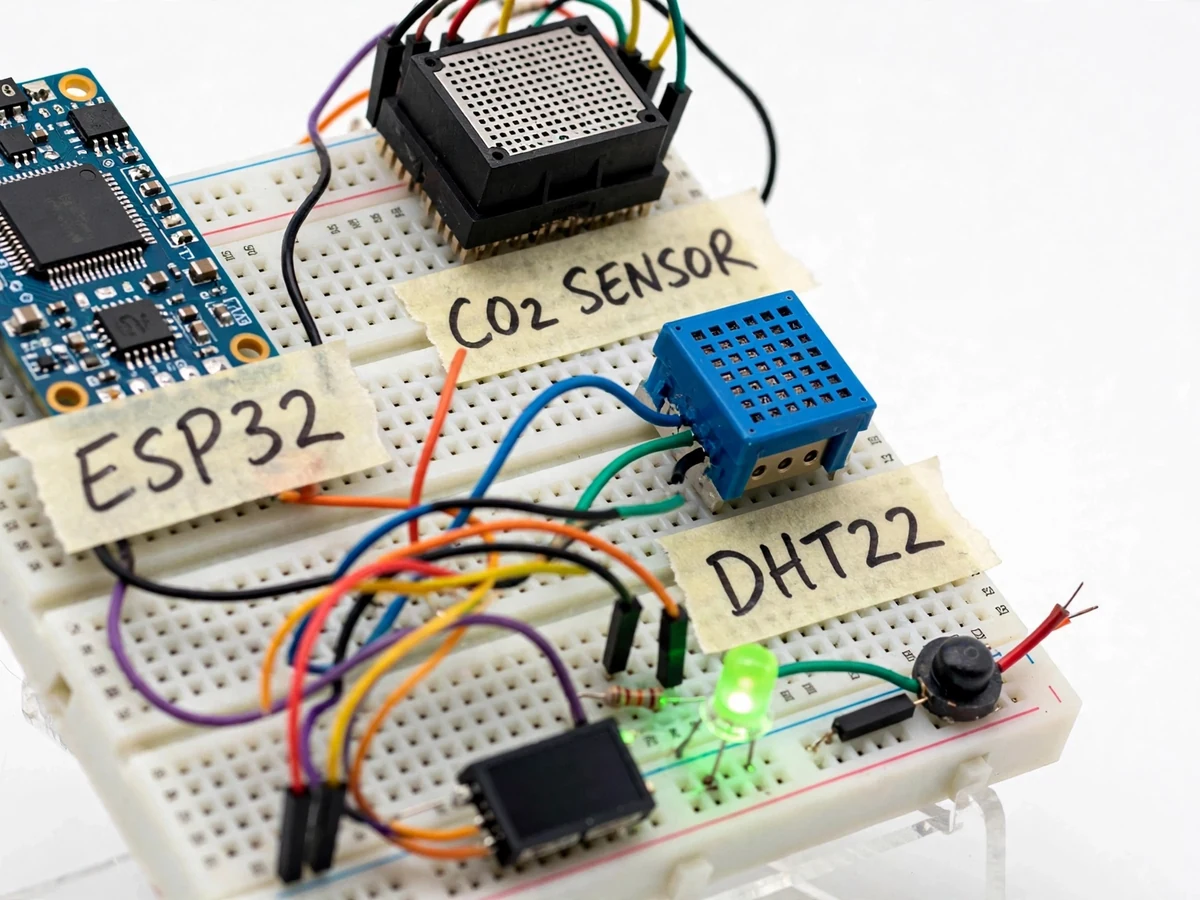
A classroom of forty students exhales a surprising amount of CO2 — levels routinely climb past 1,000 ppm in a closed room, and the research literature associates that stuffy range with drowsiness and poorer concentration. Yet nobody in the room can feel CO2 rising; ventilation happens by habit or not at all. Commercial indoor-air monitors exist but are priced per room and opaque inside. This project builds the capability as an understandable student system: an MH-Z19-class NDIR CO2 sensor (true CO2 measurement, not an estimate from VOCs) plus a DHT22 for temperature and humidity, read by an ESP32 and streamed over Wi-Fi to a companion dashboard. The dashboard plots CO2, temperature and humidity trends, computes a simple comfort/ventilation recommendation from the data, and logs high-CO2 episodes with timestamps. The hardware demonstrates NDIR sensing and telemetry; the software demonstrates turning raw sensor data into a decision a teacher can act on.
How it works
- The MH-Z19-class NDIR sensor measures CO2 via infrared absorption and reports ppm over UART; the DHT22 reports temperature and humidity alongside.
- Every 30 seconds the ESP32 publishes the triplet over Wi-Fi (MQTT/HTTP) to the dashboard backend and updates the onboard OLED.
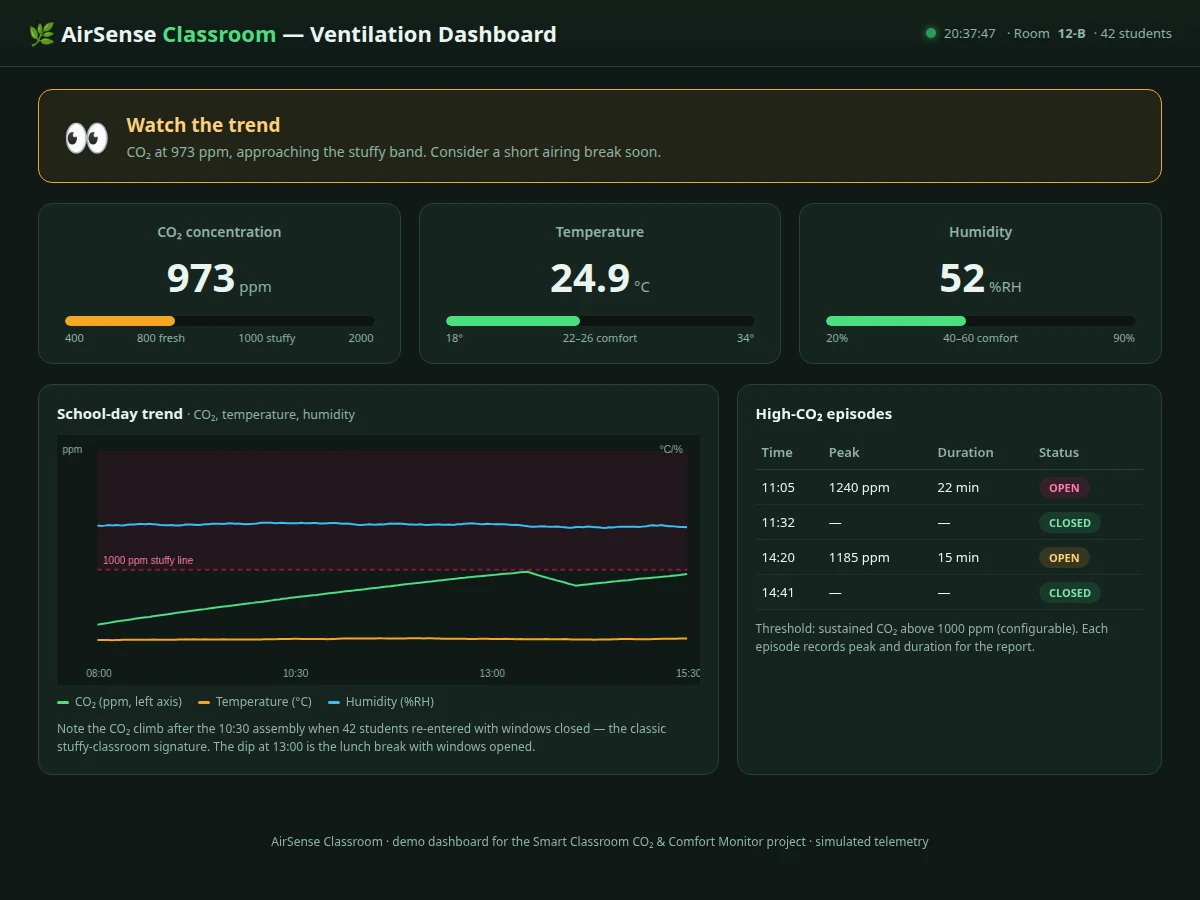
- The dashboard renders live gauges — CO2 with green/amber/red bands around the 1,000 ppm stuffy-air guideline — plus rolling trend charts.
- The recommendation engine watches CO2 level and its trend: sustained readings above threshold produce a "ventilate now" state; falling readings clear it.
- Each threshold crossing opens a timestamped episode in the log with peak CO2 and duration; closing it records the recovery.
- On the hardware, the RGB LED shifts green→amber→red with CO2 bands and the buzzer chirps on entering the red band.
- The student runs the unit through a real occupied-room session and exports the day's chart and episode log as the report's measured evidence.
Tech stack:
- ESP32 development board (Wi-Fi telemetry)
- MH-Z19-class NDIR CO2 sensor (UART)
- DHT22 temperature/humidity sensor
- 0.96-inch OLED display + RGB LED + buzzer
- MQTT/HTTP telemetry
- Companion web dashboard (gauges, charts, recommendations)
- Arduino IDE (C/C++ firmware)
| Parameter | Value |
|---|---|
| Controller | ESP32 with Wi-Fi |
| CO2 sensing | NDIR, 0–5,000 ppm class range (design target) |
| CO2 accuracy | Approximately ±50 ppm + 5% of reading (sensor class expectation) |
| Temp/humidity | DHT22: ±0.5 °C, ±2–5% RH (datasheet) |
| Sampling | Every 30 seconds (configurable) |
| Dashboard | Live gauges + trend charts + episode log + advice |
| Local UI | OLED + RGB LED + buzzer |
| Ventilation advice | Threshold + trend based (configurable) |
| Power | 5 V adapter (NDIR sensor needs stable 5 V) |
Project features
- [True NDIR CO2 sensing] An MH-Z19-class NDIR sensor measures actual CO2 (0–5,000 ppm range class) — not a VOC-derived estimate — with UART output to the ESP32.
- [Temperature and humidity] A DHT22 adds the other two comfort variables, so the dashboard reasons about the full indoor environment.
- [Live ventilation dashboard] Current CO2, temperature and humidity render as gauges with color bands, plus rolling trend charts for the school day.
- [Data-driven ventilation advice] The dashboard computes a recommendation — ventilate now / air is fine — from CO2 level and trend, not from a timer.
- [High-CO2 episode log] Every crossing of the stuffy-air threshold is timestamped and logged with peak value and duration, building an evidence record for the report.
- [Local alert] An RGB LED and buzzer on the unit signal rising CO2 in the room itself, so action does not depend on someone watching the dashboard.
- [Wi-Fi telemetry] Readings publish every 30 seconds over Wi-Fi (MQTT/HTTP) to the dashboard; the unit also shows live values on its small OLED.
What is included
- Working hardware prototype: ESP32, NDIR CO2 sensor, DHT22, OLED, LED, buzzer
- Companion dashboard web app (gauges, charts, episode log, ventilation advice)
- Complete firmware (sensing, telemetry, local alerting)
- Sensor warm-up and calibration notes (NDIR ABC calibration explained)
- Wiring diagram and MQTT/HTTP setup notes
- Project report PDF (background, NDIR sensing theory, comfort science basis, methodology, logged session)
- PPT presentation for final review
- Viva Q&A preparation document
Limitations & prerequisites
- The NDIR sensor needs a warm-up period (a few minutes) after power-up before readings stabilize — the firmware flags warming-up state explicitly.
- CO2 accuracy of roughly ±50 ppm + 5% (sensor-class expectation) suits trend and threshold use, not laboratory-grade measurement; the report states this plainly.
- The ventilation advice is a simple threshold-plus-trend rule, not a building-HVAC control signal — it advises a human, it does not drive dampers or fans in this build.
- The dashboard runs on the local network; internet-remote access needs a hosted broker, listed as future scope — no cloud features are claimed.
- One unit covers one room; whole-building coverage would need multiple units, discussed as future scope.
Frequently Asked Questions
Does it really measure CO2?
Yes — the MH-Z19-class sensor uses NDIR (non-dispersive infrared) absorption, a true CO2 measurement principle. It is not a VOC sensor guessing CO2 from other gases; the report explains the difference for the viva.
What counts as "stuffy" air?
The dashboard marks bands around the widely used 1,000 ppm guideline for indoor spaces: under ~800 ppm reads fresh, sustained readings above ~1,000 ppm trigger the ventilate advice. Thresholds are configurable.
How does the ventilation advice work?
A simple rule on level plus trend: CO2 sustained above threshold means "ventilate now"; a falling trend after windows open clears it. It advises the teacher — it does not control any fan or damper in this build.
Why does the sensor need warm-up?
NDIR sensors stabilize over a few minutes as the infrared source and optics reach thermal equilibrium. The firmware shows a warming-up state and excludes those readings from the episode log.
Can it log a whole school day?
Yes — readings every 30 seconds stream to the dashboard, and the episode log captures each high-CO2 period with timestamps, peak and duration. The student exports this as the report's measured session.
Is this project suitable for a final-year project?
Yes — for Electronics, Electrical and IoT & Embedded programs. It demonstrates NDIR gas sensing, Wi-Fi telemetry, a decision-making dashboard and honest treatment of sensor limits. Suitable for B.E./B.Tech final-year projects in Electronics, Electrical and IoT & Embedded Systems.
Components & software requirements
- ESP32 development board (Wi-Fi telemetry)
- MH-Z19-class NDIR CO2 sensor (UART)
- DHT22 temperature/humidity sensor
- 0.96-inch OLED display + RGB LED + buzzer
- MQTT/HTTP telemetry
- Companion web dashboard (gauges, charts, recommendations)
- Arduino IDE (C/C++ firmware)
Delivery information
Built-to-order project. Delivery timeline is shared after order confirmation based on current queue.
Support terms
Complete documentation, setup guide, and viva preparation included. Support for setup and explanation provided.