
More project photos (2)
The problem
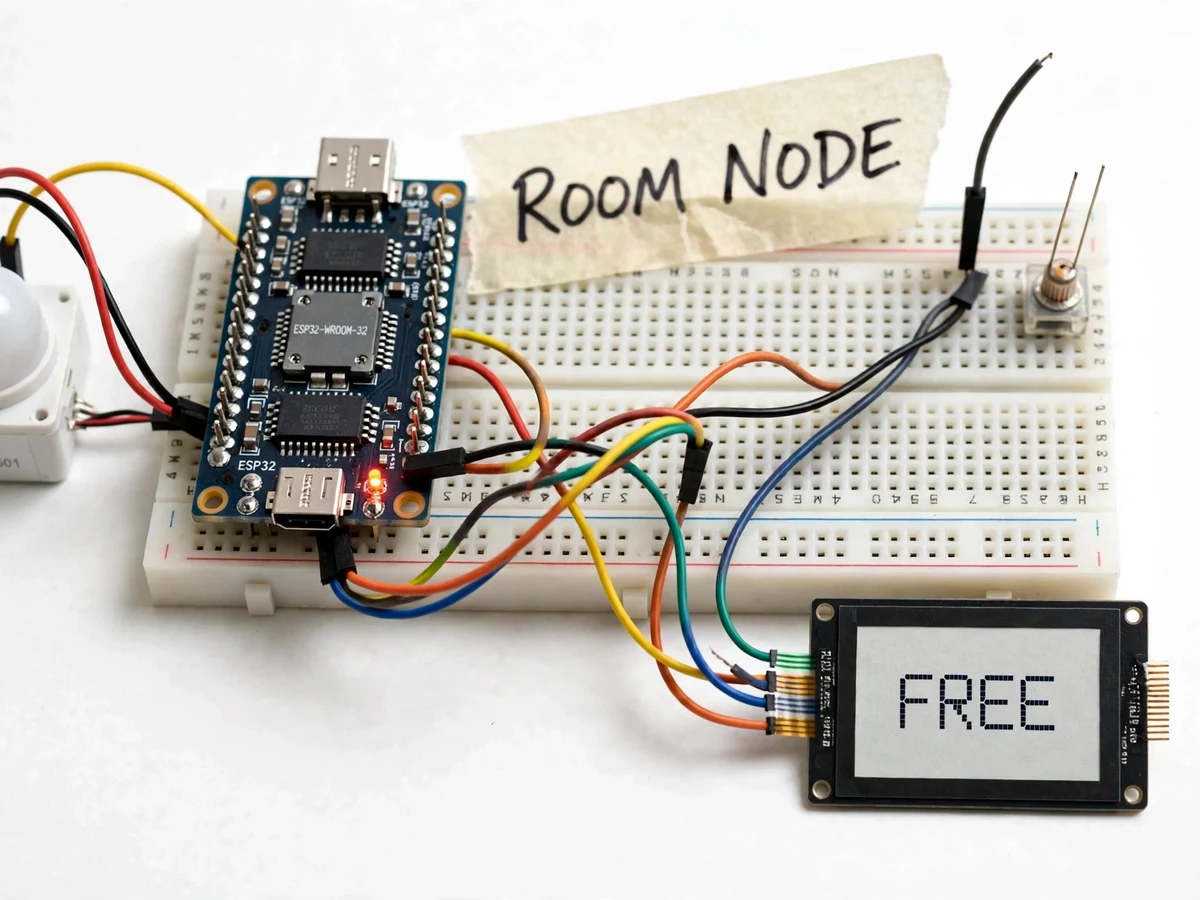
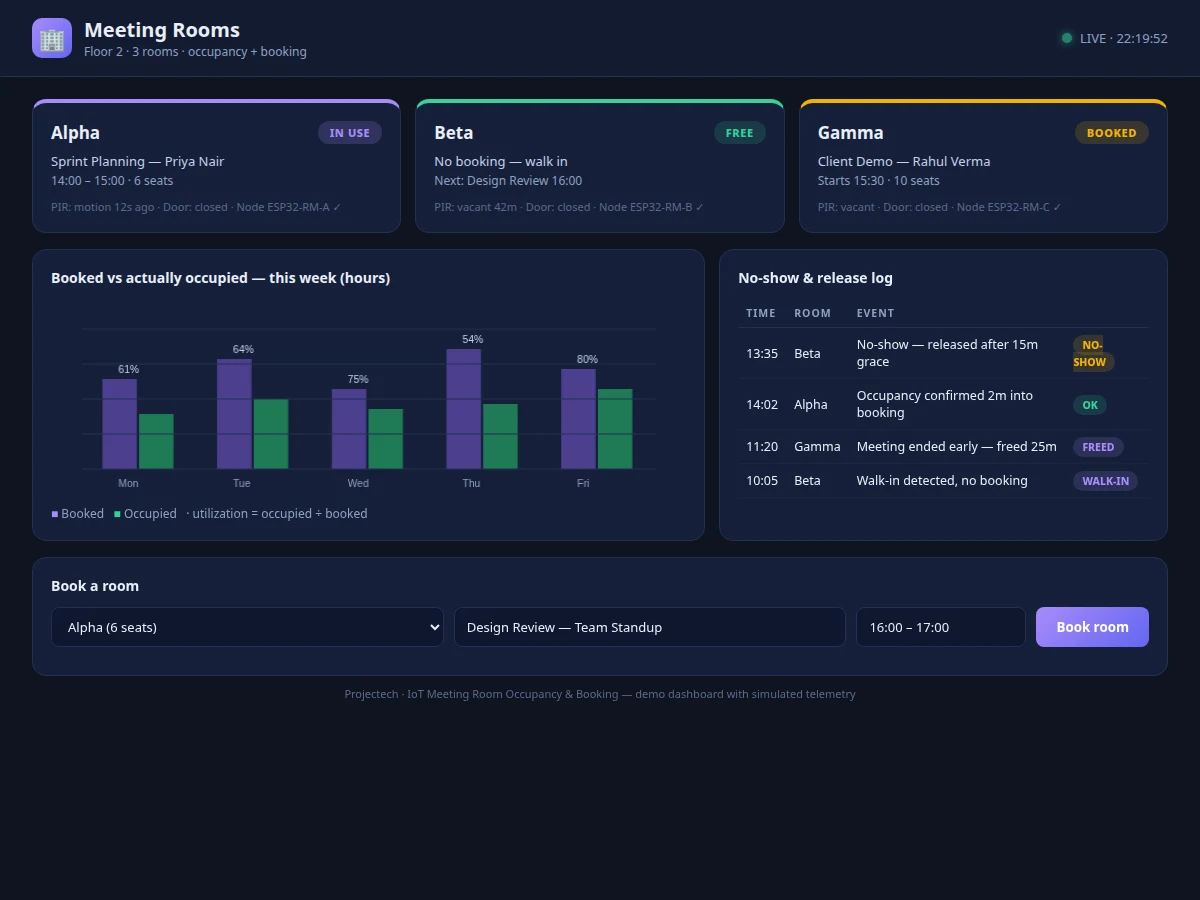
In every office, meeting rooms are booked solid on the calendar while standing half empty in reality — no-shows and ghost meetings waste the scarcest resource in the building, yet facility teams have no ground truth to act on. This project creates that ground truth: an ESP32 node with PIR motion and door sensors knows whether a room is truly occupied, an e-paper display outside the door shows the live status (FREE / BOOKED / IN-USE) that stays readable with almost no power, and a web dashboard ties it together with room booking, live states and utilization analytics. When a booked slot shows no occupancy after a grace period, the dashboard flags it as a no-show and can release the room. Hardware senses, the display informs, the dashboard manages — all three built for this project.
How it works
- The ESP32 node mounts inside the room with a PIR sensor covering the seating area and a reed/magnetic sensor on the door.
- Firmware fuses PIR motion events with door transitions into an occupied/vacant judgement with hysteresis, so momentary stillness does not flip the state.
- State changes publish over Wi-Fi (MQTT/HTTP) to the backend within seconds; the e-paper display outside the door updates to FREE / BOOKED / IN-USE.
- Bookings are created on the dashboard (room, title, organizer, slot) with overlap prevention; the display shows the current or next meeting.
- If a booked slot exceeds its grace period with no occupancy, the dashboard marks a no-show and optionally releases the slot.
- The analytics view aggregates booked vs occupied hours per room per week into utilization charts.
- The student tunes PIR sensitivity and the vacancy timeout for their demo room with the included procedure.
Tech stack:
- ESP32 development board (Wi-Fi)
- PIR motion sensor + door reed/magnetic sensor
- E-paper display panel (room status sign)
- Arduino IDE (C/C++ sensor-fusion firmware)
- MQTT/HTTP telemetry to cloud backend
- Single-file HTML/CSS/JS dashboard (floor view, booking, analytics)
- Booking conflict-prevention logic on the dashboard
| Parameter | Value |
|---|---|
| Rooms per node | 1 room per sensor node (design; multi-room = multi-node) |
| Sensing | PIR motion + door open/close, fused with hysteresis (design) |
| Display | E-paper, updates on state change only (design) |
| State latency | Room state on dashboard within seconds of change (design target) |
| No-show grace | Configurable, default 15 min (design) |
| Dashboard | Single-file web app: floor view, bookings, analytics (built for this project) |
| Booking | Overlap prevention, no external calendar needed (design) |
| Power | USB/adapter powered node (design) |
Project features
- [True occupancy sensing] A PIR motion sensor plus a door open/close sensor feed the ESP32; firmware fuses them so a briefly still meeting is not misread as empty and a door left ajar does not fake occupancy.
- [E-paper room display] A low-power e-paper panel outside the door shows FREE / BOOKED / IN-USE with the current meeting title, updating only on state change — readable in corridor light with near-zero energy.
- [Booking management] The web dashboard handles room bookings (title, organizer, time slot) with conflict prevention, so the system is usable without any external calendar.
- [No-show detection] If a booked slot shows no occupancy past a configurable grace period, the dashboard flags it as a no-show and can auto-release the room for others.
- [Utilization analytics] The dashboard charts booked-vs-occupied hours per room per week, giving facility teams the data to right-size room inventory.
- [Live room states] Every room's current state streams over Wi-Fi to the dashboard's floor view, updating within seconds of a state change.
- [Working web dashboard] A single-file HTML/CSS/JS dashboard with floor view, booking calendar and analytics charts — built for this project and screenshotted for the listing gallery.
What is included
- ESP32 room sensor node (PIR + door sensor)
- E-paper room status display with enclosure
- Firmware with occupancy sensor-fusion logic
- Working single-file web dashboard (floor view, booking calendar, analytics)
- Cloud telemetry setup guide
- Sensor-tuning procedure for the demo room
- Project report PDF (sensor fusion, e-paper driving, methodology)
- PPT presentation for final review
- Viva Q&A preparation document (PIR sensing, state machines, IoT dashboards)
Limitations & prerequisites
- One node covers one room; a PIR's field of view must cover the seating area, so very large or L-shaped rooms need careful placement.
- Occupancy fusion is heuristic — a person sitting perfectly still for a long stretch can read as vacant until they move; the timeout is tunable but the limitation is stated.
- The dashboard's booking system is standalone; syncing with Google/Outlook calendars is listed as future scope, not included.
- E-paper updates take a few seconds and the panel is not a touchscreen — interaction happens on the dashboard.
- Utilization analytics need days of history before the charts are meaningful.
Frequently Asked Questions
How does it know the room is really occupied?
A PIR motion sensor watches the seating area and a door sensor tracks entries/exits; firmware fuses both with hysteresis, so a briefly still meeting stays "occupied" and only sustained emptiness flips the state to vacant.
What is shown outside the room?
An e-paper display shows FREE, BOOKED (with the upcoming meeting) or IN-USE (with the current meeting title) — always readable, updating only when the state changes, sipping power.
What is a ghost meeting and how is it caught?
A booking with nobody in the room. If no occupancy appears within the grace period after a booking starts, the dashboard flags it as a no-show and can release the slot for others.
Does it need Google Calendar or Outlook?
No — the dashboard includes its own booking system with conflict prevention. Calendar sync is documented as future scope.
Can one node cover multiple rooms?
No — one node per room, since PIR coverage and door sensing are per-room. The dashboard's floor view aggregates as many room nodes as you add.
Is this project suitable for a final-year project?
Yes — for IoT, Embedded and Computer programs. It demonstrates sensor fusion, low-power display driving and a complete booking-plus-analytics dashboard. Suitable for B.E./B.Tech final-year projects in IoT, Embedded Systems and Computer engineering.
Components & software requirements
- ESP32 development board (Wi-Fi)
- PIR motion sensor + door reed/magnetic sensor
- E-paper display panel (room status sign)
- Arduino IDE (C/C++ sensor-fusion firmware)
- MQTT/HTTP telemetry to cloud backend
- Single-file HTML/CSS/JS dashboard (floor view, booking, analytics)
- Booking conflict-prevention logic on the dashboard
Delivery information
Built-to-order project. Delivery timeline is shared after order confirmation based on current queue.
Support terms
Complete documentation, setup guide, and viva preparation included. Support for setup and explanation provided.