
More project photos (2)
The problem
A volunteer opportunity board is a web application where local organisations post volunteering opportunities and volunteers find roles that match their skills, location, and availability, then sign up for specific event dates. Organisers list the skills each role needs and a capacity count for each event, volunteers see a skill-matching score for every opportunity, and sign-ups stop when an event is full. The demo shows the workflow with 12 pre-seeded opportunities across 6 locations.
A volunteer opportunity board exists because finding local volunteering work is still harder than it should be. A volunteer opportunity board gathers scattered local roles into one searchable place, so a willing volunteer no longer has to hear about a role by chance. Today, many small organisations announce roles on a printed notice, in a chat group, or by word of mouth, and each announcement reaches only the people who happen to see it that day. A volunteer who missed the announcement never learns the role existed, while an organiser cannot tell whether enough people saw it or whether the people who did have the skills the role needs. Roles also fill unevenly: one event turns people away at the door while another runs short-handed, because nobody tracked how many places were left. A shared board with skill tags, locations, dates, and a visible capacity count fixes that mismatch by letting each side see the same facts before anyone commits.
| Feature | Volunteer opportunity board | Notice-board post | Social-media group | Generic event app |
|---|---|---|---|---|
| Skill matching | Skill tags on every role, with a match score per volunteer | None — the reader judges fit from a poster | None — roles appear in a mixed feed | Interest tags only, no role skills |
| Capacity-aware sign-ups | Places filled shown live, sign-up blocked when full | No count — turnout is a guess | Comments or reactions, no reliable count | Ticket booking, but no volunteer roles |
| Search by skill and location | Filter by skill, location, and open places | Must be read in person, in one place | Search is buried under unrelated posts | Search by event type, not volunteer skill |
| Organiser posting | Structured posting form with skills and capacity | Anyone can pin a paper notice | Anyone can post, with no standard format | Organisers list ticketed events, not shifts |
| Sign-up record | Each volunteer keeps a list of their sign-ups | None — no record for either side | None — the volunteer must remember | Booking history, but no volunteering record |
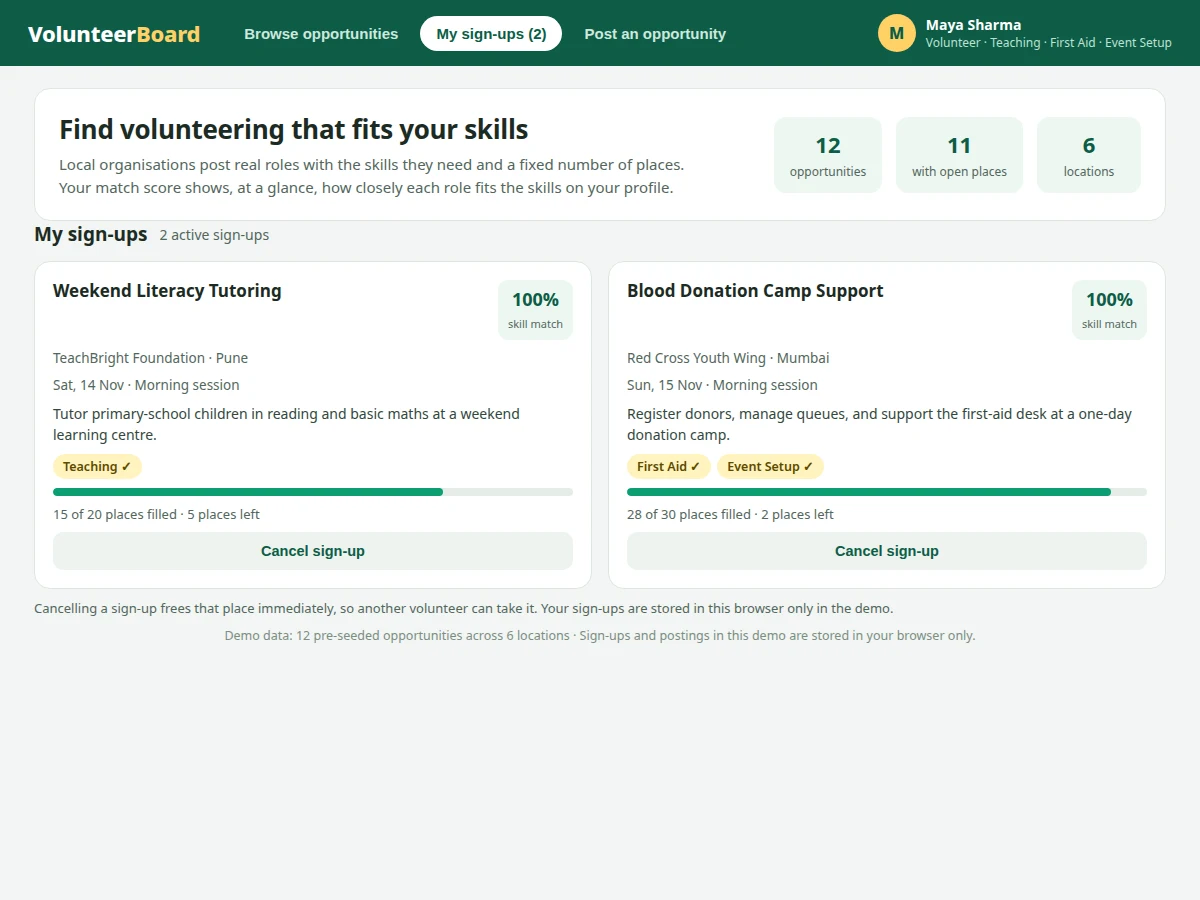
Volunteer with a skill profile browsing roles.
Follow the working sequence
How it works
The board works as a loop between two roles, volunteer and organiser, with a shared record of places in the middle. An organiser posts a role with its required skills and a capacity count, and that role joins the browse list with its places-filled count starting from zero. A volunteer with a skill profile opens the board, and the board scores every role by comparing the role's required skills with the volunteer's skills, showing the score on each card and sorting the best matches first. When the volunteer signs up, the filled count for that event rises by one place and the sign-up is added to their personal list; if the event is already full, the board offers the waitlist instead. Cancelling reverses the same record, freeing the place at once, so the count the organiser sees always reflects the sign-ups that actually stand.
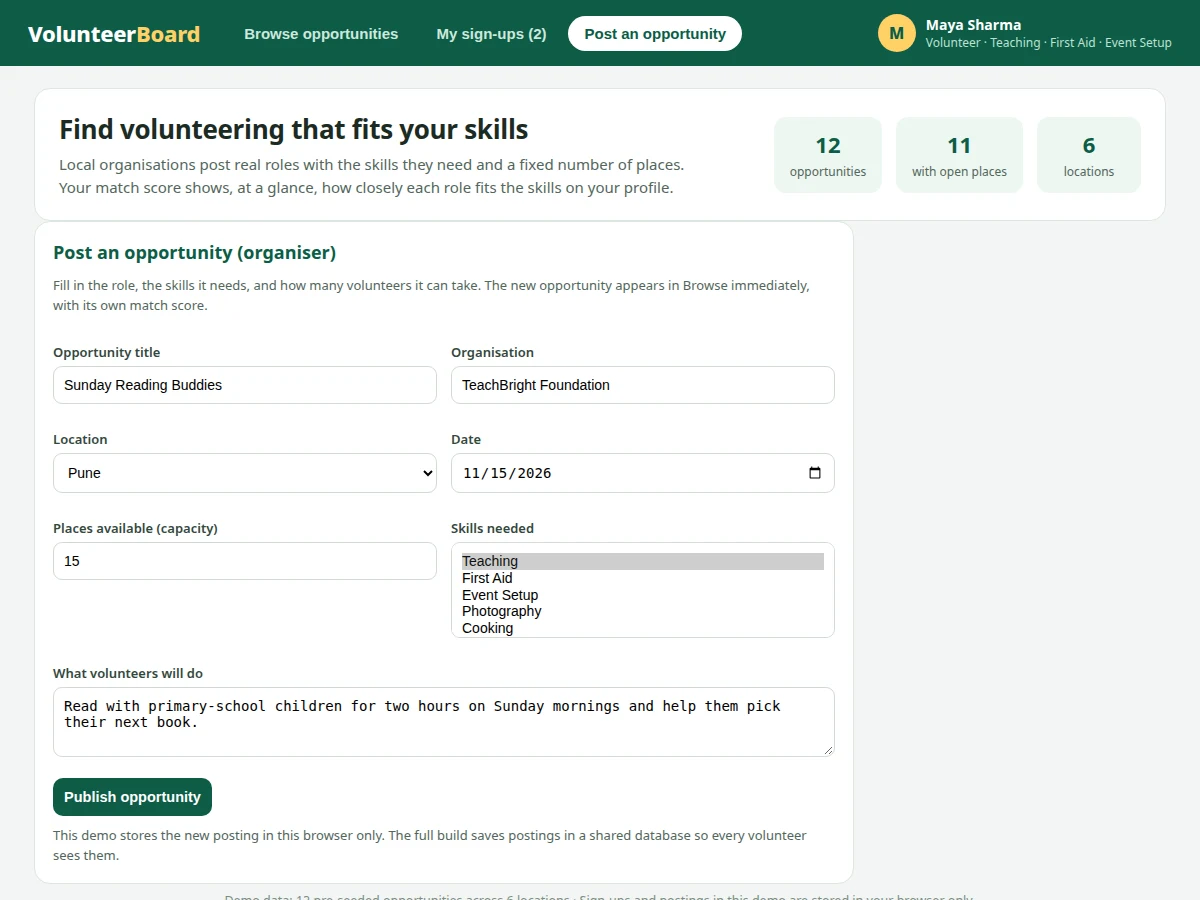
- An organiser opens the posting form and enters the role title, organisation, location, date, description, required skills, and capacity count.
- The new opportunity appears in the browse list with its skill tags, places-filled count, and a match score for each volunteer who views it.
- A volunteer sets their profile skills once, and the board scores every role by the overlap between those skills and each role's required skills.
- The volunteer searches by keyword and filters by skill, location, open places only, or a minimum match score to narrow the list.
- The volunteer signs up for a role with open places, and the filled count for that event rises by one place while the sign-up joins their personal list.
- If an event has reached its capacity, the board blocks sign-up and offers the waitlist option instead of overfilling the event.
- The volunteer manages commitments from the sign-ups view, where cancelling a sign-up lowers the filled count at once and frees the place for someone else.
Tech stack:
- HTML · CSS · JavaScript frontend
- Node.js · Express backend for the full build
- PostgreSQL · relational database for the full build
- Browser local storage · demo persistence
| Parameter | Value |
|---|---|
| Platform | Web browser on desktop and mobile devices (design target) |
| Pre-seeded opportunities in demo | 12 opportunities (demo count) |
| Locations in demo | 6 locations (demo count) |
| Volunteer profile skills in demo | 3 skills (demo count) |
| Matching score range | 0% to 100% (demo-computed percentage) |
| Matching rule | Matched skills divided by required skills, multiplied by 100 (demo formula) |
| Full-event behaviour | Sign-up blocked at full capacity, with a waitlist offered instead (design rule) |
| Storage in demo | Browser local storage on the volunteer's own device |
| Storage in full build | PostgreSQL database on the project server |
| Browser storage limit | Approximately 5 MB per origin in most browsers (browser documentation) |
| Internet requirement | Needed to load the web application; the demo runs locally after loading (expected) |
Project features
The board is built around four capabilities that work together: skill matching that scores every role against a volunteer's own skills, capacity-aware sign-ups that never let an event overfill, organiser posting that turns a role description into a structured listing with skills and a place count, and search that filters roles by skill, location, and availability. Around those four, a personal sign-ups view keeps every commitment in one place with cancellation that frees the place immediately, progress bars show how full each event is at a glance, and a waitlist keeps interested volunteers in reach when an event fills. Together, these capabilities mean a volunteer spends less time hunting through scattered announcements and more time on the role itself, while an organiser sees honest place counts instead of guesses. Nothing in the base project handles payments, and nothing in the demo pretends to verify a volunteer's background.
- [Skill-matching scores] Every opportunity shows a percentage score computed from the overlap between the volunteer's profile skills and the skills the role requires, so the best-fitting roles sort to the top without any guesswork.
- [Capacity-aware sign-ups] Each event carries a fixed capacity count, and the filled count rises with every sign-up, so an event that reaches its capacity stops accepting sign-ups instead of overfilling.
- [Search and filter by skill, location, and availability] Volunteers can search by keyword and filter by skill, location, open places only, or a minimum match score, so a long list narrows to roles they can actually take.
- [Organiser posting form] Organisers add a title, organisation, location, date, description, required skills, and capacity through a single form, and the new opportunity appears in the browse list immediately with its own match score.
- [My sign-ups view] Every sign-up is kept in one personal list with its organisation, location, date, and places-left count, so a volunteer can review their commitments without searching the whole board again.
- [Cancellation that frees a place] Cancelling a sign-up lowers the filled count at once, so the freed place becomes available to the next volunteer instead of sitting wasted until the event day.
- [Waitlist for full events] When an event is full, the sign-up button is replaced by a waitlist option, so interested volunteers stay reachable if a place opens up later.
Implemented in the demo, delivered in the full build, and future scope, kept separate: the HTML demo already implements skill-matching scores, capacity-aware sign-ups, search and filtering, the organiser posting form, the sign-ups view, cancellation, and the waitlist on 12 pre-seeded opportunities across 6 locations. The delivered full build adds a server database and user accounts so postings and sign-ups are shared between all users instead of living in one browser. Payment handling, an in-app messaging system, and background verification of volunteers are future scope only, and are not part of the base project.
What is included
- Complete web application source code with the matching, sign-up, posting, and sign-ups-view features above
- Single-file HTML demo with 12 pre-seeded opportunities across 6 locations
- Setup instructions for running the application and trying the demo workflow
- Project report PDF covering background, design, implementation, and limitations
- PPT presentation for the final review
- Viva Q&A preparation document covering skill matching, capacity handling, roles, and storage
To request a quotation, message Projectech on WhatsApp with the project name, the scope you want (the base board, or the base board plus user accounts and a server database), and your delivery date; Projectech replies with a quotation covering scope, price, and delivery timeline.
Limitations & prerequisites
- Skill matching is keyword and skill-tag overlap computed in the demo, not a machine-learning model and not an assessment of a volunteer's real ability.
- The demo stores sign-ups and postings in one browser only, so two volunteers on different devices cannot see each other's demo sign-ups until the full build adds a shared database.
- There is no payment handling in the base project, since volunteering roles carry no fee, and adding payments would be a separate customisation.
- There is no in-app messaging system in the base project, so organisers and volunteers coordinate outside the board, and messaging is future scope only.
- There is no background verification of volunteers in the base project, so organisers must run their own checks where a role needs them.
- Browser local storage holds only a small amount of demo data, approximately 5 MB per origin in most browsers, so the demo is not a substitute for the full build's database.
- Event dates and times in the demo are sample values, and real deployments need organisers to enter and maintain their own dates.
Frequently Asked Questions
Is this project suitable for a final-year project?
Yes, for Computer Science and IT programmes, because it combines a real two-role web application with skill matching, capacity rules, and a posting workflow that a reviewer can open and test directly. The work demonstrates interface design, data modelling for roles and sign-ups, filtering and sorting logic, and the difference between browser-local demo storage and a shared server database. A reviewer can also trace a single sign-up from its button click through the rising filled count to its entry in the personal sign-ups list.
How does skill matching work?
Skill matching here is simple skill-tag overlap, not machine learning, because each role lists its required skills and each volunteer lists their own skills, and the score is the matched skills divided by the required skills, multiplied by 100. A role needing Teaching alone scores 100% for a volunteer with Teaching, while a role needing Teaching and Photography scores 50% for that same volunteer. That transparency is deliberate: the score can be checked by hand from the tags on the card, and no hidden model or training data is involved.
What happens when an event is full?
When an event reaches its capacity count, the board blocks further sign-ups and offers a waitlist option instead, so the event cannot overfill through the board. The places-filled count and the places-left count stay visible on the card, and a cancellation frees a place at once for the next volunteer. In the demo, the full event is the community kitchen role, which shows its filled count equal to its capacity and offers the waitlist in place of sign-up.
Can organisers post their own opportunities?
Yes, the organiser posting form accepts a title, organisation, location, date, description, required skills, and capacity count, and the new opportunity appears in the browse list immediately with its own match score. In the demo the posting is stored in the same browser, while the full build saves it in a shared database so every volunteer sees it. Organisers can also be given a separate posting view as a customisation, keeping volunteer and organiser flows apart.
Does the base project include payment or messaging?
No, the base project includes neither payment handling nor an in-app messaging system, because volunteering roles carry no fee and coordination can happen outside the board. Payment handling would only make sense for ticketed or paid events, which this board is not built for, and messaging is listed as future scope rather than quietly assumed. Both can be added as customisations, and the quotation states the exact scope before work starts so there is no ambiguity.
What will I receive with the project?
You receive the complete web application source code, the single-file HTML demo with 12 pre-seeded opportunities, setup instructions, the project report, the review presentation, and the viva Q&A document. The quotation on WhatsApp confirms the exact scope, price, and delivery timeline before work starts, so there is no ambiguity about what is included. Delivery also includes a short walkthrough of the demo, so the matching, sign-up, and posting flows can be shown confidently at review time.
Components & software requirements
- HTML · CSS · JavaScript frontend
- Node.js · Express backend for the full build
- PostgreSQL · relational database for the full build
- Browser local storage · demo persistence
Delivery information
Built-to-order project. Delivery timeline is shared after order confirmation based on current queue.
Support terms
Complete documentation, setup guide, and viva preparation included. Support for setup and explanation provided.
Download free synopsis (PDF)
Enter your name and WhatsApp number — the synopsis PDF downloads immediately. We may send occasional project updates on WhatsApp; no spam.