
More project photos (2)
The problem
Final-year students need a portfolio that shows their work, but most of them put it off: setting up a personal site means wrestling with frameworks, hosting and deployment before writing a single line of content. Existing portfolio templates are static files — change one detail and you are editing code. This project takes the opposite approach: a portfolio builder web app where the student picks one of three professionally designed templates and fills in a guided form — name, tagline, skill tags, projects with tech tags, education and links — while a live preview renders the portfolio in real time. When it looks right, the app exports a shareable link or a standalone HTML file the student can host anywhere or attach to internship applications. Because the whole builder is a single HTML file with no build step and no backend, the student can explain every part of it in the viva: state management, live rendering, the template system and the export pipeline.
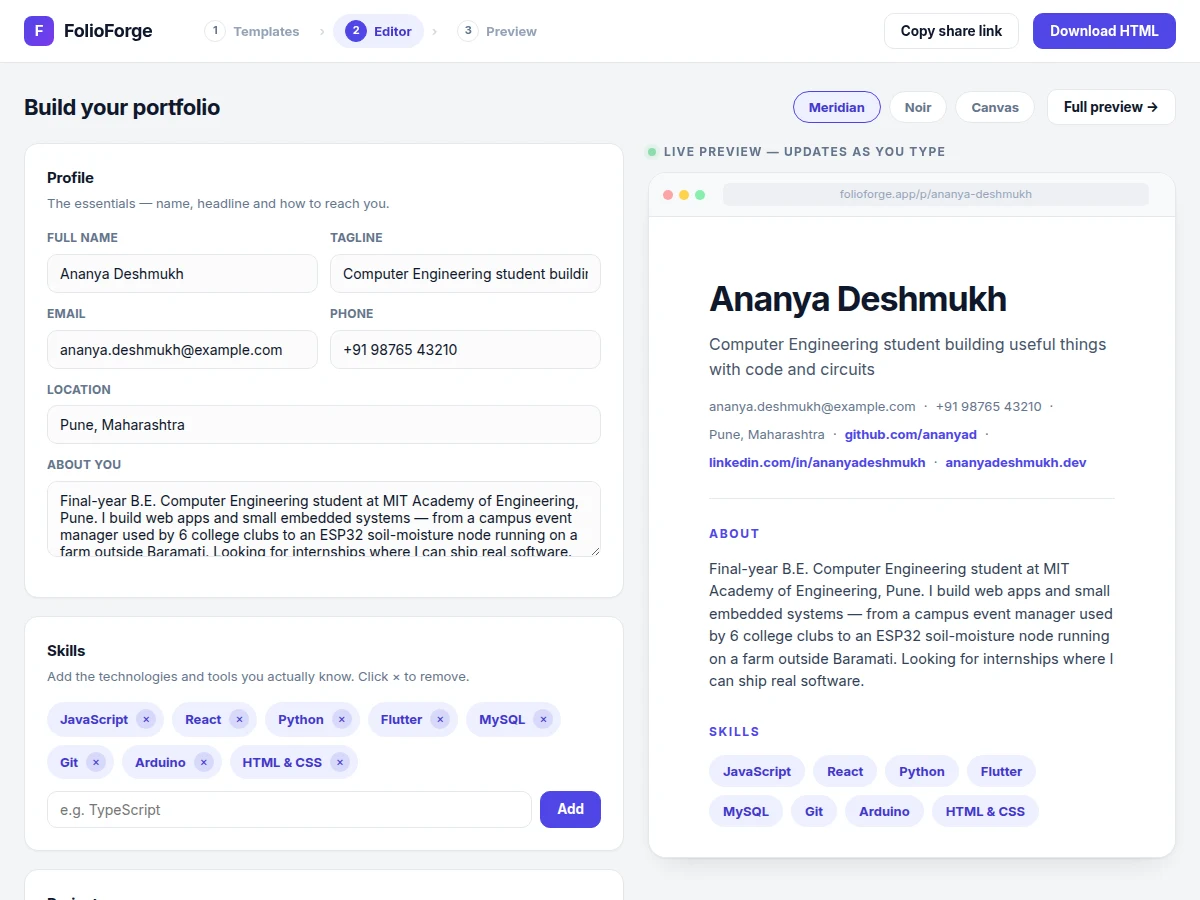
Student building a portfolio from the guided editor.
Follow the working sequence
How it works
- The app loads as a single HTML file; all portfolio data lives in one JavaScript state object (profile, skills, projects, education, links, selected template).
- The template gallery renders each of the three designs live from the same state, scaled into preview cards — the student picks one and enters the editor.
- Every form input is bound to its state field; on each keystroke the state updates and the preview pane re-renders the chosen template instantly.
- Skills are added through a tag input (duplicates rejected, removable with ×) and projects through an add-project form with title, description, tech tags and link — each entry appears in the showcase immediately.
- Template pills at the top of the editor re-render the same data in a different design on demand, so switching designs never loses content.
- "Copy share link" builds a URL from the student's name plus a random suffix and copies it via the Clipboard API, with a manual fallback where the API is blocked.
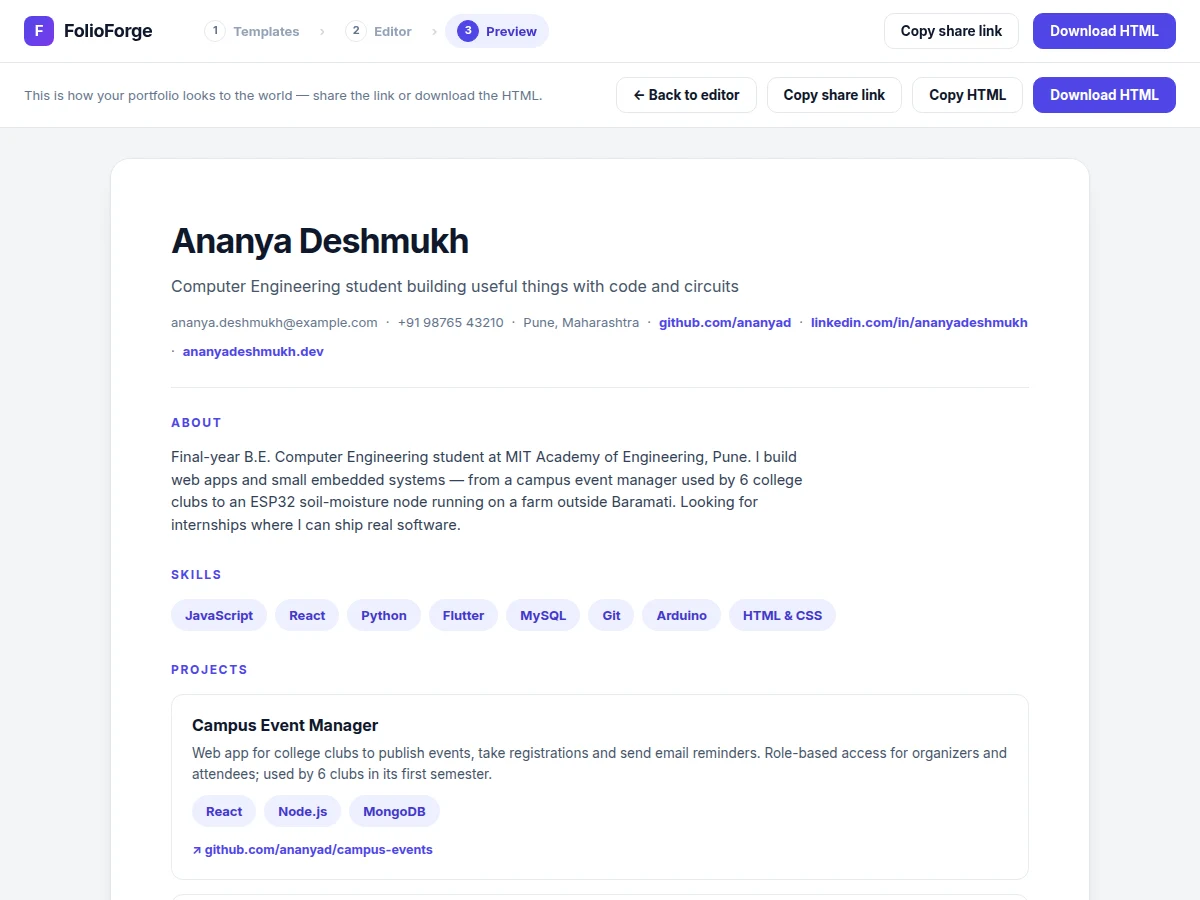
- "Download HTML" serializes the current portfolio — template markup plus its CSS — into one standalone file and triggers a browser download; "Copy HTML" puts the same markup on the clipboard.
Tech stack:
- HTML5
- CSS3
- JavaScript (ES6)
- DOM live rendering
- Clipboard API
- Blob download API
- Google Fonts · Inter
- Git
| Parameter | Value |
|---|---|
| App format | Single HTML file, approximately 30 KB (expected) |
| Portfolio templates | 3 complete designs (Meridian, Noir, Canvas) |
| Editor sections | 5 (profile, skills, projects, education, links) |
| Backend required | None — runs fully client-side |
| Browser support | Any modern browser with ES6 and Clipboard API (expected) |
| Export formats | Shareable URL, standalone HTML file |
| Preview update | Instant, on every keystroke (design behavior) |
| Hosting needed | Any static host, or none (file opens locally) |
Project features
- [Template gallery] Three complete portfolio designs — Meridian (light minimal), Noir (dark developer) and Canvas (warm editorial) — each rendered live from the same data, selectable in one click and switchable at any time without losing entered content.
- [Guided portfolio editor] Form sections for profile, skills, projects, education and links; every keystroke re-renders the live preview instantly, so the student sees exactly what a visitor will see.
- [Skill tags with add/remove] Skills are managed as visual chips — type a skill, press Add, click × to remove — and render as styled tags in every template.
- [Project showcase manager] Add projects with title, description, tech tags and an optional link; remove entries freely and see the showcase update live as each project is added.
- [Live preview pane] A browser-chrome preview panel mirrors the chosen template in real time as the form is edited, including a preview of the shareable portfolio URL.
- [Shareable link export] One click generates a portfolio URL from the student's name plus a random suffix and copies it to the clipboard via the Clipboard API, ready to paste into a resume or application.
- [Standalone HTML export] Downloads the finished portfolio as a single self-contained HTML file — no dependencies, no build step — that opens in any browser and can be hosted on any static host.
- [Realistic sample data] Ships pre-filled with a fictional student profile, so the templates, editor and exports can be demonstrated immediately; every field is editable and the data can be cleared.
What is included
- Complete single-file portfolio builder web app (FolioForge)
- Three portfolio templates (Meridian, Noir, Canvas)
- Guided editor with live preview, skill tags and project showcase
- Share-link and standalone-HTML export features
- Realistic sample student data pre-loaded
- Project report PDF (background, design decisions, architecture, methodology)
- PPT presentation for final review
- Viva Q&A preparation document (state management, rendering, template system, export pipeline)
- Setup and customization guide
Limitations & prerequisites
- The shareable link is a client-side simulation — there is no backend, so generated links are not hosted or persistent; real hosted links need a static host or backend, listed as customization.
- Data lives in the browser session only — closing the tab loses unsaved edits unless the HTML is exported; no login, no database and no cloud save in the base build.
- The exported HTML is a snapshot: later edits mean re-exporting from the builder or editing the file by hand.
- The base build ships exactly three templates — additional designs are a customization, not a setting.
- Templates are responsive, but very small screens get a simplified single-column layout rather than a separate mobile design.
- Clipboard copy needs a secure context (https or localhost) in some browsers; the app falls back to manual copy where the API is blocked.
Frequently Asked Questions
Is this project suitable for a final-year project?
Yes, for Computer Science, IT and Web Development programs. It demonstrates DOM manipulation, state management, live rendering, a template system and browser APIs (Clipboard, Blob download) — all explainable in a viva without hiding behind frameworks. The single-file architecture means the entire codebase can be reviewed in one sitting.
Does it need a backend or database?
No. The base build is fully client-side: all portfolio data lives in a JavaScript state object in the browser. That keeps setup trivial — open the file and it works — and keeps the viva explanation clean. A backend with login and cloud-saved portfolios is a realistic customization, scoped separately.
How does the live preview work?
Every form field is bound to the state object. On each keystroke the state updates and the preview pane re-renders the selected template's HTML from that state. Switching templates re-renders the same data in the new design, which is why no entered content is ever lost when changing templates.
What do I actually receive?
The complete builder source, the three templates, the export features and the sample data, plus the documentation kit: report PDF, review PPT, viva Q&A and a setup/customization guide. Everything is prepared fresh for your order.
Can it be customized?
Yes: more templates, a dark-mode editor, drag-to-reorder projects, profile photo upload, PDF export, or a backend with login, cloud save and real hosted share links. Customizations are scoped separately based on your requirements and timeline.
Can I host the exported portfolio?
Yes. The downloaded HTML is fully self-contained and opens in any browser, so it drops onto any static host — GitHub Pages, Netlify, a college server — or attaches directly to internship applications. Hosting costs are separate from the project itself. Suitable for B.E./B.Tech final-year projects in Computer Science, IT and Web Development.
Components & software requirements
- HTML5
- CSS3
- JavaScript (ES6)
- DOM live rendering
- Clipboard API
- Blob download API
- Google Fonts · Inter
- Git
Delivery information
Built-to-order project. Delivery timeline is shared after order confirmation based on current queue.
Support terms
Complete documentation, setup guide, and viva preparation included. Support for setup and explanation provided.
Download free synopsis (PDF)
Enter your name and email — the synopsis PDF downloads immediately. We may send occasional project updates; no spam, unsubscribe anytime.