
More project photos (2)
The problem
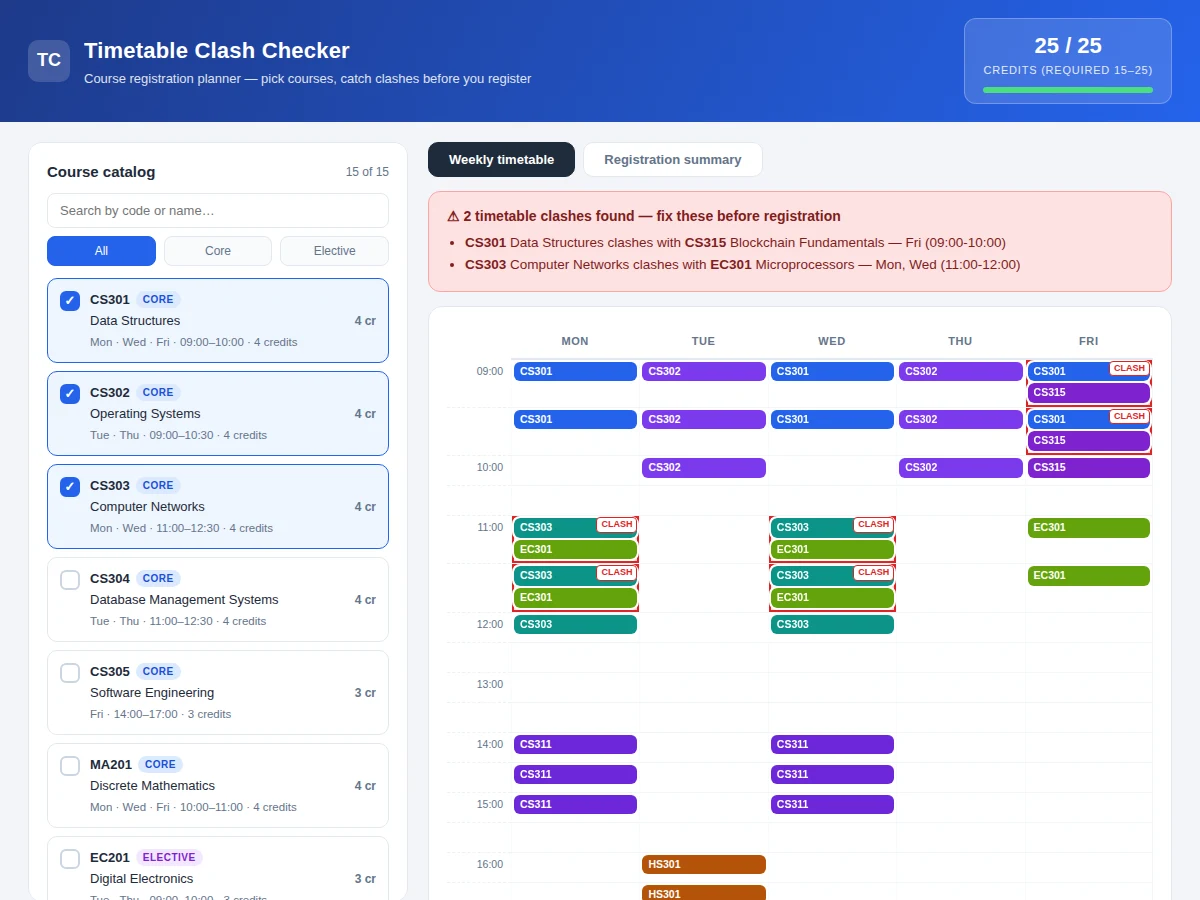
Every semester, students pick courses for registration and discover timetable clashes only after submitting — two lectures at the same hour on the same day, found out the hard way during the first week of classes. Department notice boards and PDF timetables make it hard to see overlaps across a full course list, and credit totals are usually tallied by hand against the semester's minimum and maximum. The Timetable Clash Checker solves this with a single-file web app: select courses from a searchable catalog and it instantly builds a Mon–Fri weekly grid, highlights every overlapping class in red with the exact days and overlap times, tracks running credits against the 15–25 band, and compiles a registration-readiness checklist. One click exports the verified plan as CSV or prints it for the registration form. Built with plain HTML, CSS and JavaScript — no frameworks, no build step, no server — the whole project is readable end to end, which makes the logic easy to explain in a viva.
Toggles courses in the selection set, reviews the grid and exports the verified timetable.
Follow the working sequence
How it works
- Courses are stored as structured data: code, name, credits, type and a list of (day, start, end) session tuples.
- Clicking a course toggles it in the selection set; the grid, credit counter and clash banner re-render on every change.
- The clash engine compares every pair of selected courses and, for each shared day, computes the overlap of their time intervals using half-open [start, end) logic — so back-to-back classes (one ending 10:00, next starting 10:00) do not clash.
- Cells occupied by two courses get a striped red background with a CLASH tag, and a banner lists each conflict with days and exact overlap times.
- Total credits are summed and shown against the 15–25 band with a progress bar and under/over warnings.
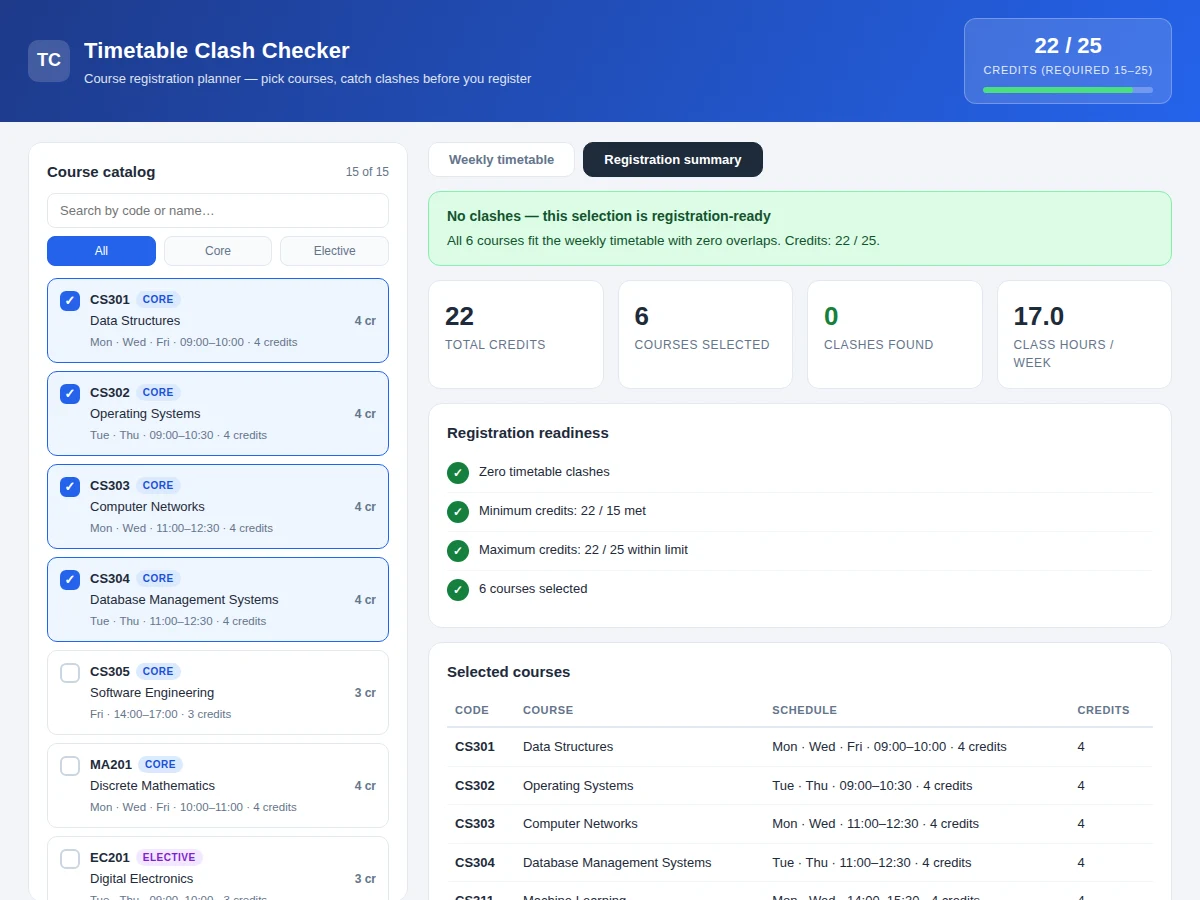
- The summary view compiles statistics (credits, course count, clashes, weekly class hours), the four-point readiness checklist and a selected-courses table.
- The verified timetable exports to CSV via the Blob API, or prints through a dedicated print stylesheet.
Tech stack:
- HTML5, CSS3 (grid layout, responsive cards, print stylesheet)
- Vanilla JavaScript (ES6) — clash engine, grid rendering, CSV export
- No frameworks, no build step, no backend — single file, runs in any modern browser
| Parameter | Value |
|---|---|
| Course catalog | 15 courses (6 core, 9 elective) in an editable data array |
| Timetable grid | Mon–Fri, 09:00–18:00, 30-minute cells |
| Clash rule | Half-open interval overlap per shared day; back-to-back classes allowed |
| Credit band | 15 minimum – 25 maximum (single configurable constant) |
| Export | CSV download (Blob API) + print stylesheet |
| Browser support | Any modern browser (Chrome, Edge, Firefox expected) |
| App size | Approximately 26 KB, one HTML file |
| Setup | None — open the file; no server or build step |
Project features
- [Searchable course catalog] Fifteen courses with realistic codes, names, credits and session timings; filter by Core/Elective or search by code or name.
- [Automatic clash detection] A pairwise overlap engine compares every selected course's day-time slots and flags any shared-day time overlap instantly.
- [Weekly timetable grid] A Mon–Fri, 09:00–18:00 half-hour grid renders the selection with color-coded lecture blocks.
- [Exact clash explanations] Each conflict is listed with the two courses, the clashing days and the precise overlap window (e.g. Mon, Wed 11:00–12:00).
- [Credit tracker] Running credit total with a progress bar against the 15–25 registration band, warning when under or over.
- [Registration-readiness checklist] Four checks — zero clashes, minimum credits, maximum credits, non-empty selection — all green before submission.
- [CSV export and print] Download the final timetable as CSV (courses, schedules, totals) or print it for the registration form.
What is included
- Single-file web app (HTML/CSS/JS) with the working clash checker
- Editable 15-course dataset with realistic codes, schedules and credits
- Project report PDF (background, scheduling problem, design decisions, testing)
- PPT presentation for final review
- Viva Q&A preparation document (interval-overlap logic, grid rendering, edge cases)
- User guide for adding courses and changing the credit band
Limitations & prerequisites
- The catalog ships as a fixed 15-course demo dataset — it is extended with the buyer's department course list during the built-to-order delivery.
- Clash detection is purely time-based; prerequisites, seat availability and faculty assignment are out of scope.
- The 15–25 credit band is a common default, not a universal rule — it is one configurable constant.
- This build has no backend, so selections are not saved between sessions (persistence is listed as future scope).
- The grid covers a Mon–Fri daytime schedule; weekend or evening programs need the grid range extended.
Frequently Asked Questions
How does the app detect a clash?
It compares every pair of selected courses: for each day both courses meet, it checks whether their time intervals overlap (start-A < end-B and start-B < end-A). Any positive overlap is a clash, and the exact overlapping window is reported.
Why don't back-to-back classes clash?
Intervals are half-open [start, end): a class ending at 10:00 and another starting at 10:00 share no interior time, so the engine correctly treats them as non-conflicting.
Can the course catalog be customized for a real college?
Yes — every course is one entry in a plain JavaScript data array (code, name, credits, sessions). The user guide documents the format, and the built-to-order delivery loads the buyer's real course list.
Are selections saved between visits?
Not in this build — there is no backend and no localStorage yet. Saving selections to localStorage is the documented first extension.
Is this project suitable for a final-year project?
Yes — for Web Development, Computer Science and IT programs. It demonstrates real algorithmic thinking (interval overlap), clean DOM rendering, state management and a genuinely useful tool, all in code the student can fully explain.
Components & software requirements
- HTML5, CSS3 (grid layout, responsive cards, print stylesheet)
- Vanilla JavaScript (ES6) — clash engine, grid rendering, CSV export
- No frameworks, no build step, no backend — single file, runs in any modern browser
Delivery information
Built-to-order project. Delivery timeline is shared after order confirmation based on current queue.
Support terms
Complete documentation, setup guide, and viva preparation included. Support for setup and explanation provided.
Download free synopsis (PDF)
Enter your name and email — the synopsis PDF downloads immediately. We may send occasional project updates; no spam, unsubscribe anytime.