
More project photos (2)
The problem
Most housing societies still run maintenance on WhatsApp groups: a resident posts "the lift is stuck", twenty messages bury it, nobody owns it, and the same complaint resurfaces three weeks later with no record of what was done. Committee members cannot tell which complaints are open, which vendor was assigned, or which ones crossed their deadline — and residents cannot tell whether anyone is acting at all. The gap is not effort but workflow: complaints need to become tracked tickets with an owner, a status, and a visible history. This project builds exactly that — a society complaint portal where every complaint becomes a ticket with a category, priority, SLA target, assigned vendor, a step-by-step status timeline, and a discussion thread between the resident and the committee, all the way from "raised" to "resolved with a resolution note".
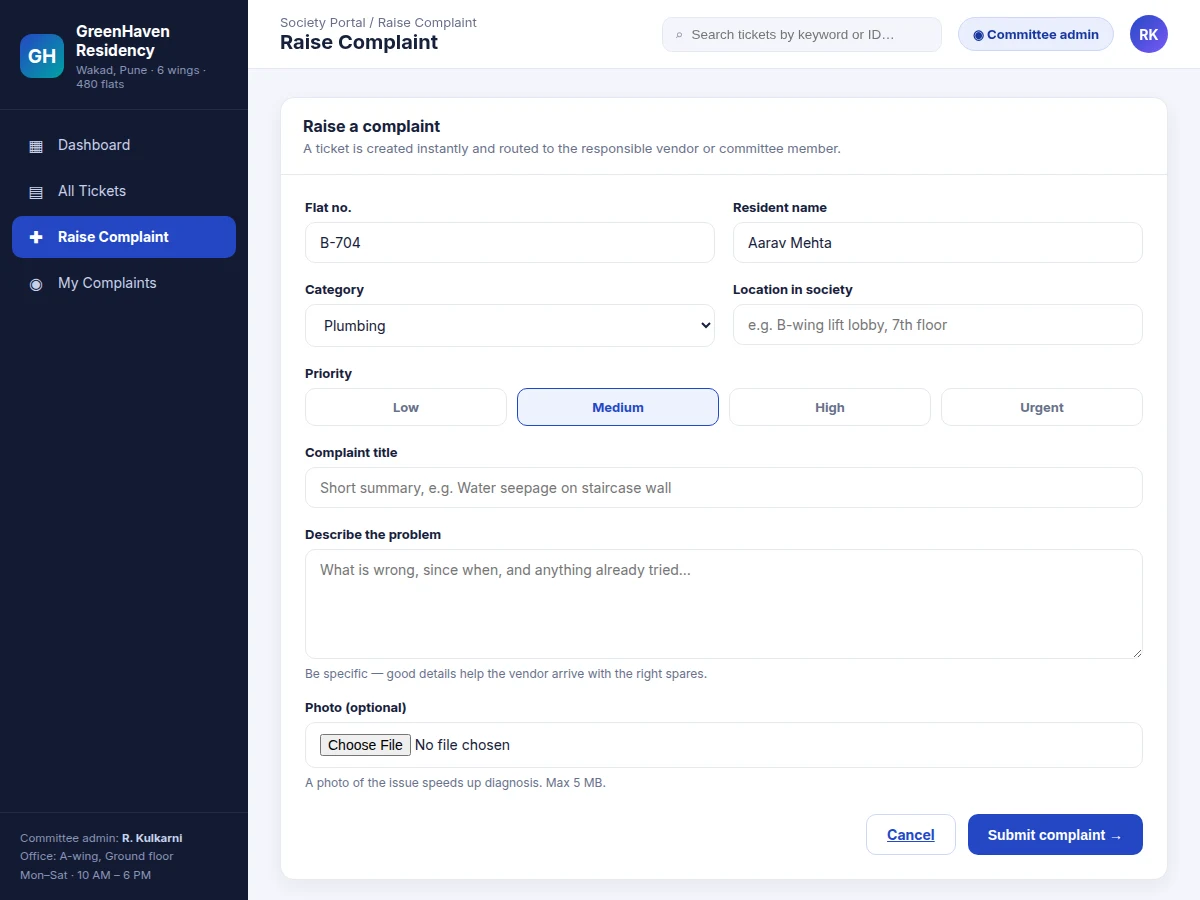
Raises complaints with flat number, category, priority, title and description.
Follow the working sequence
How it works
- A resident opens "Raise Complaint", fills in flat number, category, location, priority, title and description, and submits — the portal creates a ticket with a unique ID (SC-1043…) instantly.
- The ticket lands in the committee's Open queue, counted on the dashboard and visible under "Needs attention" with its priority badge.
- A committee admin reviews the complaint, assigns a vendor or maintenance staff, and moves the ticket to In Progress — the assignment and timestamp enter the timeline.
- Vendor visits, quotes and comments are posted to the ticket's discussion thread and timeline entries, so residents see progress without calling the office.
- Tickets approaching or past their SLA target are flagged; breached tickets show an escalation warning on the timeline.
- When the work is done, the admin moves the ticket to Resolved with a resolution note (e.g. "ringer wire re-soldered; tested with the gate"), and the resident's acknowledgement closes the loop.
- The dashboard aggregates everything: open vs resolved counts, average resolution time, and category-wise load for the committee's monthly review.
Tech stack:
- HTML5 · CSS3 · JavaScript (ES6)
- Single-file web app (no build step)
- Browser localStorage (demo persistence layer)
- Responsive CSS grid layout
- REST-ready JSON ticket model
- Git (version control)
| Parameter | Value |
|---|---|
| Application type | Single-file web application (runs from any static host) |
| User roles | Resident (raise/view own), Committee admin (assign/update/close) |
| Ticket states | Open, In Progress, Resolved |
| Categories | Plumbing, Electrical, Lift, Housekeeping, Security, Civil/Structural, Water Supply, Parking/Common area |
| Priorities | Low, Medium, High, Urgent |
| Demo records | 12 realistic society tickets with timelines and comments (seeded) |
| Photo upload | Optional, 5 MB design limit per attachment |
| Browser support | Current Chrome, Edge, Firefox, Safari (expected) |
| Hosting requirement | Any static host or shared hosting with PHP/MySQL for the built-to-order backend |
Project features
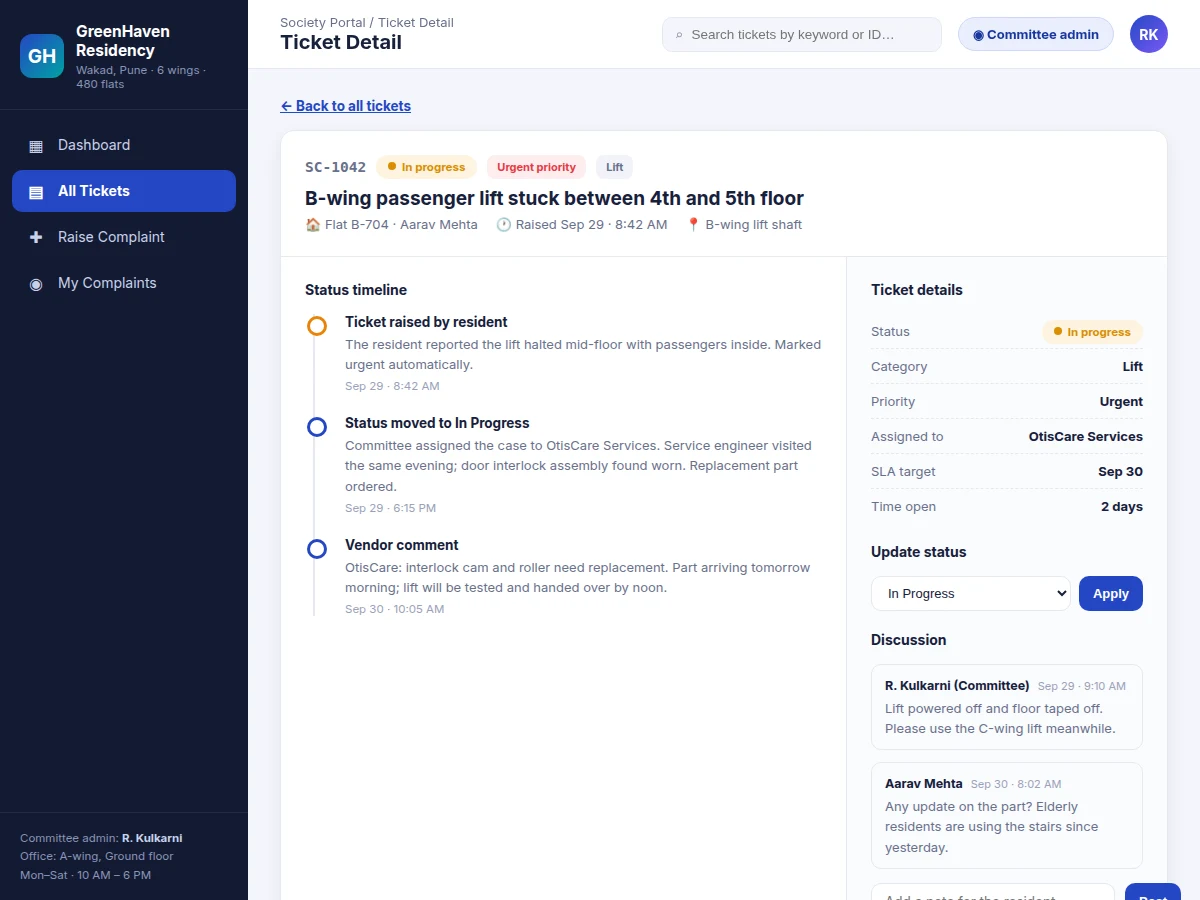
- [Ticket lifecycle with status timeline] Every complaint becomes a ticket (e.g. SC-1042) that moves through Open → In Progress → Resolved, and every transition, vendor visit and committee note is appended to a timestamped timeline on the ticket page.
- [Raise-complaint form with priority routing] Residents submit category, location, priority (Low/Medium/High/Urgent), title, description and an optional photo; urgent lift and safety tickets are flagged for immediate committee attention.
- [Committee dashboard] Live counts of open, in-progress and resolved tickets, average resolution time, a "needs attention" queue sorted by priority, and open tickets broken down by category with bar charts.
- [Filters, search and SLA flags] Filter by status, category and priority, search by keyword or ticket ID, and see breached-SLA tickets escalated automatically with a warning marker.
- [Vendor assignment] Each ticket carries an assigned vendor or committee member (e.g. OtisCare Services for the lift case), visible on the ticket details panel with the SLA target and time-open.
- [Resident–committee discussion] A comment thread on every ticket lets residents chase updates and the committee post vendor notes, keeping the conversation attached to the ticket instead of scattered across WhatsApp.
- [Status update control] The committee admin changes a ticket's status from a dropdown on the detail page; the change is written into the timeline with a timestamp so the history is never lost.
What is included
- Complete single-file portal source code (HTML/CSS/JS) with the working demo
- Seeded realistic demo data: 12 society tickets with full timelines, vendors and comments
- Backend integration guide (wiring the frontend to a PHP/MySQL or Firebase backend)
- Project report PDF (background, requirement analysis, system design, screenshots, testing)
- PPT presentation for final review
- Viva Q&A preparation document (ticket lifecycle design, role handling, SLA logic, hosting)
Limitations & prerequisites
- The shipped demo runs on browser localStorage: data persists per browser and is not shared between devices until the backend is connected.
- Photo uploads in the demo are client-side only; real file storage needs the server backend (covered in the integration guide).
- There is no built-in SMS/WhatsApp notification to residents — alerts are in-portal; notification integration is listed as an optional extension.
- The demo seeds one society (480 flats, 6 wings); multi-society support needs the backend's tenant model.
- Average-resolution and SLA figures in the demo are computed from the seeded demo records, not measured from a live deployment.
- User accounts in the demo are simulated (flat-number based); real authentication (OTP/login) is part of the backend build.
Frequently Asked Questions
Is there an admin panel?
Yes — the committee admin view is the core of the project: a dashboard with open/in-progress/resolved counts, a "needs attention" queue, category breakdowns, ticket assignment, status updates and SLA flags.
Is the database included?
The demo uses browser localStorage as its data layer so it runs without any setup. The built-to-order delivery includes the full backend integration guide and database schema (tickets, users, comments, vendors) for a PHP/MySQL or Firebase backend.
Can it be hosted online?
Yes. The frontend is a single static file, so it deploys to any static host; the backend variant runs on standard shared hosting. Hosting and domain costs are separate.
Can more roles or modules be added?
Yes — realistic extensions are a vendor login, a guard/security-desk view, payment/maintenance-bill tracking, and society notices/announcements. These are optional customizations, not part of the base build.
Does it send SMS or WhatsApp alerts to residents?
Not in the base build — updates are visible in the portal's ticket timeline. SMS/WhatsApp notification on status change can be added as a customization using a messaging API.
Is this project suitable for a final-year project?
Yes — for Computer Science, IT and Web Development programs. It demonstrates requirement analysis for a real workflow, CRUD with state machines, role-based views, dashboard design, and frontend-to-backend integration. Suitable for B.E./B.Tech final-year projects in Computer Science, IT and Web Development.
Components & software requirements
- HTML5 · CSS3 · JavaScript (ES6)
- Single-file web app (no build step)
- Browser localStorage (demo persistence layer)
- Responsive CSS grid layout
- REST-ready JSON ticket model
- Git (version control)
Delivery information
Built-to-order project. Delivery timeline is shared after order confirmation based on current queue.
Support terms
Complete documentation, setup guide, and viva preparation included. Support for setup and explanation provided.
Download free synopsis (PDF)
Enter your name and email — the synopsis PDF downloads immediately. We may send occasional project updates; no spam, unsubscribe anytime.