
More project photos (2)
The problem
Every semester, thousands of students queue at the college admin office for bonafide certificates — needed for scholarships, passports, education loans, bank accounts and visas. The process runs on paper registers and word of mouth: requests get lost, students make repeated trips just to ask "is it ready?", and the office has no record of who asked for what. This project digitises the whole workflow. A student logs in, picks the purpose, uploads the supporting document and submits; the request lands instantly in the office's verification queue. Clerks check documents, the HOD approves, and the student watches the status move — Submitted, Under Verification, Approved, Ready for Collection — without a single trip to the office. The issued certificate carries a QR verification code so banks and scholarship authorities can confirm it is genuine. It is the kind of boring, high-value administrative software colleges actually need.
Submits the request with purpose and supporting document.
Follow the working sequence
How it works
- The student logs in and opens the New Request form, selecting the certificate's purpose and attaching the supporting document (fee receipt, ID).
- On submit, the request is stored with status Submitted and appears instantly at the top of the office verification queue.
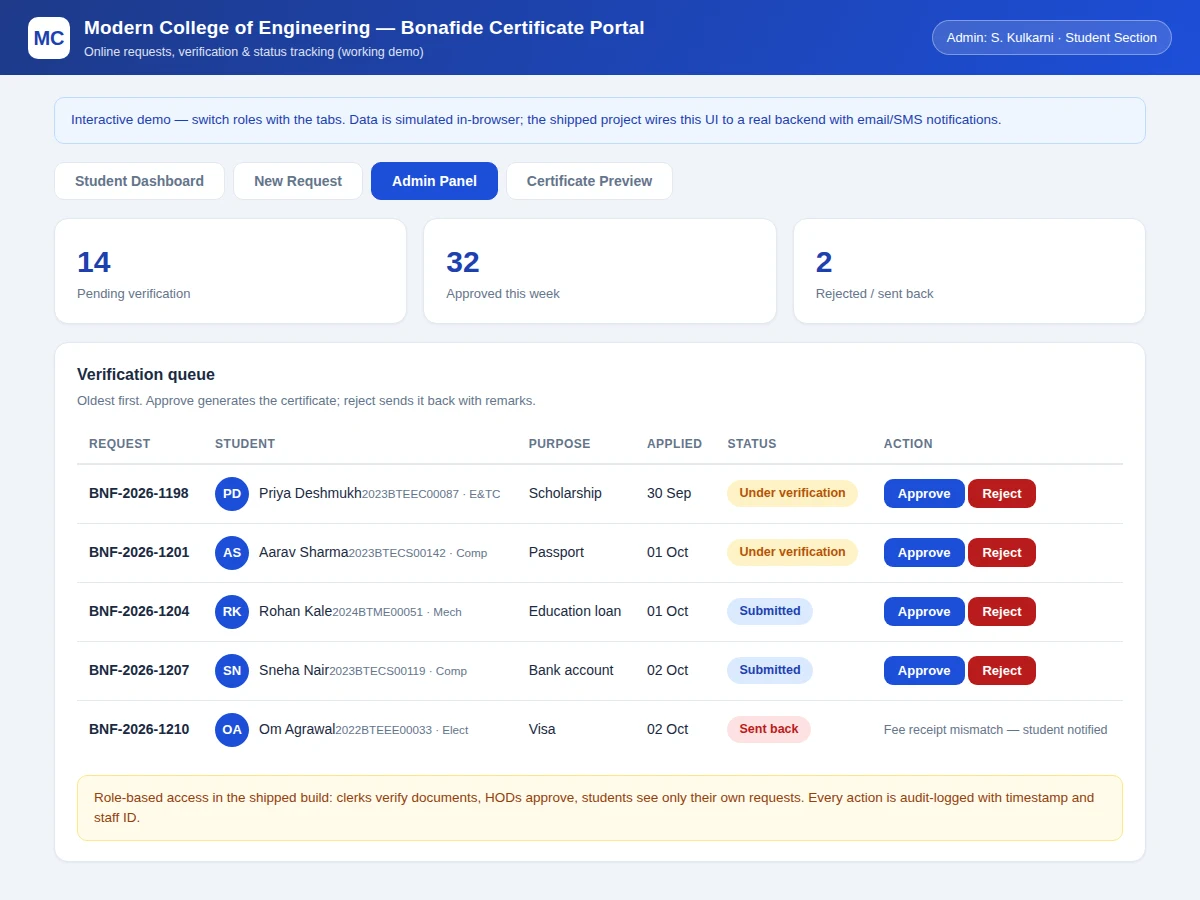
- A clerk opens the request, matches the uploaded document against college records, and marks documents verified or sends it back with remarks.
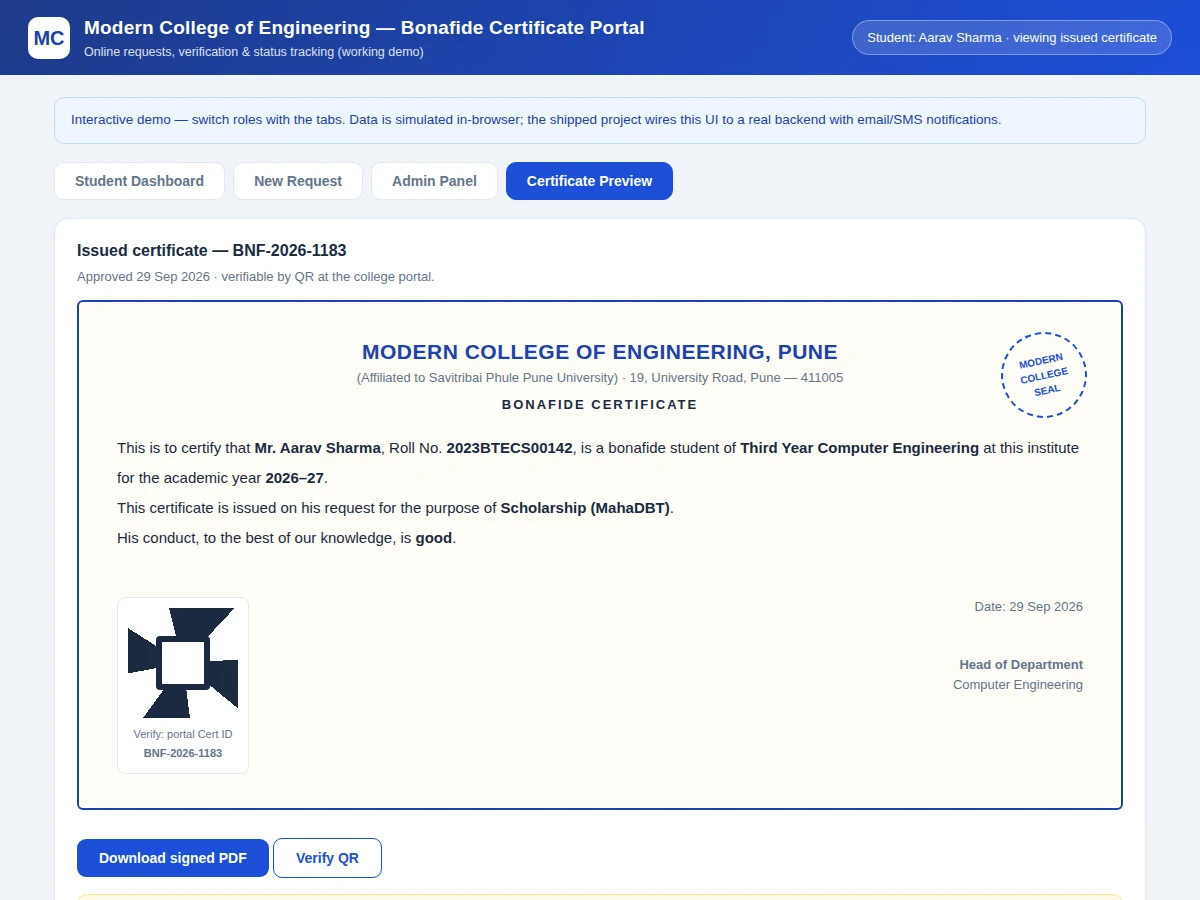
- The Head of Department reviews verified requests and approves; approval triggers certificate generation with a unique certificate ID and QR code.
- The student sees the status advance to Approved and then Ready for Collection, and can download the signed PDF or collect the printout.
- Anyone — a bank officer, an embassy, a scholarship portal — scans the QR code to land on a verification page confirming the certificate's details.
Tech stack:
- Frontend: HTML5, CSS3, JavaScript (single-file demo)
- Backend (shipped build): PHP or Node.js with MySQL
- Authentication: role-based login (student, clerk, HOD)
- PDF generation: server-side certificate rendering
- QR codes: verification-link encoding
- File storage: supporting-document uploads
- Notifications: email/SMS gateway hooks
- Hosting: standard shared/VPS deployment
| Parameter | Value |
|---|---|
| Request pipeline | 5 stages: Submitted → Document check → HOD approval → Generated → Ready |
| Purposes supported | 6 (scholarship, passport, education loan, bank, visa, internship) |
| Roles | 3 (student, clerk, HOD) with audit logging |
| Certificate | Printable PDF with QR verification code |
| Demo | Single-file HTML/JS, runs offline in a browser |
| Shipped backend | PHP/Node.js + MySQL (buyer's choice) |
| Data | Realistic seeded records for demo and testing |
| Deployment target | Shared hosting or VPS (design) |
Project features
- [Student request flow] Purpose-based application form (scholarship, passport, education loan, bank, visa, internship) with document upload and remarks, validated before submission.
- [Admin verification queue] Oldest-first queue with approve/reject actions; rejections carry mandatory remarks so the student knows exactly what to fix.
- [Live status tracking] Every request moves through a five-stage timeline visible to the student — no more office visits just to check progress.
- [QR-verified certificates] Approved requests generate a printable certificate whose QR code resolves to a verification page, so third parties can confirm authenticity.
- [Role-based access] Students see only their own requests; clerks verify documents; HODs approve — with every action audit-logged by staff ID and timestamp.
- [Notification hooks] The design wires status changes to the college's email/SMS gateway; the demo simulates the alerts in-browser.
- [Admin analytics] Counts of pending, approved and sent-back requests give the office a real workload picture.
What is included
- Working portal demo (student + admin flows, certificate preview)
- Complete backend source (buyer's choice of PHP or Node.js) with MySQL schema
- Role-based authentication module
- Server-side PDF certificate generator with QR codes
- Public QR verification page
- Email/SMS notification integration guide
- Project report PDF (requirements, workflow design, schema, methodology)
- PPT presentation for final review
- Viva Q&A preparation document (role-based access, state machines, QR verification, audit logging)
Limitations & prerequisites
- The demo runs fully in the browser with simulated data — the shipped build wires it to the real backend and database described above.
- Real email/SMS alerts need the college's own gateway credentials; the integration points are built, the credentials are the college's.
- Document uploads in production need server-side virus scanning and size limits, noted as deployment requirements in the report.
- The QR verification page must be hosted on the college's domain to be trustworthy — a demo link proves the mechanism, not the trust.
- Digital signatures on the PDF need the institution's signing certificate; the demo shows placement and layout.
Frequently Asked Questions
What problem does this actually solve?
The paper-register bonafide workflow: lost requests, repeated office visits just to check status, and no audit trail. The portal gives students a live tracker and the office a proper queue with history — the two sides of the same pain.
How does the QR verification work?
Each approved certificate gets a unique ID encoded in a QR code. Scanning it opens a verification page showing the certificate's details as issued. A forged printout either has no valid ID or shows mismatched details.
Who can approve a certificate?
Only the HOD role. Clerks can verify documents and send requests back, but the approve button — and certificate generation — belongs to the HOD, with every action logged by staff ID.
What does the student need to upload?
Typically the current fee receipt and a college ID, selected per purpose. The form validates that a document is attached before submission; the clerk's checklist confirms they match records.
Can this be deployed at a real college?
Yes — that is the point. The shipped build includes the backend, schema, deployment notes and gateway integration guide; the main college-side work is providing the domain, the mail/SMS credentials and the signing certificate.
Is this project suitable for a final-year project?
Yes — for Computer Science, IT and Web Development programs. It demonstrates requirements analysis, workflow/state-machine design, role-based access control, database modelling and a genuinely deployable product. Suitable for B.E./B.Tech final-year projects in Computer Science, IT and Web Development.
Components & software requirements
- Frontend: HTML5, CSS3, JavaScript (single-file demo)
- Backend (shipped build): PHP or Node.js with MySQL
- Authentication: role-based login (student, clerk, HOD)
- PDF generation: server-side certificate rendering
- QR codes: verification-link encoding
- File storage: supporting-document uploads
- Notifications: email/SMS gateway hooks
- Hosting: standard shared/VPS deployment
Delivery information
Built-to-order project. Delivery timeline is shared after order confirmation based on current queue.
Support terms
Complete documentation, setup guide, and viva preparation included. Support for setup and explanation provided.
Download free synopsis (PDF)
Enter your name and email — the synopsis PDF downloads immediately. We may send occasional project updates; no spam, unsubscribe anytime.