
More project photos (2)

The problem
College project exhibitions are usually run on a patchwork of registration spreadsheets, printed score sheets and hand-tallied totals. Judges write marks on paper, organizers add them up after the event, and transcription errors or lost sheets can delay results by hours or spark disputes. Visitors get no central place to browse exhibits — they wander stalls with no map of what is on show. The missing piece is a single web portal that carries the whole expo: teams register online and get booth numbers, every exhibit appears in a public showcase gallery, judges score on a fixed weighted rubric from their phones or laptops, and a live leaderboard ranks projects the moment each score lands. This project builds exactly that portal, so an expo moves from paper chaos to a transparent, real-time workflow that organizers, judges, teams and visitors all share.
Sets up the expo, judge panel and rubric weights; watches the live leaderboard.
Follow the working sequence
How it works
- The organizer sets up the expo — name, venue, dates, judge panel and the four rubric weights — and opens team registration.
- Teams register through the registration form; validated entries receive booth numbers and appear in the public showcase gallery.
- Visitors browse the gallery, filter by branch or category, search by project title or team name, and open project detail views.
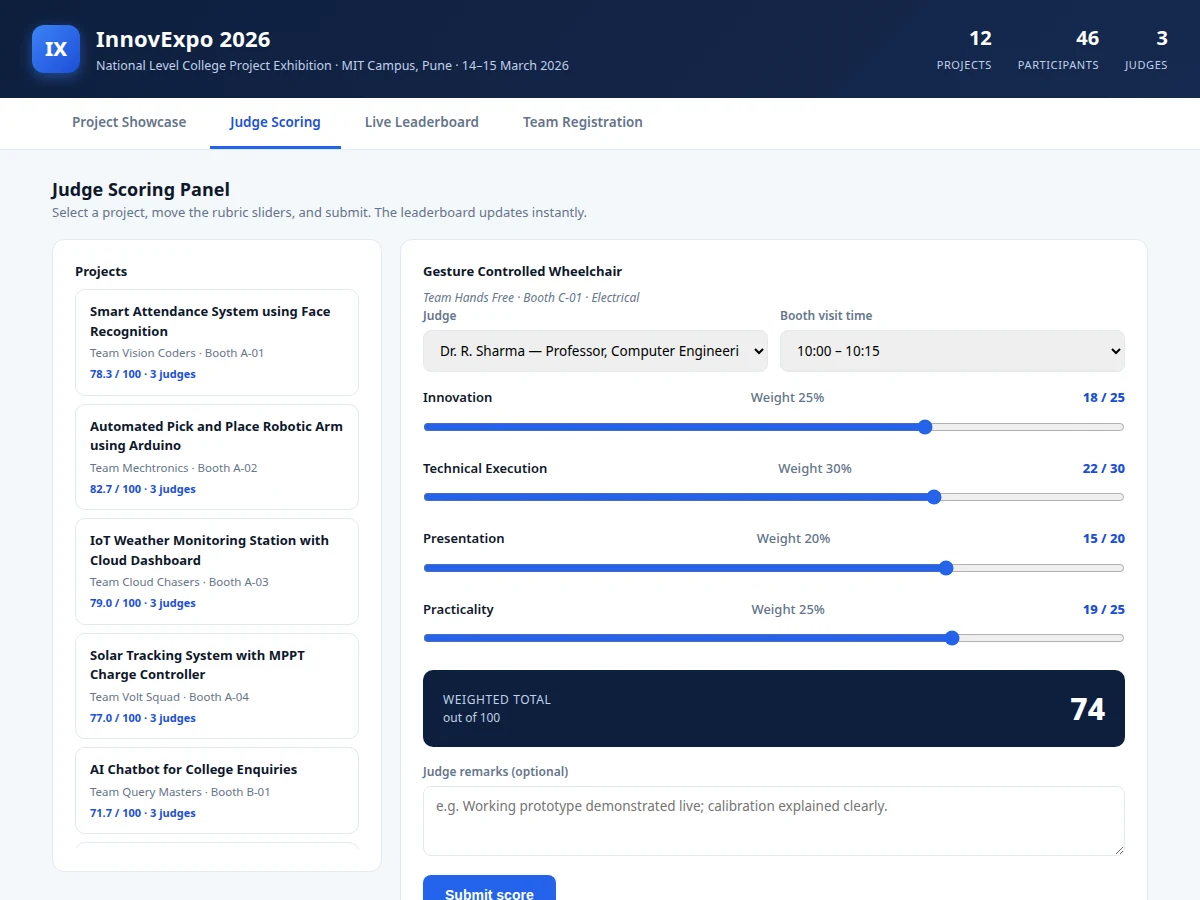
- Each judge opens the scoring panel, selects an exhibit, and moves the four rubric sliders while the weighted total updates live on screen.
- On submit, the score is stored against that judge and project; the project's average and the full leaderboard re-rank immediately.
- Organizers watch the live leaderboard — the top-three podium plus the ranked table showing how many judges have scored each exhibit.
- When scoring closes, the organizer exports the results to CSV for declaration, certificates and records.
Tech stack:
- HTML5, CSS3, JavaScript (ES6)
- PHP 8 (backend in the built-to-order deployment)
- MySQL (relational storage for teams, projects, judges, scores)
- Responsive CSS grid layout
- Client-side CSV export (Blob API)
- Apache / Nginx shared hosting
- Git
| Parameter | Value |
|---|---|
| User roles | Visitor, team, judge, organizer (design) |
| Scoring rubric | 4 criteria, weighted 25 / 30 / 20 / 25 (configurable) |
| Score range | 0–100 weighted total per judge per project |
| Leaderboard refresh | Immediate on score submit (design target) |
| Seeded demo data | 12 projects, 3 judges (demonstration) |
| Concurrent judges | Design target: approximately 20 simultaneous scoring sessions |
| Demo page load | Approximately under 1 s locally (expected) |
| Result export | CSV download |
| Backend (built-to-order) | PHP 8 + MySQL; the demo itself runs fully in-browser |
| Deployment | Standard shared hosting with PHP and MySQL (design) |
Project features
- [Project showcase gallery] A public card gallery of every exhibit with booth numbers, branch tags and live average scores; visitors browse, filter by branch or category, search by title or team, and open any project for details.
- [Weighted judge scoring rubric] Judges score each exhibit on four criteria — innovation (25%), technical execution (30%), presentation (20%), practicality (25%) — using sliders that display the weighted total live before the score is submitted.
- [Live leaderboard] Projects are ranked by average weighted score across all judges the instant a score is submitted, with a top-three podium view and a full ranked table showing per-project judge coverage.
- [Team registration] Teams register with project title, branch, category, leader email and description; validated entries are assigned a booth number and appear in the showcase gallery immediately.
- [Project detail modal] Every exhibit opens a detail view with team members, the project description and the complete per-judge score breakdown, keeping evaluation transparent.
- [Result export] The leaderboard exports to CSV (rank, project, team, branch, booth, average score, judges scored) for result declaration, certificates and record-keeping.
- [Realistic seeded demo data] The demo ships with 12 believable exhibits, 3 judge profiles and pre-scored rubrics, so the organizer-to-result workflow can be evaluated end to end without setup.
What is included
- Complete source code of the expo portal (working single-file demo + PHP/MySQL backend build)
- Seeded demo data (12 exhibits, 3 judge profiles, rubric weights) for instant evaluation
- Database schema and setup script for the production deployment
- Organizer setup guide (expo configuration, judge onboarding, rubric weights)
- Deployment guide for shared hosting (Apache/Nginx with PHP and MySQL)
- Project report PDF (system design, ER diagram, module workflows)
- PPT presentation for final review
- Viva Q&A preparation document (web architecture, role-based workflows, scoring logic)
Limitations & prerequisites
- The demo runs entirely in the browser with seeded in-memory data — scores do not persist across page reloads; persistence comes from the MySQL backend in the built-to-order deployment.
- Judge login sessions are part of the production build; the demo uses a judge selector so the scoring workflow can be evaluated without credentials.
- The concurrent-judge capacity is a design target (approximately 20 simultaneous sessions) — it has not been load-tested on the buyer's hosting.
- Rubric weights are configurable but apply expo-wide in the base build; per-category rubrics (different weights for hardware vs software exhibits) are a customization.
- CSV is the only export format in the base build; PDF result sheets and printed certificates are optional customizations.
- The registration form validates input in the browser; the production deployment should add server-side validation and CAPTCHA to block spam registrations.
Frequently Asked Questions
How does the judge scoring work?
Each judge opens the scoring panel, selects an exhibit, and moves four rubric sliders — innovation (25%), technical execution (30%), presentation (20%), practicality (25%) — while the weighted total updates live. Submitting stores the score against that judge, and the project's average plus the full leaderboard re-rank immediately.
Is a backend database included?
The demo runs fully in the browser with seeded data so the workflow can be evaluated instantly. The built-to-order delivery adds a PHP 8 + MySQL backend with persistent storage, judge login sessions and an organizer panel — the database schema and setup script are part of the deliverables.
Can the rubric weights be changed?
Yes — the weights are configurable values, so an organizer can rebalance the four criteria before an expo. Per-category rubrics, such as different weights for hardware and software exhibits, can be developed as a customization.
Can it be hosted for our actual college expo?
Yes — the production build is designed for standard shared hosting with PHP and MySQL (Apache or Nginx). Hosting and domain costs are separate; the included deployment guide walks through the setup step by step.
Is this project suitable for a final-year project?
Yes — for Computer Science, IT and Web Development programs. It demonstrates full-stack web development, role-based workflows, relational database design and a real event-management use case that colleges actually run. Suitable for B.E./B.Tech final-year projects in Computer Science, IT and Web Development.
Components & software requirements
- HTML5, CSS3, JavaScript (ES6)
- PHP 8 (backend in the built-to-order deployment)
- MySQL (relational storage for teams, projects, judges, scores)
- Responsive CSS grid layout
- Client-side CSV export (Blob API)
- Apache / Nginx shared hosting
- Git
Delivery information
Built-to-order project. Delivery timeline is shared after order confirmation based on current queue.
Support terms
Complete documentation, setup guide, and viva preparation included. Support for setup and explanation provided.
Download free synopsis (PDF)
Enter your name and email — the synopsis PDF downloads immediately. We may send occasional project updates; no spam, unsubscribe anytime.