
More project photos (2)
The problem
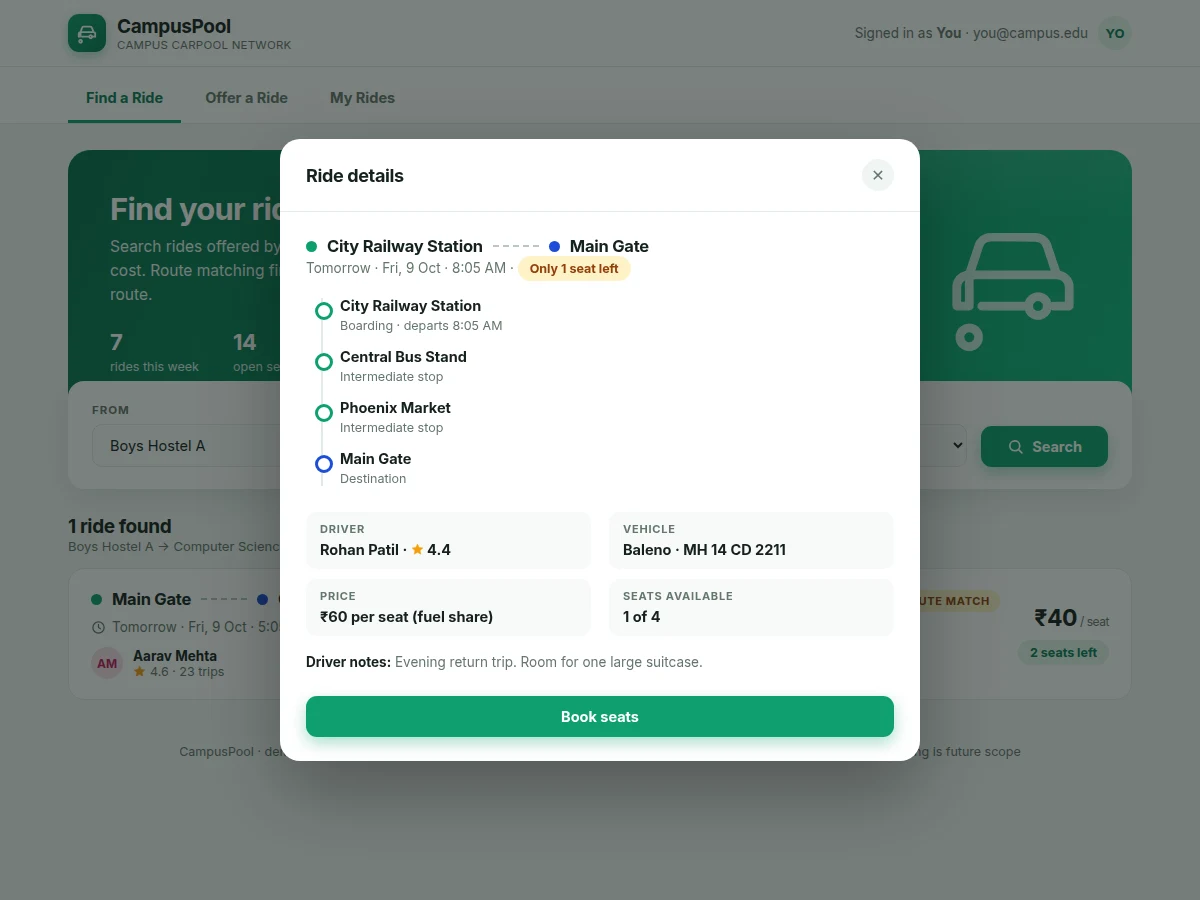
Students living in hostels, PGs and rented flats around a campus make the same trips every day — to the main gate, the department block, the library, and back home in the evening. Most of these trips happen in half-empty cars and two-wheelers, while classmates squeeze into crowded buses or pay for expensive private cabs. The usual workaround is a WhatsApp group: ride offers scroll past in minutes, there is no way to search by route or date, seat counts are never reliable, and nobody keeps track of who rode with whom. This project replaces that chaos with a proper carpool platform. Drivers post rides with from/to points, date, time, available seats and intermediate stops; riders search by route and date and book seats with a confirmation; both sides track everything on a single dashboard. Route matching also catches partial overlaps, so a rider boarding at an intermediate stop still finds the ride. The result is a working two-sided marketplace that demonstrates authentication, search and ranking, seat inventory, booking transactions, and reputation through post-ride ratings.
Signs up with a college email, searches rides by from, to and date, books seats and rates drivers after the ride.
Follow the working sequence
How it works
- A student signs up with a college email address; the backend checks the email domain, hashes the password with bcrypt, and returns a JWT that the React app attaches to every authenticated request.
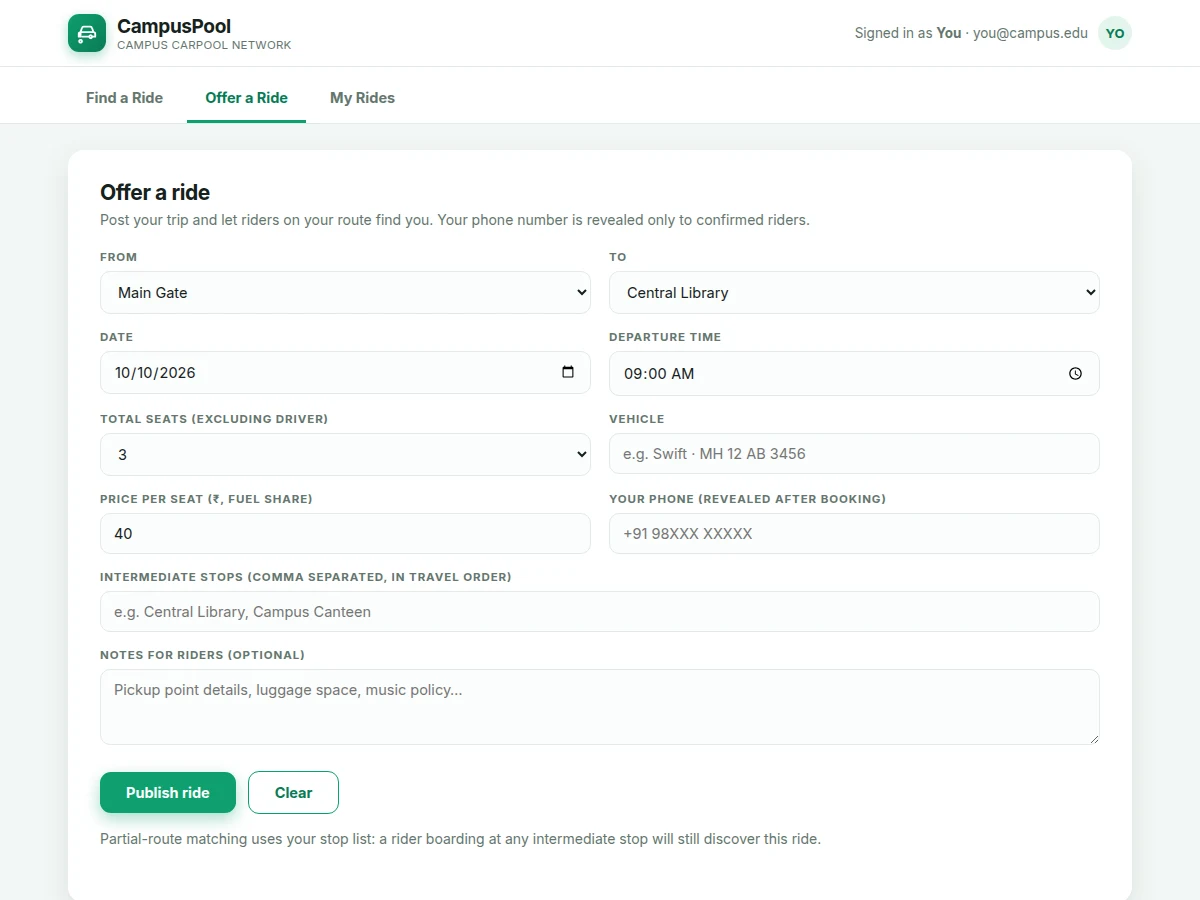
- A driver opens "Offer a ride" and submits from/to points, date, time, seats, vehicle and intermediate stops. Express validates the payload and Mongoose saves the ride document with seats-left set equal to total seats.
- A rider searches with from, to and date. The route-matching module first pulls exact from/to rides, then scans ride stop lists for ordered partial overlaps, and returns both groups ranked with exact matches first.
- Booking sends the rider ID and seat count to the API. The backend decrements seats-left in a single atomic update — concurrent bookings cannot oversell the last seat — and then creates the booking record.
- On confirmation, the rider sees the driver's phone number and a message thread opens for pickup coordination; the driver's dashboard shows the new booking with the rider's name and seat count.
- After the ride's departure time passes, the scheduled job marks it completed. Booked riders can then rate the driver, and the updated average feeds the rating badge shown on future searches.
Tech stack:
- React 18 with React Router (single-page frontend)
- Node.js with Express (REST API backend)
- MongoDB with Mongoose (users, rides, bookings, ratings)
- JWT authentication with bcrypt password hashing
- Custom route-matching module (exact plus ordered partial-stop matching)
- Tailwind CSS (responsive interface styling)
| Parameter | Value |
|---|---|
| Frontend | React 18 single-page app with React Router (design) |
| Backend | Node.js with Express REST API |
| Database | MongoDB with 4 collections: users, rides, bookings, ratings |
| Authentication | JWT with 24-hour token expiry (design target) |
| Password storage | bcrypt with 10 salt rounds |
| Route matching | Exact from/to first, then ordered partial-stop overlap; maximum 8 stops per ride |
| Seats per ride | 1 to 6 seats (configurable) |
| Booking safety | Atomic seat decrement — the last seat cannot be double-booked (design) |
| Search page size | 12 results per page (design target) |
| Supported browsers | Latest Chrome, Firefox, Edge and Safari (expected) |
Project features
- [College-email signup and JWT login] Students register with their college email address and log in through a JWT-secured session. Passwords are stored as bcrypt hashes, and every ride, booking and dashboard route sits behind authentication middleware.
- [Offer-a-ride form] Drivers post a ride with from/to points, date, departure time, total seats, vehicle details and up to 8 intermediate stops in travel order. The stop list becomes the input for partial-route matching.
- [Route search with partial matching] Riders search by from, to and date. The matcher returns exact-route rides first, then rides whose stop lists contain both points in travel order — so a rider boarding mid-route still finds a lift — ranked by departure time.
- [Seat booking with confirmation] Booking reserves the requested seats through an atomic database update, so two riders can never grab the last seat at the same time. Both sides receive a booking confirmation carrying the trip details.
- [My-rides dashboard] One screen separates offered rides from booked rides, showing live seat counts, upcoming/completed/cancelled statuses, and one-tap cancellation that immediately releases the seats back to the pool.
- [Contact reveal on booking] Driver phone numbers stay hidden in search results and are revealed only to confirmed riders, alongside a simple in-app message thread for pickup coordination.
- [Post-ride driver ratings] Once a ride is marked completed, booked riders can rate the driver 1 to 5 stars. The running average appears as a rating badge on the driver's future ride cards.
- [Automatic ride status updates] A scheduled job flips upcoming rides to completed once their departure time passes, so dashboards, seat counts and rating eligibility stay accurate without manual cleanup.
What is included
- Complete source code: React frontend plus Express backend
- MongoDB schema definitions with Mongoose models and a seed-data script
- Setup guide with .env.example (JWT secret, MongoDB URI, port configuration)
- Route-matching module with documented matching rules and examples
- Project report PDF (background, architecture, schema design, test cases)
- PPT presentation for the final review
- Viva Q&A preparation document (MERN concepts, JWT, matching logic, booking concurrency)
Limitations & prerequisites
- No real payments: fuel-cost sharing is agreed manually between driver and riders. Payment-gateway integration is a documented extension, not part of the base build.
- No live GPS tracking or map route drawing in the base build — matching works on the entered from/to points and intermediate stops. Google Maps integration is future scope.
- College-email verification is a signup domain check; OTP-based email verification is not implemented in the base build.
- Hosting, domain and database costs are separate from the project deliverable.
- Ratings are only possible after a ride is marked completed, so a brand-new driver starts with no rating history.
- The base build assumes one campus per deployment; multi-college support is a customization.
Frequently Asked Questions
Does it use Google Maps or live GPS tracking?
No. Route matching works on the from/to points and intermediate stops the driver enters — the matcher finds rides whose stop lists cover the rider's trip in travel order. Live map drawing and GPS tracking are documented as future scope, not part of the base build.
How do riders pay the driver?
They do not pay through the app. Fuel-cost sharing is agreed manually between the driver and riders at booking time or during the ride, usually as the fixed per-seat fuel share shown on the ride card. Online payment collection is a realistic customization, and the report documents it as an extension.
Can the same app serve multiple colleges?
The base build is configured for one campus: the stop list, the email-domain check and the seed data are campus-specific. Multi-college support is a listed customization — each campus gets its own stop list, email-domain rule and seed data, while the same matching and booking engine serves all of them.
What happens if a driver cancels a ride?
Cancellation releases all booked seats immediately, and every booked rider sees the cancelled status on their dashboard. The driver is expected to message booked riders through the in-app thread first, so nobody waits at the pickup point. Since no money changes hands inside the app, there is nothing to refund — the rider simply books another ride.
Is this project suitable for a final-year project?
Yes, for Computer Science and IT programs. It demonstrates full-stack MERN development, JWT authentication, a custom route-matching algorithm, atomic seat-booking transactions and dashboard state management. The matching logic and the concurrency handling give strong viva material, and the report, PPT and Q&A document keep the review straightforward.
Can the route-matching logic be explained in the viva?
Yes. The matcher is a small self-contained module: exact from/to rides rank first, then rides whose stop lists contain both points in travel order, scored by stop overlap. The report documents the rules with worked examples, and you can walk the examiner through a live search in the demo showing how a mid-route boarding point still returns the ride.
Components & software requirements
- React 18 with React Router (single-page frontend)
- Node.js with Express (REST API backend)
- MongoDB with Mongoose (users, rides, bookings, ratings)
- JWT authentication with bcrypt password hashing
- Custom route-matching module (exact plus ordered partial-stop matching)
- Tailwind CSS (responsive interface styling)
Delivery information
Built-to-order project. Delivery timeline is shared after order confirmation based on current queue.
Support terms
Complete documentation, setup guide, and viva preparation included. Support for setup and explanation provided.
Download free synopsis (PDF)
Enter your name and email — the synopsis PDF downloads immediately. We may send occasional project updates; no spam, unsubscribe anytime.