
More project photos (1)
The problem
Lectures, meetings, CCTV recordings and match footage share one problem: the important parts are buried in hours of video, and finding them means scrubbing back and forth by hand. A good summary is not just fast-forward — it must keep the distinct moments and drop the repetition. This project builds an unsupervised video summarizer that does exactly that. Frames are sampled and described with visual features, visually similar frames are clustered so duplicates collapse, segments are scored by motion and visual-change activity, and a selection algorithm picks the representative keyframes that cover the video's content within a target summary length. Because the method is unsupervised, it works on any video without labeled training data — a practical advantage over supervised summarizers that need expensive human annotations. And because summarization is partly subjective, the project is honest about that too: evaluation against human-annotated SumMe and TVSum summaries measures agreement, not perfection.
Source video decoded and sampled at a fixed frame rate.
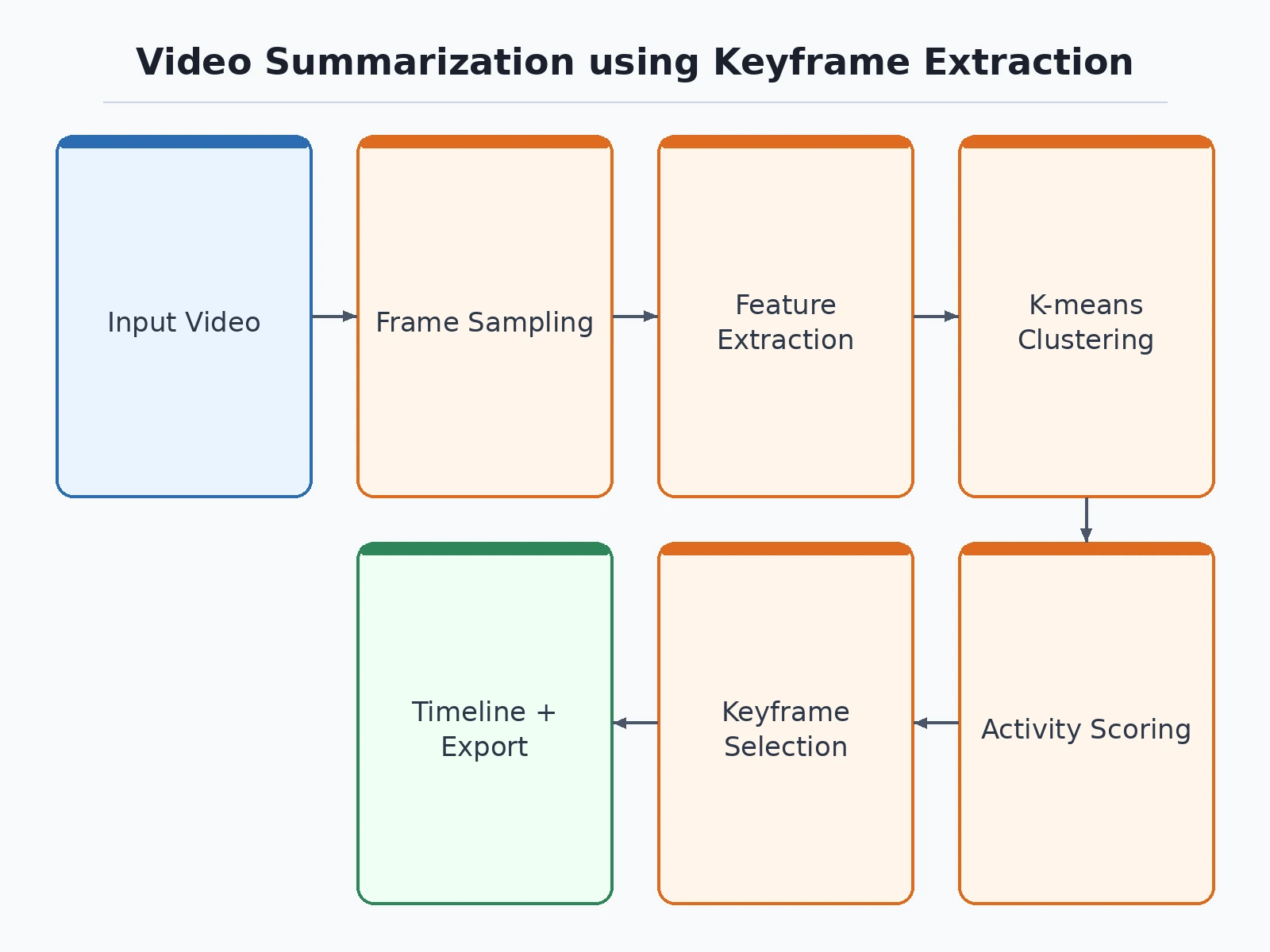
Follow the working sequence
How it works
- The input video is decoded and frames are sampled at a fixed rate with OpenCV.
- Each sampled frame is represented by color-histogram features and optional CNN embeddings.
- K-means clustering groups visually similar frames so repetitive segments collapse into clusters.
- Segments are scored by motion energy and inter-frame change; high-activity segments earn selection priority.
- A selection algorithm picks representative keyframes that maximize coverage within the target summary length.
- The evaluation notebook compares the selected keyframes against SumMe and TVSum human annotations and computes precision and recall during your build.
Tech stack:
- Python 3.10 (frame processing and summarization pipeline)
- OpenCV (video decoding, frame sampling, histograms)
- PyTorch and torchvision (optional CNN frame embeddings)
- scikit-learn (K-means clustering, feature scaling)
- NumPy (motion scoring and keyframe selection)
- SumMe and TVSum datasets (public human-annotated summaries)
- Matplotlib (timeline plots and evaluation charts)
- Streamlit demo app (timeline viewer, keyframe strip, summary playback)
| Parameter | Value |
|---|---|
| Method | Unsupervised keyframe extraction: clustering plus motion-based segment scoring |
| Features | Color histograms with optional CNN embeddings per sampled frame |
| Design target | Target ~0.40+ F1 agreement with human summaries on SumMe/TVSum — precision, recall and F1 are computed by the notebook during your build |
| Input | Video files (MP4 and other OpenCV-readable formats) |
| Output | Keyframe strip, summary video clip, timeline with marked keyframes |
| Configurable | Summary ratio, sampling rate, number of clusters, motion threshold |
Project features
- Frame sampling and visual feature extraction (color histograms and CNN embeddings)
- K-means clustering of frames to collapse visually duplicate segments
- Motion and visual-change activity scoring per segment
- Keyframe selection covering content within a configurable summary length
- Timeline viewer with selected keyframes marked on the video
- Summary export as a concatenated video clip
- Evaluation notebook scoring precision and recall against SumMe and TVSum annotations
- Configurable summary ratio, sampling rate and clustering parameters
What is included
- Complete source code (frame extraction, clustering, scoring, selection, demo app)
- Evaluation notebook (buyer-run procedure on SumMe/TVSum annotations)
- Project report PDF (background, method design, evaluation, error analysis)
- PPT presentation for final review
- Viva Q&A preparation document (clustering, video features, evaluation of summaries)
- Setup guide (environment, dataset download, summarizing your own videos)
Advantages
- Samples frames and describes them with visual features — colour histograms and CNN embeddings.
- K-means clustering collapses visually duplicate segments so the summary does not repeat itself.
- Motion and visual-change activity scoring per segment keeps the most active content.
- Keyframe selection within a configurable summary length, with configurable summary ratio, sampling rate and clustering parameters.
- Timeline viewer with selected keyframes marked on the video, summary export as a concatenated clip, and an evaluation notebook scoring precision and recall against human-annotated SumMe and TVSum summaries.
Disadvantages
- Summarisation is subjective — human annotators disagree, so agreement scores measure consensus, not correctness.
- The method keys on visual change and motion, so quiet but important moments like a spoken decision or a still slide can be missed.
- Very long videos need downsampling for memory, which can skip brief but important events.
Limitations & prerequisites
- Summarization is subjective: human annotators disagree with each other, so agreement scores measure consensus, not correctness — the report presents them that way.
- The method keys on visual change and motion; quiet but important moments (a spoken decision, a still slide) can be missed, and the report documents this bias.
- Very long videos need downsampling for memory, which can skip brief but important events.
Frequently Asked Questions
Why unsupervised instead of training a summarizer?
Labeled video summaries are expensive to produce, so supervised models train on tiny datasets. The unsupervised approach works on any video out of the box and needs no annotations at all.
How does it avoid picking duplicate frames?
K-means clustering groups visually similar frames; the selector takes at most one representative per cluster, so repetitive segments collapse instead of filling the summary.
How is it evaluated?
The notebook compares the selected keyframes against human annotations in SumMe and TVSum, computing precision, recall and F1 during your build.
What is a good score here?
Human annotators themselves only partly agree, so the design target is ~0.40+ F1 agreement — the honest number is the one your evaluation run produces.
Can I control how long the summary is?
Yes — the target summary ratio is configurable, from a quick skim to a detailed digest.
Does it understand speech or captions?
No. It works on visual content only — motion, scene change and visual variety. Spoken content needs a transcription-based approach the report names as future work. Suitable for B.E./B.Tech final-year projects in Computer Science, AI/ML and Data Science.
Components & software requirements
- Python 3.10 (frame processing and summarization pipeline)
- OpenCV (video decoding, frame sampling, histograms)
- PyTorch and torchvision (optional CNN frame embeddings)
- scikit-learn (K-means clustering, feature scaling)
- NumPy (motion scoring and keyframe selection)
- SumMe and TVSum datasets (public human-annotated summaries)
- Matplotlib (timeline plots and evaluation charts)
- Streamlit demo app (timeline viewer, keyframe strip, summary playback)
Delivery information
Built-to-order project. Delivery timeline is shared after order confirmation based on current queue.
Support terms
Complete documentation, setup guide, and viva preparation included. Support for setup and explanation provided.
Download free synopsis (PDF)
Enter your name and WhatsApp number — the synopsis PDF downloads immediately. We may send occasional project updates on WhatsApp; no spam.
Creating Summaries from User Videos (Gygli et al., ECCV 2014)