
More project photos (1)
The problem
Webcam filters are usually treated as black-box effects; this project opens the box. A convincing cartoon look needs two things at once: flat, posterized color regions and bold dark edges — and both can be built from classical image processing with no training data and no GPU. The bilateral filter smooths away texture while keeping true edges sharp, adaptive thresholding finds the dark contour lines, and k-means color quantization flattens shading into a handful of tones. Recombined, the result reads instantly as a cartoon.
The pipeline is designed for live video: every stage is a standard OpenCV operation tuned for per-frame cost, with a design target of around 20+ FPS at 640x480 on a typical laptop webcam. The demo app exposes every parameter as a live trackbar — bilateral sigma, edge block size, number of colors — so the cartoon look can be tuned while the camera runs, and an on-screen FPS meter reports the actual frame rate on the buyer's own machine. Quality here is visual and subjective, so evaluation is by inspection: before/after frame comparisons and recorded sample clips, not metrics.
Captures frames at 640x480 with OpenCV video capture.
Follow the working sequence
How it works
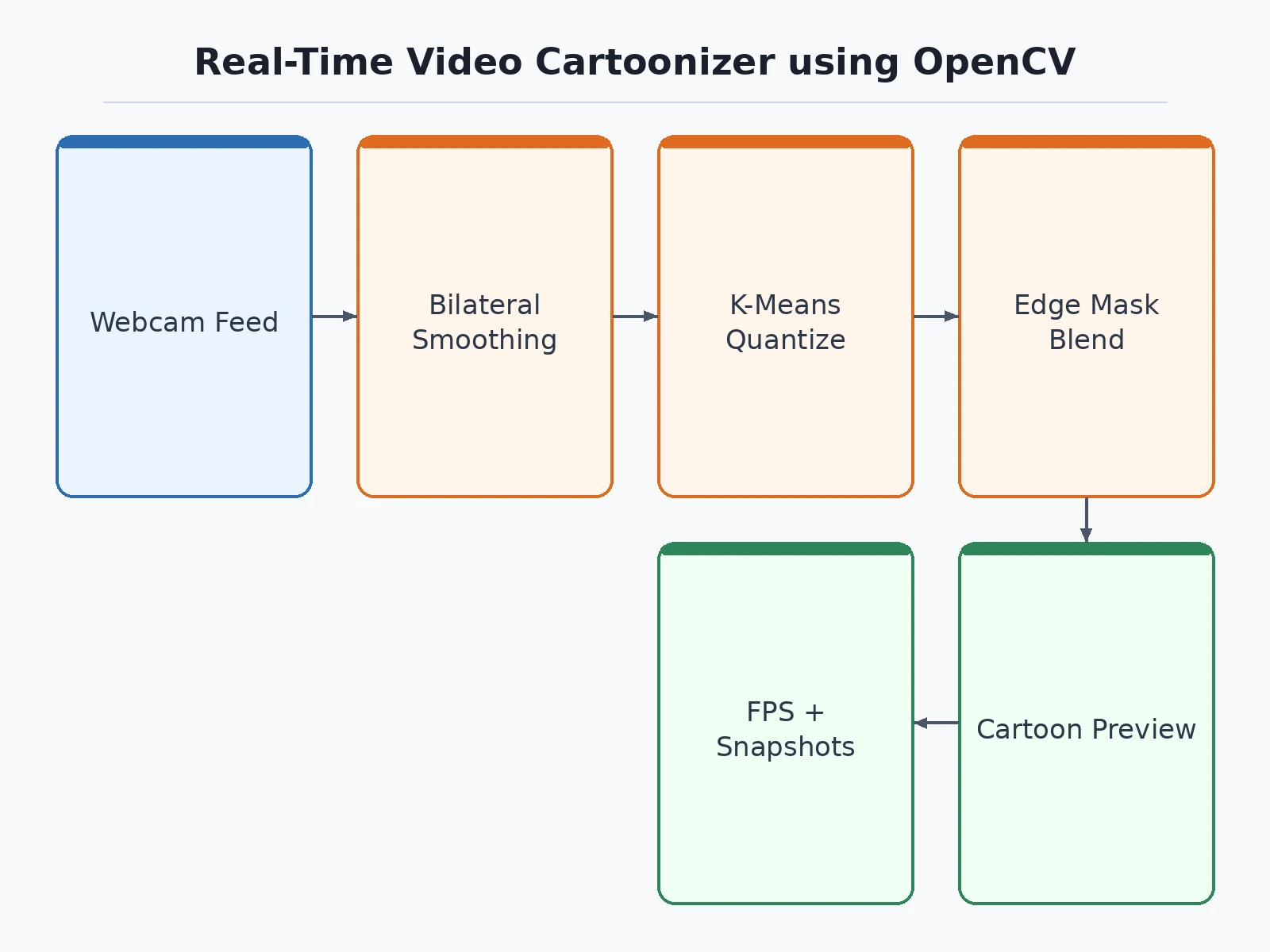
- Frames are captured from the webcam at 640x480 with OpenCV video capture.
- Each frame is downsampled once to cut per-frame processing cost.
- A bilateral filter smooths texture while preserving true object edges.
- Adaptive thresholding on the grayscale frame extracts the dark contour lines.
- K-means quantization on the smoothed color frame flattens shading into a fixed set of tones.
- The quantized color frame is masked with the edge lines and upsampled back to full resolution for display.
Tech stack:
- Python 3.10, OpenCV (video capture, filtering, GUI)
- NumPy (frame buffers and array operations)
- Bilateral filter (edge-preserving smoothing)
- Adaptive thresholding (cartoon contour extraction)
- K-means color quantization via cv2.kmeans
- OpenCV trackbars (live parameter tuning interface)
- Matplotlib (before/after comparison figures for the report)
| Parameter | Value |
|---|---|
| Pipeline | Bilateral filter, adaptive-threshold edges, k-means quantization |
| ML involved | None — classical image processing only, no training data |
| Frame size | 640x480 webcam capture |
| Speed | Design target around 20+ FPS on a typical laptop, with the in-app FPS meter showing the real number on your machine |
| Tuning | Live trackbars for smoothing, edge strength, color count |
| Output | Cartoonized live video, snapshots, sample clips |
Project features
- Real-time webcam cartoonization with a pure OpenCV pipeline, no ML involved
- Bilateral filtering for edge-preserving smoothing of each frame
- Adaptive-threshold edge mask for bold cartoon contour lines
- K-means color quantization for flat posterized color regions
- Live trackbars for smoothing, edge strength and color count
- On-screen FPS meter reporting the frame rate on your machine
- Side-by-side original and cartoon view plus snapshot saving
- Recorded sample-clip export for before/after comparison
What is included
- Complete source code (capture, filter pipeline, GUI, snapshot and clip export)
- Demo app with live trackbars and FPS meter
- Project report PDF (background, filter theory, pipeline design, parameter study, visual evaluation)
- PPT presentation for final review
- Viva Q&A preparation document (bilateral filtering, thresholding, k-means, real-time tradeoffs)
- Setup guide (environment, webcam access, running and tuning the demo)
Advantages
- Pure classical OpenCV pipeline with no machine learning and no training data — nothing to download or train.
- Bilateral filter smooths each frame while preserving edges, keeping the cartoon look clean.
- Adaptive-threshold edge mask draws bold cartoon contour lines over the smoothed frame.
- K-means colour quantisation flattens frames into posterised colour regions.
- Live trackbars tune smoothing, edge strength and colour count while the video runs.
- On-screen FPS meter reports the real frame rate on your own machine, with side-by-side original and cartoon view, snapshot saving and sample-clip export for before-and-after comparison.
Disadvantages
- Quality is visual and subjective — there is no accuracy number to claim; the build is evaluated with before-and-after comparisons and sample clips instead.
- Fine detail is deliberately destroyed by design — small text and subtle textures do not survive cartoonisation.
- Edge quality depends on scene lighting and contrast; low-light or very busy scenes produce noisier contour lines.
- Frame-rate design target is 640x480 on a typical laptop — higher resolutions or weaker machines run slower.
Limitations & prerequisites
- Cartoon quality is visual and subjective: there is no accuracy number to claim, and the report evaluates the build with before/after comparisons and sample clips instead.
- Fine detail is deliberately destroyed by design — small text and subtle textures do not survive cartoonization.
- Edge quality depends on scene lighting and contrast; low-light or very busy scenes produce noisier contour lines.
- The frame-rate design target assumes 640x480 on a typical laptop; higher resolutions or weaker machines run slower, and the FPS meter shows the real number on your hardware.
Frequently Asked Questions
Is there any machine learning in this project?
None. The entire effect is classical image processing — bilateral filtering, adaptive thresholding and k-means quantization — which is exactly the point: real-time effects without training data or a GPU.
How is it evaluated without accuracy metrics?
By visual inspection: the report carries before/after frame comparisons, a parameter study showing what each control changes, and recorded sample clips. The FPS meter provides the only number, measured live on your machine.
What does each trackbar control?
Bilateral sigma controls smoothing strength, the adaptive-threshold block size and constant control edge boldness, and the cluster count controls how many flat color tones the image is reduced to.
Why is the frame downsampled first?
K-means and bilateral filtering scale with pixel count; processing at a reduced resolution and upsampling the result is the standard trick that keeps the pipeline at interactive frame rates.
Can it process video files too?
Yes — the same pipeline accepts a video file or an image sequence as input in place of the webcam, which is how the sample clips for the report are produced.
Does it need a GPU?
No. Every operation runs on the CPU through OpenCV, which is why the project is positioned as a real-time classical-CV build rather than a deep-learning one. Suitable for B.E./B.Tech final-year projects in Computer Science, AI/ML and Data Science.
Components & software requirements
- Python 3.10, OpenCV (video capture, filtering, GUI)
- NumPy (frame buffers and array operations)
- Bilateral filter (edge-preserving smoothing)
- Adaptive thresholding (cartoon contour extraction)
- K-means color quantization via cv2.kmeans
- OpenCV trackbars (live parameter tuning interface)
- Matplotlib (before/after comparison figures for the report)
Delivery information
Built-to-order project. Delivery timeline is shared after order confirmation based on current queue.
Support terms
Complete documentation, setup guide, and viva preparation included. Support for setup and explanation provided.
Download free synopsis (PDF)
Enter your name and WhatsApp number — the synopsis PDF downloads immediately. We may send occasional project updates on WhatsApp; no spam.