
More project photos (2)
The problem
Independent vehicle service centres still run the day on paper job cards, a whiteboard for bays and phone calls for estimate approval. Cards get misplaced, two advisors book the same bay, mechanics wait without knowing their next vehicle, and customers dispute costs because the approved estimate was never recorded. When a vehicle returns months later, nobody can quickly find what was done last time. This web app digitises that whole flow in one place: intake creates a digital job card, the scheduling board shows every bay and mechanic for the day, estimates are built line by line and marked approved only after the customer agrees, and closing a job produces an invoice summary linked to a permanent per-vehicle service history.
Advisor records customer, vehicle, complaints and promised delivery time.
Follow the working sequence
How it works
- The advisor logs in and creates a job card at vehicle intake, entering customer details, vehicle model and registration number, odometer reading and the customer's stated complaints.
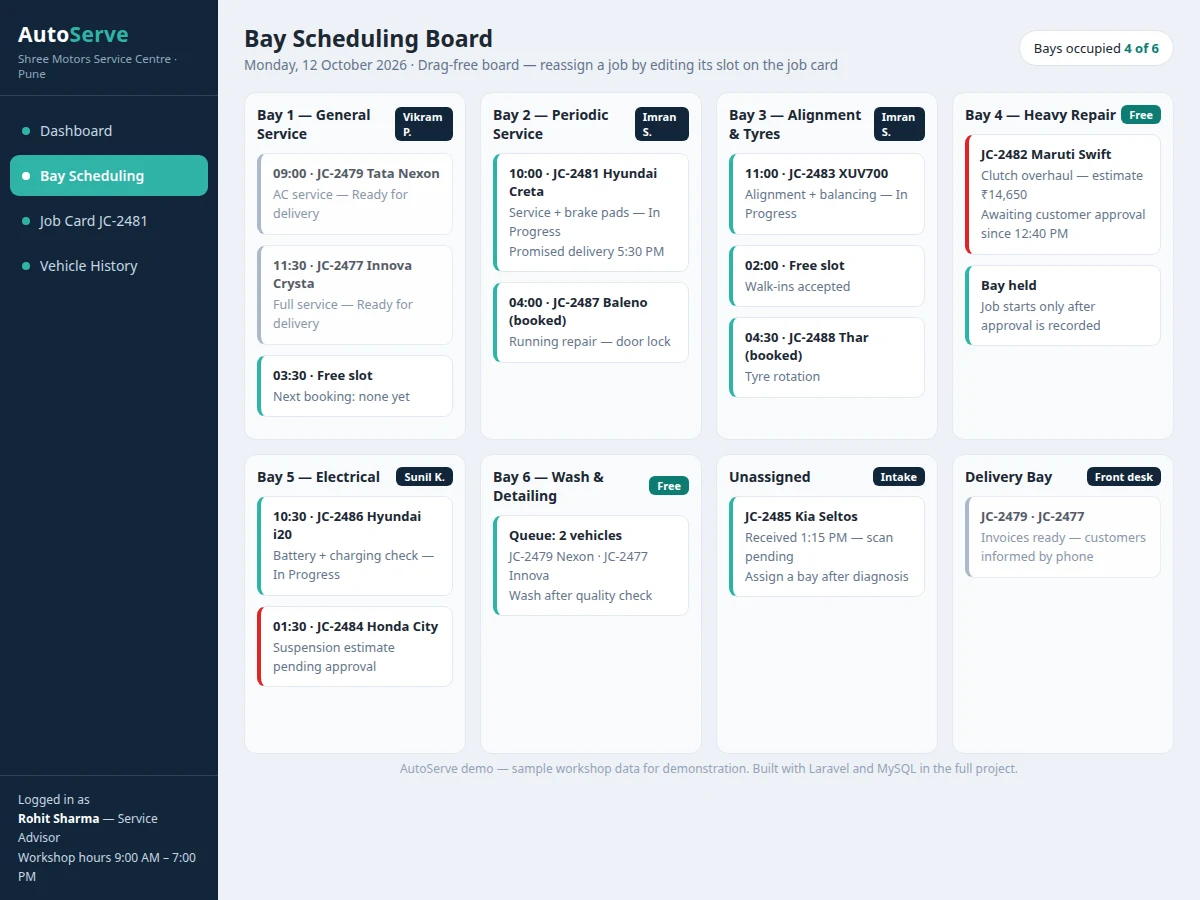
- The system generates a unique job number and places the card in Received status; the advisor then assigns a bay and a mechanic on the scheduling board for a chosen time slot.
- The mechanic records inspection findings on the job card, and the advisor builds the estimate from labour operations and spare-parts line items with quantities and rates.
- The estimate total is shown to the customer; the advisor records Approved or Declined on the job card, and only approved work moves the job to In Progress.
- During repair the mechanic updates the job status and adds any parts actually consumed; extra work found mid-job returns the card to Awaiting Approval before it proceeds.
- After a quality check the job is marked Ready, and the app generates the invoice summary from the approved estimate plus consumed parts.
- On delivery the job is closed and the completed card is filed into the vehicle's service history, where it can be retrieved by registration number on the next visit.
Tech stack:
- PHP 8 with Laravel framework (MVC, Blade views)
- MySQL database (job cards, vehicles, bays, estimates)
- HTML5, CSS3 and vanilla JavaScript (scheduling board)
- Laravel authentication with role-based access
- Dompdf-style printable invoice summary
- Apache or Laravel's built-in server for local hosting
| Parameter | Value |
|---|---|
| User roles | 3 roles (Admin, Service Advisor, Mechanic) — design target |
| Service bays | Up to 12 bays per workshop (configurable, design target) |
| Job statuses | 7 stages from Received to Delivered |
| Estimate lines | Up to 40 line items per estimate (design target) |
| Page response | Under 2 seconds on a local network (expected) |
| Concurrent users | Approximately 10 staff users on shared hosting (expected) |
| Database | MySQL 8 tables for vehicles, job cards, estimates and parts (approximate count) |
| History retention | All closed job cards retained per vehicle (no auto-deletion) |
| Hosting | PHP 8 and MySQL shared hosting or local XAMPP (expected) |
| Backup | Manual database export from the admin panel (design target) |
Project features
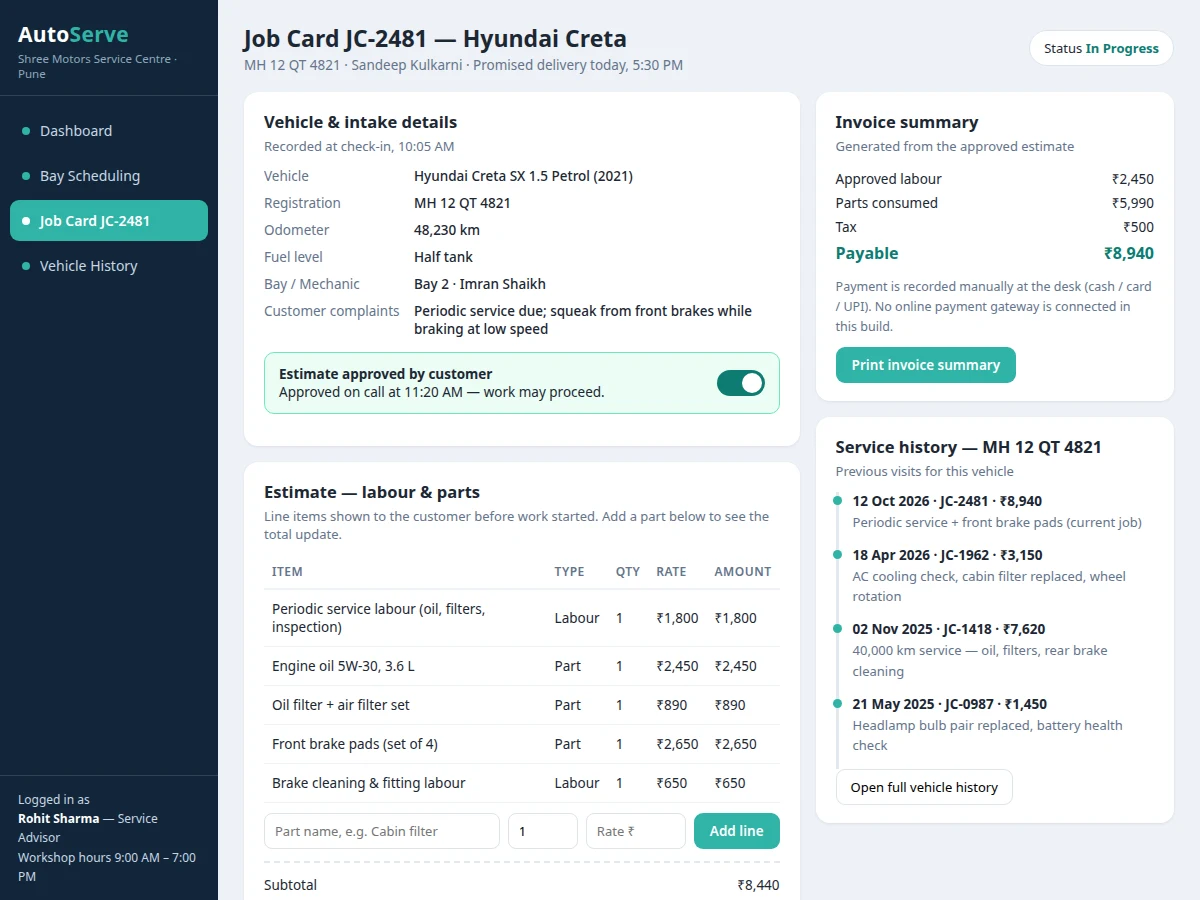
- [Digital job card creation] An advisor records customer, vehicle, odometer reading, fuel level, customer complaints and promised delivery time on a structured job card with a unique job number, replacing the handwritten paper card.
- [Bay and mechanic scheduling board] A day board shows each service bay as a column with its booked job cards and assigned mechanic, so clashes and idle bays are visible at a glance and jobs can be reassigned by editing the slot.
- [Estimate builder with approval status] Labour and parts lines are added to an estimate with quantities and rates; the job card shows Pending, Approved or Declined status, and work beyond the estimate cannot be marked complete until approval is recorded.
- [Spare-parts line items] Parts used during the job are entered as line items with part name, quantity and unit price, kept separate from labour charges so the final bill can be explained item by item.
- [Job status tracking] Every job moves through Received, Inspection, Awaiting Approval, In Progress, Quality Check, Ready and Delivered stages, with the current stage and timestamps visible on the dashboard.
- [Invoice summary] On completion the app totals approved labour, parts and tax into a printable invoice summary that matches the approved estimate, with any extra approved work shown as separate lines.
- [Service history per vehicle] Searching a registration number opens the vehicle's full history — past job cards, work done, parts replaced and amounts billed — so advisors can advise repeat customers from record, not memory.
What is included
- Complete Laravel source code with MySQL database file
- Seeded sample data for bays, mechanics, labour operations and parts
- Setup instructions for local XAMPP and shared-hosting deployment
- Project abstract and full project report PDF
- PPT presentation for final review
- Viva Q&A preparation document (Laravel MVC, relational schema, role-based access, estimate workflow)
Limitations & prerequisites
- No payment-gateway integration as shipped — payment is recorded manually as cash, card or UPI against the invoice summary.
- No OEM or manufacturer parts catalogue is included; part names and prices are entered and maintained by the workshop itself.
- Single-workshop scope as shipped — one centre with its own bays and staff; multi-branch operation would need separate development.
- Customer approval is recorded by the advisor after speaking to the customer; there is no customer login or self-service approval link in the base build.
- No SMS or WhatsApp notification integration as shipped; status updates are visible inside the app to logged-in staff.
- Estimates are only as accurate as the rates the workshop maintains — the app does not fetch live parts prices from any supplier.
Frequently Asked Questions
Is this project suitable for a final-year project?
Yes — for B.E./B.Tech Computer Science, IT and related programmes, and for BCA and MCA projects. It demonstrates a complete Laravel MVC application with a relational MySQL schema, role-based login, a scheduling workflow and an approval-based billing flow, all of which map well to viva questions on web application design.
Is payment gateway integration included?
No. As shipped, the app records how the customer paid — cash, card or UPI — against the invoice summary, but it does not process payments online. Adding a gateway such as Razorpay is a realistic customisation, since it needs the workshop's own merchant account, production approval and webhook handling beyond the base build.
Can more bays, mechanics or roles be added?
Yes. Bays and mechanics are maintained from the admin screens rather than hard-coded, so a workshop can add bays up to the configured layout and register new staff accounts. New roles with different permissions can also be added in Laravel by defining the role and assigning it route-level access in the controllers.
Is the database included and can the project be hosted online?
Yes. The delivery includes the MySQL database file with sample bays, mechanics, labour operations and vehicles, plus setup instructions. The app runs on a local XAMPP setup for demonstration and can be hosted on standard PHP and MySQL shared hosting so it is reachable from any browser on the workshop network.
How is estimate approval different from just writing a bill?
The estimate is built and approved before major work starts, and the job cannot move to In Progress until approval is recorded on the card. The final invoice summary is then generated from that approved estimate plus parts actually consumed, so differences between the estimate and the bill stay visible and explainable to the customer.
What are the main limitations I should mention in the viva?
Be direct: the base build covers a single workshop, has no payment gateway, no OEM parts catalogue and no customer-facing login or messaging integration. Approval is recorded by the advisor after contacting the customer. These boundaries are deliberate scope choices for an academic build and each one is a documented extension point.
Components & software requirements
- PHP 8 with Laravel framework (MVC, Blade views)
- MySQL database (job cards, vehicles, bays, estimates)
- HTML5, CSS3 and vanilla JavaScript (scheduling board)
- Laravel authentication with role-based access
- Dompdf-style printable invoice summary
- Apache or Laravel's built-in server for local hosting
Delivery information
Built-to-order project. Delivery timeline is shared after order confirmation based on current queue.
Support terms
Complete documentation, setup guide, and viva preparation included. Support for setup and explanation provided.
Download free synopsis (PDF)
Enter your name and email — the synopsis PDF downloads immediately. We may send occasional project updates; no spam, unsubscribe anytime.