
More project photos (3)
The problem
Booking a sports turf in Pune still runs on phone calls and chat messages: a player calls a venue, asks which hours are free, negotiates a price, then collects cash shares from friends after the game. Double bookings happen because the venue register and the players have no shared view of availability, and nobody has a clear record of who owes what. This project replaces that manual chain with a single web application. Players browse venues by sport, area and surface, see a live hourly availability grid where booked slots are blocked, and confirm a booking in minutes. The organiser adds the group members and the app splits the total evenly, so the cost conversation is settled before anyone reaches the ground.
Browses Pune turf venues and picks a date and hourly slots for the group.
Follow the working sequence
How it works
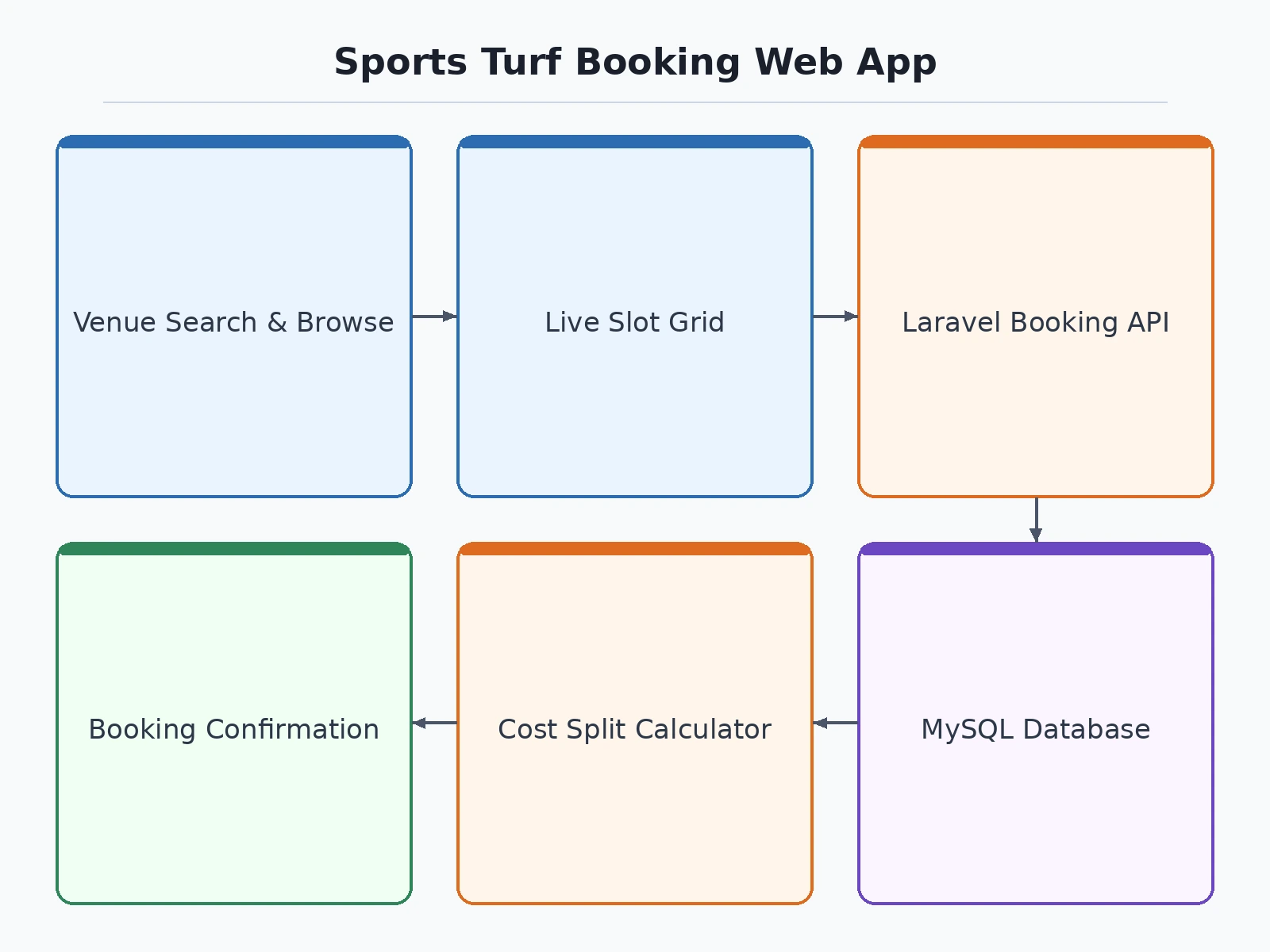
- The user registers or logs in and browses the venue listing; the frontend sends the sport and area filters to the backend, which queries the venues table in MySQL and returns matching turfs with photographs and hourly rates.
- The user opens a venue and picks a date; the backend loads all bookings and maintenance blocks for that venue and date from the database and the frontend renders the hourly grid with booked slots blocked.
- The user selects one or more available hourly slots; the frontend calculates a provisional total from the stored peak and off-peak rates and shows it before confirmation.
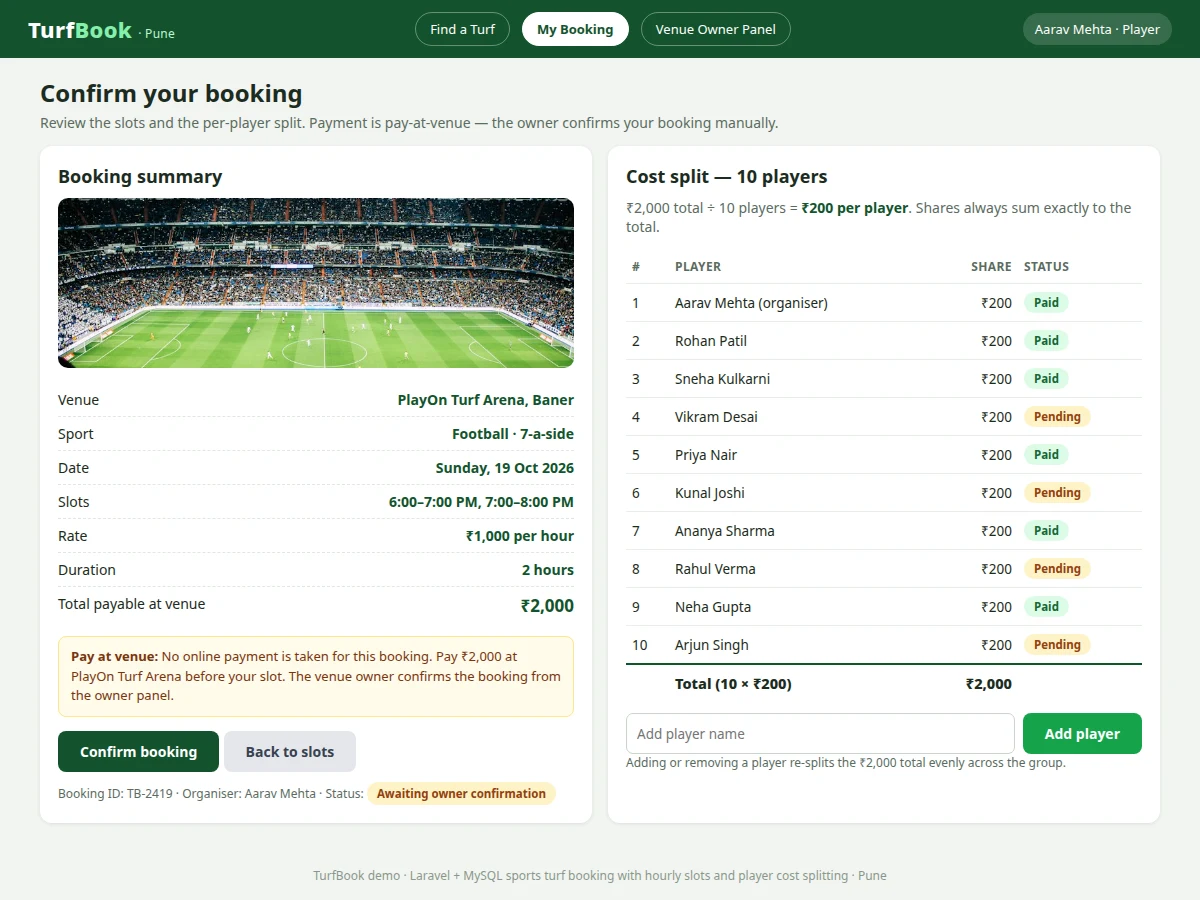
- The organiser adds the group players by name; the backend validates the player list and the app divides the slot total evenly across all players, adjusting any remainder on the organiser share so shares sum exactly to the total.
- On confirmation the backend re-checks slot availability inside a database transaction, inserts the booking and player-share records, and rejects the request if another booking took a slot first — preventing double booking.
- The confirmation page reads the saved booking from the database and shows venue, date, slots, total and each player's share; the venue owner sees the same booking in the admin panel.
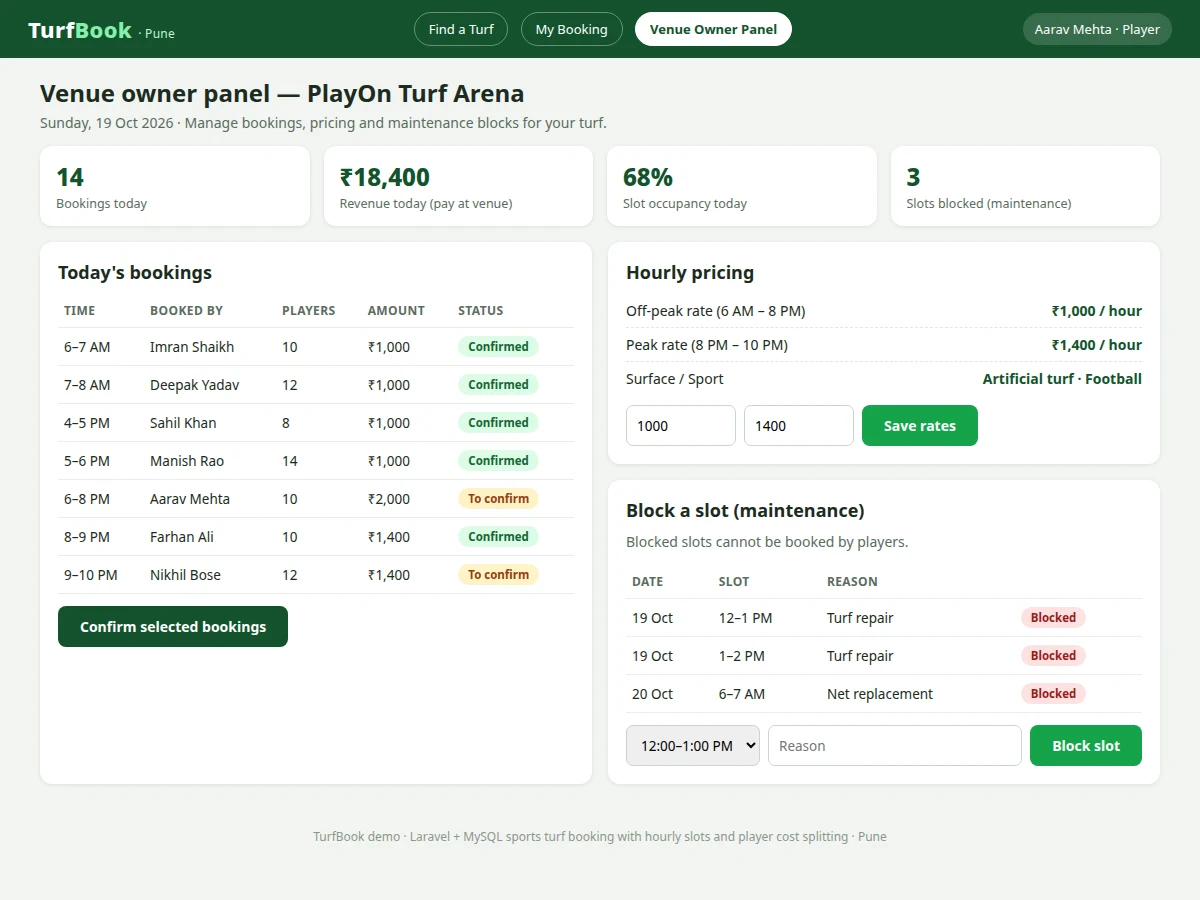
- The venue owner can later block slots for maintenance or update peak and off-peak pricing from the admin panel; those changes are written to the database and reflected immediately in the availability grid.
Tech stack:
- Laravel (PHP framework) · Blade templates
- MySQL relational database
- HTML5 · CSS3 · JavaScript
- Bootstrap responsive layout
- Eloquent ORM and migrations
- PHP built-in authentication with role checks
| Parameter | Value |
|---|---|
| Slot duration | 1 hour per slot |
| Slots per venue per day | Approximately 16 slots per day (Design target) |
| Venues supported | Approximately 20 venues (Design target) |
| Players per booking | 2 to 22 players per booking (Design target) |
| Sports covered | 3 sports — football, cricket and box cricket |
| Page response time | Under 2 seconds on broadband (Design target) |
| Cost-split accuracy | Shares sum exactly to the booking total in rupees (Expected) |
| Database | MySQL relational database with transactional booking inserts |
Project features
- [Venue listing and search] Players browse turf venues with photographs, sport type (football, cricket or box cricket), surface, area and hourly price, and can filter by sport and locality before opening a venue.
- [Live hourly availability grid] Each venue page shows slots hour by hour for the selected date; booked and maintenance-blocked slots are disabled so a slot cannot be selected twice.
- [Hourly slot booking] A player selects one or more consecutive hourly slots, confirms the group booking and receives an on-screen confirmation with venue, date, time and total amount.
- [Automatic player cost splitting] The organiser adds every player by name; the app totals the selected slot rates and divides the total evenly, showing each player's share on the booking and confirmation pages.
- [Venue-owner admin panel] Owners manage their turfs, edit details and photographs, set peak and off-peak hourly rates, view bookings for their venues and block slots for maintenance.
- [Booking records and history] Players see their upcoming and past bookings in one list, and owners see bookings per venue and date, giving both sides the same record.
- [Role-based access] Separate accounts and permissions for players and venue owners: players manage only their own bookings, owners manage only their own venues.
Optional customizations (not in base build): payment-gateway checkout, SMS or WhatsApp booking reminders, coupon codes and recurring weekly team bookings can be added on request. Future scope: a native mobile app and inter-venue tournaments are not part of the base build.
What is included
- Complete Laravel source code with Blade frontend
- MySQL database schema, migrations and seed data with sample Pune venues
- Setup instructions for local PHP and MySQL hosting
- Project report PDF (background, design, database schema, methodology, results)
- PPT presentation for final review
- Viva Q&A preparation document (MVC, transactions, role-based access, cost-split logic)
- Project abstract PDF
Limitations & prerequisites
- The base build does not include online payment collection; bookings are settled pay-at-venue or by manual confirmation, and gateway checkout is an optional customization.
- Availability is only as current as the data owners maintain; an owner who takes offline phone bookings must enter or block those slots in the panel.
- Cost splitting is strictly equal by default; unequal shares (for example, a player joining for one hour only) need manual adjustment by the organiser.
- Photographs and prices in the seed data are sample data for demonstration; a live deployment needs the venue's own photographs and confirmed rates.
- The system needs internet hosting to be shared with players; it runs locally for demonstration without a public domain.
Frequently Asked Questions
Is this project suitable for a final-year project?
Yes. It covers full-stack web development in one coherent system: relational database design for venues, slots and bookings, role-based access for players and venue owners, availability logic that prevents double booking, and a responsive frontend. It demonstrates Laravel MVC, MySQL transactions and form validation, all of which can be explained clearly in a viva.
Is payment gateway integration included?
No. Payment-gateway integration is an optional customization and is not included in the base build. The base build records the booking and marks it for pay-at-venue or manual confirmation by the venue owner. A gateway such as Razorpay or Stripe can be added later if the venue provides its merchant account and credentials.
How does the player cost splitting work?
The organiser selects one or more hourly slots and adds every player in the group by name. The app adds the hourly rates for the selected slots to get the total, then divides that total evenly across all players and shows each share on the confirmation page. If the total does not divide evenly, the remainder is adjusted on the organiser share so shares always sum to the total.
Does the project contain an admin panel?
Yes. Venue owners get a separate admin panel to add and edit turfs, set peak and off-peak hourly rates, view all bookings for their venues, cancel bookings where permitted, and block slots for maintenance so they cannot be booked. Players only see their own bookings, while owners only manage their own venues.
Can this project be hosted online and customized?
Yes. The Laravel application can be deployed on any standard PHP and MySQL hosting with the included setup instructions. Realistic customizations include new sports, multiple cities, coupon codes, recurring team bookings and optional payment-gateway checkout. The base build itself covers venue listing, hourly booking, cost splitting and owner administration.
Components & software requirements
- Laravel (PHP framework) · Blade templates
- MySQL relational database
- HTML5 · CSS3 · JavaScript
- Bootstrap responsive layout
- Eloquent ORM and migrations
- PHP built-in authentication with role checks
Delivery information
Built-to-order project. Delivery timeline is shared after order confirmation based on current queue.
Support terms
Complete documentation, setup guide, and viva preparation included. Support for setup and explanation provided.
Download free synopsis (PDF)
Enter your name and email — the synopsis PDF downloads immediately. We may send occasional project updates; no spam, unsubscribe anytime.