
More project photos (2)
The problem
Most housing societies still manage their community hall with a paper register kept by a committee member, backed up by scattered WhatsApp messages. Nobody can see at a glance whether next Saturday is free, clashes surface only when two residents turn up with claims, and money collected — cash, UPI, cheques — gets noted in loose sheets that go missing by year-end. Residents must call or message someone just to check availability, and the committee has no clean record of who paid and for which event.
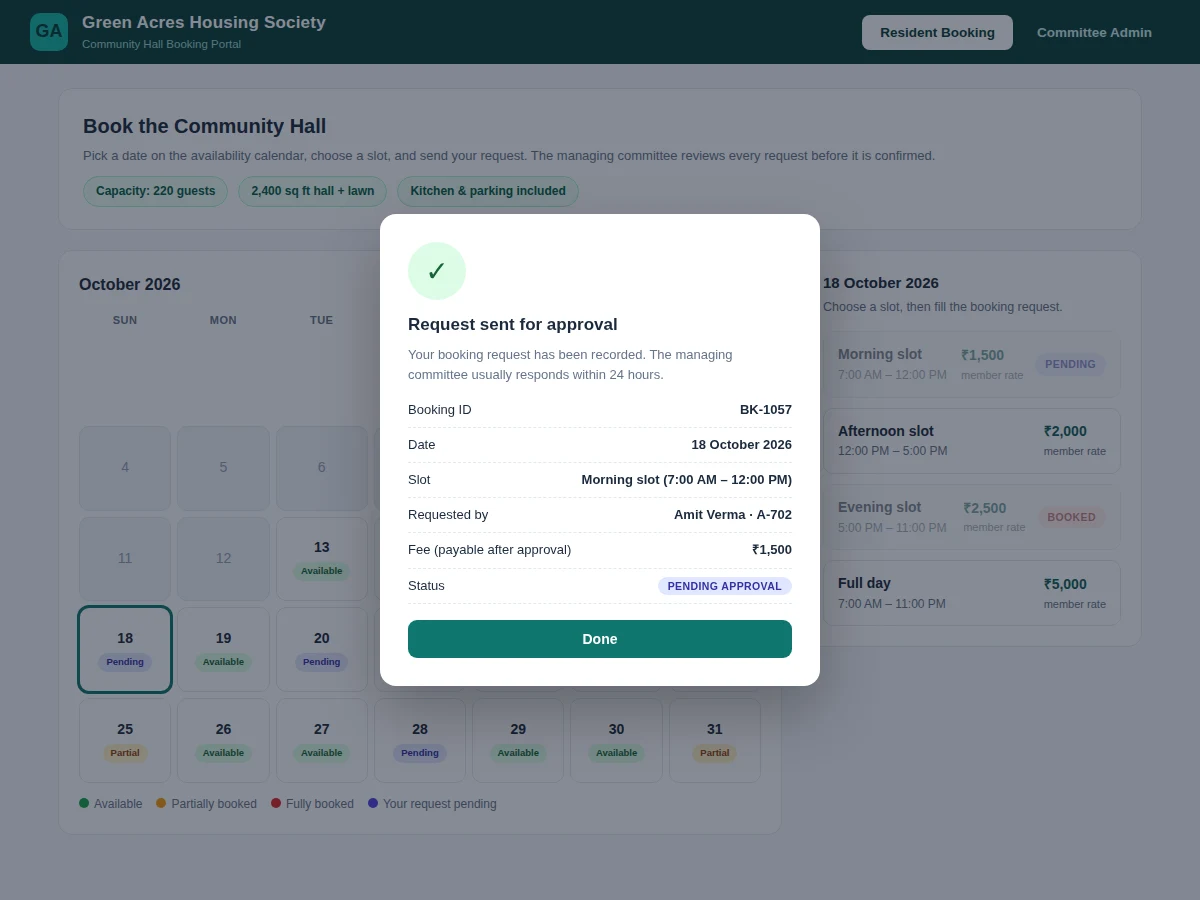
This web app moves the process online. A month-view availability calendar shows every date as available, partially booked, fully booked or under review. Residents pick a date and a slot (morning, afternoon, evening or full day), see the charges upfront, and send a booking request. The managing committee approves or rejects each request; approval locks the slot so the same date-slot cannot be approved twice. Payments collected outside the system are recorded against each confirmed booking with a receipt number, so the society always knows what is paid and what is still due.
Picks a date and slot on the calendar and sends a booking request.
Follow the working sequence
How it works
- The resident opens the portal and views the month calendar, where each date is colour-coded by availability and past dates are disabled.
- Clicking a date shows its four slots with the applicable member or outsider price; booked slots are greyed out and cannot be selected.
- The resident fills the request form (name, flat, mobile, event type, expected guests) and submits; the slot is marked "pending review" on the calendar.
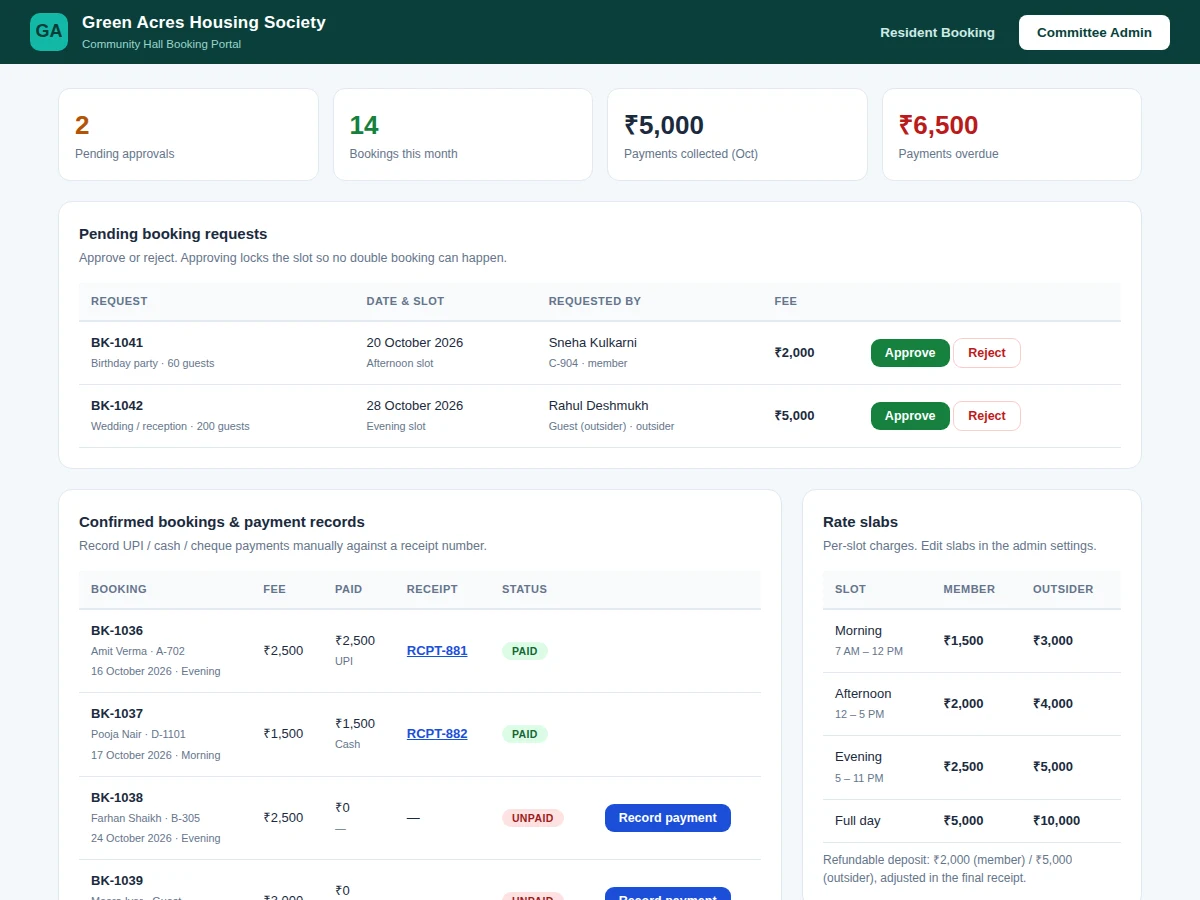
- The committee admin opens the pending-request queue, reviews the details, and approves (slot locks, fee confirmed) or rejects the request.
- After approval, the committee records each payment as it arrives — UPI, cash or cheque — with the mode noted against a generated receipt number.
- The resident's request page updates with approved status, paid amount and balance due; the full booking history stays searchable for audits.
Tech stack:
- HTML5, CSS3, JavaScript (responsive frontend)
- Node.js + Express (backend REST API)
- MySQL (users, slots, bookings, payments)
- Session/JWT authentication with resident and committee roles
- Date-picker calendar logic with slot-state rendering
- Receipt-number generation and audit-style record views
| Parameter | Value |
|---|---|
| User roles | 2 — resident and committee admin (implemented) |
| Booking slots per day | 4 — morning, afternoon, evening, full day (configurable) |
| Calendar view | Month grid with 5 availability states (implemented) |
| Payment gateway | Not integrated — manual UPI/cash/cheque recording only (implemented) |
| Conflict handling | Date-slot lock on approval; design target prevents double approval |
| Residents supported | Approximately 500 per society (expected, single-server deployment) |
| Page load | Design target under 2 seconds on broadband (unmeasured) |
| Hosting | Standard shared or VPS hosting with Node.js and MySQL (expected) |
Project features
- [Availability calendar] Month-view calendar with every date marked available, partially booked, fully booked or pending review; past dates are locked so nobody can book backwards.
- [Booking request workflow] Residents submit a request with name, flat, mobile, event type and guest count; it stays in a pending queue until the committee acts on it.
- [Slot conflict prevention] Approving a request locks that date-slot in the database, so a second pending request for the same slot can no longer be approved.
- [Payment record tracking] Committee members record UPI, cash or cheque payments manually against each confirmed booking; the system assigns a receipt number and shows a receipt view.
- [Member vs outsider rate slabs] Four per-day slots (morning, afternoon, evening, full day) with separate charges for society members and outsiders, plus a configurable refundable deposit.
- [Admin dashboard] Pending-approval count, monthly bookings, payments collected and overdue amounts at a glance, with a searchable booking history.
- [Status tracking for residents] Every request shows its live status — pending, approved, rejected — with the fee, receipt number and balance due.
- [Receipt view] Printable receipt-style view for each payment record, showing booking details, total fee, amount received and balance due.
What is included
- Complete frontend + backend source code
- MySQL database schema with realistic seed data
- Setup and hosting instructions (database import, configuration)
- Working single-file demo walkthrough of the resident and admin flows
- Project report PDF (background, methodology, schema design, screenshots)
- PPT presentation for the final review
- Viva Q&A preparation document (roles, workflow, conflict logic, schema)
Limitations & prerequisites
- No online payment gateway in the base build — payments are recorded manually after money is collected through UPI, cash or cheque.
- Notifications are shown in-app; SMS or WhatsApp alerts are an optional add-on with third-party messaging costs not included.
- Two residents can both send requests for the same free slot; the conflict is resolved at approval time, not at request time.
- The base build models a single hall; multi-hall support is a customization.
- No native mobile app; the web app is responsive and works in a mobile browser.
- Refund and deposit adjustments follow the manual receipt flow — there is no automated refund calculation.
Frequently Asked Questions
Is this project suitable for a final-year project?
Yes. Computer Engineering, IT and MCA students can use it to demonstrate full-stack web development, relational database design, role-based access control and workflow logic. The report and demo make the booking flow easy to explain in a review, and the committee-admin side gives plenty of technical depth for questions.
Is there an integrated payment gateway?
No. The base project does not include a live payment gateway. Payments collected through UPI, cash or cheque are recorded manually by the committee against each confirmed booking, and the system generates a receipt number with a printable receipt view. A gateway integration can be added as a paid customization.
Can more halls or different slot timings be added?
Yes. The slot table, rate slabs and date rules are data-driven, so extra halls, new slot timings or changed charges can be added through the admin settings or a small customization. The calendar, approval flow and payment records work the same way for every hall.
How does the system stop the same slot from being booked twice?
A date-slot combination can move from pending to approved only once. When the committee approves a request, the slot is locked in the database, so any other pending request for that slot can no longer be approved. Pending requests are also visible on the calendar, so residents can see the slot is under review.
Can it be hosted online for the college demo?
Yes. The project is a standard web application with a database, so it can be hosted on shared or VPS hosting and shown live from a laptop or phone during the review. The setup guide covers the database import and configuration steps needed to get it running online.
Components & software requirements
- HTML5, CSS3, JavaScript (responsive frontend)
- Node.js + Express (backend REST API)
- MySQL (users, slots, bookings, payments)
- Session/JWT authentication with resident and committee roles
- Date-picker calendar logic with slot-state rendering
- Receipt-number generation and audit-style record views
Delivery information
Built-to-order project. Delivery timeline is shared after order confirmation based on current queue.
Support terms
Complete documentation, setup guide, and viva preparation included. Support for setup and explanation provided.
Download free synopsis (PDF)
Enter your name and email — the synopsis PDF downloads immediately. We may send occasional project updates; no spam, unsubscribe anytime.