
More project photos (3)


The problem
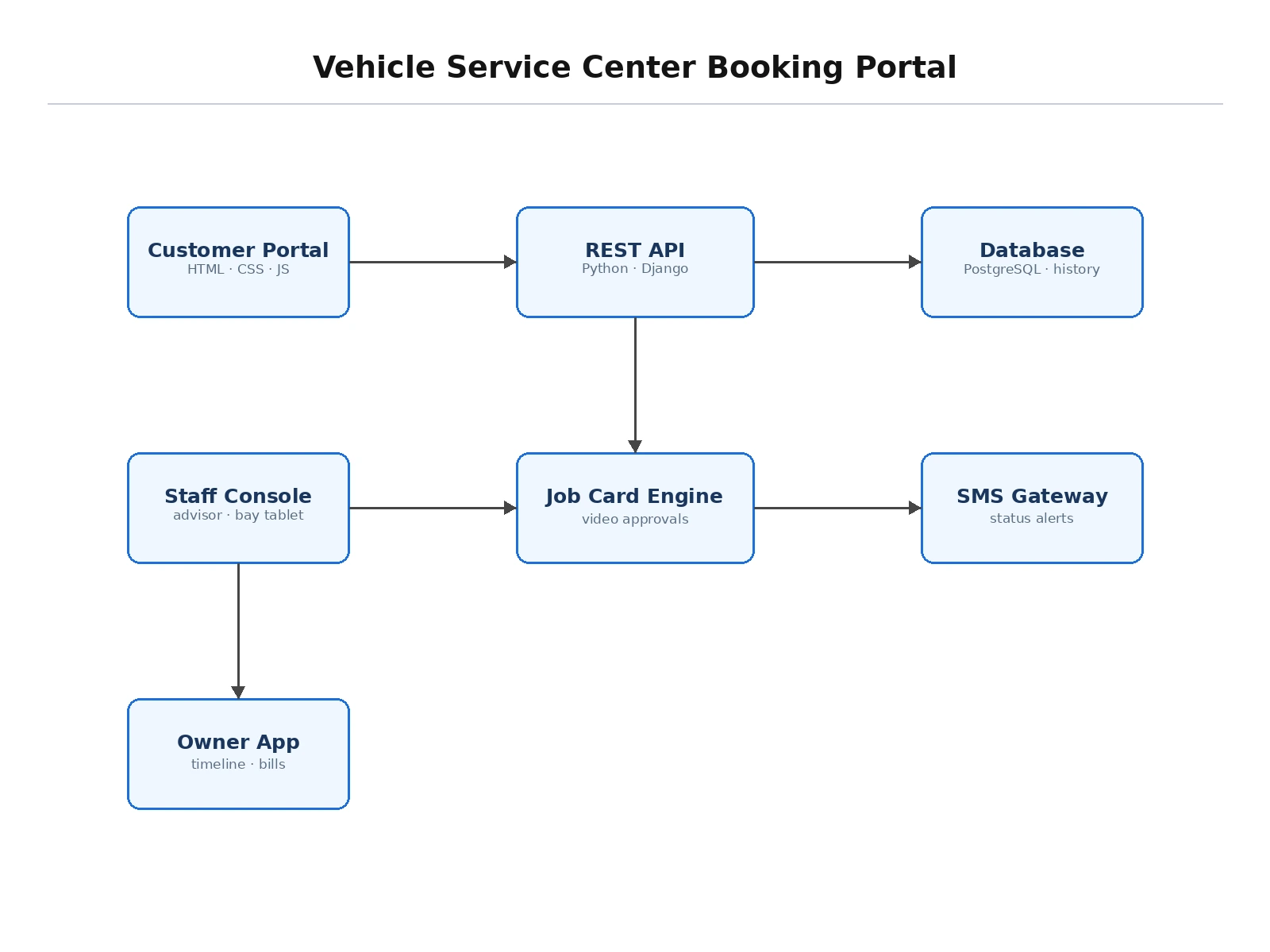
Vehicle servicing is notorious for opaque pricing and poor communication: owners approve work they don't understand, wait without updates, and lose service records across scattered invoices, while advisors burn time on coordination calls. An online booking portal fixes both sides with transparency — published menus, slot-based bay scheduling, pickup logistics, and a digital job card the owner follows live. This project builds that portal end to end: owners book specific services at fixed prices, choose pickup or drive-in, watch a timeline from vehicle-received to ready-for-delivery, approve additional work from an inspection video before it starts, and keep a lifetime service record per vehicle with next-due reminders.
Books a slot from the service menu, approves extra work in-app, and picks up the serviced vehicle.
Follow the working sequence
How it works
- The owner selects a vehicle, ticks services from the published menu, and picks a slot within bay capacity.
- Pickup & drop (optional) creates a driver task with a time window; drive-in owners get a bay assignment.
- At intake the advisor creates the digital job card with the odometer reading and starts the timeline.
- Technicians update stage transitions from the bay view; the owner watches progress live.
- If inspection reveals extra work, the advisor uploads a video plus revised estimate; work pauses until the owner approves in-app.
- Quality check and wash complete the timeline; the owner gets an SMS, pays, and the record files into history with the next due date.
Tech stack:
- Python (Django) or Node.js REST backend with role-based access
- PostgreSQL/MySQL; object storage for inspection videos
- HTML5, CSS3, JavaScript — responsive owner app plus bay tablet view
- SMS/email gateway for status and approval alerts
- Payment support for advance or online settlement
| Parameter | Value |
|---|---|
| Roles | Owner, advisor, technician, admin |
| Job-card stages | 5 (received → inspection → work → QC → ready) |
| Approval gate | Extra work blocked until owner approves |
| Slot model | Per-bay, per-day capacity |
| History | Per vehicle: costs, odometer, due dates |
| Pickup | Driver task with time window |
| Demo data | Service menu, 3 past services, live job card (sample) |
Project features
- [Transparent service menu] Fixed prices and duration estimates per service, filterable for car and bike.
- [Bay-capacity scheduling] Slots derived from real bay availability; pickup & drop adds driver tasks with windows.
- [Live digital job cards] Owner-visible timeline: received, inspection, work in progress, quality check, ready.
- [Video approval flow] Inspection videos with supplementary estimates; extra work starts only after in-app approval.
- [Per-vehicle history] Lifetime records with costs, odometer readings and next-service due dates.
- [Role-based access] Owner app, advisor console, bay tablet view and admin — each seeing only its workflow.
- [Notifications] SMS alerts for status changes, approval requests and ready-for-delivery.
What is included
- Complete portal (owner, advisor, technician and admin modules)
- Digital job-card workflow with live timeline
- Inspection-video approval flow
- Per-vehicle service-history module
- Project report PDF (workflow design, roles, schema)
- PPT presentation for final review
- Viva Q&A preparation document (workflow engines, RBAC, approvals)
Limitations & prerequisites
- Inspection videos in the demo are sample uploads; production needs advisor phones with the capture flow.
- Live payments need a gateway account configured at deployment.
- Pickup routing is time-window based, not a full route-optimization engine.
- Spare-parts inventory linkage is future scope; parts are line items in this build.
- The bay tablet view assumes a modern browser on the workshop device.
Frequently Asked Questions
How does the video approval flow work?
When inspection finds extra work, the advisor uploads a short video and a revised estimate. The job card pauses, the owner gets an alert, and approves or declines from their phone. Only approved items proceed — declined items are logged as declined.
What prevents overbooking the workshop?
Slots are generated from bay capacity minus existing bookings, so the schedule can never exceed what the floor can handle.
Can owners track the car live?
They see the job-card timeline update at each stage transition — received, inspection done, work in progress, quality check, ready — with timestamps.
Does it handle both cars and bikes?
Yes — the service catalog is tagged by vehicle type, and each vehicle keeps its own history.
Is this project suitable for a final-year project?
Yes — for Computer Science, IT and Web Development programs. It demonstrates workflow modeling, role-based access, approval gates and real-time status design. Suitable for B.E./B.Tech final-year projects in Computer Science, IT and Web Development.
Components & software requirements
- Python (Django) or Node.js REST backend with role-based access
- PostgreSQL/MySQL; object storage for inspection videos
- HTML5, CSS3, JavaScript — responsive owner app plus bay tablet view
- SMS/email gateway for status and approval alerts
- Payment support for advance or online settlement
Delivery information
Built-to-order project. Delivery timeline is shared after order confirmation based on current queue.
Support terms
Complete documentation, setup guide, and viva preparation included. Support for setup and explanation provided.
Download free synopsis (PDF)
Enter your name and WhatsApp number — the synopsis PDF downloads immediately. We may send occasional project updates on WhatsApp; no spam.