
More project photos (2)
The problem
Hostel complaints today travel by word of mouth: a student tells the warden, the warden calls a contractor, and nobody knows whether the leaking tap was ever fixed. Repeat complaints, lost follow-ups and zero accountability are the norm, while urgent issues like water outages compete with trivia for attention. This project builds a proper redressal portal for hostels: students raise categorized complaints with photo evidence, each ticket carries an SLA clock derived from its category, overdue tickets auto-escalate to the warden with full history, and a ticket can only close after the resident confirms the fix. A dashboard turns complaints into measurable service data — volumes by category, resolution times, and team-wise SLA compliance feeding a contractor scorecard.
How it works
- A resident raises a complaint with category, priority, block/room location, description and photos; the system assigns a ticket ID and an SLA deadline.
- The ticket auto-routes to the responsible maintenance team and appears in their queue.
- Staff acknowledge the ticket, post progress updates and schedule technician visits on the timeline.
- A background scheduler watches SLA deadlines; breached tickets escalate to the warden with full history.
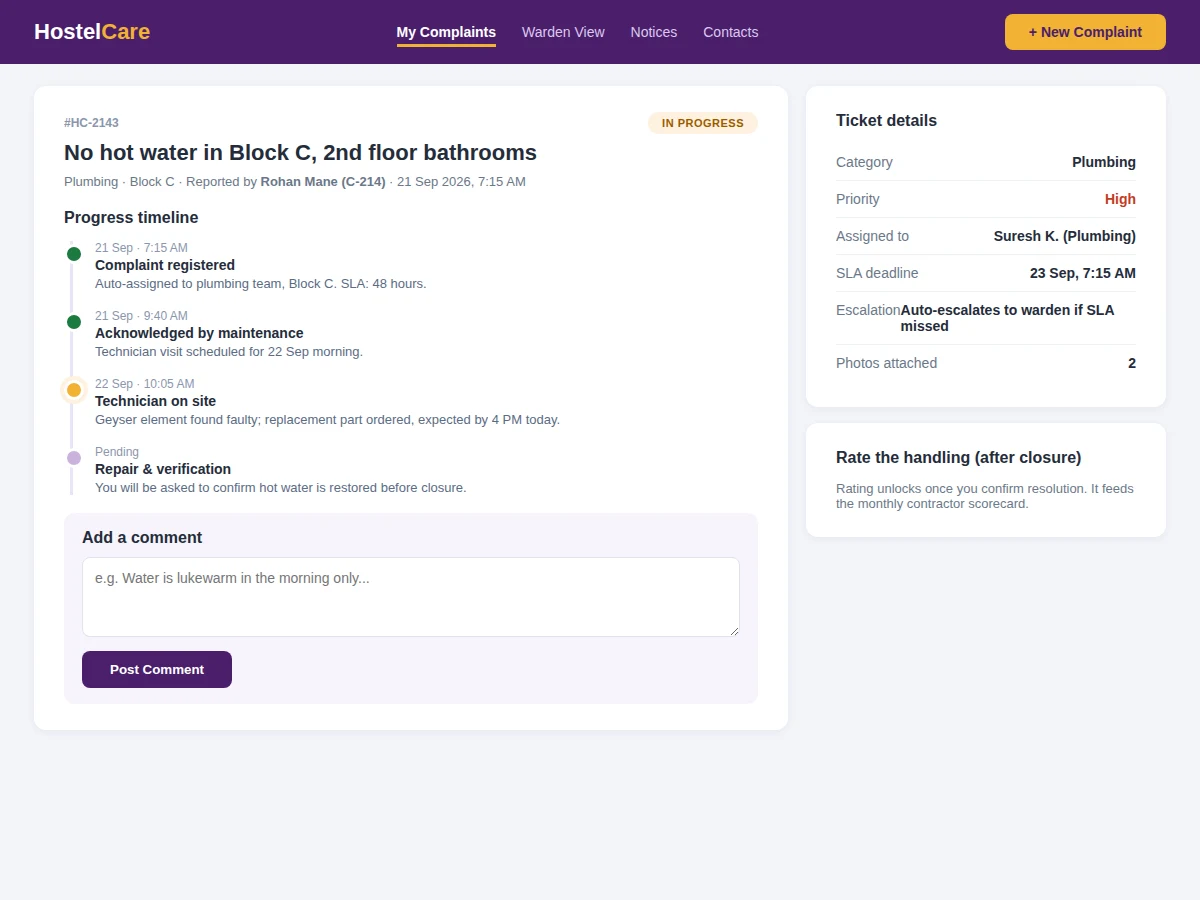
- When the work is done, staff request closure; the resident confirms the fix (or reopens with a comment) and rates the handling.
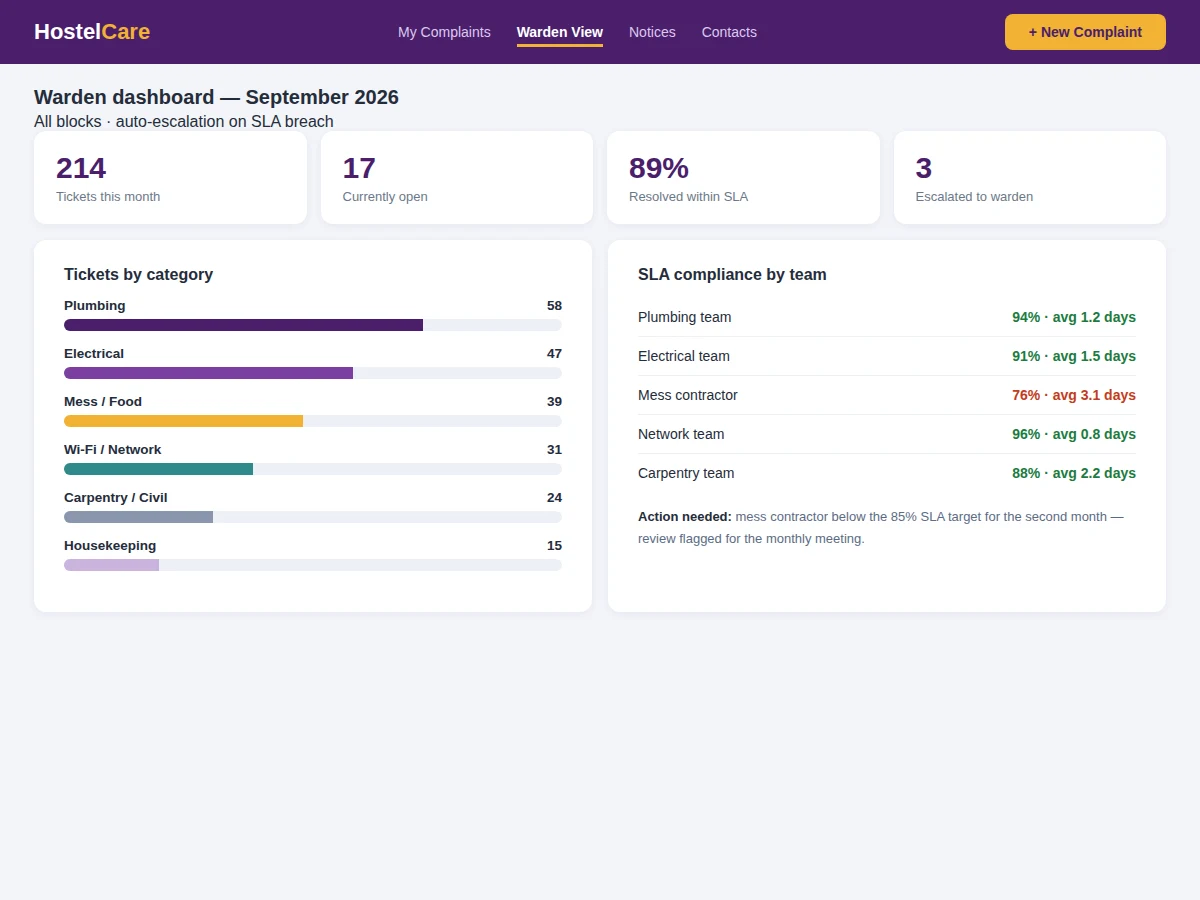
- Ratings and resolution times feed the warden dashboard and the monthly contractor scorecard.
Tech stack:
- Python (Django/Flask) or Node.js backend
- PostgreSQL/MySQL relational database
- HTML5, CSS3, JavaScript (mobile-first frontend)
- Background scheduler for SLA checks
- Media storage for complaint photos
- Email/SMS notification gateway
- Role-based access (resident, staff, warden)
- Dashboard charts
| Parameter | Value |
|---|---|
| Application type | Role-based ticketing web application |
| Ticket states | Open, in progress, pending confirmation, resolved, escalated, reopened |
| SLA model | Per-category deadlines (configurable per hostel) |
| Escalation | Automatic on SLA breach, with full history |
| Closure rule | Resident confirmation required (by design) |
| Photo evidence | Multiple photos per ticket |
| Deployment | Shared hosting or small VPS |
| Deliverables | Source code, DB schema, setup guide, report, PPT, viva Q&A |
Project features
- [Categorized complaint intake] Plumbing, electrical, mess, Wi-Fi, housekeeping and carpentry categories with priority tags, location and photo upload.
- [SLA clocks per ticket] Each category carries a resolution deadline; countdowns are visible to the resident and the assigned team.
- [Auto-escalation] Breached SLAs escalate to the warden automatically with the complete ticket history attached.
- [Resident-confirmed closure] Staff can only request closure; the ticket closes when the resident confirms the fix, with a satisfaction rating.
- [Progress timeline] Every ticket shows a timestamped trail: registered, acknowledged, technician on site, resolved.
- [Warden dashboard] Ticket volumes, category mix, SLA compliance by team and the escalation list in one view.
- [Team assignment] Tickets route to the right maintenance team with workload visibility.
What is included
- Complete complaint portal source code (resident, staff, warden interfaces)
- Database schema and migration scripts
- SLA engine with escalation scheduler
- Warden dashboard with compliance analytics
- Notification templates (SLA warnings, escalations, closure requests)
- Setup and deployment guide
- Test scenarios for the buyer to verify the full ticket lifecycle
- Project report PDF (background, workflow design, escalation model, methodology)
- PPT presentation for final review
- Viva Q&A preparation document (state machines, scheduling, role-based access)
Limitations & prerequisites
- Actual repair work is done by humans; the system tracks and enforces process, not wrenches.
- SLA deadlines are policy values configured by the hostel — the system does not decide what is reasonable.
- Photo evidence helps triage but cannot verify that a repair was done well; resident confirmation does.
- Notification delivery depends on the configured email/SMS gateway.
- Multi-hostel hierarchies (cluster wardens, central admin) are configurable but add setup complexity.
- Predictive maintenance from complaint patterns is future scope.
Frequently Asked Questions
What stops staff from just marking everything resolved?
They cannot. Staff can only request closure; the ticket closes when the resident confirms the fix. Unconfirmed closures stay visible as pending.
How does auto-escalation work?
A scheduler checks SLA deadlines continuously. When a ticket breaches its deadline, it is flagged as escalated and the warden is notified with the complete timeline — no manual step needed.
Can a resident reopen a closed ticket?
Yes. If the fix fails, the resident reopens with a comment and the ticket returns to the team's queue with its history intact.
How are SLA deadlines decided?
Per category, configured by the hostel administration — e.g. water and electrical issues get shorter deadlines than carpentry. The system enforces whatever policy is set.
Does the warden see individual complaints or only summaries?
Both — the dashboard aggregates volumes and compliance, and any ticket (especially escalated ones) can be drilled into for the full timeline.
Is this project suitable for a final-year project?
Yes — for Computer Science, IT and Web Development programs. It demonstrates workflow engines, state machines, scheduled jobs, role-based access and analytics around a genuine institutional problem. Suitable for B.E./B.Tech final-year projects in Computer Science, IT and Web Development.
Components & software requirements
- Python (Django/Flask) or Node.js backend
- PostgreSQL/MySQL relational database
- HTML5, CSS3, JavaScript (mobile-first frontend)
- Background scheduler for SLA checks
- Media storage for complaint photos
- Email/SMS notification gateway
- Role-based access (resident, staff, warden)
- Dashboard charts
Delivery information
Built-to-order project. Delivery timeline is shared after order confirmation based on current queue.
Support terms
Complete documentation, setup guide, and viva preparation included. Support for setup and explanation provided.