
More project photos (2)
The problem
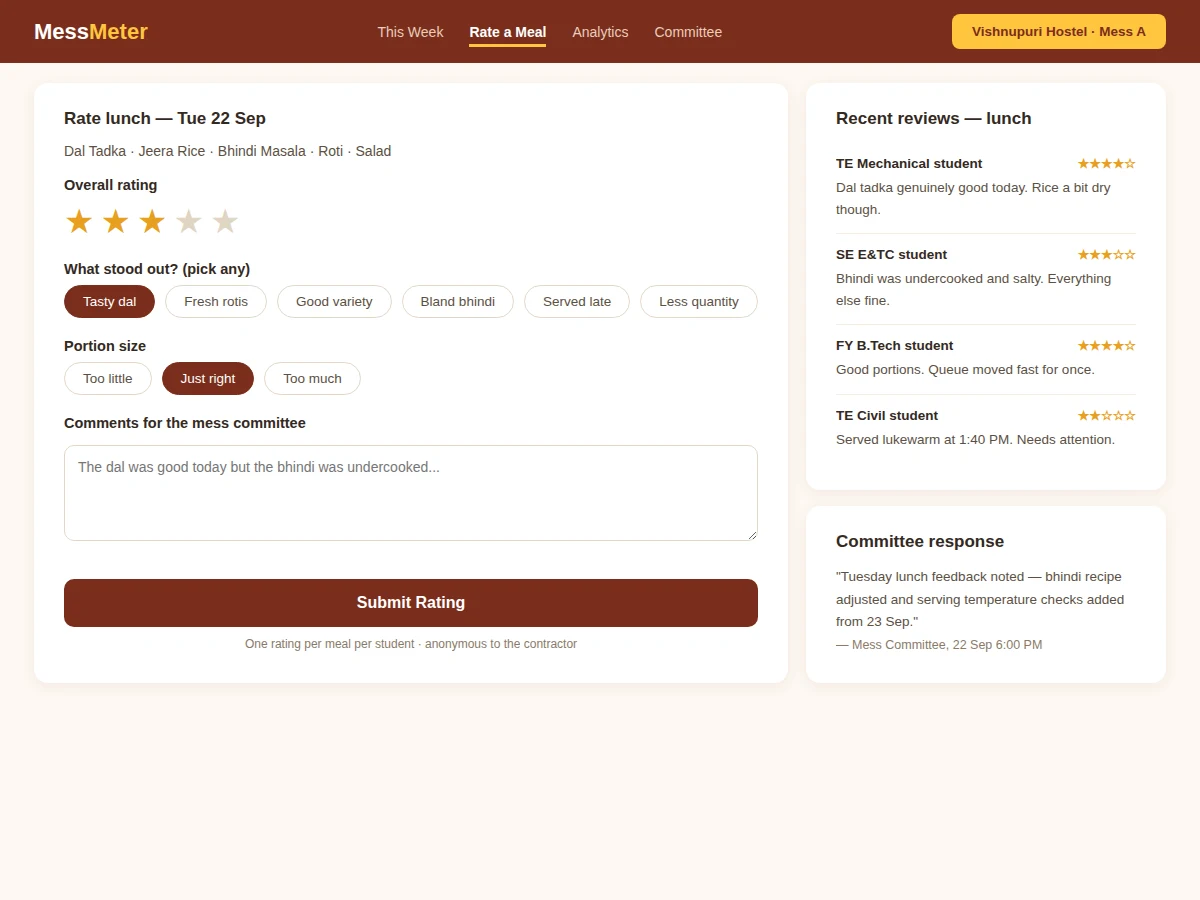
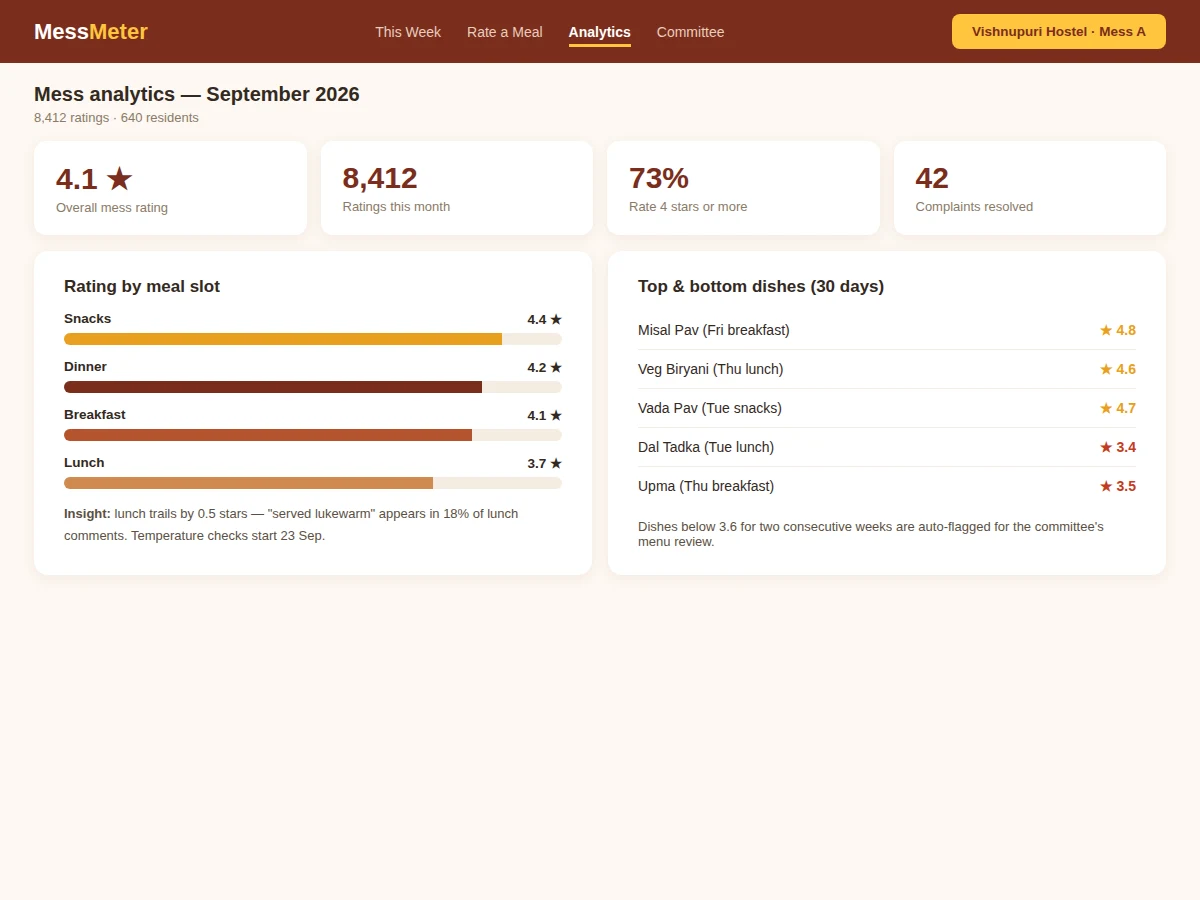
Mess food is the most complained-about and least measured service on any residential campus. Committees argue from anecdotes — "the dal is always bad" — while contractors dismiss complaints as a vocal minority, because nobody has numbers. This project builds a mess feedback system: the weekly menu published in advance with historical dish ratings, per-meal star ratings from verified residents with structured tags (tasty, bland, served late, less quantity) and comments, analytics by meal slot, day and dish, automatic flagging of dishes below threshold for two consecutive weeks, and a monthly contractor scorecard. Committee responses are published against feedback, so students see that rating causes change.
How it works
- The mess committee enters the weekly menu; residents browse it with each dish's historical rating.
- After each meal window opens, verified residents submit a star rating with tags and optional comments — one per meal per student.
- The system aggregates ratings into rolling averages by dish, slot and day, updating dashboards live.
- Dishes scoring below threshold for two consecutive weeks are auto-flagged for the committee's menu review.
- The committee publishes responses to notable feedback, visible to all residents.
- At month end, the contractor scorecard is generated: ratings, trends, flagged dishes and response log.
Tech stack:
- Python (Django/Flask) or Node.js backend
- PostgreSQL/MySQL relational database
- HTML5, CSS3, JavaScript (mobile-first frontend)
- Scheduled jobs for meal-window open/close
- Charting library for analytics
- Role-based access (resident, committee, contractor view)
- CSV/PDF scorecard export
- Responsive web UI
| Parameter | Value |
|---|---|
| Application type | Feedback and analytics web application |
| Rating rule | One rating per meal per student (enforced) |
| Rating scale | 1–5 stars with structured tags |
| Analytics | Dish, slot and day-level rolling averages |
| Auto-flag rule | Below threshold for 2 consecutive weeks (configurable) |
| Scorecard | Monthly contractor report (exportable) |
| Deployment | Shared hosting or small VPS |
| Deliverables | Source code, DB schema, setup guide, report, PPT, viva Q&A |
Project features
- [Weekly menu publishing] Breakfast, lunch, snacks and dinner for each day, with each dish carrying its historical rating.
- [One-rating-per-meal feedback] Verified residents rate each meal once — fairness is enforced at the data layer, not by policy.
- [Structured tags + comments] Quick tags (tasty, fresh rotis, bland, served late, less quantity) plus free-text comments for the committee.
- [Dish-level analytics] Rolling averages by dish, meal slot and day, with trend views the committee can actually read.
- [Auto-flagging] Dishes below the rating threshold for two consecutive weeks are flagged for menu review automatically.
- [Contractor scorecard] Monthly export: overall rating, slot-wise scores, complaint counts and resolution status.
- [Committee responses] Official replies published against feedback threads, visible to all residents.
What is included
- Complete mess feedback application source code
- Database schema and migration scripts
- Menu management and rating-window scheduler
- Analytics dashboards and auto-flagging engine
- Contractor scorecard generator
- Setup and deployment guide
- Pilot plan for the buyer to measure real adoption in one hostel
- Project report PDF (background, feedback design, analytics model, methodology)
- PPT presentation for final review
- Viva Q&A preparation document (rating integrity, aggregation, scheduling)
Limitations & prerequisites
- Ratings reflect the opinions of residents who choose to rate — participation bias is real and documented in the report.
- One-rating-per-meal is enforced per account; account sharing is a policy matter.
- The system measures satisfaction; it does not inspect kitchens or verify hygiene.
- Menu decisions stay with the committee — analytics advise, they do not auto-change menus.
- Scorecards are only as honest as the rating base; pilot adoption targets are design goals.
- Nutrition tracking and pre-order counts are future scope.
Frequently Asked Questions
What stops someone from spamming 1-star ratings?
The data layer allows exactly one rating per meal per verified account. Coordinated campaigns would need many real accounts — and the committee sees rating distributions, not just averages.
Are ratings anonymous to the contractor?
Yes. The contractor's scorecard view shows aggregates only; individual ratings and comments are visible to the committee, never attributed publicly.
How are "bad dishes" decided objectively?
A dish is auto-flagged only after scoring below the configured threshold for two consecutive weeks — sustained underperformance, not one bad day.
Can the committee fake good ratings?
Committee accounts are role-separated from resident accounts and cannot submit ratings; the audit log records all administrative actions.
What if only 10% of residents rate?
The dashboard shows the rating count beside every average so small samples are visible as small samples. The pilot plan targets raising participation through meal-time QR prompts.
Is this project suitable for a final-year project?
Yes — for Computer Science, IT and Web Development programs. It demonstrates feedback-system design, rating integrity, aggregation analytics and building a tool an institution can genuinely adopt. Suitable for B.E./B.Tech final-year projects in Computer Science, IT and Web Development.
Components & software requirements
- Python (Django/Flask) or Node.js backend
- PostgreSQL/MySQL relational database
- HTML5, CSS3, JavaScript (mobile-first frontend)
- Scheduled jobs for meal-window open/close
- Charting library for analytics
- Role-based access (resident, committee, contractor view)
- CSV/PDF scorecard export
- Responsive web UI
Delivery information
Built-to-order project. Delivery timeline is shared after order confirmation based on current queue.
Support terms
Complete documentation, setup guide, and viva preparation included. Support for setup and explanation provided.