
More project photos (2)
The problem
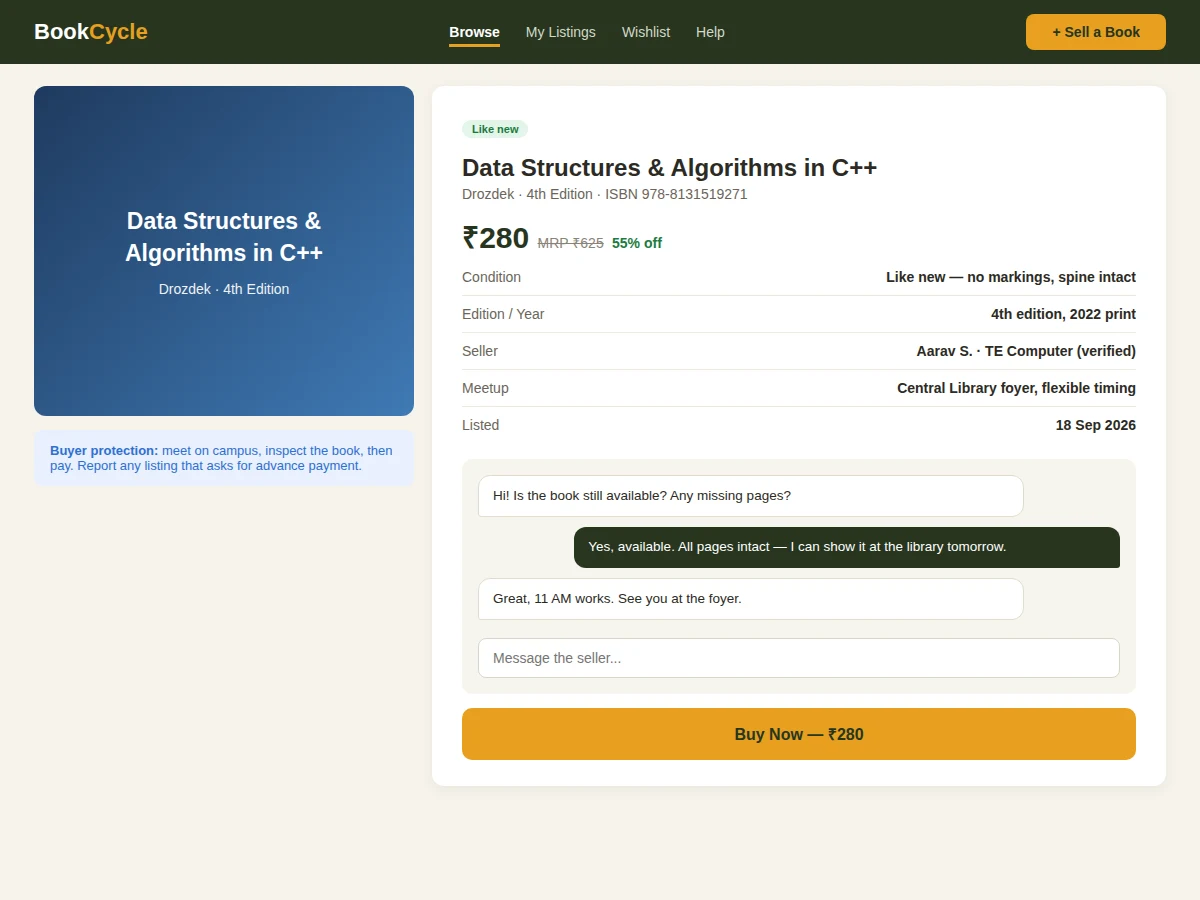
Every semester, juniors pay full MRP for textbooks that seniors sell to scrap dealers for a tenth of the price — simply because no trusted marketplace connects them. Generic classifieds mix students with strangers and add shipping friction for a 200-rupee book, while informal WhatsApp selling has no price transparency or seller accountability. This project builds a campus-only book exchange: college-email-verified sellers, structured listings with condition grades and MRP comparison, in-app chat that keeps phone numbers private until a deal is struck, and handover by campus meetup. The transaction stays offline by design — the platform handles discovery and trust, not payments.
How it works
- A seller verifies with a campus email and creates a listing: ISBN auto-fills title/author/edition, then condition grade, price and photos are added.
- The listing goes live in the browsable marketplace with search by title, author or ISBN and filters by branch and condition.
- A buyer opens the detail page, compares the price against MRP, and messages the seller through in-app chat.
- The two agree on a campus meetup spot and time; the buyer inspects the book before paying (cash/UPI in person).
- Either party marks the deal complete; the listing leaves browse results and the buyer rates the seller.
- Wishlist owners get alerts when matching books are listed, closing the discovery loop.
Tech stack:
- Python (Django/Flask) or Node.js backend
- PostgreSQL/MySQL relational database
- HTML5, CSS3, JavaScript (mobile-first frontend)
- Media storage for listing photos
- In-app messaging
- Email service for verification and alerts
- Campus-email domain verification
- Responsive web UI
| Parameter | Value |
|---|---|
| Application type | Campus marketplace web application |
| Listing fields | ISBN, edition, condition grade, photos, price vs MRP |
| Seller verification | Campus email domain (configurable) |
| Chat | Private per-listing threads |
| Photos | Multiple per listing, approximately 5 MB each (configurable) |
| Payments | Offline by design (meetup handover) |
| Deployment | Shared hosting or small VPS |
| Deliverables | Source code, DB schema, setup guide, report, PPT, viva Q&A |
Project features
- [Structured book listings] Title, author, edition, ISBN, condition grade (like-new/good/fair) and photos, with ISBN-based auto-fill.
- [Verified sellers] Campus-email verification; profiles show department, year and seller rating from completed handovers.
- [Price transparency] Every listing shows the asking price against MRP with the discount percentage and condition-adjusted guidance.
- [Private in-app chat] Buyer and seller negotiate and coordinate meetups without exposing phone numbers prematurely.
- [Wishlist alerts] Save wanted books; get notified the moment a matching listing appears.
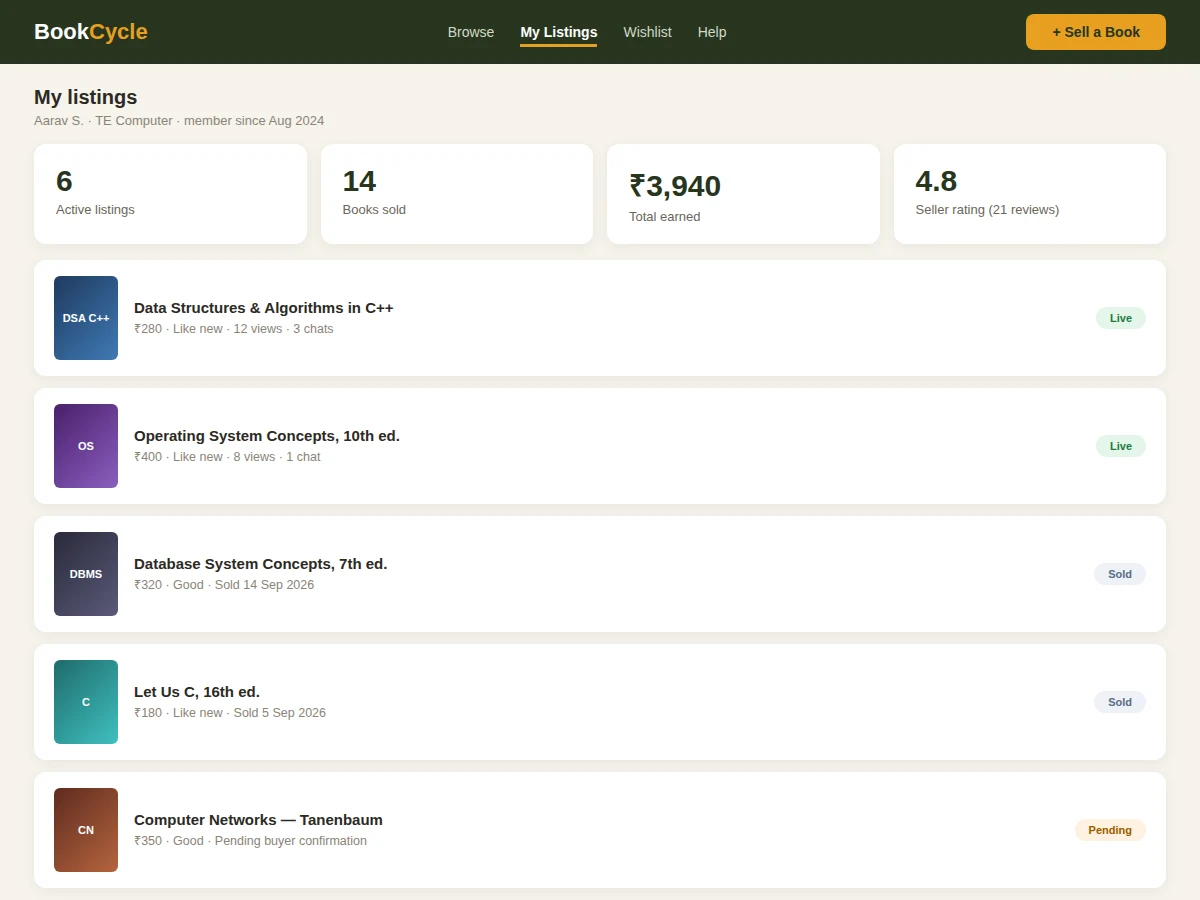
- [Seller dashboard] Active listings with views and chats, sold history, earnings total and rating breakdown.
- [Safety rails] No advance-payment flows anywhere; buyer-protection guidance is embedded at listing, chat and checkout steps.
What is included
- Complete marketplace source code (browse, listings, chat, dashboards)
- Database schema and migration scripts
- Campus-email verification flow
- In-app chat implementation
- Wishlist and alert system
- Setup and deployment guide
- Test scenarios for the buyer to verify listing-to-sale flows
- Project report PDF (background, trust model, marketplace design, methodology)
- PPT presentation for final review
- Viva Q&A preparation document (marketplace design, verification, safety, search)
Limitations & prerequisites
- Payments stay offline by design — there is no escrow, refund or dispute-resolution for money.
- Trust depends on campus-email verification; it deters but cannot eliminate bad actors.
- Condition grading is the seller's self-assessment; buyers verify at meetup before paying.
- The marketplace is only as useful as its liquidity — adoption across batches matters more than features.
- ISBN auto-fill depends on an external book-data source being reachable.
- Rental and donation flows are future scope, not in the base build.
Frequently Asked Questions
How do buyers avoid getting scammed?
Three layers: sellers are campus-email verified, chat keeps phone numbers private until a deal is struck, and handover is in-person on campus — the buyer inspects the book before paying. The platform never handles advance payments.
Who decides the price?
The seller, with guidance: the listing form shows MRP and typical condition-adjusted ranges so pricing stays fair without fixed rules.
What if the book is not as described?
The buyer inspects at meetup before paying — that is the verification step. Post-handover ratings then warn future buyers about inaccurate sellers.
Can non-students buy or sell?
No. Listing and buying require a verified campus email, which keeps the marketplace within the student community.
How is this different from a WhatsApp group?
Structured search by ISBN/branch/condition, price-vs-MRP transparency, private chat, wishlist alerts, seller ratings and sold-history — none of which a chat group provides.
Is this project suitable for a final-year project?
Yes — for Computer Science, IT and Web Development programs. It demonstrates marketplace design, verification flows, messaging, search and trust-and-safety thinking. Suitable for B.E./B.Tech final-year projects in Computer Science, IT and Web Development.
Components & software requirements
- Python (Django/Flask) or Node.js backend
- PostgreSQL/MySQL relational database
- HTML5, CSS3, JavaScript (mobile-first frontend)
- Media storage for listing photos
- In-app messaging
- Email service for verification and alerts
- Campus-email domain verification
- Responsive web UI
Delivery information
Built-to-order project. Delivery timeline is shared after order confirmation based on current queue.
Support terms
Complete documentation, setup guide, and viva preparation included. Support for setup and explanation provided.