
More project photos (2)
The problem
The USB Device Intrusion Detection and Blocking Tool is a Python desktop service that guards a Windows computer against a classic attack route in labs and offices: the unknown pendrive. Students and staff routinely plug unfamiliar USB drives into shared machines, and a single compromised drive can silently drop malware or copy sensitive data. Windows mounts removable drives the moment they enumerate, often before the user questions where the drive came from. This tool closes that gap. It runs as a background service with administrator rights, subscribes to the operating system's own device-change notifications, and checks every arriving USB device against a locally stored allowlist before the user can interact with it. Devices that match are left alone; anything unrecognized is immediately blocked or quarantined, and the operator gets a tray alert and a permanent event-log entry. A live dashboard mirrors the service console, so the whole detection pipeline is visible end to end.
How it works
The USB Device Intrusion Detection and Blocking Tool works as an event-driven pipeline with no polling loop. Windows broadcasts a WM_DEVICECHANGE message the moment a USB device enumerates, and the Python service hooks that broadcast — subscribing through pywin32 to the WMI Win32_DeviceChangeEvent class with EventType 2, which signals device arrival — before the user ever opens Explorer. On each arrival the service extracts the device identity: vendor and product IDs, the device serial when the firmware reports one, and the Windows device instance ID. That identity is looked up in a local SQLite allowlist, which keys on the serial and falls back to the instance ID because many cheap pendrives report identical vendor/product IDs. A match means the device is allowed silently; a miss triggers the configured policy — full block via the OS device-management API, or quarantine with write access revoked — and raises a tray notification plus an alert record in the dashboard.
- The service starts with administrator rights and registers a WMI event subscription: SELECT * FROM Win32_DeviceChangeEvent WHERE EventType = 2.
- When a USB device enumerates, Windows broadcasts WM_DEVICECHANGE (0x0219) and the pywin32 hook wakes the handler immediately.
- The handler reads the arriving device's identity — VID/PID, serial, Windows device instance ID and USB device class.
- The identity is looked up in the local SQLite allowlist: serial match first, device instance ID as fallback.
- A match means the device is allowed silently and the event is logged as allowed.
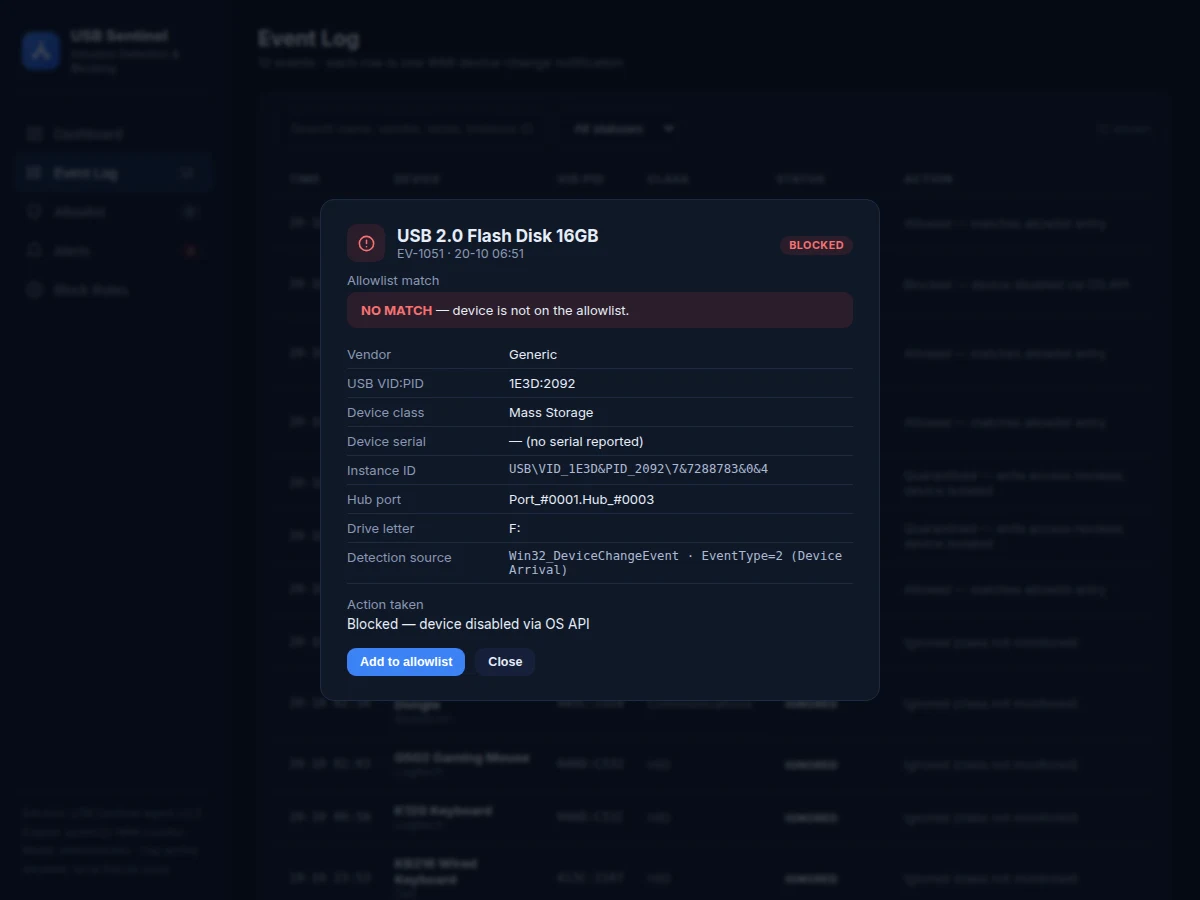
- A miss triggers the policy engine: full block (device disabled through the OS device-management API) or quarantine (write access revoked), per the configured rule.
- A tray notification fires and an alert is raised with severity until acknowledged.
- Every event — allowed, blocked, quarantined, flagged — is written to the event log with its full device record for the operator to review.
Tech stack:
- Python 3
- pywin32 (Win32 API · WMI access)
- WMI Win32_DeviceChangeEvent subscription
- SQLite (local allowlist store)
- pystray (system-tray icon)
- HTML · CSS · JavaScript (operator dashboard)
- Windows device-management API (block action)
| Parameter | Value |
|---|---|
| Detection source | WMI Win32_DeviceChangeEvent, EventType 2 (device arrival) |
| Windows broadcast hooked | WM_DEVICECHANGE (0x0219) |
| Flag-to-block latency | Under ~2 s in the bench test (design target) |
| USB device classes monitored | 4 — Mass Storage (08h), HID (03h), Printer (07h), Communications (02h) |
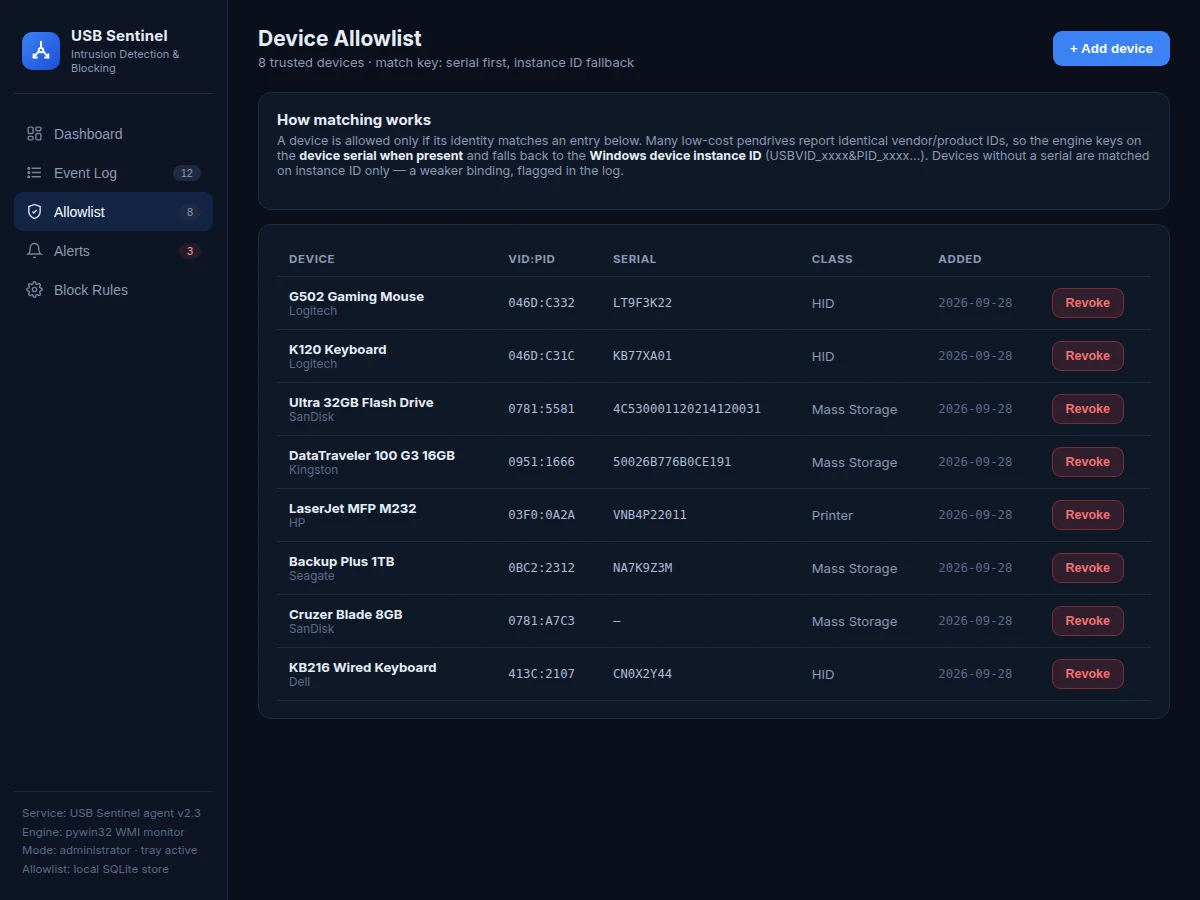
| Allowlist match key | Device serial; Windows device instance ID as fallback |
| Allowlist storage | Local SQLite database |
| Platform | Windows 10 / 11, 64-bit |
| Python version | Python 3.10 or later |
| Required privileges | Administrator (device-disable API refuses standard users) |
| Memory footprint | Approximately 40–60 MB while running (expected) |
| Detection model | Event-driven subscription; no polling loop |
Project features
The USB Device Intrusion Detection and Blocking Tool combines event-driven USB monitoring, a serial-keyed device allowlist, policy-based blocking and quarantine, and a full operator console. Its core capability is detection speed: the service subscribes to the WMI Win32_DeviceChangeEvent notification for device arrival, so it flags an unrecognized insert in under ~2 s in the bench test — a design target, not a measured guarantee — before the removable media can be opened. The allowlist stores each trusted device by serial, falling back to the Windows device instance ID, which defeats the common trick of swapping in a lookalike pendrive with identical vendor/product IDs. Enforcement is configurable: full device block for strict labs, or quarantine that revokes write access while leaving the device readable for inspection. Every decision lands in a searchable event log with a tray alert, and the dashboard gives the operator allowlist management, rule toggles and alert history in one place.
- [Event-driven USB monitoring] The service subscribes to WMI Win32_DeviceChangeEvent with EventType 2 (device arrival) through pywin32 — no polling loop, so inserts are caught the moment Windows broadcasts the WM_DEVICECHANGE message.
- [Serial-keyed allowlist] Trusted devices are identified by device serial when the firmware reports one, falling back to the Windows device instance ID (USB\VID_xxxx&PID_xxxx\…) — because many cheap pendrives report identical vendor/product IDs.
- [Auto-block and quarantine policies] Unrecognized devices are either fully disabled through the OS device-management API or quarantined with write access revoked, per the operator's configured rule.
- [Live event log] Every arrival is recorded with timestamp, vendor, VID/PID, serial, device class and the action taken; the log supports status filtering and full-text search.
- [Alert system] Each block or quarantine raises an alert with severity until the operator acknowledges it; unacknowledged alerts stay visible in the dashboard badge.
- [Block-rule console] Toggles for auto-block, quarantine-instead-of-block, serial-first matching, monitored USB device classes and notification preferences, applied to the next device arrival.
- [System-tray integration] The service runs minimized with a tray icon; tray notifications fire on every block or quarantine event.
- [Allowlist manager] Add devices manually by VID/PID and serial, revoke entries, and promote a blocked device to the allowlist straight from its event record.
What is included
- Complete Python service source code (WMI monitor, policy engine, allowlist manager)
- Operator dashboard (event log, allowlist, alerts, block-rule console)
- System-tray integration module with notification support
- Setup and configuration guide (admin rights, WMI permissions, allowlist seeding)
- Project report PDF (background, OS event mechanism, methodology, testing procedure)
- PPT presentation for final review
- Viva Q&A preparation document (WMI, device instance IDs, allowlist design, limitations)
- Project abstract PDF
Limitations & prerequisites
- Requires administrator rights on every protected machine — the device-disable call is refused for standard users.
- Windows-only: the WMI/WM_DEVICECHANGE mechanism does not exist on Linux or macOS; a Linux port would need usbmon and udev rules and is out of scope.
- Firmware-level attacks are out of scope: a BadUSB device spoofing a trusted device's VID/PID and serial can pass the identity check — this tool raises the bar against casual misuse, not hardware implants.
- Many cheap pendrives report no serial at all; those fall back to instance-ID matching, a weaker binding that can change across USB ports.
- Blocking races auto-mount: Windows may briefly expose a drive before the disable call completes; the under-~2 s figure is a design target from the bench test, not a guarantee on every machine.
- Quarantine (write-revoke) behavior varies with filesystem and driver support; some devices only support full block.
Frequently Asked Questions
How does the tool detect a USB insertion?
It subscribes through pywin32 to the WMI Win32_DeviceChangeEvent class with EventType 2, which Windows raises on device arrival. The service is notified event-driven the moment a USB device enumerates — there is no polling loop — so the check runs before the user opens the drive in Explorer.
How does the block action actually work?
When an unrecognized device arrives and the auto-block rule is on, the service calls the Windows device-management API to disable the device, the same mechanism Device Manager uses. With the quarantine rule instead, it revokes the device's write access so the drive stays readable for inspection but nothing can be written to or executed from it.
What identifies a trusted device?
The allowlist keys on the device serial number when the firmware reports one, because vendor and product IDs alone are not unique — many cheap pendrives share identical VID/PID pairs. Devices that report no serial fall back to the Windows device instance ID, which is a weaker binding that can change when the device moves USB ports.
Does it need administrator rights?
Yes — the service must run as administrator on every machine it protects, because disabling a device through the Windows device-management API is a privileged operation that standard user accounts are refused outright. This is a deliberate operating-system security boundary: only elevated processes may disable hardware, so the installer requests elevation once during setup and the service keeps those rights for every device check. Without those rights the detection and logging still work, but the block action is refused by Windows.
What can it not stop?
It cannot stop firmware-level attacks such as BadUSB, where a malicious device presents itself as a trusted keyboard or drive with spoofed identifiers. It is designed to stop the realistic everyday threat — unknown pendrives in shared labs and offices — and it states that boundary honestly in the report.
Is this project suitable for a final-year project?
Yes — for Computer Science and IT programs, because it combines OS-level event handling through WMI, identity and access-control design with a serial-keyed allowlist, SQLite-backed persistence, and a working operator console, all grounded in real Windows internals. Those internals give the student concrete, defensible viva material: a real WMI subscription, a real allowlist schema and a real policy engine, instead of a surface-level demo.
Components & software requirements
- Python 3
- pywin32 (Win32 API · WMI access)
- WMI Win32_DeviceChangeEvent subscription
- SQLite (local allowlist store)
- pystray (system-tray icon)
- HTML · CSS · JavaScript (operator dashboard)
- Windows device-management API (block action)
Delivery information
Built-to-order project. Delivery timeline is shared after order confirmation based on current queue.
Support terms
Complete documentation, setup guide, and viva preparation included. Support for setup and explanation provided.
Download free synopsis (PDF)
Enter your name and WhatsApp number — the synopsis PDF downloads immediately. We may send occasional project updates on WhatsApp; no spam.