
More project photos (3)


The problem
A desktop contact manager app with groups and birthday reminders is a single-user desktop application that stores names, phone numbers, email addresses, birthdays and notes in one searchable place, organises contacts into groups such as Family, Work, Friends and College, and lists upcoming birthdays inside a configurable reminder window. Most people still keep contacts scattered across a phone address book, old notebooks, email signatures and chat histories, so finding the right number means searching several places, and birthdays are remembered only when someone else posts about them. A dedicated desktop manager removes that scatter: every contact lives in one local database, groups keep personal and professional circles separate, instant search matches names, numbers and companies, and the birthday panel counts down the days to each upcoming birthday so greetings are planned instead of missed. The result is a practical desktop utility that demonstrates GUI design, local database operations, search, sorting and date arithmetic in one complete, explainable build.
This is a built-to-order software project: the desktop application source code, local database schema, demo build, project report, presentation and viva preparation material are prepared fresh for you.
Comparison
| Option | Groups | Birthday reminders | Works offline | CSV import/export |
|---|---|---|---|---|
| This desktop contact manager | Yes, 4 built-in groups (Family, Work, Friends, College) | Yes, 30-day reminder window (configurable) | Yes, local SQLite database | Yes, both directions |
| Phone address book | Limited, depends on the phone app | Birthday field only, no countdown panel | Yes | Varies by phone app |
| Spreadsheet contact list | Only by manual sheet tabs | No, needs manual date checking | Yes | Import only, by hand |
| Web CRM tool | Yes, but needs an account and usually a subscription | Yes, usually on paid plans | No, needs internet | Usually export only |
Builder note (from the actual demo build): the birthday panel sorts by days-until-birthday rather than by calendar date, so a birthday 3 days away outranks one 300 days away. Calendar sorting buried the nearest birthday at the bottom of the list during the demo build, which is why the countdown ordering was chosen.
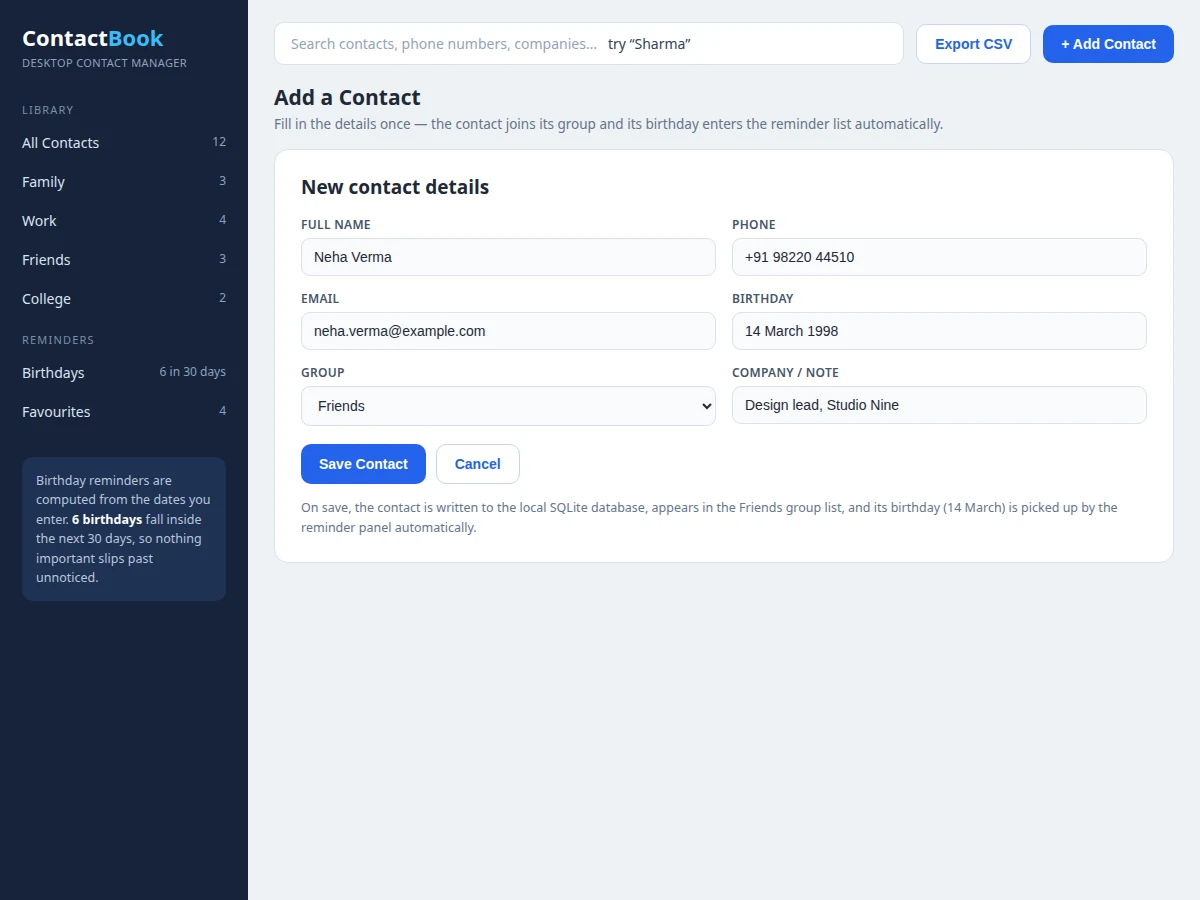
The user adds a contact through the form or imports a CSV file.
How it works
End to end, the Desktop Contact Manager App with Groups and Birthday Reminders works as a loop from typed input to stored record to visible result. The user enters a contact through the add-contact form or imports a CSV file, and each record is validated — a name is required, and phone and email formats are checked — before it is written to the local SQLite database with its group label and birthday. When the user searches, the app runs one text query across the name, phone, email and company fields and returns matching rows ordered by name; when the birthday panel opens, it compares every stored birthday against today's date, computes the days remaining with past birthdays rolled to next year, and sorts the ones inside the 30-day window soonest first. Editing or deleting a contact updates or removes the same database row, and CSV export writes the table back out in the same layout it imports.
- The user adds a contact through the form (name, phone, email, birthday, group, company note) or imports a CSV file; validation checks that a name is present and that phone and email formats look correct.
- The validated record is written to the local SQLite database with its group label and birthday stored as fields on the same row.
- The contact list renders from the database, filtered by the sidebar group or showing all contacts, and clicking a row opens the detail pane for that contact.
- Typing in the search box runs one text query across the name, phone, email and company-note fields and refreshes the list to matching rows ordered by name.
- Opening the birthday panel compares every stored birthday with today's date, computes days remaining with past birthdays rolled to next year, and lists the birthdays inside the 30-day window soonest first.
- Editing a contact updates the same database row and deleting removes it; starring toggles a favourite flag that the Favourites view collects across groups.
- Export writes the current contact table to a CSV file in the same 5-column layout used for import, so the data round-trips without loss.
Tech stack:
- Python 3
- Tkinter · desktop GUI
- SQLite database
- CSV import · export
- HTML · CSS · JavaScript demo build
- Git
| Parameter | Value |
|---|---|
| Platform | Windows, macOS and Linux desktops (Python 3 runtime) |
| Database | SQLite, single local file, no server required |
| Groups in the demo build | 4 groups: Family, Work, Friends, College |
| Contacts in the demo build | 12 contacts (actual demo build) |
| Birthday reminder window | 30 days (configurable design target) |
| CSV columns | 5 columns: Name, Phone, Email, Birthday, Group |
| Search fields | 4 fields: name, phone, email, company note |
| Storage mode | Local only; no account and no cloud sync in the base build |
| Demo views | 3 views: contact list, birthday reminders, add contact |
Project features
Contact grouping, instant search, birthday reminders and CSV portability are the four capabilities that define the Desktop Contact Manager App with Groups and Birthday Reminders. Grouping keeps Family, Work, Friends and College contacts separate while still searchable together, so one list serves personal and professional life without mixing them. Instant search matches a typed fragment against names, phone numbers, email addresses and company notes in the same pass, so the right contact appears after a few keystrokes instead of a scroll through hundreds of entries. Birthday reminders turn a stored date into a countdown: the panel sorts upcoming birthdays by days remaining within a 30-day window, so the soonest birthday always appears first whatever the calendar month. CSV import and export complete the set, letting contacts move in from a spreadsheet and out to any other tool without retyping, which is what makes the app genuinely usable rather than a classroom exercise.
- [Contact groups] Every contact belongs to one group — Family, Work, Friends or College in the demo build — and the sidebar filters the list to that group in one click, while All Contacts still searches across every group.
- [Instant search] A single search box matches the typed text against names, phone numbers, email addresses and company notes at once, so a fragment of any field is enough to find the contact.
- [Birthday reminder panel] The panel compares every stored birthday with today's date, rolls birthdays already passed this year forward to next year, and lists the ones inside the 30-day window soonest first, with the days remaining shown for each.
- [CSV import and export] Contacts import from a CSV file with Name, Phone, Email, Birthday and Group columns, and export back out in the same layout, so the whole address book moves between tools without retyping.
- [Add, edit and delete contacts] The add-contact form validates each record before saving — a name is required and phone and email formats are checked — and any contact can be edited or deleted from its detail view.
- [Favourites] Any contact can be starred, and the Favourites view collects starred contacts across all groups for the handful of people called most often.
- [Local SQLite storage] All contacts live in a single local SQLite database file on the user's machine, so the app works with no account, no server and no internet connection.
Optional customization (not in the base build): cloud sync across devices, multi-user login, an SMS or email greeting sender, and a mobile companion app. Future scope: duplicate detection and merge, contact photo attachments, and recurring event reminders beyond birthdays.
What is included
- Complete Python desktop application source code (Tkinter + SQLite)
- Local database schema and sample address book (12 contacts across 4 groups)
- Working demo build showing the same screens (HTML version, for preview)
- CSV import/export sample files in the documented 5-column layout
- Project report PDF (design, database schema, search and birthday logic, screenshots)
- PPT presentation for final review
- Viva Q&A preparation document (GUI events, SQLite CRUD, date arithmetic, file handling)
- Setup and run instructions
Limitations & prerequisites
- Single-user local app: no multi-user login and no cloud sync in the base build, so contacts live on one machine only.
- Birthday reminders appear only while the app is open; the base build has no background notification service and no email or SMS sender.
- CSV import expects exactly the 5 documented columns; rows missing a name are skipped and reported, not guessed.
- Search is exact substring matching across 4 fields; it does not do fuzzy or phonetic matching, so a misspelled name will not match.
- The demo address book holds 12 contacts; behaviour with tens of thousands of contacts is a design expectation, not a measured result.
- Contact photos are not stored in the base build; contacts are identified by coloured initials avatars.
- No duplicate detection in the base build: importing the same contact twice creates 2 entries (listed as future scope).
Frequently Asked Questions
What does the app actually do?
The app stores contacts with names, phone numbers, emails, birthdays and notes in a local database, organises them into groups, finds any contact through one search box, and counts down to upcoming birthdays in a reminder panel. It also imports and exports contacts as CSV files, so the address book moves in and out of spreadsheets without retyping. Everything runs on the desktop with no account and no internet connection.
Does the app need internet?
No, the app works fully offline because every contact lives in a local SQLite database file on the user's own machine, and search, grouping and birthday countdowns all run locally. Internet is never required for any feature in the base build; the only files that leave the machine are CSV exports the user deliberately creates. Cloud sync is available only as optional customization.
Can the app be customized?
Yes, realistic customizations include extra contact groups beyond the 4 in the demo build, a different birthday reminder window, additional contact fields, and a different colour theme for the interface. Larger additions such as cloud sync, multi-user login, an SMS or email greeting sender, and a mobile companion app can be developed separately, since none of them are part of the base build. Customization requests are scoped with the order, so the delivered build matches the college's requirements.
What will I receive with the project?
You receive the complete Python desktop application source code with its SQLite schema, a sample address book of 12 contacts across 4 groups, a working demo build of the same screens, CSV import/export samples, and a full documentation set. The documentation set covers the project report, a final-review presentation, a viva Q&A document, and setup and run instructions for the application. The demo build previews the screens before the desktop code is delivered.
Is this project suitable for a final-year project?
Yes, it fits Computer Science and Information Technology programmes because it demonstrates GUI event handling, relational database design, CRUD operations, search and sorting, and date arithmetic in one complete application. The scope is realistic for a semester timeline, every feature is implemented rather than simulated, and the report and viva material explain each design decision.
Components & software requirements
- Python 3
- Tkinter · desktop GUI
- SQLite database
- CSV import · export
- HTML · CSS · JavaScript demo build
- Git
Delivery information
Built-to-order project. Delivery timeline is shared after order confirmation based on current queue.
Support terms
Complete documentation, setup guide, and viva preparation included. Support for setup and explanation provided.
Download free synopsis (PDF)
Enter your name and WhatsApp number — the synopsis PDF downloads immediately. We may send occasional project updates on WhatsApp; no spam.