
More project photos (2)
The problem
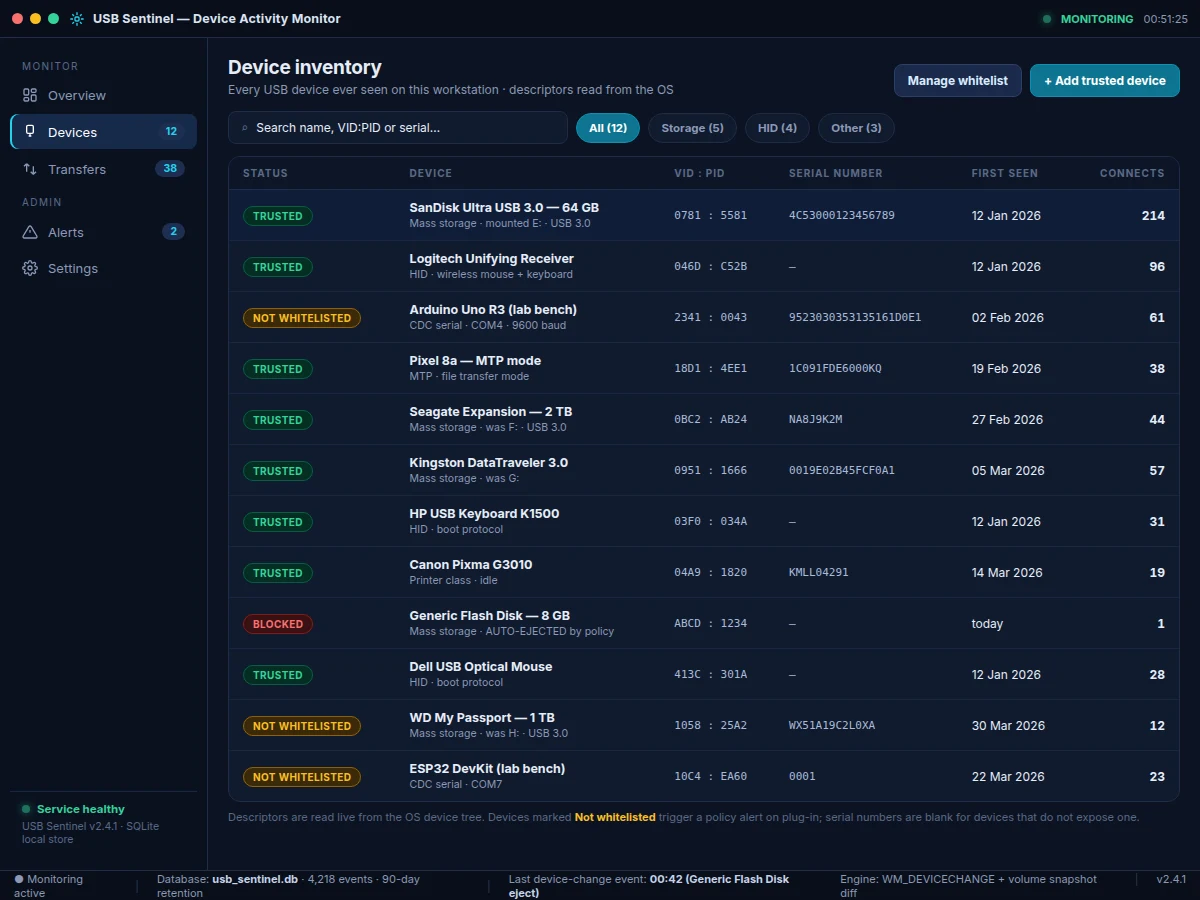
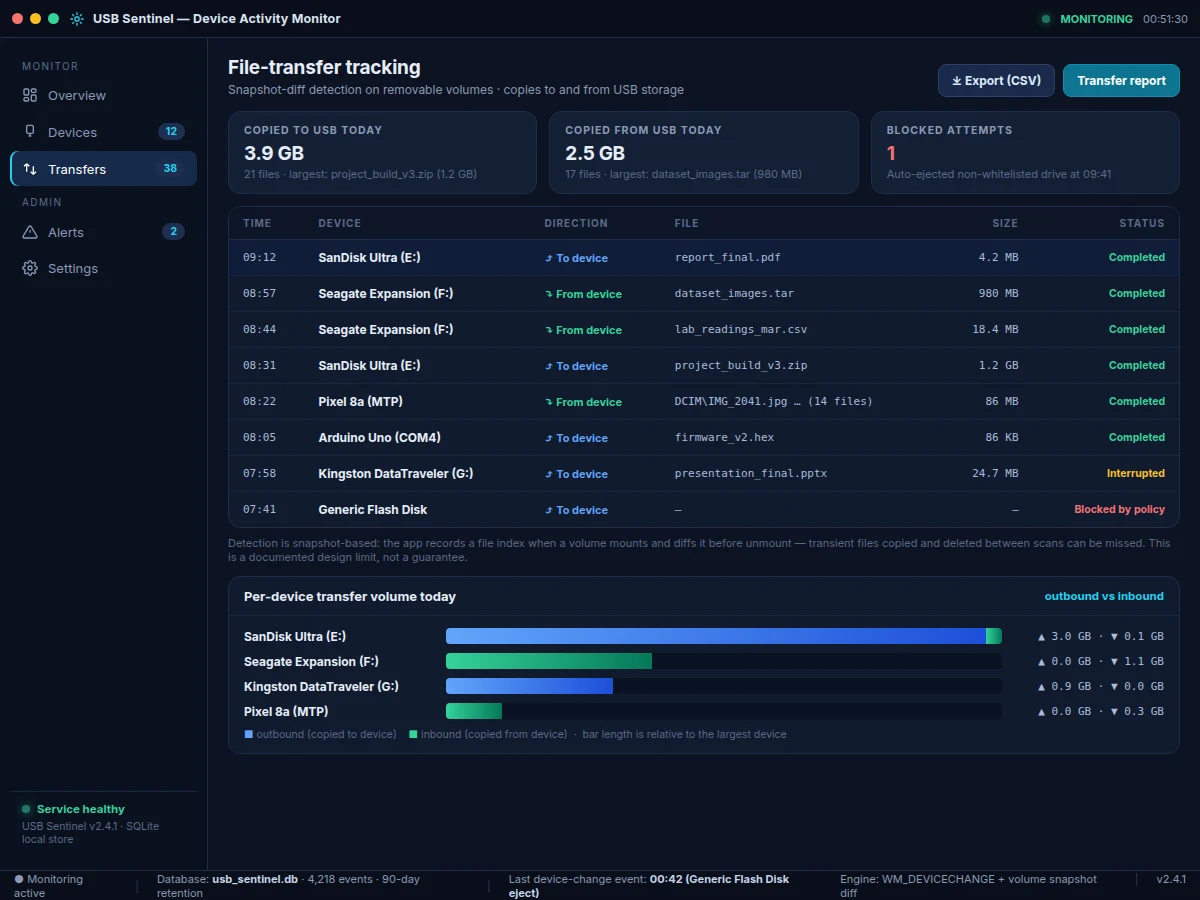
Shared lab machines have a blind spot: any pen drive can be plugged in, files copied, and the drive removed without leaving a trace. Windows shows a notification, but it keeps no searchable history of which device was connected, when, or what moved across it. USB Sentinel closes that gap — a Windows desktop application that listens to OS device-change notifications and turns them into a permanent, queryable record. Every arrival and removal is logged with a timestamp; every device is fingerprinted from the OS device tree (vendor ID, product ID, serial number, manufacturer and product strings, device class, mount point); and file transfers on removable volumes are reconstructed by snapshot differencing — indexing a volume on mount and diffing it before unmount to record each added or removed file with its name, size and direction. A configurable whitelist turns the log into a policy tool: unknown drives raise an alert and can be auto-ejected. All data stays local in an SQLite database with a 90-day retention design target, and the PyQt6 interface presents a live activity feed, a device inventory, per-file transfer records and policy alerts in one console.
Plugged-in device presenting VID, PID, serial and product descriptors.
Follow the working sequence
How it works
- A background monitor service subscribes to OS device-change notifications; on Windows this is WM_DEVICECHANGE delivered through pywin32.
- When a device arrives, the descriptor resolver queries the OS device tree (SetupAPI/WMI) for VID, PID, serial number, manufacturer and product strings, and device class, and resolves the mount point and volume label for storage devices.
- The device is checked against the SQLite whitelist: trusted devices proceed silently, unknown devices raise a policy alert, and with auto-eject enabled the volume is ejected programmatically.
- For removable storage, the snapshot engine records a file index (path, size, modification time) at mount time.
- Before unmount — and on periodic rescan — the index is diffed; added files become "copied to device" records and removed files become "copied from device" records, each with name, size, direction and timestamp.
- The arrival, the descriptor set, the whitelist verdict and any transfers are written to the local SQLite database with a 90-day retention design target.
- The PyQt6 frontend reads the same database and renders the live feed, device inventory, transfer log, alerts and settings views; CSV export and daily summaries are generated on demand.
Tech stack:
- Python 3, PyQt6 (desktop UI)
- pywin32 (WM_DEVICECHANGE notifications, WMI/SetupAPI queries)
- psutil (volume and mount-point detection)
- SQLite3 (local event database)
- PyInstaller (single-file Windows build)
| Parameter | Value |
|---|---|
| Platform | Windows 10/11 (primary); Linux udev fallback with reduced fidelity |
| Event source | WM_DEVICECHANGE via pywin32 (Windows) |
| Event capture target | Within 1 s of the OS notification (design target) |
| Device identity | VID, PID, serial, manufacturer/product strings, device class (as reported by the device) |
| Transfer detection | Volume snapshot diff on mount/unmount + periodic rescan |
| Storage | Local SQLite, configurable retention (90 days design target) |
| UI | PyQt6 desktop app, 5 views (Overview, Devices, Transfers, Alerts, Settings) |
| Packaging | PyInstaller single-file Windows executable (expected) |
| Privileges | Device-notification and descriptor-read rights; auto-eject needs the mounting user context |
Project features
- [Plug/unplug event logging] Every USB arrival and removal is captured from OS device-change notifications (WM_DEVICECHANGE on Windows) with a timestamp, with a design target of logging each event within 1 second of the notification.
- [Device fingerprinting & inventory] VID, PID, serial number, manufacturer/product strings, device class and mount point are read from the OS device tree for each device, building a permanent inventory of every USB device ever connected.
- [File-transfer tracking] Removable volumes are indexed on mount and diffed before unmount; each added or removed file is recorded with name, size, direction (to/from device) and status (completed, interrupted, blocked by policy).
- [Whitelist policy engine] Trusted devices are whitelisted; unknown drives trigger an alert on plug-in and can be auto-ejected when the policy is enabled.
- [Live dashboard] The PyQt6 console shows a live activity feed, currently-connected devices, transfer counters and an events-per-hour chart, updating as events arrive.
- [Search, filter & CSV export] The full event log is searchable by device name, VID:PID or serial, filterable by device class, and exportable to CSV for reports and forensics coursework.
- [Local SQLite storage] No cloud, no accounts — the event database lives on the machine with configurable retention (90 days as the design target).
- [Daily transfer summaries] Per-day totals of data copied to and from USB storage, per-device volume breakdowns, and blocked-attempt counts for lab audit use.
What is included
- Complete Python source code (monitor service, descriptor resolver, snapshot engine, policy engine, PyQt6 UI)
- Local SQLite schema and database module
- PyInstaller build configuration for the Windows executable
- Demo dataset: scripted device-event simulation for testing without physical drives
- Setup and test-procedure guide (run during your own setup to verify event capture)
- Project report PDF (background, OS-integration design, module responsibilities, methodology, limitations)
- PPT presentation for final review
- Viva Q&A preparation document (WM_DEVICECHANGE, SetupAPI/WMI, snapshot diffing, whitelist design, Windows vs Linux)
Limitations & prerequisites
- Windows is the primary platform — the Linux udev fallback reads fewer descriptor fields and has no WM_DEVICECHANGE equivalent, so event fidelity is lower there.
- File-transfer tracking is snapshot-diff based: a file copied and deleted between two scans is missed. This is a documented design limit, not a guarantee of complete capture.
- VID, PID and serial strings are self-reported by the device and can be spoofed — identity is indicative, not cryptographic proof.
- The app cannot inspect the contents of encrypted volumes, and MTP transfers are not tracked at file granularity on all devices.
- Auto-eject and some descriptor reads require appropriate OS privileges; behaviour varies across Windows editions and user contexts.
- The 1-second event-capture target and 90-day retention are design targets, stated honestly — the setup test procedure lets you verify actual behaviour on your machine.
Frequently Asked Questions
How does the app detect a pen drive being plugged in?
It subscribes to OS device-change notifications — WM_DEVICECHANGE on Windows via pywin32 — so the operating system itself tells the app the moment a device arrives or is removed, rather than polling.
How is file-transfer tracking done without a driver?
No kernel driver is used. When a removable volume mounts, the app records a file index (path, size, modification time); before unmount it diffs the index. Added files are logged as copied-to-device, removed files as copied-from-device. Files copied and deleted between scans can be missed — that limit is documented.
Can it block unknown pen drives?
Yes — the whitelist policy flags any device not on the trusted list with an alert, and with auto-eject enabled the volume is ejected. It is a policy deterrent, not a hardware-level block: a determined user with admin rights can circumvent it.
Does it work on Linux or macOS?
Windows 10/11 is the primary target with full descriptor reads. A Linux udev-based fallback is included with reduced fidelity; macOS is not covered in the base build and is listed as future scope.
Is my data sent anywhere?
No. Everything is stored in a local SQLite database on the machine — there is no cloud sync, no account, and no telemetry.
Is this project suitable for a final-year project?
Yes — for Computer Science, IT and Computer Engineering programs. It demonstrates OS-level programming (device notifications, SetupAPI/WMI), applied data structures (snapshot diffing), database design and a complete desktop product with a real lab-security use case. Suitable for B.E./B.Tech final-year projects in Computer Science, IT and Computer Engineering.
Components & software requirements
- Python 3, PyQt6 (desktop UI)
- pywin32 (WM_DEVICECHANGE notifications, WMI/SetupAPI queries)
- psutil (volume and mount-point detection)
- SQLite3 (local event database)
- PyInstaller (single-file Windows build)
Delivery information
Built-to-order project. Delivery timeline is shared after order confirmation based on current queue.
Support terms
Complete documentation, setup guide, and viva preparation included. Support for setup and explanation provided.
Download free synopsis (PDF)
Enter your name and email — the synopsis PDF downloads immediately. We may send occasional project updates; no spam, unsubscribe anytime.