
More project photos (3)
The problem
Losing files is one of the most common and most painful failures students and professionals face: a crashed laptop, a corrupted USB drive, or an accidental overwrite can wipe out weeks of project work in seconds. Most people know they should back up regularly, yet manual backup discipline rarely survives contact with a deadline — copying folders by hand is tedious, easy to forget, and offers no way to recover an earlier version of a single file. Cloud sync tools help, but they mirror the current state, so a file deleted or overwritten by mistake disappears everywhere within minutes, and free plans keep only limited history. This project builds an Automatic File Backup Scheduler: a desktop app that takes over the discipline. The user defines backup jobs mapping source folders to destinations, picks a schedule, and the app quietly copies new or changed files into timestamped snapshots, maintaining a browsable version history with one-click restore. It demonstrates file-system programming, change detection with hashing, scheduling, and desktop GUI design — practical skills behind every real backup product.
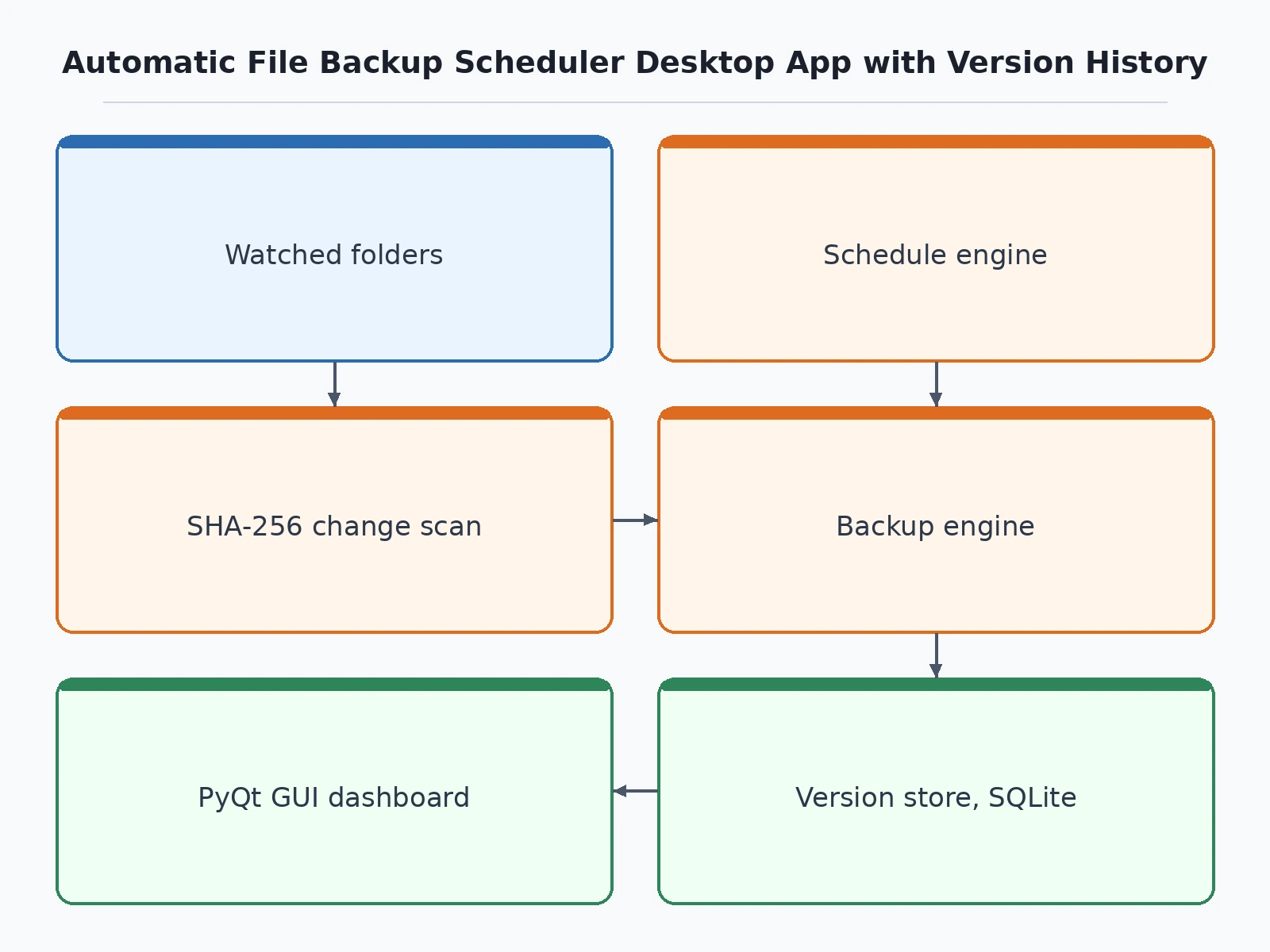
User-selected folders watched for new or changed files.
Follow the working sequence
How it works
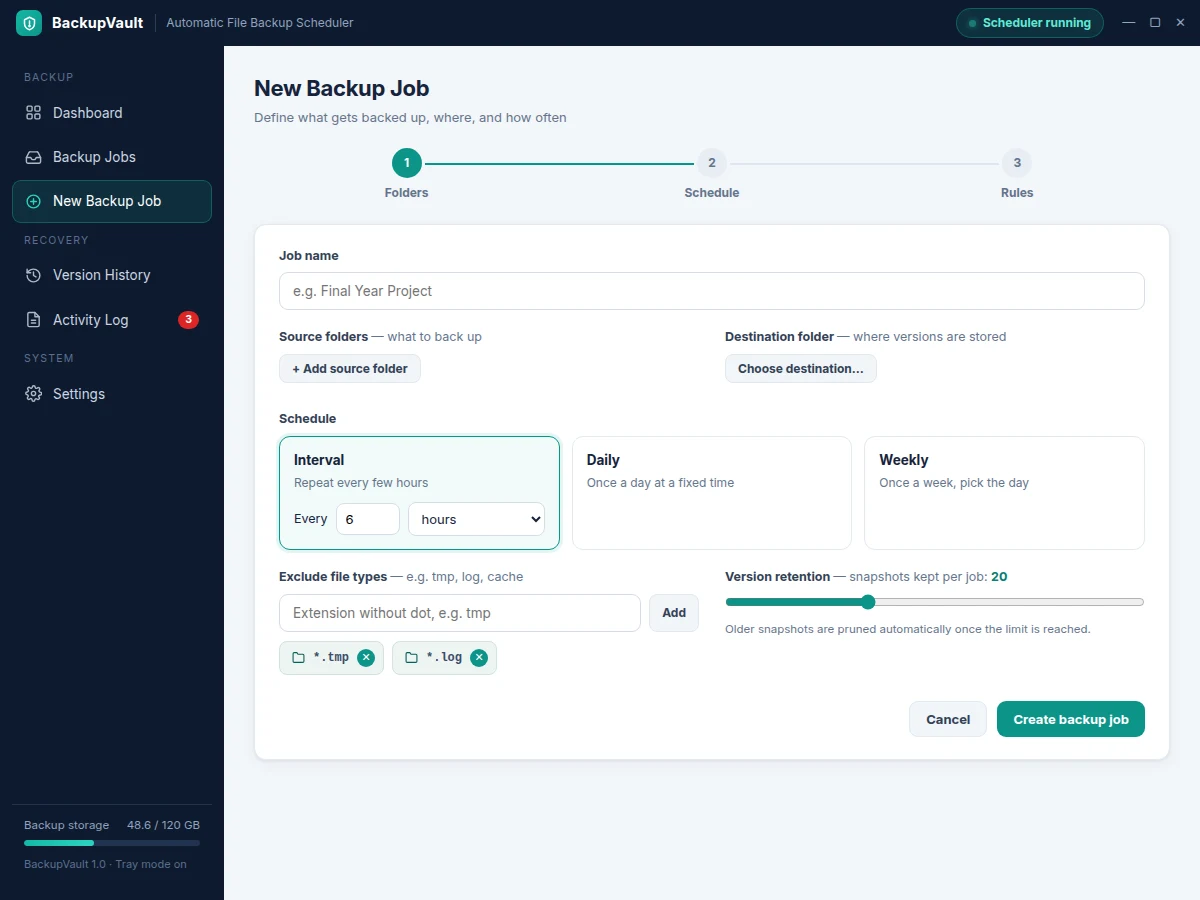
- The user creates a backup job: selects source folders, a destination folder, a schedule (interval, daily or weekly) and optional exclusion rules.
- When the schedule triggers — or the user clicks Run now — the engine scans the source folders and fingerprints every file with SHA-256 plus size and modification time.
- Fingerprints are compared against the previous snapshot's manifest; only new or changed files are queued for copying.
- Changed files are copied into a new timestamped version folder under the destination (format YYYY-MM-DD_HH-MM-SS), so every run is a self-contained restorable snapshot.
- A snapshot record — timestamp, files copied, bytes written, skipped files — is saved to the SQLite database, and the dashboard and activity log update.
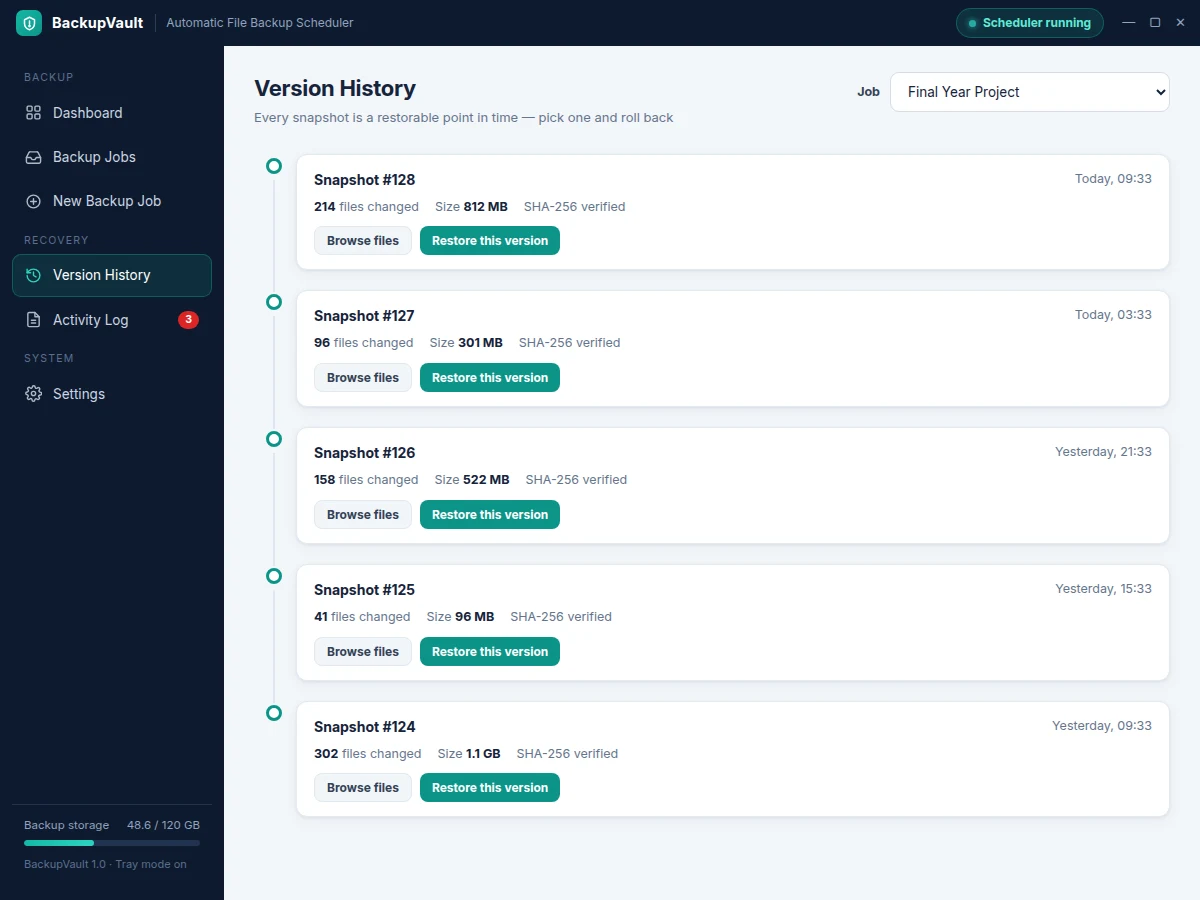
- To recover, the user opens version history, picks a snapshot, and restores selected files or everything to the original location or a new folder.
Tech stack:
- Python 3
- PyQt 6 (desktop GUI)
- SQLite (jobs, snapshots, run logs)
- watchdog (file-system events)
- hashlib SHA-256 (change detection)
- OS scheduler integration (cron / Windows Task Scheduler)
- PyInstaller (packaging)
- pytest (unit tests)
| Parameter | Value |
|---|---|
| Backup mode | Incremental, per-file |
| Change detection | SHA-256 hash + size + modification time |
| Schedule granularity | Every 15 minutes to every 7 days (configurable); daily/weekly at fixed time |
| Snapshot naming | Timestamped folders, format YYYY-MM-DD_HH-MM-SS |
| Retention | 5–50 snapshots per job (configurable, default 20) |
| Metadata store | SQLite, single local file |
| Packaged size | Approximately 45 MB (expected, PyInstaller build) |
| Platforms | Windows 10/11 and Ubuntu 22.04+ (design target) |
Project features
- [Backup job definitions] Create named backup jobs that map one or more source folders to a destination folder, each with its own schedule, exclusion rules and retention settings.
- [Schedule engine] Run jobs on a fixed interval (every N hours), daily at a set time, or weekly — plus a Run now button for on-demand backups.
- [Incremental backup with change detection] Every file is fingerprinted with SHA-256, size and modification time; only new or changed files are copied, so repeat runs are fast and storage stays lean.
- [Version history] Each run creates a timestamped snapshot; the timeline shows when every version was taken, how many files changed and how much space it used.
- [One-click restore] Restore selected files or an entire snapshot to the original location or a chosen folder, with a confirmation step before anything is overwritten.
- [Exclusion rules] Skip files by extension, name pattern or folder — temporary files, caches and build outputs never pollute a backup.
- [Status dashboard and activity log] Live view of all jobs with last-run time, status and next scheduled run, plus a detailed per-run log of copied, skipped and failed files.
- [Background system-tray operation] The app minimises to the tray and keeps running scheduled backups without an open window; missed runs are flagged on the next launch.
What is included
- Complete desktop application source code (Python + PyQt 6)
- SQLite database schema with sample jobs and snapshots
- PyInstaller build scripts for Windows and Linux packages
- User guide with setup and scheduling instructions
- Project report PDF (background, design, methodology, results)
- PPT presentation for final review
- Viva Q&A preparation document (file systems, hashing, scheduling, GUI architecture)
Limitations & prerequisites
- The base build backs up to local folders and mapped network drives only — cloud destinations (Google Drive, OneDrive) are an optional customization.
- Version history consumes disk space in proportion to how much changes; the retention cap keeps growth bounded but the oldest versions are eventually pruned.
- Files locked by another application may be skipped during a run on some operating systems; skipped files are listed in the run log and retried on the next run.
- Backups run on the configured schedule, not continuously — a file changed and deleted between two runs is not captured.
- Scheduled runs need the app running in the system tray, or OS scheduler integration enabled, on the machine.
- Restoring over the original location overwrites current files; the app asks for confirmation and can take a pre-restore snapshot first.
Frequently Asked Questions
Is this project suitable for a final-year project?
Yes — for Computer Science and IT programs. It demonstrates file-system programming, hashing-based change detection, scheduling logic, relational data modeling with SQLite, and desktop GUI design in PyQt 6. The system is fully explainable end to end, which makes backup workflows, incremental strategies and restore semantics strong viva material.
What is the main technology used?
The app is written in Python 3 with PyQt 6 for the desktop interface. Backup metadata — jobs, snapshots and run logs — lives in SQLite, file-system events come from the watchdog library, and change detection uses SHA-256 hashing. Scheduling works through an internal timer with optional integration into cron on Linux and Task Scheduler on Windows.
Does it need the internet?
No. The base project works fully offline — sources and destinations are local folders or mapped network drives, and the scheduler, hashing and database all run on the machine. An internet connection is only needed if you add the optional cloud-destination module.
Can cloud backup be added?
Yes, as a customization. The job model already separates source, destination and transport, so a cloud module (Google Drive, OneDrive or S3-compatible storage) can be added without changing the scheduling or versioning logic. Authentication and upload quotas for the chosen provider would be handled in that module.
What happens to files that are open during a backup?
Files locked by another program may be skipped on some operating systems. Every skipped file is listed in the run log with the reason, and the next scheduled run retries it automatically — so an open document is delayed, not lost.
How much disk space do old versions use?
Only changed files are stored per snapshot, so steady-state growth is small — unchanged files are never duplicated. A retention setting (5–50 snapshots per job) caps history, and the dashboard shows per-snapshot sizes so you can see exactly what each version costs.
Components & software requirements
- Python 3
- PyQt 6 (desktop GUI)
- SQLite (jobs, snapshots, run logs)
- watchdog (file-system events)
- hashlib SHA-256 (change detection)
- OS scheduler integration (cron / Windows Task Scheduler)
- PyInstaller (packaging)
- pytest (unit tests)
Delivery information
Built-to-order project. Delivery timeline is shared after order confirmation based on current queue.
Support terms
Complete documentation, setup guide, and viva preparation included. Support for setup and explanation provided.
Download free synopsis (PDF)
Enter your name and email — the synopsis PDF downloads immediately. We may send occasional project updates; no spam, unsubscribe anytime.