
More project photos (2)
The problem
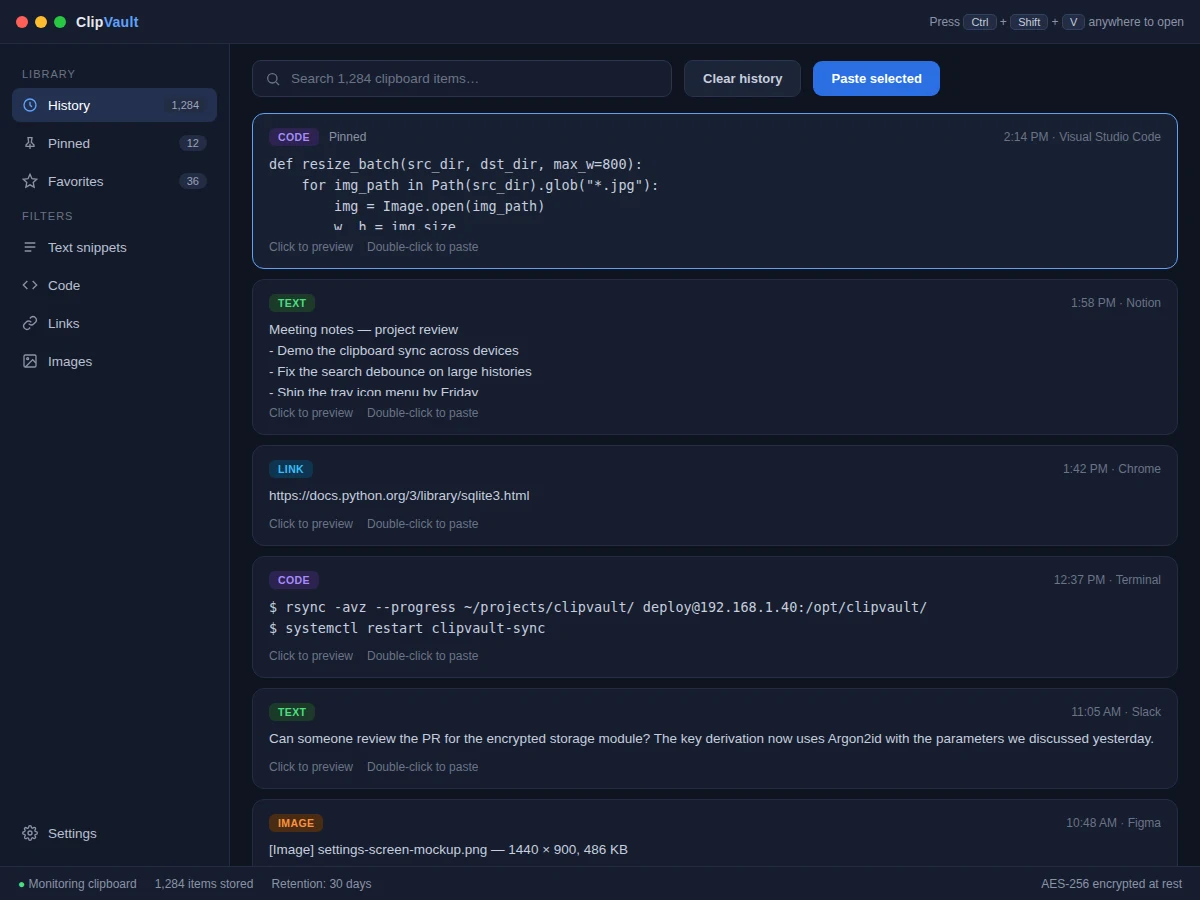
Every computer user copies dozens of items a day and loses nearly all of them — the operating system keeps only the most recent one, so a snippet copied an hour ago is gone the moment something else is copied. Developers, writers and students feel this constantly: a terminal command, a code block, a reference link, all re-typed or re-found from scratch. A clipboard history manager solves it by listening to OS clipboard events, storing each entry with its type, source application and timestamp, and surfacing the whole history through instant search and a global hotkey. This project implements that as a real desktop application: a system-tray resident program with a searchable history window, pinning, favorites, per-type filters and AES-256 encrypted storage, plus an optional end-to-end encrypted sync channel so the clipboard follows the student across machines.
How it works
- On launch, the app registers OS clipboard listeners (Win32 clipboard viewer chain on Windows, NSPasteboard polling on macOS, X11 selections on Linux).
- Each clipboard change is captured with metadata: content type, source application, timestamp and size, then written to the encrypted SQLite store.
- The FTS5 index updates incrementally so search stays instant even with tens of thousands of entries.
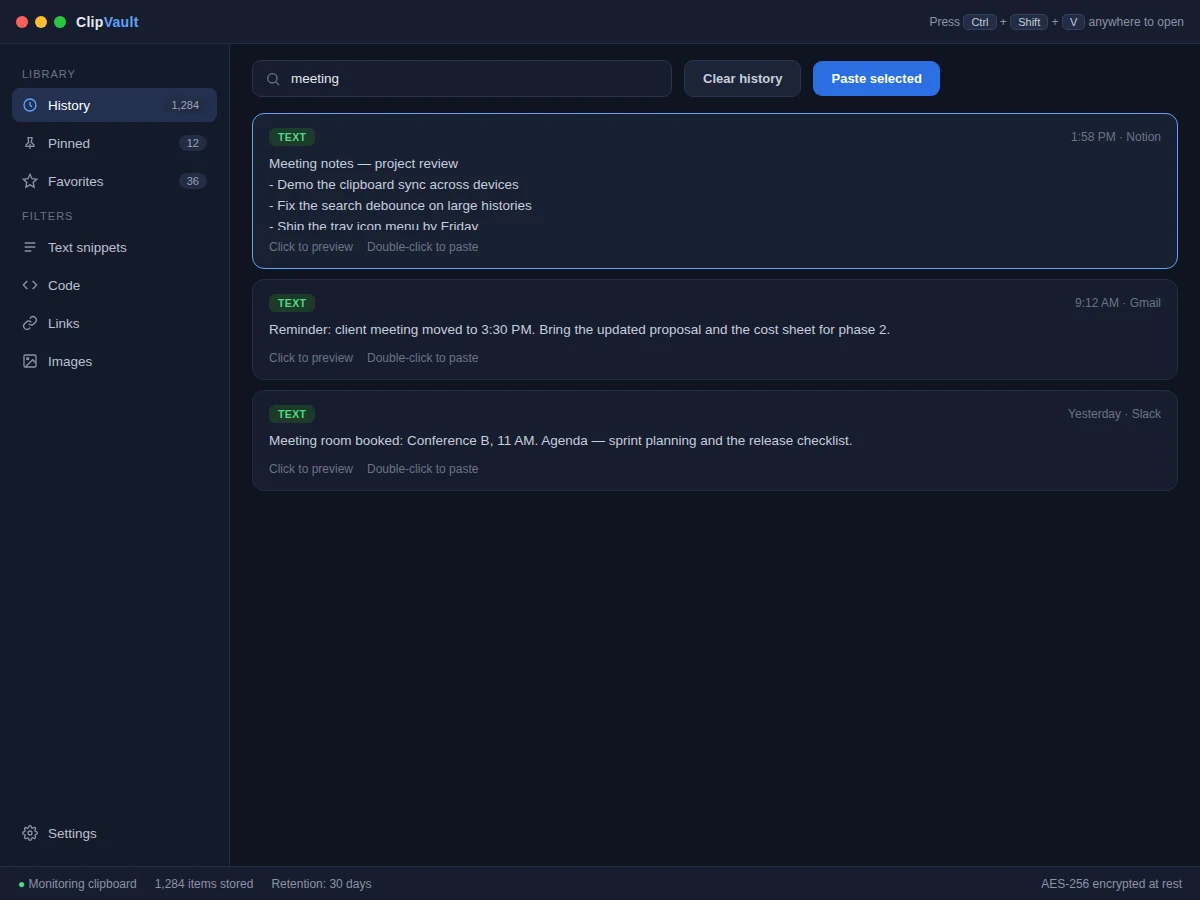
- Pressing the global hotkey summons the overlay window; typing filters the history live and double-click (or Enter) pastes the chosen entry via simulated keystrokes.
- Pinned and favorite items are excluded from the retention sweeper, which deletes unpinned entries older than the configured window.
- When sync is enabled, new entries are encrypted with the device key and pushed to the sync relay; other devices pull, decrypt and merge them by timestamp.
Tech stack:
- Python 3
- PyQt6 · Qt (desktop UI)
- SQLite · FTS5 (indexed storage)
- cryptography · Argon2id (encryption)
- pynput (hotkeys & paste simulation)
- PyInstaller (packaging)
| Parameter | Value |
|---|---|
| Platforms | Windows 10/11, macOS 13+, Ubuntu 22.04+ (expected) |
| Storage | SQLite, AES-256 at rest (design target) |
| Search index | FTS5 full-text, incremental updates |
| Hotkey | Ctrl+Shift+V (configurable) |
| Retention | 7–90 days, user configurable |
| Sync | Optional, end-to-end encrypted relay |
| Memory footprint | Approximately 60–90 MB resident (expected) |
| Packaging | Single-file installer per OS |
Project features
- [System-wide clipboard monitoring] A background listener captures text, code, links and images from any application the moment they are copied, with negligible CPU overhead.
- [Instant full-text search] Every entry is indexed in SQLite with FTS5, so searching thousands of items returns results as you type.
- [Pinning and favorites] Frequently reused snippets can be pinned to the top or starred, surviving retention cleanup and staying one hotkey away.
- [Global hotkey paste] Pressing Ctrl+Shift+V anywhere opens the history overlay; double-clicking an entry pastes it into the active window.
- [AES-256 encrypted storage] The local database is encrypted at rest with a key derived via Argon2id, so copied passwords and tokens stay protected.
- [Cross-device sync] An optional sync service replicates the clipboard over an encrypted channel, with conflict handling when two devices copy simultaneously.
- [Per-type filters and retention] Separate views for text, code, links and images, plus configurable retention (7–90 days) with automatic cleanup of unpinned items.
What is included
- Complete desktop application source code
- Installers for Windows, macOS and Linux
- User manual (features, hotkeys, settings)
- Project report PDF (clipboard internals, storage and encryption design, sync protocol)
- PPT presentation for final review
- Viva Q&A preparation document (OS clipboard APIs, FTS indexing, Argon2id, E2E sync)
Limitations & prerequisites
- Clipboard formats beyond text/HTML/image (e.g. proprietary app objects) are stored as plain text fallbacks.
- Sync needs both devices online at least once; there is no real-time push when a device is offline.
- Very large copied images (above ~25 MB) are stored as thumbnails with a size note to bound database growth.
- Paste simulation can be blocked by elevated/admin windows on Windows — a documented OS restriction, not an app bug.
- The macOS build needs accessibility permission granted manually on first run.
- Password-manager "clear clipboard after N seconds" behavior is respected and such entries are never stored.
Frequently Asked Questions
How does the app see what I copy?
It uses each OS's official clipboard notification mechanism — the clipboard viewer chain on Windows, NSPasteboard change notifications on macOS, and X11 selection events on Linux. No screen scraping or keylogging is involved.
Is my copied data safe?
Yes. The database is encrypted with AES-256, the key is derived from your master password with Argon2id, and sync traffic is end-to-end encrypted — the relay server only sees ciphertext.
How fast is search with a large history?
SQLite FTS5 indexes every entry incrementally, so even tens of thousands of items filter as you type; the demo ships with a generator script so you can verify this yourself.
Can it sync between my laptop and desktop?
Yes, via the optional sync relay. Entries are encrypted on-device before upload, merged by timestamp on download, and conflicts resolve to the newest copy with the older kept in history.
Does it slow down my computer?
The monitor is event-driven, not polling (except on X11), and idles at near-zero CPU; expected resident memory is approximately 60–90 MB.
Is this project suitable for a final-year project?
Yes — for Computer Science and IT programs. It covers OS-level APIs, database indexing, applied cryptography and a real shipped desktop product with an installer. Suitable for B.E./B.Tech final-year projects in Computer Science and IT.
Components & software requirements
- Python 3
- PyQt6 · Qt (desktop UI)
- SQLite · FTS5 (indexed storage)
- cryptography · Argon2id (encryption)
- pynput (hotkeys & paste simulation)
- PyInstaller (packaging)
Delivery information
Built-to-order project. Delivery timeline is shared after order confirmation based on current queue.
Support terms
Complete documentation, setup guide, and viva preparation included. Support for setup and explanation provided.